Ask the source: Scaling code search to a billion lines with Elasticsearch and Elastic Agent Builder
Sourcerer matches Claude Code and Codex on code retrieval quality and searches up to thousands of times faster than grep. Every answer links back to the exact files and lines across repos and versions.
Code is the source of truth for its own behavior; it’s always authoritative and never outdated. Definitive answers live at a specific commit in a particular repository, but enterprise deployments depend on many versioned projects working together. Understanding how it all works is a major code search effort.
Does App A v1.2.3 support Feature X? Is it compatible with App B v9.8.7 when running on Kubernetes? Will I need more JVM heap space?
These are the kinds of questions that our field teams handle constantly. Answering them is harder than it looks. Documentation offers context, but it's an abstraction that can't anticipate every possible question. When we hit one it doesn't cover, our options are to interrupt an engineer who should be developing code or to hunt through that code ourselves. Often we don't have the time or expertise to navigate that much of it.
Coding agents do this well for a single repository on your laptop. Wouldn't it be great if we could scale that to our entire code estate? As a field engineer, I wanted that capability to serve my customers: agentic code intelligence across every project, dependency, platform, and version that we support. And I wanted it grounded in linked citations and always available to everyone as a service.
So I built it with Elasticsearch and Elastic Agent Builder and packaged it into a command line interface (CLI). I released it under an Apache 2.0 license and called it Sourcerer. This blog post reports multiple performance benchmarks of Sourcerer as a code research agent and walks through the design and rationale of its implementation.
Sourcerer
Sourcerer explores code like a frontier coding agent, searching across many versioned repositories as fast as it would in a single repository, and it generates answers with linked citations that establish trust.
Sourcerer consists of:
A set of configuration files for tools, skills, and agents in Agent Builder.
A set of index templates to store and search code from Git commit snapshots.
A CLI to install those assets and index and prune commit snapshots from remote Git repositories.
At Elastic, we're using Sourcerer to support our customers with verifiable information about our software directly from the source. Our internal deployment has indexed over a billion lines of code from our own public and private repositories. It also includes our core dependencies, such as Apache Lucene and OpenJDK, along with our common integrations, like Kubernetes and OpenTelemetry. Our solution architects, customer architects, consulting architects, and support engineers no longer have to hunt for answers in documentation or reach out to our engineers who should be building software rather than supporting it.
Code search benchmarks
Agentic code retrieval
SWE-Explore is a new benchmark, published on June 5, 2026, by Zhang et al., that evaluates "how well coding agents explore, localize, and rank repository context." It appears to be the only benchmark that specifically tests agentic code retrieval quality. I ran the benchmark with Sourcerer to see how it performs and compares to the other coding agents from the original paper, and again with Claude Code to measure and compare its token usage and task durations with Sourcerer's.
Retrieval scores
Sourcerer performs as well as frontier coding agents on relevance metrics for code retrieval (see Figure 1). The composite retrieval score is the arithmetic mean of all retrieval metrics weighed by their Pearson correlations (r) as reported in the paper; I did this to rank the agents by a measurement of overall retrieval quality. Sourcerer trailed Claude Code by 0.002 and surpassed Codex by 0.022 on a 0.0–1.0 scale, which should be interpreted as a statistical tie, given that the results vary slightly on each run due to the indeterminism of large language models (LLMs).
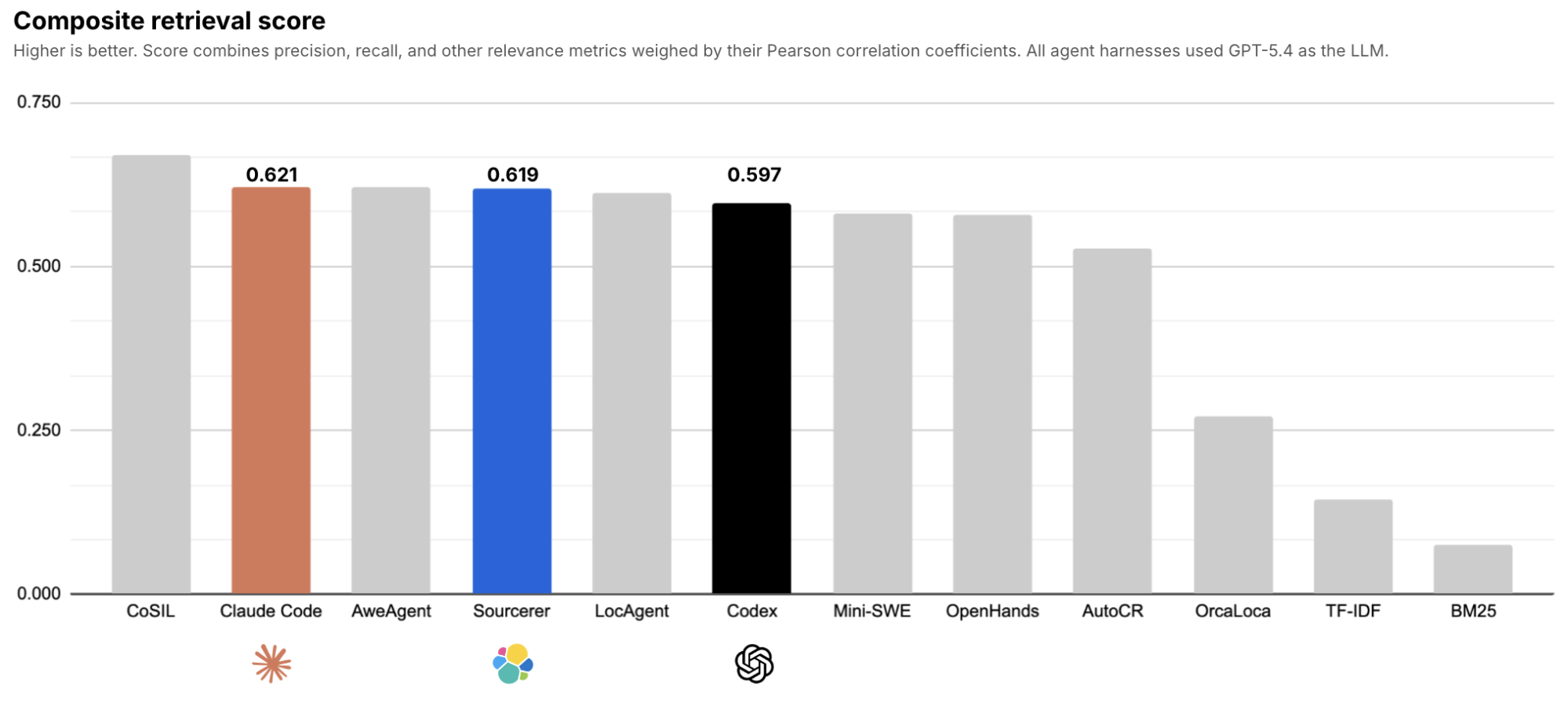
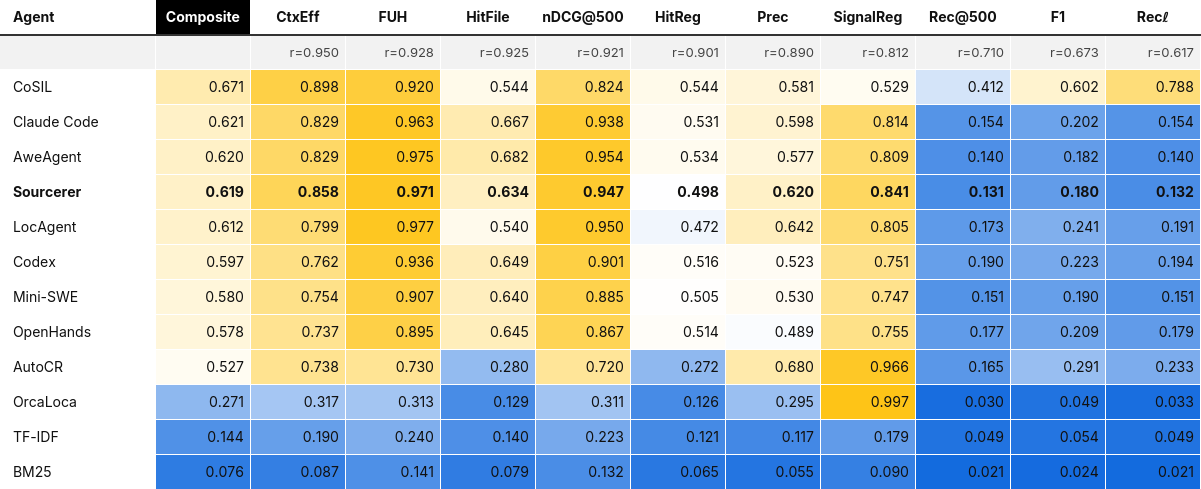
Generally, all the coding agents, including Sourcerer, performed well on precision metrics and suboptimally on recall metrics, although recall metrics had lower Pearson correlations and thus less importance. Table 1 shows Sourcerer's retrieval scores alongside the scores of the other agents tested in the original paper (page 8, table 6). "SignalReg" is the inverse of what the authors called "NoiseReg" (that is, 1 – NoiseReg); I did this to keep that metric consistent with the other metrics whose ranges imply that higher is better.
Token usage and task duration
Zhang et al. didn’t publish metrics for token usage or task durations, so I ran the benchmark again to capture those metrics for Claude Code. Given the high token cost of running the benchmark with any agent that uses an LLM, I opted to test only one coding agent, and Claude Code was the one that I expected most people would find useful as a comparison.
Compared to Claude Code, Sourcerer used ~13.9% more tokens to complete all 848 benchmark tasks. Sourcerer used 156,379,977 input tokens and 1,612,175 output tokens, while Claude Code used 137,629,435 input tokens and 1,137,176 output tokens. Sourcerer took ~8.9% longer to complete all 848 benchmark tasks. Sourcerer took 40,717 seconds, and Claude Code took 37,460 seconds.
I view these results on token usage and task duration as an acceptable modest tax in exchange for efficiently searching across multiple repositories and versions. That said, there’s room to explore optimizations to Sourcerer's tools, skills, and system prompt, the harness of Agent Builder, or the search engine of Elasticsearch and Lucene.
Single-repo vs. multi-repo scope
Critically, the SWE-Explore benchmarks only measure the retrieval scores, token usage, and task duration of agents searching within the boundaries of a single commit snapshot of a repository for any given task. This is the typical search space of a development coding agent. Sourcerer's intended scope is much broader, covering many commit snapshots of many repositories. The benchmark on "search speed and scalability," covered next in this report, shows Sourcerer's unique advantage when searching across many repositories.
Retrieval benchmark methodology
Appendix A explains the configuration of these benchmarks in detail.
Sourcerer searched all indexed representations of the SWE-Explore-Bench dataset (see Appendix A). Both benchmark runs used the same GPT-5.4 model that was used in the original paper. Sourcerer communicated with GPT-5.4 through Elastic Inference Service (EIS), while Claude Code communicated with GPT-5.4 through a shim proxy to be compatible with the OpenAI API.
I made a best effort to ensure that Sourcerer's benchmark task prompt was like-for-like with Claude Code's (see Appendix A). Both agents received identical instructions for their roles and tasks, along with output formats, and differed only in their brief harness-specific instructions. I instructed Sourcerer not to use its repo discovery skill and instead gave it explicit repo filtering instructions, ensuring that it was on a level playing field with Claude Code, which already receives the resolved directories. An alternative could have been to leave Sourcerer's repo discovery skill active while instructing Claude Code to find the repository in a filesystem that has all the repositories for the benchmark. I left Sourcerer's system prompts and skills, in addition to its tools, unmodified from their defaults, given that we're comparing the two harnesses overall, and much of which in Claude Code is closed source and not visible or controllable anyway.
Code search speed and scalability
Coding agents tend to use external tools to match substrings or regular expressions as a first line of retrieval. LLMs are trained to use shell commands, like ls and grep, when exploring code on a filesystem. Claude Code's own built-in Grep tool invokes ripgrep. This is the behavior I wanted to reproduce in Elasticsearch.
Elasticsearch has a wildcard field type that can scale regular expression matching to billions of documents. Sourcerer mimics the inputs and outputs of grep in Elasticsearch using sourcerer.code.grep, an Elasticsearch Query Language (ES|QL) tool that performs anRLIKE query on awildcard field of an index where each document has the contents of a single line of code. Sourcerer also providessourcerer.code.search, which performs a BM25-ranked MATCH query against an analyzed text field, for relevance-ranked discovery rather than exact substring retrieval.
I benchmarked the speed of both approaches against the speed of ripgrep and grep on a filesystem using two different corpus sizes and pattern rarities. Corpus sizes included one commit (7,215,509 lines of code) and 52 commits (200,325,684 lines of code) from the elastic/elasticsearch repository. The single commit covers the release tag for v9.4.3. The 52 commits cover the latest patch release tag for every major and minor release from v6.0.1 to v9.4.3. Sourcerer searched the corpus as indexed in Elasticsearch, while ripgrep and grep searched the corpus as stored on a filesystem, reflecting their respective use cases. The regular expression patterns included one that appears rarely among the commits (DiskBBQ) and one that appears commonly among the commits (XContentType).
sourcerer.code.grep
The first search I benchmarked was a rare pattern for DiskBBQ that appears only in some commits:
.*[dD][iI][sS][kK][-_]?[bB][bB][qQ].*
Search latency (in seconds) spanning a single commit (605 matches found from 7,215,509 lines of code):
Retrieval method | Cache | p0 | p50 | p100 | stdev | vs. sourcerer.code.grep |
| Cold | 0.069s | 0.124s | 0.167s | 0.020s | - |
| Warm | 0.027s | 0.029s | 0.046s | 0.005s | - |
| Cold | 0.788s | 0.800s | 0.809s | 0.005s | ~6.5x slower |
| Warm | 0.081s | 0.088s | 0.109s | 0.009s | ~3.0x slower |
| Cold | 3.565s | 3.580s | 3.821s | 0.055s | ~28.9x slower |
| Warm | 0.825s | 0.827s | 0.833s | 0.002s | ~28.5x slower |
Search latency (in seconds) spanning 52 commits (1,041 matches found from 200,325,684 lines of code):
Retrieval method | Cache | p0 | p50 | p100 | stdev | vs. sourcerer.code.grep |
| Cold | 0.159s | 0.164s | 0.270s | 0.028s | - |
| Warm | 0.027s | 0.031s | 0.053s | 0.006s | - |
| Cold | 22.356s | 22.364s | 22.459s | 0.026s | ~136.4x slower |
| Warm | 16.017s | 16.123s | 16.297s | 0.058s | ~520.1x slower |
| Cold | 101.962s | 102.386s | 104.281s | 0.752s | ~624.3x slower |
| Warm | 73.082s | 73.507s | 74.915s | 0.536s | ~2,371.2x slower |
Table 2. p0/p50/p100/stdev retrieval speeds of sourcerer.code.grep, ripgrep , and grep, under cold and warm caches, at two corpus scopes (20 runs per method per cache state; three warmup runs discarded before each warm-cache measurement). All percentiles computed via linear interpolation. Ratios are computed against sourcerer.code.grep's p50 at the matching cache state. See the “Methodology” section for cache definitions and query/command syntax.
The wildcard field type indexes trigrams of each value and uses them as a filter to narrow the candidate set for a regular expression before verifying full matches. For a selective pattern like this one (605 matches out of 7.2 million lines, 1041 out of 200 million) this approaches sublinear time complexity relative to corpus size. ripgrep and grep both perform scans with linear time complexity, with ripgrep using multithreading and single instruction, multiple data–accelerated (SIMD-accelerated) literal prefiltering to speed up searches, but neither has a mechanism to skip the vast majority of a corpus the way that an indexed trigram search can.
This shows up starkly in how each approach scales. Going from the single-commit corpus to the all-commits corpus is a 27.8x increase in line count. sourcerer.code.grep warm-cache time barely moves from 0.029 seconds to 0.031 seconds. ripgrep's warm-cache time goes from 0.089 seconds to 16.1 seconds, a 183x change; and grep's goes from 0.83 seconds to 1.2 minutes, an 89x change. Both filesystem tools scale worse than linearly with corpus size on this hardware, while the indexed approach is nearly flat.
The second search I benchmarked was a common pattern for XContentType that appears in all commits:
.*[xX][cC][oO][nN][tT][eE][nN][tT][tT][yY][pP][eE].*
Search latency (in seconds) spanning a single commit (7,999 matches found from 7,215,509 lines of code):
Retrieval method | Cache | p0 | p50 | p100 | stdev | vs. sourcerer.code.grep |
| Cold | 0.158s | 0.172s | 0.224s | 0.015s | - |
| Warm | 0.055s | 0.057s | 0.140s | 0.023s | - |
| Cold | 0.794s | 0.804s | 0.824s | 0.007s | ~4.7x slower |
| Warm | 0.093s | 0.095s | 0.096s | 0.001s | ~1.7x slower |
| Cold | 3.385s | 3.399s | 3.421s | 0.010s | ~19.8x slower |
| Warm | 0.681s | 0.683s | 0.686s | 0.001s | ~12.1x slower |
Search latency (in seconds) spanning 52 commits (290,662 matches found from 200,325,684 lines of code):
Retrieval method | Cache | p0 | p50 | p100 | stdev | vs. sourcerer.code.grep |
| Cold | 1.587s | 1.644s | 1.756s | 0.047s | - |
| Warm | 1.480s | 1.541s | 1.627s | 0.040s | - |
| Cold | 22.426s | 22.440s | 22.548s | 0.028s | ~13.6x slower |
| Warm | 16.021s | 16.276s | 16.498s | 0.119s | ~10.6x slower |
| Cold | 97.699s | 97.922s | 99.150s | 0.404s | ~59.6x slower |
| Warm | 68.883s | 69.184s | 70.374s | 0.360s | ~44.9x slower |
Table 3. p0/p50/p100/stdev retrieval speeds for the pattern .*[xX][cC][oO][nN][tT][eE][nN][tT][tT][yY][pP][eE].* under the same conditions as Table 2.
The relative search latencies of sourcerer.code.grep compared to grep shows why the pattern's match count matters as much as the corpus size:
Corpus | Corpus size | Cache | Speed of sourcerer.code.grep with a rare pattern (DiskBBQ) | Speed of sourcerer.code.grep with a common pattern (XContentType) |
1 commit | 7,215,509 lines | Cold | ~28.9x faster | ~19.8x faster |
1 commit | 7,215,509 lines | Warm | ~28.5x faster | ~12.1x faster |
52 commits | 200,325,684 lines | Cold | ~624.3x faster | ~59.6x faster |
52 commits | 200,325,684 lines | Warm | ~2,371.2x faster | ~44.9x faster |
Table 4. This table shows how much faster sourcerer.code.grep was compared to grep when searching across two different corpus sizes and two different pattern rarities.
The pattern with far more matches shows a dramatically smaller Elasticsearch advantage, most strikingly at all-commits scope, where the advantage drops from 2,371x to 45x. The reason is visible in the absolute numbers: sourcerer.code.grep's warm-cache time at all-commits scope jumps from 0.031 seconds (DiskBBQ) to 1.541 seconds (XContentType), a 49.7x increase for a 279x increase in match count, while grep's warm-cache time barely changes (73.5 seconds to 69.2 seconds, effectively flat, since it scans the same number of bytes regardless of how many of them match). The wildcard field's trigram index has sublinear-in-corpus-size behavior that comes specifically from narrowing the candidate set before verification. Once a pattern matches hundreds of thousands of lines, the bottleneck shifts from narrowing candidates to collecting and serializing all of them, a cost that scales with match count rather than corpus size. sourcerer.code.grep still wins by a wide margin even in this less favorable case, but the margin depends heavily on how selective the search is, not just how large the corpus is.
sourcerer.code.search
Sourcerer's other retrieval tool, sourcerer.code.search, performs a BM25-ranked MATCH query rather than an exact-substring regex match. Its speed on both patterns is included below for reference.
Pattern | Corpus scope | p0 | p50 | p100 | stdev | Matches found |
DiskBBQ | One commit | 0.013s | 0.017s | 0.018s | 0.002s | 288 |
DiskBBQ | 52 commits | 0.014s | 0.020s | 0.046s | 0.007s | 493 |
XContentType | One commit | 0.062s | 0.063s | 0.154s | 0.020s | 7,177 |
XContentType | 52 commits | 2.203s | 2.359s | 2.611s | 0.125s | 249,737 |
Table 5. p0/p50/p100/stdev retrieval speeds of sourcerer.code.search, warm cache only, for both patterns at both corpus scopes (20 runs per row; cold-cache figures omitted; see Methodology). Match counts are sourcerer.code.search's own, not the regex-based methods' BM25 matches on tokens rather than substrings, so these aren’t directly comparable to Tables 2–4.
What drives the speed advantage
sourcerer.code.grep outperformed ripgrep and grep at every corpus scale and pattern rarity tested, along with every cache state tested. But it wasn’t by a fixed margin. The advantage ranged from ~3–30x on a common pattern to over 2,300x on a rare pattern, because indexed and brute-force search respond to different things. The trigram narrowing of the wildcard field does less work as a pattern gets more selective, while grep and ripgrep do the same amount of work regardless of how much of the corpus happens to match. sourcerer.code.search is a third option for the cases where the exact string isn't known at all.
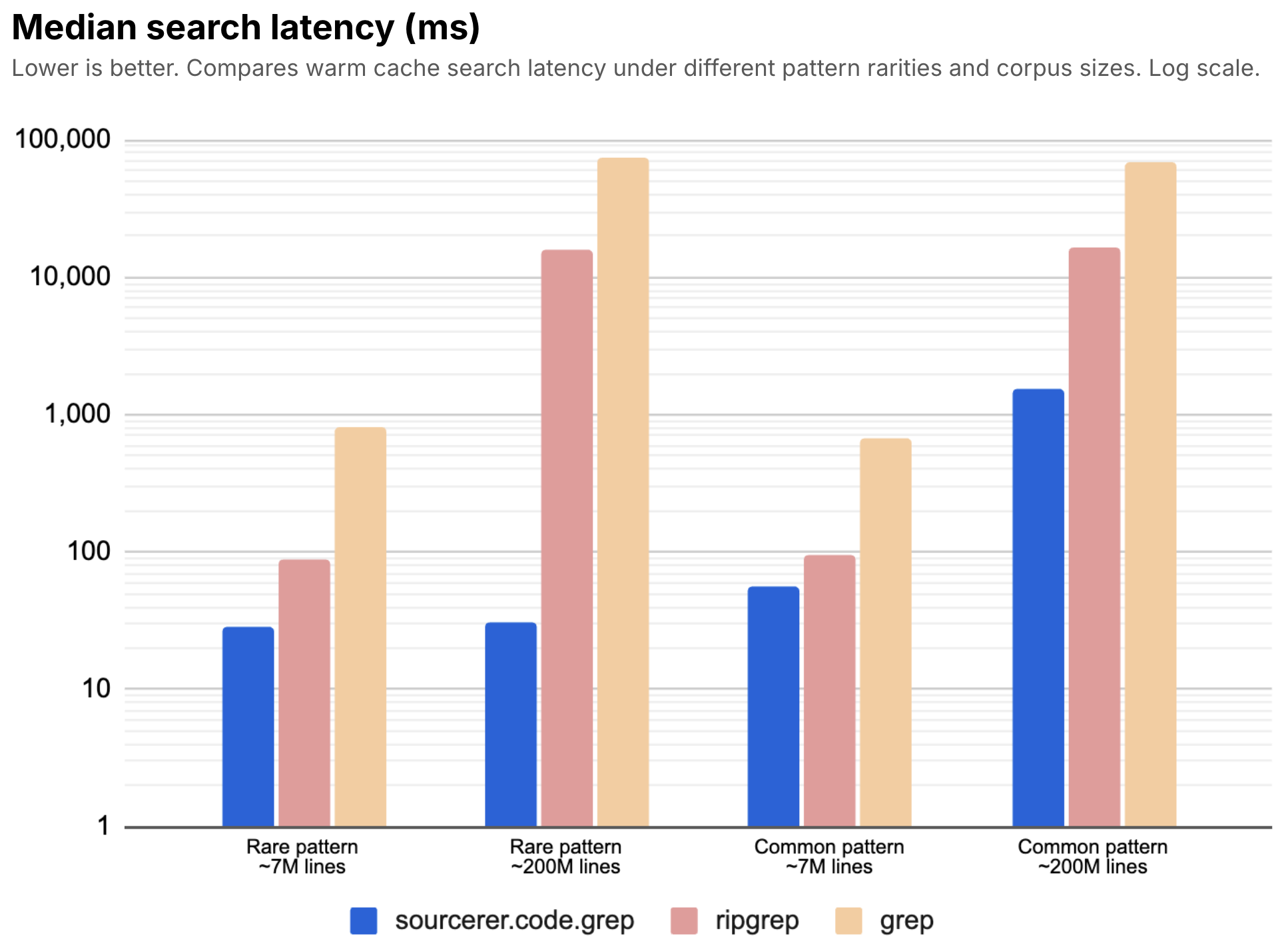
Figure 2: Sourcerer's sourcerer.code.grep tool outperformed ripgrep and grep in every combination of corpus size and pattern rarity benchmarked, sometimes by multiple orders of magnitude. Its outperformance was strongest when searching rare patterns in large corpora and weakest when searching common patterns in small corpora.
These search speed benchmarks show what scalable means in practice for an enterprise code search agent. It's being able to search the histories of any number of repositories at interactive speeds, just like how a developer coding agent searches the working state of a single repository on a filesystem.
Speed benchmark methodology
Appendix B explains the configuration of this benchmark. Note that while the Elasticsearch deployment had two data nodes each with the same specs as the virtual machine used for ripgrep and grep, the benchmark consisted of one index with one primary shard and one replica shard. Each search ran on a single shard, which means that sourcerer.code.grep had the same amount of vCPUs and memory available per search as ripgrep and grep, despite having twice as much capacity across the overall deployment. Having two data nodes actually incurred a slight latency penalty compared to just one data node. For brevity, I've omitted results from the benchmark with one data node. We don't recommend single-node deployments in production, so it's worth including the realistic latency overhead that comes with a multi-node deployment in this benchmark.
I compared all retrieval methods under both cold and warm caches, 20 cold runs and 20 warm runs per method. The definitions of cold and warm caches weren’t like-for-like between the Elasticsearch and filesystem benchmarks. For ripgrep and grep, a cold cache meant performing a full-page cache drop (sync; echo 3 > /proc/sys/vm/drop_caches) immediately before each cold run; and a warm cache meant three discarded warmup executions immediately followed by the 20 measured runs, with no cache drops in between. For ES|QL, a cold cache meant calling POST /_cache/clear before each run. This only clears Elasticsearch's internal caches, not the OS page caches of the data nodes, which can't be cleared by hand on Elastic Cloud Hosted (ECH). A warm cache for ES|QL meant three discarded warmup queries immediately before the 20 measured runs, to help ensure that the caches on both data nodes would be warm. sourcerer.code.search's cold-cache figures are omitted from Table 5 for the same reason discussed elsewhere in this post: Its cold-cache measurements came back statistically indistinguishable from its own warm-cache measurements, evidence that the OS-level cache-clearing limitation affects it more than it affects sourcerer.code.grep, which showed a consistent, physically sensible cold/warm gap throughout.
Code search indexing throughput
I didn't conduct a formal benchmark of indexing throughout. I'll share my general observations instead.
Typically, I see a sustained indexing throughput of 20K–25K lines per second on data nodes that each have ~16GiB RAM and ~8 vCPU on c4a-highcpu instances on Google Cloud Platform (GCP). That includes writing to a primary shard and its replica shard. I've seen throughput as high as ~60K lines per second on Elastic Cloud Serverless with Search Power set to "Performant."
An engineering team at Elastic compared Sourcerer's indexing throughput to semantic code search implementations that used either sparse vector generation (Elastic Learned Sparse EncodeR [ELSER]) or dense vector embedding generation (Jina). Sourcerer indexed ~25x faster than .elser-2-elastic and ~15x faster than .jina-embeddings-v5-text-small, while retrieval quality was similar among all of them. More concretely, what took ~6 hours to index with ELSER took ~14 minutes to index with Sourcerer.
Code search solution design and rationale
The remainder of this blog post explains the rationale for my design decisions of Sourcerer, giving expert insights for practitioners of Elasticsearch and generative AI (GenAI).
Goals
Ultimately, we want an agent that answers questions about deployed software and its supporting infrastructure by searching the primary sources of truth (the code itself) and generating verifiable responses that cite those sources so they can be trusted. Inspired by the success of coding agents with grep, my main functional goal for Sourcerer was to reproduce the search behavior of a coding agent and generate responses with citations, all using Agent Builder. My nonfunctional goals were to keep it fast and scalable, as well as accurate, when searching across many versioned repositories, while maintaining acceptable costs and ease of use. Of these goals, reproducing the search behaviors of coding agents would be the most consequential, as it would dictate the access pattern, index design, and query design, plus their effects on nonfunctional goals.
Access pattern
From a human perspective, the intended access pattern is simple: We expect to ask natural language questions about software and receive plain language answers grounded in the source of truth. From the perspective of the agent handling those questions, the intended access pattern is to reproduce the search behavior of coding agents to find what it needs. The LLMs used by coding agents are heavily trained to explore code with shell commands, likelsor find, grep or ripgrep, cat, head, tail, and so on. Claude Code's built-in tools, such as Glob and Grep, provide similar functions.
I chose to go with the grain of how models are trained. So my intended access pattern for Sourcerer was to reproduce the names, inputs, and outputs of shell commands as ES|QL tools in Agent Builder. That way, the Agent Builder harness would allow an LLM to use its trained intuition to achieve similar results as a frontier harness, like Claude Code or Codex, without having to fill the LLM's limited context window with instructions for using a different search interface. This was the main context engineering problem to solve with Sourcerer. Solving it would enable faster searches that scale across many repositories at once, allowing an agent to answer questions about deployments in which many different versioned software projects work together.
Index design
I decided on three index templates to fulfill this access pattern:
sourcerer-refs: Each document indexes the high-level metadata for a single Git reference or ref identified by its unique commit hash, which can have a tag name or branch name associated with it. A ref represents an entire snapshot of a repository at a point in time. This is a small index. The agent mainly uses this to discover the repositories and snapshots that are available to search.sourcerer-files: Each document indexes the metadata for a single file of a given ref. This is a larger index. The agent mainly uses this to navigate files and directories usinglssemantics.sourcerer-lines: Each document indexes the contents of a single, numbered line of code for a given file of a given ref. Yes, every line of code becomes a document. This is the largest index (but perhaps not as large as you might expect). The agent mainly uses this to search and view code usinggrepandcatsemantics.
The design is almost entirely denormalized. Each index has the same namespacing fields for fast, joinless filtering. Each indexed ref stores all files and lines from its commit snapshot, rather than storing diffs and reconstructing them at search time or storing unique files and lines with a mutable array of ref names associated with each. These choices trade duplicative storage (the cheapest compute resource) for faster searches and less segment merging pressure.
Namespacing
All three indices use four fields to namespace the ref, file, or line of code:
git.host: A Git hosting provider (for example, github, gitlab).git.org: An account name (for example, elastic).git.repo: A Git repository (for example, elasticsearch, kibana).git.commit: A commit hash, stored as the full 40-character SHA-1 digest for integrity.
The document _id hashes for files and lines are also namespaced by {git.host}, {git.org}, {git.repo}, and {git.commit} to allow for idempotent indexing. That means you can safely rerun an indexing job without duplicating any documents.
Likewise, the index names are namespaced with the same semantics, using tildes (~) as a reliable separator since it's a disallowed character in Git repository names and organization names:
sourcerer-v*-files~{git.host}~{git.org}~{git.repo}sourcerer-v*-lines~{git.host}~{git.org}~{git.repo}
This namespace convention has many benefits:
Agents can quickly narrow the search space for refs and files, along with lines of code, by these common scoping fields, keeping searches fast and focused.
The semantics reflect common permission boundaries. You can reproduce the access policies of your Git hosting provider by implementing your choice of index-level security and/or document-level security based on host or organization or based on repository.
You can instantly delete indices for a whole repository or organization, or for a host, without an expensive
_delete_by_query.The index names are future proofed for different levels of granularity. Sourcerer might eventually allow indexing code by
{git.host},{git.host}~{git.org}, or{git.host}~{git.org}~{git.repo}~{git.commit}for selective shard sizing optimizations. The query syntax would be unaffected because they target index aliases (sourcerer-filesandsourcerer-lines), not individual indices.
Settings
Three index settings help to optimize storage costs and search speed:
Index sorting gives faster searches and better compression at the cost of reduced indexing throughput. Each index sorts documents on disk by
git.host,git.org,git.repo,git.commit. File and line documents are further sorted byfile.path, and line documents are further sorted byline.number.Synthetic
_sourcediscards_sourceand instead reconstructs it as needed when reindexing. None of the queries access_source, which makes it dead weight. Enabling this setting reclaims ~50% storage space in the files and lines indices. While it requires an Enterprise license, enabling it on a non-licensed deployment won’t prevent the index from being created; instead the setting will be ignored.best_compressionis a fallback for Elastic deployments that lack an Enterprise license to use synthetic_source. It provides decent compression for_source(~11% storage savings by my observations) in exchange for a modest tax on indexing throughput (~15% slower), while search speeds are essentially unaffected because the queries don't fetch_source.
I use index aliases to support zero-downtime upgrades when reindexing to a new schema.
Mappings
The indices mainly use keyword fields. They facilitate efficient filtering with basic wildcard support and aggregations, along with optimal storage usage and indexing throughput.
The line.content field is indexed both as a wildcard field and as a text field with tokenization and similarity settings tuned for code search. This gives agents the option to search code using familiar and effective grep-like regular expressions on the wildcard field or using the inverted index of the text field to return only the highest ranking matched lines to reduce token usage and increase search speed. Both options are remarkably fast and scalable, taking milliseconds to finish in most cases.
Shards
While shards are becoming less relevant with the rise of stateless platforms like Elastic Cloud Serverless, I want the solution to accommodate all deployment modes of Elasticsearch. So I've given attention to the effect of the index design on the number and size of primary shards. Based on my observations, I expect that most users won’t need to give much attention to shards.
By default, Elasticsearch enforces a soft limit of 1,000 shards per data node (including replicas). That means this solution will hit a soft limit of just under 250 repositories indexed per data node, because each repository is written to a files index and a lines index, each with one primary shard and one replica. Additionally, there’s a conventional best practice of limiting shard sizes to ~50GB, which affects how many refs you can index per repository. Both of these limits can be pushed a bit. But they reveal that this solution design really is optimized for its intended use case of searching the commit snapshots of supported, deployed software. You wouldn't use Sourcerer to index every repository on the Internet, and you shouldn't use it to index every ephemeral development branch. Plus, you should decide how many refs are worth retaining for each repository.
Repository-level granularity of indices appears to strike the right balance of shard counts and shard sizes. For reference, Kibana is one of the largest repositories on GitHub (source). I observed its shard size to be a manageable 60GB–75GB when retaining only the latest patch release for every major and minor version release from v6.0.0 to v9.5.0. That's great coverage for the Elastic deployments we see in the wild. If that's one of the largest repositories out there, you can expect just about any other repository to fit in a single shard as long as you have a reasonable retention policy, which I discuss in the next section (“Pruning”).
Pruning
By default, Sourcerer retains everything you index. Pruning lets you delete old refs to prevent unbounded growth. You can define ref retention policies based on the age of refs and the number of refs indexed in the repo. You can also define these policies based on the number of semantic versions indexed in the repo at any level of granularity for major, minor, patch, build, and prerelease versions. Some common configurations are to retain only the latest commit of the default branch or the most recent patch release tag for every major and minor version release tag.
Elastic Agent Builder tools
With the index design in place, we can review the tools that query those indices.
ES|QL tools in Agent Builder are parameterized ES|QL queries with descriptions to guide the agent's use of them. Sourcerer has tools for several purposes: repo discovery, file discovery, code search, and code display. These tools reproduce the names, inputs, and outputs of shell commands that coding agents prefer to use when exploring code, making them intuitive enough for the LLM to use with minimal instructions passed into its context window.
Repo discovery
These are typically the first tools that the agent calls. Unlike most coding agents, which search within a single repository on a filesystem, Sourcerer is aware that its search space likely has multiple repositories and versions, and so its first step is to decide which repos and refs to scope its searches to.
sourcerer.repos.list: Lists the repos that are available to search.sourcerer.repos.search: Lists the repos whose file contents best match a given query.sourcerer.refs.list: Lists the repos and refs that are available to search.
File discovery
All file discovery tools support glob matching (* and **) on file paths.
sourcerer.files.ls: Lists files and directories that match a given pattern.sourcerer.files.tree: Lists files and directories that match a given pattern in a tree-like format.sourcerer.files.wc: Counts lines, words, characters, bytes, and longest lines for each matching file.
Code search
All file code search tools support glob matching (* and **) on file paths.
sourcerer.code.grep: Searches lines of code usingRLIKEon awildcardfield for rapid execution of regular expressions.sourcerer.code.search: Searches lines of code usingMATCHon atextfield that has been tuned for code search.
Code retrieval
All file code retrieval tools concatenate the desired lines of any matching file and return them as a single, contiguous block of code in grep -n format, which is a format preferred by coding agents, including Claude Code's built-in Grep tool. This lets the agent see a faithful representation of file contents with line-level attribution for precise citations, without requiring the agent to reconstruct the contents or infer line numbers through reasoning.
To illustrate, here's how the sourcerer.files.head tool formats the first five lines of Kibana's README.md file, reconstructed from five documents from the lines index:
1:# Kibana
2:
3:Kibana is the open source interface to query, analyze, visualize, and manage your data stored in Elasticsearch.
4:
5:- [Getting Started](#getting-started)
All file code retrieval tools support glob matching (* and **) on file paths. Agents typically use these tools to display the contents of a single file.
sourcerer.files.cat: Concatenates and displays all lines for each matching file.sourcerer.files.head: Concatenates and displays the firstnlines for each matching file.sourcerer.files.tail: Concatenates and displays the lastnlines for each matching file.sourcerer.files.read_lines: Concatenates and displays the range of lines between two given line numbers for each matching file.
Agent Builder skills
With the tools implemented, we can review the skills that guide the agent's proper use of them. Agents typically invoke the follow skills in this order:
sourcerer-repo-discovery: Guides the agent in discovering and selecting the repositories that are available to search for a given prompt. While this is typically the first skill an agent invokes, the agent might return to it when tracing dependencies from other repositories or when answering questions that span multiple repositories or versions.sourcerer-ref-resolution: Guides the agent in resolving the names of tags or branches to their unique, immutable commit hashes. This lets the agent reliably filter its searches to a single commit snapshot.sourcerer-code-search: Guides the agent in exploring code, with basic best practices on when and how to use the available tools for maximum efficiency.sourcerer-code-citations: Guides the agent in citing files, directories, lines of code, and ranges of lines of code. Sourcerer auto-generates more specific citation skills for each major Git hosting provider, so that its citation links conform to the URL formats of each respective host.
Agent system prompt
The final packaging of the agent comes with a system prompt that succinctly describes the agent's role and its high-level instructions. The configure file that defines the system prompt also defines the tools and skills that are made available to the agent, so that it can only execute what we permit it to execute.
Sourcerer CLI
The Sourcerer CLI assists with setup and indexing, along with pruning to keep operations simple. Configuration is managed through a sourcerer.yml configuration file.
sourcerer setup: Idempotently loads the index templates and Agent Builder configurations, in addition to Kibana dashboards. This is typically a one-time operation and takes a few seconds.sourcerer index: Checks for new refs that match patterns defined insourcerer.ymland then idempotently indexes them, skipping any refs that have already been indexed or that qualify for pruning based on retention policies. It callsgitto clone repos and to list remote refs, as well as to check out refs.sourcerer prune: Checks the retention policies for any refs that qualify for pruning and then deletes them from all three indices using_delete_by_query.
You can easily schedule indexing and pruning using external schedulers, like cron. For our internal use at Elastic, we maintain sourcerer.yml files in a private Git repository and schedule indexing and pruning with GitHub Actions. I prefer to index code frequently, while pruning outside of normal working hours to prevent agents from suddenly losing context in the middle of a conversation.
Feature license summary
For transparency, here’s a summary of the license levels for all non–open source software (non-OSS) features referenced in this solution design.
Subscription features:
Agent Builder (optional; you can query the indices from a different harness using the Elasticsearch API).
Synthetic
_source(optional).Document-level security (optional).
Free features, proprietary to Elastic (not OSS as defined by the Open Source Initiative [OSI]):
A subscription gives you the magic of "everything just works" with Agent Builder, along with resource optimizations, finer security permissions, and platform support. Without a subscription, you can still index and prune code with the Sourcerer CLI and search the code using the Elasticsearch API.
Conclusion
Sourcerer demonstrates that Elasticsearch + Agent Builder is an exceptional solution for agentic enterprise code intelligence, as evidenced in many ways:
Accurate: Sourcerer's agentic code retrieval quality is at parity with frontier coding agents as demonstrated by its performance on the academic benchmark SWE-Explore.
Fast: Sourcerer's query speed ranges from milliseconds in a single repository to multiple seconds across a billion lines of code. Indexing is also much faster than could be achieved with vector embedding generations.
Scalable: Elasticsearch sharding enables horizontal scaling, making it possible to search the current and historical states of an entire enterprise software estate. Alternatively, the stateless architecture of Serverless naturally scales without having to plan shards.
Resilient: Elasticsearch replication enables high availability to keep the agent operational 24/7. Likewise, the stateless architecture of Serverless naturally provides high availability.
Polyglot: Sourcerer's indexing and retrieval methods are completely language-agnostic and tolerant of malformed code.
Secure: Elasticsearch document-level security enforces access policies for humans and agents at the organization, repository, and commit levels.
Efficient: Sourcerer demonstrates an efficient use of storage, memory, compute, and token consumption for its intended use case.
Manageable: The Sourcerer CLI, and its use of native
gitcommands and Elastic REST APIs, makes it easy to get started with and operate, as well as schedule.Universal: Organizations from all industries build software, and Git is the source of truth for ~85% of them (source). Sourcerer has value to all of these organizations.
Sourcerer is currently less than two months old, and the benchmark results suggest that there’s room to improve recall and token efficiency, along with task duration. I'll continue to work on this project in the near future.
Try it yourself
Sourcerer depends on Elasticsearch and Kibana. You can get started with those in a couple ways:
Elastic Cloud (includes an Enterprise trial).
Local setup with Docker (includes an Enterprise trial).
Then you can get started with Sourcerer.
I built this with Agent Builder. What will you build?
References
Sen, S. (2026). Is Grep All You Need? How Agent Harnesses Reshape Agentic Search. arXiv. https://arxiv.org/abs/2605.15184
Zhang, S. (2026). SWE-Explore: Benchmarking How Coding Agents Explore Repositories. arXiv. https://arxiv.org/abs/2606.07297
Appendices
Appendix A. SWE-Explore benchmark configuration
Benchmark environment:
Sourcerer version: v1.0.0 (commit hash: 26d2e84e3f9e4c1e1598a48532eba9a739465c3e)
Elastic Cloud Hosted (ECH):
Region: GCP - Los Angeles (us-west2)
CPU Optimized hardware (c4a-highcpu)
3x Elasticsearch data nodes (each with 16GiB RAM, 8 vCPUs)
2x Kibana instances (each with 2GiB RAM)
Elastic stack version: v9.5.0 (commit hash: dbedef007f580447413782705acb9afec41f945b)
Claude Code version: 2.1.202
LLM: GPT-5.4
Indices as reported by GET /_cat/indices:
index                                          pri rep docs.count docs.deleted store.size
sourcerer-v1-files~ansible~ansible               1   1     234423            0     18.5mb
sourcerer-v1-files~apache~druid                  1   1      46720            0      4.1mb
sourcerer-v1-files~apache~lucene                 1   1      47932            0      4.2mb
sourcerer-v1-files~astral-sh~ruff                1   1      49021            0      9.1mb
sourcerer-v1-files~astropy~astropy               1   1      38994            0      6.1mb
sourcerer-v1-files~axios~axios                   1   1        339            0       89kb
sourcerer-v1-files~babel~babel                   1   1      24798            0      4.9mb
sourcerer-v1-files~briannesbitt~carbon           1   1      14054            0      1.2mb
sourcerer-v1-files~burntsushi~ripgrep            1   1        408            0    232.4kb
sourcerer-v1-files~caddyserver~caddy             1   1       2162            0    533.9kb
sourcerer-v1-files~django~django                 1   1    1329708            0     91.7mb
sourcerer-v1-files~element-hq~element-web        1   1      29426            0      6.1mb
sourcerer-v1-files~facebook~docusaurus           1   1       9288            0        2mb
sourcerer-v1-files~faker-ruby~faker              1   1       1130            0    207.2kb
sourcerer-v1-files~fastlane~fastlane             1   1      13663            0      1.7mb
sourcerer-v1-files~flipt-io~flipt                1   1      10518            0    873.8kb
sourcerer-v1-files~fluent~fluentd                1   1       3340            0    744.4kb
sourcerer-v1-files~fmtlib~fmt                    1   1       1243            0    133.7kb
sourcerer-v1-files~future-architect~vuls         1   1       3952            0      828kb
sourcerer-v1-files~gin-gonic~gin                 1   1        217            0     76.6kb
sourcerer-v1-files~gohugoio~hugo                 1   1      11545            0      1.2mb
sourcerer-v1-files~google~gson                   1   1       1432            0    349.4kb
sourcerer-v1-files~gravitational~teleport        1   1     100317            0     16.3mb
sourcerer-v1-files~hashicorp~terraform           1   1      13511            0      1.5mb
sourcerer-v1-files~immutable-js~immutable-js     1   1        458            0      120kb
sourcerer-v1-files~internetarchive~openlibrary   1   1      35448            0      5.9mb
sourcerer-v1-files~javaparser~javaparser         1   1       5154            0      1.3mb
sourcerer-v1-files~jekyll~jekyll                 1   1        720            0    272.9kb
sourcerer-v1-files~jordansissel~fpm              1   1        167            0     98.3kb
sourcerer-v1-files~jqlang~jq                     1   1       1172            0    291.4kb
sourcerer-v1-files~laravel~framework             1   1      29021            0      4.9mb
sourcerer-v1-files~matplotlib~matplotlib         1   1     133013            0     19.9mb
sourcerer-v1-files~micropython~micropython       1   1      15631            0        3mb
sourcerer-v1-files~mrdoob~three.js               1   1       9858            0      1.1mb
sourcerer-v1-files~mwaskom~seaborn               1   1        633            0      181kb
sourcerer-v1-files~navidrome~navidrome           1   1      10301            0      2.1mb
sourcerer-v1-files~nlohmann~json                 1   1       1090            0    281.9kb
sourcerer-v1-files~nodebb~nodebb                 1   1     104805            0     14.5mb
sourcerer-v1-files~nushell~nushell               1   1       8990            0      1.7mb
sourcerer-v1-files~pallets~flask                 1   1        251            0    120.1kb
sourcerer-v1-files~php-cs-fixer~php-cs-fixer     1   1       8300            0        1mb
sourcerer-v1-files~phpoffice~phpspreadsheet      1   1      17140            0      3.6mb
sourcerer-v1-files~preactjs~preact               1   1       3446            0    772.5kb
sourcerer-v1-files~projectlombok~lombok          1   1      24153            0        4mb
sourcerer-v1-files~prometheus~prometheus         1   1       3416            0    644.9kb
sourcerer-v1-files~protonmail~webclients         1   1      84927            0     14.9mb
sourcerer-v1-files~psf~requests                  1   1        928            0    329.4kb
sourcerer-v1-files~pydata~xarray                 1   1       5114            0    910.6kb
sourcerer-v1-files~pylint-dev~pylint             1   1      24945            0      3.8mb
sourcerer-v1-files~pytest-dev~pytest             1   1       8880            0      1.3mb
sourcerer-v1-files~qutebrowser~qutebrowser       1   1      29453            0      4.6mb
sourcerer-v1-files~reactivex~rxjava              1   1       1959            0    523.7kb
sourcerer-v1-files~redis~redis                   1   1      12646            0        2mb
sourcerer-v1-files~rubocop~rubocop               1   1      15349            0      3.3mb
sourcerer-v1-files~scikit-learn~scikit-learn     1   1      39030            0      6.2mb
sourcerer-v1-files~sharkdp~bat                   1   1       2526            0    789.3kb
sourcerer-v1-files~sphinx-doc~sphinx             1   1      55638            0      8.8mb
sourcerer-v1-files~sympy~sympy                   1   1     112572            0     16.7mb
sourcerer-v1-files~tokio-rs~axum                 1   1       1474            0    365.9kb
sourcerer-v1-files~tokio-rs~tokio                1   1       5175            0        1mb
sourcerer-v1-files~tutao~tutanota                1   1       9267            0      1.6mb
sourcerer-v1-files~uutils~coreutils              1   1       3226            0    806.6kb
sourcerer-v1-files~valkey-io~valkey              1   1       6681            0      1.4mb
sourcerer-v1-files~vuejs~core                    1   1       2785            0      750kb
sourcerer-v1-lines~ansible~ansible               1   1   23067027            0      6.9gb
sourcerer-v1-lines~apache~druid                  1   1   10230691            0      1.4gb
sourcerer-v1-lines~apache~lucene                 1   1    9857695            0      1.5gb
sourcerer-v1-lines~astral-sh~ruff                1   1    5895776            0    797.9mb
sourcerer-v1-lines~astropy~astropy               1   1   16855521            0      5.1gb
sourcerer-v1-lines~axios~axios                   1   1     104915            0     17.3mb
sourcerer-v1-lines~babel~babel                   1   1     661054            0     96.4mb
sourcerer-v1-lines~briannesbitt~carbon           1   1    2256429            0      339mb
sourcerer-v1-lines~burntsushi~ripgrep            1   1     121406            0     20.5mb
sourcerer-v1-lines~caddyserver~caddy             1   1     423391            0     60.4mb
sourcerer-v1-lines~django~django                 1   1  187595831            0     26.4gb
sourcerer-v1-lines~element-hq~element-web        1   1    5435563            0        1gb
sourcerer-v1-lines~facebook~docusaurus           1   1    1098502            0      173mb
sourcerer-v1-lines~faker-ruby~faker              1   1     281240            0     72.8mb
sourcerer-v1-lines~fastlane~fastlane             1   1    3774359            0    515.3mb
sourcerer-v1-lines~flipt-io~flipt                1   1    2318144            0    339.1mb
sourcerer-v1-lines~fluent~fluentd                1   1     616236            0     87.9mb
sourcerer-v1-lines~fmtlib~fmt                    1   1     525144            0     78.7mb
sourcerer-v1-lines~future-architect~vuls         1   1    1340951            0    410.3mb
sourcerer-v1-lines~gin-gonic~gin                 1   1      42186            0      6.2mb
sourcerer-v1-lines~gohugoio~hugo                 1   1    1323287            0    415.2mb
sourcerer-v1-lines~google~gson                   1   1     269864            0     82.1mb
sourcerer-v1-lines~gravitational~teleport        1   1   35961497            0      5.3gb
sourcerer-v1-lines~hashicorp~terraform           1   1    1913651            0    284.3mb
sourcerer-v1-lines~immutable-js~immutable-js     1   1     132082            0     41.1mb
sourcerer-v1-lines~internetarchive~openlibrary   1   1    6505234            0    903.1mb
sourcerer-v1-lines~javaparser~javaparser         1   1     756387            0    233.7mb
sourcerer-v1-lines~jekyll~jekyll                 1   1      57072            0      9.2mb
sourcerer-v1-lines~jordansissel~fpm              1   1      32285            0      8.8mb
sourcerer-v1-lines~jqlang~jq                     1   1     373367            0     56.1mb
sourcerer-v1-lines~laravel~framework             1   1    4680025            0      1.2gb
sourcerer-v1-lines~matplotlib~matplotlib         1   1   24426468            0      3.6gb
sourcerer-v1-lines~micropython~micropython       1   1    2104199            0      320mb
sourcerer-v1-lines~mrdoob~three.js               1   1    5519778            0   1014.6mb
sourcerer-v1-lines~mwaskom~seaborn               1   1     219103            0       35mb
sourcerer-v1-lines~navidrome~navidrome           1   1    1293741            0    405.1mb
sourcerer-v1-lines~nlohmann~json                 1   1     174859            0     53.5mb
sourcerer-v1-lines~nodebb~nodebb                 1   1    6621106            0      2.2gb
sourcerer-v1-lines~nushell~nushell               1   1    1424029            0    405.3mb
sourcerer-v1-lines~pallets~flask                 1   1      34538            0     11.1mb
sourcerer-v1-lines~php-cs-fixer~php-cs-fixer     1   1    1272280            0    357.6mb
sourcerer-v1-lines~phpoffice~phpspreadsheet      1   1    1999435            0      291mb
sourcerer-v1-lines~preactjs~preact               1   1     975966            0    274.3mb
sourcerer-v1-lines~projectlombok~lombok          1   1    1480367            0    470.7mb
sourcerer-v1-lines~prometheus~prometheus         1   1    1132908            0    484.6mb
sourcerer-v1-lines~protonmail~webclients         1   1   22247802            0      3.2gb
sourcerer-v1-lines~psf~requests                  1   1     337782            0    144.1mb
sourcerer-v1-lines~pydata~xarray                 1   1    2413091            0    714.7mb
sourcerer-v1-lines~pylint-dev~pylint             1   1    1188057            0    351.7mb
sourcerer-v1-lines~pytest-dev~pytest             1   1    1882734            0    532.2mb
sourcerer-v1-lines~qutebrowser~qutebrowser       1   1    6734755            0        1gb
sourcerer-v1-lines~reactivex~rxjava              1   1     486774            0    135.3mb
sourcerer-v1-lines~redis~redis                   1   1    3551629            0        1gb
sourcerer-v1-lines~rubocop~rubocop               1   1    2899319            0    763.3mb
sourcerer-v1-lines~scikit-learn~scikit-learn     1   1   10940081            0      3.2gb
sourcerer-v1-lines~sharkdp~bat                   1   1     317845            0      118mb
sourcerer-v1-lines~sphinx-doc~sphinx             1   1   15102452            0      3.9gb
sourcerer-v1-lines~sympy~sympy                   1   1   45538891            0     13.8gb
sourcerer-v1-lines~tokio-rs~axum                 1   1     146486            0     40.6mb
sourcerer-v1-lines~tokio-rs~tokio                1   1    1068294            0    293.9mb
sourcerer-v1-lines~tutao~tutanota                1   1    2932455            0    985.3mb
sourcerer-v1-lines~uutils~coreutils              1   1     478330            0    127.7mb
sourcerer-v1-lines~valkey-io~valkey              1   1    1876977            0    575.5mb
sourcerer-v1-lines~vuejs~core                    1   1     684268            0    190.9mb
sourcerer-v1-refs                                1   1        847            0    457.5kb
Benchmark task prompt:
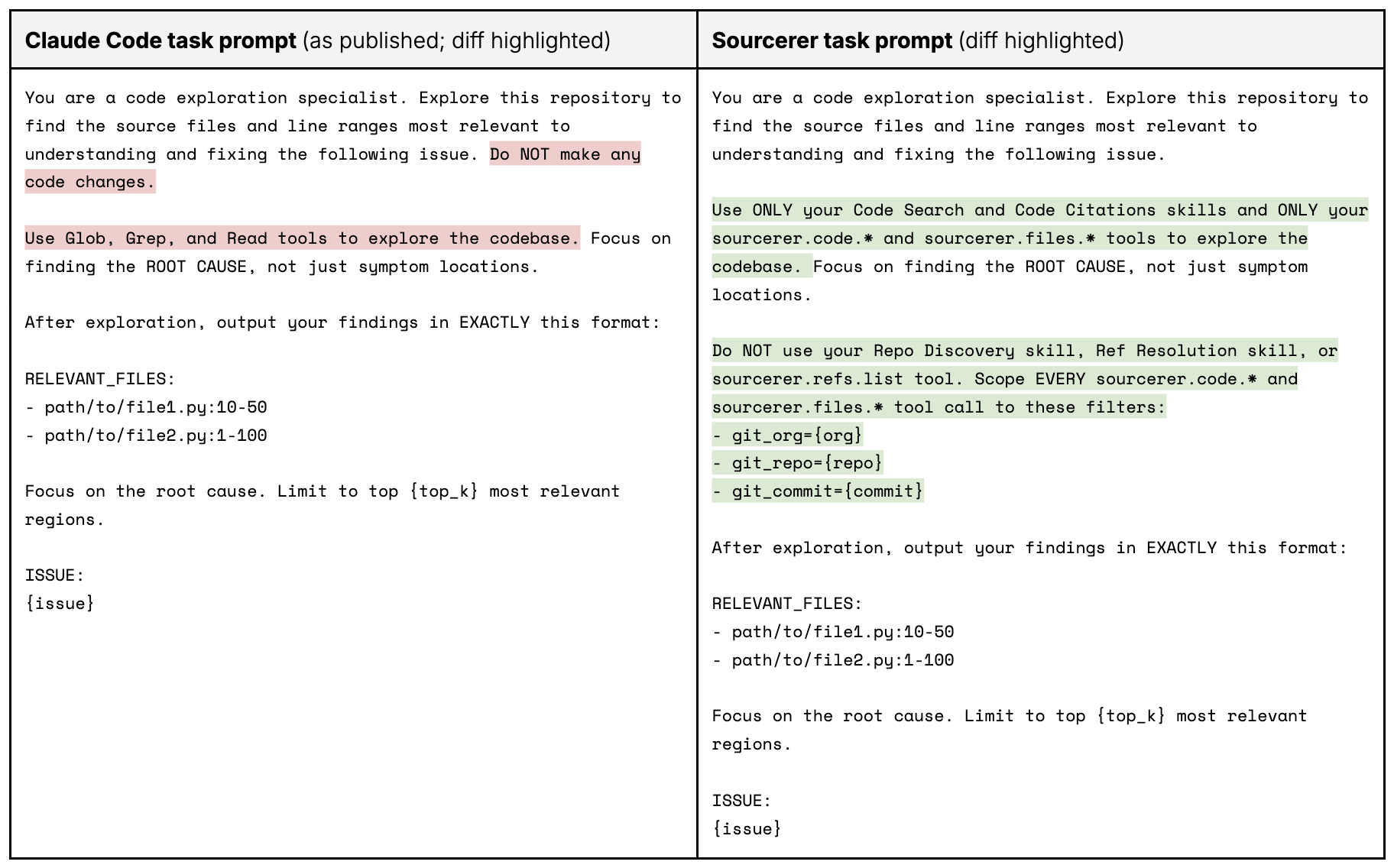
Table 6. This table compares Claude Code's task prompt used in the original paper and Sourcerer's task prompt used in this benchmark run. The highlights indicate where Sourcerer's task prompt differed from Claude Code's: red indicates an instruction from Claude Code's task prompt that wasn't used by Sourcerer's, and green indicates an instruction that was unique to Sourcerer's task prompt.
Appendix B. Code search speed and scalability benchmark configuration
Benchmark environment:
Sourcerer version: v2.0.0 (commit hash: dcc373b3bf7b24168e00ed7b172aea7227f705f9)
Elastic Cloud Hosted (ECH) for ES|QL:
Region: GCP - Los Angeles (us-west2)
CPU Optimized hardware (c4a-highcpu)
2x Elasticsearch data nodes (each with 16GiB RAM, 8 vCPUs)
1x Kibana instances (2GiB RAM)
Elastic stack version: v9.5.0 (commit hash: 8d4246a64bc255212407b1b313fe402391299c88)
Virtual machine for
ripgrepandgrep:Region: GCP - Los Angeles (us-west2-a)
CPU Optimized hardware (c4a-highcpu-8-lssd)
16GiB RAM
Image: projects/ubuntu-os-cloud/global/images/ubuntu-2404-noble-arm64-v20260717
Provisioned IOPS: 3300
Provisioned throughput: 215
Indices as reported by GET /_cat/indices:
index                                           pri rep docs.count docs.deleted store.size
sourcerer-v2-lines~github~elastic~elasticsearch   1   0  200387235            0     44.8gb
Cluster settings adjusted to avoid truncating the returned match count on frequent patterns:
PUT /_cluster/settings
{
  "persistent": {
    "esql.query.result_truncation_max_size": 1000000
  }
}
Regular expression used by ripgrep and grep:
DiskBBQ:
.*[dD][iI][sS][kK][-_]?[bB][bB][qQ].*XContentType:
.*[xX][cC][oO][nN][tT][eE][nN][tT][tT][yY][pP][eE].*
ES|QL query syntax used for sourcerer.code.grep:
FROM sourcerer-lines
 | WHERE git.host LIKE ?git_host
     AND git.org LIKE ?git_org
     AND git.repo LIKE ?git_repo
     AND git.commit LIKE ?git_commit
     AND file.path LIKE ?file_path
     AND line.content RLIKE ?regex
 | EVAL _fp_is_recursive = ?file_path != REPLACE(?file_path, "[*][*]", "")
 | EVAL _fp_segs = LENGTH(?file_path) - LENGTH(REPLACE(?file_path, "/", "")) + 1
 | EVAL _file_segs = MV_COUNT(SPLIT(file.path, "/"))
 | WHERE _fp_is_recursive OR _file_segs == _fp_segs
 | KEEP git.host, git.org, git.repo, git.commit, file.path, file.size, line.number, line.content
 | SORT git.host, git.org, git.repo, git.commit, file.path, line.number
 | LIMIT ?n
ES|QL query syntax used for sourcerer.code.search:
FROM sourcerer-lines METADATA _score
 | WHERE git.host LIKE ?git_host
     AND git.org LIKE ?git_org
     AND git.repo LIKE ?git_repo
     AND git.commit LIKE ?git_commit
     AND file.path LIKE ?file_path
     AND MATCH(line.content.text, ?q)
 | EVAL _fp_is_recursive = ?file_path != REPLACE(?file_path, "[*][*]", "")
 | EVAL _fp_segs = LENGTH(?file_path) - LENGTH(REPLACE(?file_path, "/", "")) + 1
 | EVAL _file_segs = MV_COUNT(SPLIT(file.path, "/"))
 | WHERE _fp_is_recursive OR _file_segs == _fp_segs
 | SORT _score DESC
 | KEEP git.host, git.org, git.repo, git.commit, file.path, file.size, line.number, line.content
 | LIMIT ?n
ES|QL query parameters used in all tests:
git_host="github"git_org="elastic"git_repo="elasticsearch"n=1000000
ES|QL query parameters used for specific tests:
Corpus with single commit:
git_commit="45f6a06b1b441b41fe711059b8720013173e7c89"Corpus with all commits:
git_commit="*"sourcerer.code.greppattern for rare pattern (DiskBBQ):regex=".*[dD][iI][sS][kK][-_]?[bB][bB][qQ].*"sourcerer.code.greppattern for common pattern (XContentType):regex=".*[xX][cC][oO][nN][tT][eE][nN][tT][tT][yY][pP][eE].*"sourcerer.code.searchpattern for common pattern (DiskBBQ):q="DiskBBQ"sourcerer.code.searchpattern for common pattern (XContentType):q="XContentType"
n was set high enough to recover the true, uncapped match count for each pattern (605 and 1,041 matches for DiskBBQ; 7,999 and 290,662 matches for XContentType), confirmed in each case by comparing hits_returned against ripgrep's and grep's own match counts on the same underlying data.
Command syntax used for ripgrep :
rg -n --no-ignore -j 6
Command syntax used for grep:
grep -E -r -n --binary-files=without-match --exclude-dir=.git
Directories of each cloned repository snapshot and the approximate total sizes of their nonbinary files tracked by Git, which is the search space of ripgrep and grep:
54M     elastic-elasticsearch-v6.0.1
55M     elastic-elasticsearch-v6.1.4
56M     elastic-elasticsearch-v6.2.4
79M     elastic-elasticsearch-v6.3.2
83M     elastic-elasticsearch-v6.4.3
89M     elastic-elasticsearch-v6.5.4
95M     elastic-elasticsearch-v6.6.2
99M     elastic-elasticsearch-v6.7.2
100M    elastic-elasticsearch-v6.8.23
99M     elastic-elasticsearch-v7.0.1
99M     elastic-elasticsearch-v7.1.1
135M    elastic-elasticsearch-v7.10.2
137M    elastic-elasticsearch-v7.11.2
140M    elastic-elasticsearch-v7.12.1
144M    elastic-elasticsearch-v7.13.4
147M    elastic-elasticsearch-v7.14.2
149M    elastic-elasticsearch-v7.15.2
154M    elastic-elasticsearch-v7.16.3
157M    elastic-elasticsearch-v7.17.29
103M    elastic-elasticsearch-v7.2.1
105M    elastic-elasticsearch-v7.3.2
109M    elastic-elasticsearch-v7.4.2
113M    elastic-elasticsearch-v7.5.2
118M    elastic-elasticsearch-v7.6.2
124M    elastic-elasticsearch-v7.7.1
127M    elastic-elasticsearch-v7.8.1
132M    elastic-elasticsearch-v7.9.3
149M    elastic-elasticsearch-v8.0.1
152M    elastic-elasticsearch-v8.1.3
173M    elastic-elasticsearch-v8.10.4
182M    elastic-elasticsearch-v8.11.4
187M    elastic-elasticsearch-v8.12.2
191M    elastic-elasticsearch-v8.13.4
196M    elastic-elasticsearch-v8.14.3
205M    elastic-elasticsearch-v8.15.5
230M    elastic-elasticsearch-v8.16.6
233M    elastic-elasticsearch-v8.17.10
241M    elastic-elasticsearch-v8.18.8
250M    elastic-elasticsearch-v8.19.18
149M    elastic-elasticsearch-v8.2.3
153M    elastic-elasticsearch-v8.3.3
155M    elastic-elasticsearch-v8.4.3
159M    elastic-elasticsearch-v8.5.3
161M    elastic-elasticsearch-v8.6.2
164M    elastic-elasticsearch-v8.7.1
168M    elastic-elasticsearch-v8.8.2
170M    elastic-elasticsearch-v8.9.2
231M    elastic-elasticsearch-v9.0.8
244M    elastic-elasticsearch-v9.1.10
254M    elastic-elasticsearch-v9.2.8
267M    elastic-elasticsearch-v9.3.7
305M    elastic-elasticsearch-v9.4.3