Two lines of JSON to replace your ILM policy: data stream lifecycle adds frozen tier support
In Elasticsearch 9.5, frozen_after in data stream lifecycle moves indices to searchable snapshots on object storage on their own, keeping them queryable alongside downsampling and retention.
Data stream lifecycle in Elasticsearch 9.5 can move backing indices to the frozen tier as searchable snapshots on object storage, with no ILM policy required. Add frozen_after next to data_retention and optional downsampling in a few lines of JSON, or set it in Kibana. The feature is generally available in 9.5.
How to configure frozen_after in data stream lifecycle
frozen_after sits at the top level of the lifecycle, next to data_retention and downsampling.
PUT _data_stream/my-data-stream/_lifecycle
{
"data_retention": "90d",
"frozen_after": "30d"
}
That's the whole feature, at the API level. Indices in my-data-stream stay on hot for 30 days, then move to frozen for the remaining 60. After 90 days they're deleted, and the backing snapshot goes with them.
It composes with the rest of the lifecycle, including downsampling:
PUT _data_stream/my-data-stream/_lifecycle
{
  "data_retention": "90d",
  "frozen_after": "30d",
  "downsampling": [
    { "after": "1d", "fixed_interval": "1h" }
  ]
}
Same options in an index template:
PUT _index_template/my-index-template
{
"index_patterns": ["my-data-stream*"],
"data_stream": {},
"template": {
"lifecycle": {
"data_retention": "90d",
"frozen_after": "30d"
}
  }
}
The order of values is enforced: frozen_after has to be less than data_retention and greater than any downsampling.after. The API rejects configurations that don't make physical sense.
Where frozen tier data is stored: the default snapshot repository
Frozen tier data is held as partially-mounted searchable snapshots, which means DLM needs a snapshot repository to write into. Rather than make you choose a repository per lifecycle, 9.5 introduces a cluster-level default snapshot repository.
PUT _cluster/settings
{
  "persistent": {
    "repositories.default_repository": "my-snapshot-repo"
  }
}
DLM uses this repository for every frozen tier index in the cluster. On Elastic Cloud Hosted (ECH), the default is pre-populated with found-snapshots so existing clusters work out of the box. You can change it to a repository you control if you'd rather keep your frozen data in a bucket you own (useful if you want object versioning, lifecycle backups to Glacier, or anything else that needs bucket-level access). Wherever you can set frozen_after in Kibana, the UI shows the current default repository inline and links to the place to change it, so you can see where frozen data will be written.
If the cluster doesn't have a default repository configured, you can still write a lifecycle with frozen_after. The API accepts it but returns a warning:
{
  "acknowledged": true,
  "warnings": [
    {
      "message": "No default snapshot repository has been configured. Data will not be moved to the frozen tier until a default snapshot repository is configured."
    }
  ]
}
The data stays on hot until a default repository is configured and exists. The same logic applies if the cluster lacks a valid Enterprise license. Errors are visible in the data stream lifecycle status API for that stream.
Configuring frozen_after in Kibana
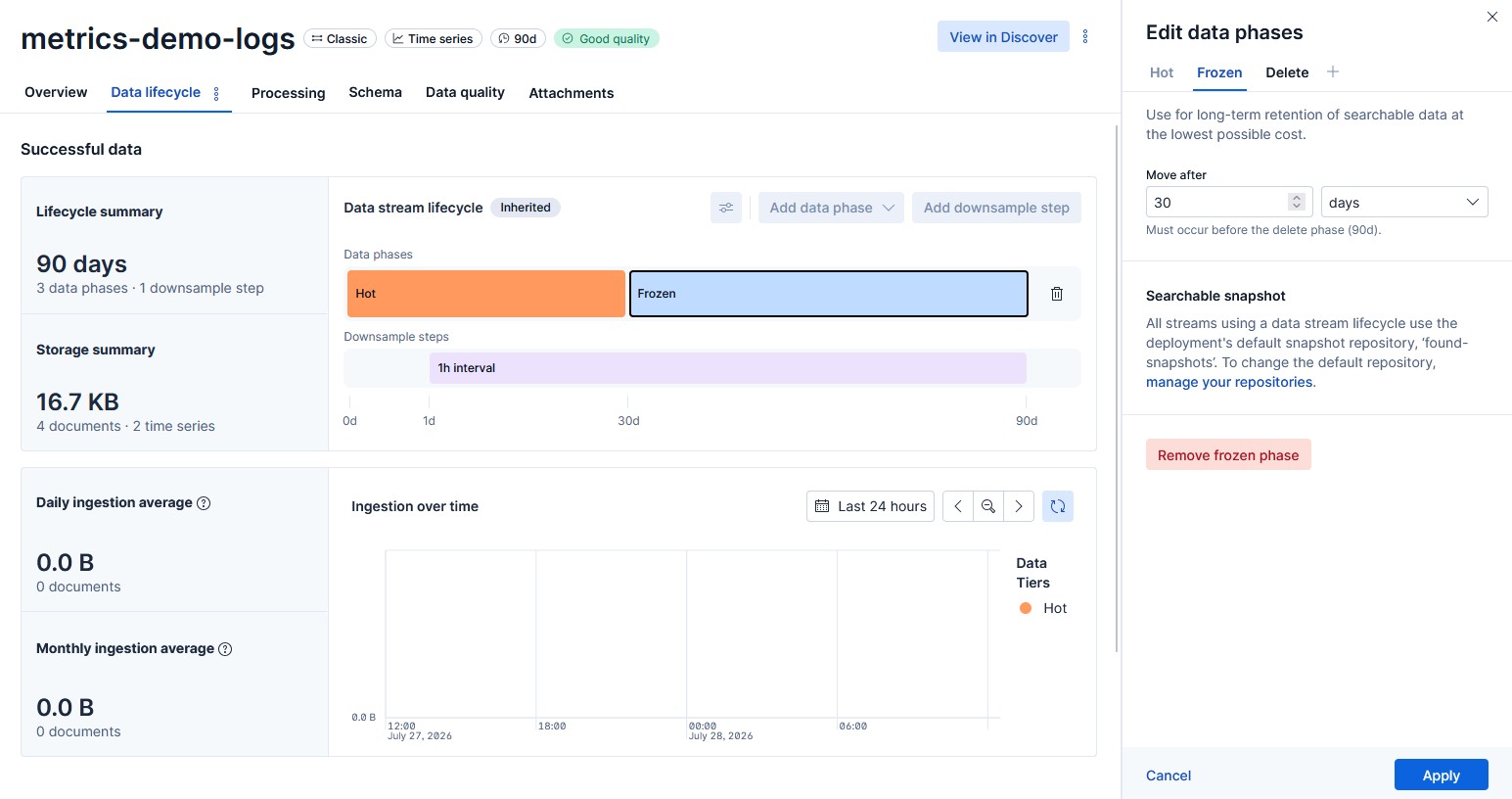
Kibana in 9.5 lets you set frozen_after and the default snapshot repository from the UI. In Streams, the Retention tab shows the frozen phase on the lifecycle timeline alongside hot and any downsampling steps. Click the timeline to open the data lifecycle flyout, set frozen_after, and see the timeline update before you save. Index Management's Data Streams page opens the same flyout.
How frozen tier conversion works in data stream lifecycle
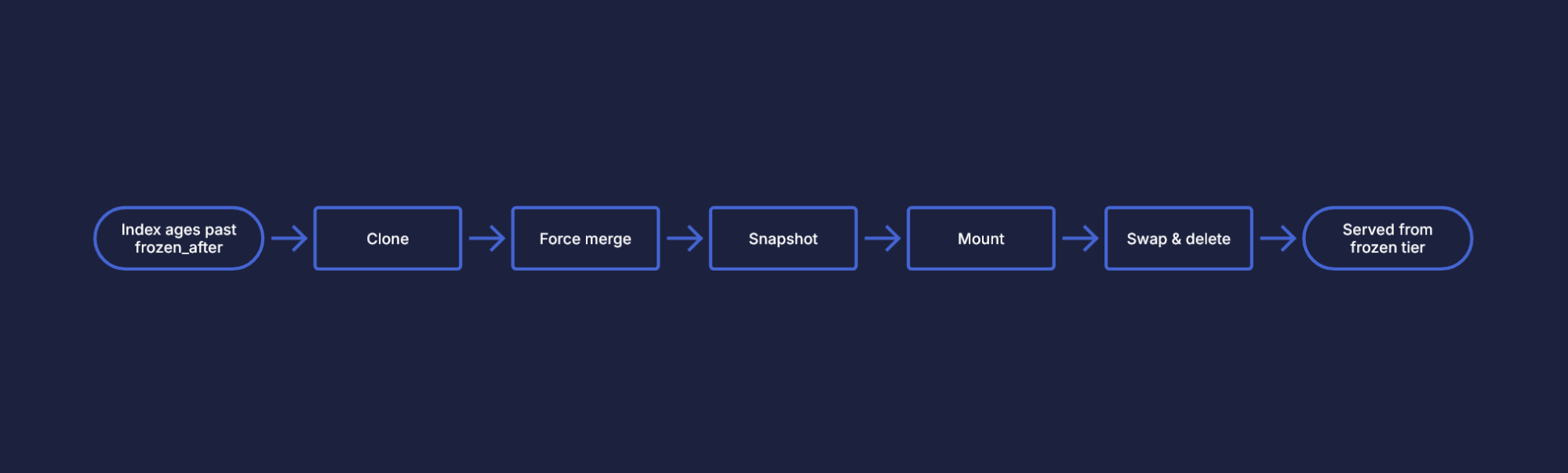
When a backing index ages past frozen_after, DLM walks through five steps in order:
Clone. Mark the index read-only and clone it to a zero-replica copy so the original stays available while conversion runs.
Force merge. Merge the clone to a single segment. On completion a cluster state marker is written; duplicate force-merge requests (for instance after a master failover) are deduplicated, so a restart doesn't repeat the work.
Snapshot. Write the merged clone to the default repository, and record the snapshot name in cluster state on success. If a stalled snapshot from a previous attempt is detected, DLM deletes it and re-runs the step.
Mount. Create a partially-mounted searchable snapshot index from the snapshot.
Swap and delete. Once the mounted index's shards are fully allocated, atomically swap it in for the original in the data stream, then delete the original. The swap is atomic, so query results don't see a data volume dip during the transition.
On failure, DLM retries from the last successful step on the next run.
Each step is idempotent, and the cluster state markers make sure work already done isn't repeated after a master failover. Throttling caps concurrent conversions so a lifecycle change covering thousands of indices doesn't overwhelm the cluster. Errors surface in the data stream lifecycle status API and roll up to the lifecycle health indicator.
Scope and limitations of frozen_after
Data indices only.
frozen_afterapplies to a data stream's data indices. Failure store indices don't currently support the frozen tier and continue to be governed by their owndata_retentionsetting.Enterprise license required. Frozen tier in DLM is implemented with searchable snapshots and requires an Enterprise license. You can write
frozen_afteron any license, but data won't move to frozen until the license is valid.Serverless ignores the field. In Elastic Cloud Serverless,
frozen_afteris accepted but ignored - Serverless manages tiering on your behalf. Built-in templates may include the field, so we don't reject it, but the step is skipped.
Getting started with frozen_after
In Kibana, open Streams or Index Management and choose a data stream backed by data stream lifecycle.
Open the Edit data lifecycle flyout, set a frozen-after value, and save. The lifecycle timeline shows the new phase.
On a self-managed cluster, set
repositories.default_repositoryto a repository you control. On ECH,found-snapshotsis already configured if you want zero setup.For declarative workflows, write the same configuration into your index templates so new data streams pick up the lifecycle automatically.
Learn more
The release and timing of any features or functionality described in this post remain at Elastic's sole discretion. Any features or functionality not currently available may not be delivered on time or at all.