

 Share on Twitter
Share on Twitter

 Share on LinkedIn
Share on LinkedIn

 Share on Facebook
Share on Facebook

 Share by Email
Share by Email

 Print this page
Print
Hello from the Elastic DevRel team! In this newsletter, we highlight AutoOps, which is now free for all users, and jina-embeddings-v5-text. We also share our latest blogs, videos, and upcoming events.
What’s new
AutoOps is free for all
AutoOps is available at no cost through Elastic Cloud Connect. It is the same AutoOps product for every license level, regardless of the deployment mode.
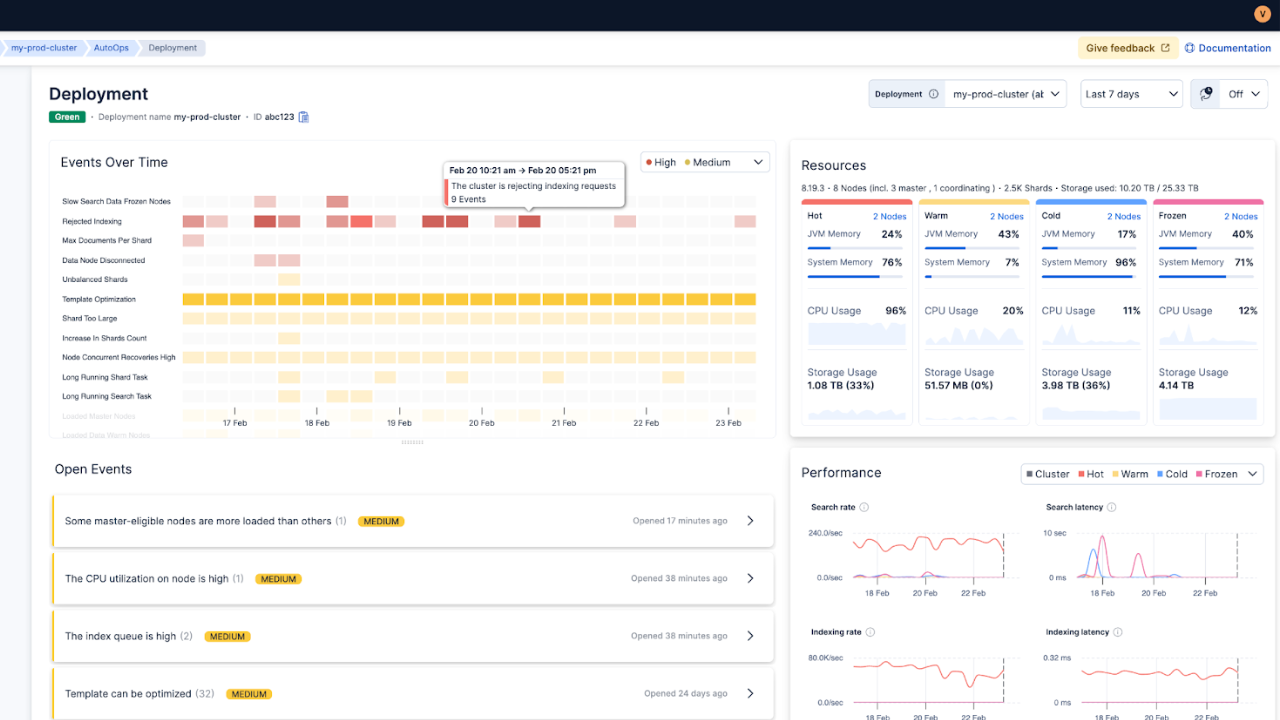
How it works
AutoOps runs on Elastic Cloud. You connect a self-managed cluster using Elastic Cloud Connect and a lightweight agent. The agent ships operational metadata (e.g., node stats, shard state, and cluster settings) to AutoOps in near real time. Your indexed data stays in your environment.
No monitoring cluster to provision
No extra infrastructure to operate
No patching or upgrades to manage for the AutoOps service
What changes compared to Stack Monitoring
Stack Monitoring gives you metrics and alerts. AutoOps adds the missing parts that engineers usually do manually:
Correlates cluster state, allocation, watermarks, and node metrics
Performs automated root cause analysis with a timeline of contributing events
Provides fix recommendations with in-context Elasticsearch commands
Offers a multi-cluster overview and higher signal alerts
Example: Cluster turns red at night
With Stack Monitoring:
You get an alert when cluster health turns red
You inspect shard allocation and logs to find why the primaries could not allocate
You correlate older disk watermark events and recent rollovers manually
With AutoOps:
You get a red status event
The timeline shows prior low and high watermark events leading up to it
You get a clear remediation path to bring the cluster back to green
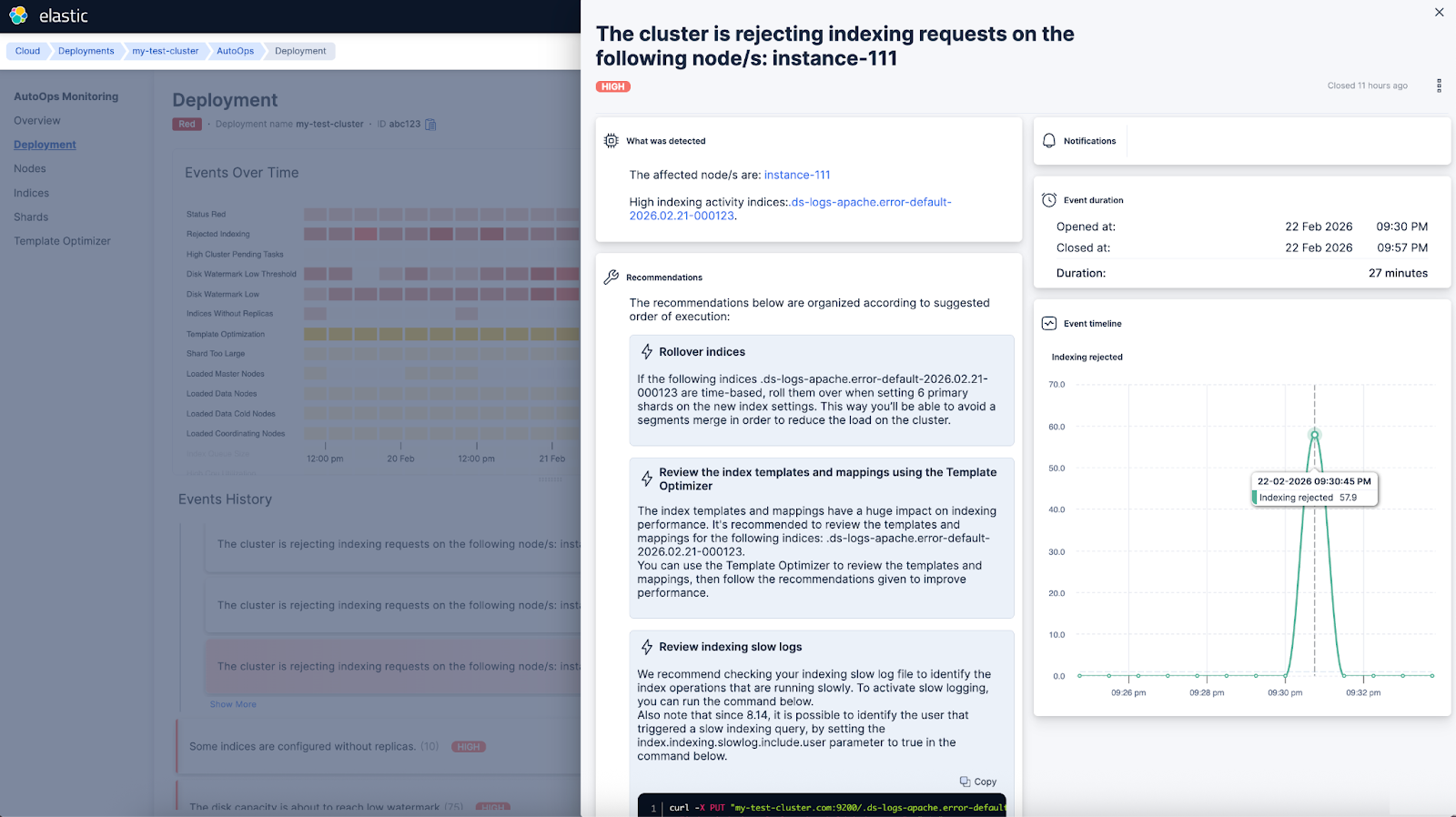
Less noise when health flaps
AutoOps separates yellow and red status events and lets you tune notifications. For example, you can ignore brief yellow periods, such as 5 minutes, and expected operations like replica relocations or index open and close.
Start now
Connecting a cluster takes minutes:
Log in to Elastic Cloud (a free account is enough).
Choose your environment: ECK, Kubernetes, Docker, or Linux.
Run the single-agent install command shown in the UI.
Open AutoOps in Elastic Cloud, and review the first recommendations.
For more, please refer to our official documentation.
Jina Embeddings v5 text models are now available in Elastic Inference Service (EIS)
The jina-embeddings-v5-text family provides compact, multilingual embeddings designed for search and semantic tasks.
Two model sizes, both optimized for real workloads
- jina-embeddings-v5-text-small: 1,024 dimensions by default, long context support (up to 32K tokens)
- jina-embeddings-v5-text-nano: 768 dimensions by default, smaller footprint (up to 8K tokens)
The models support multiple task types, such as retrieval, similarity, clustering, classification, via task-specific adapters, so you do not need a different model for each job.
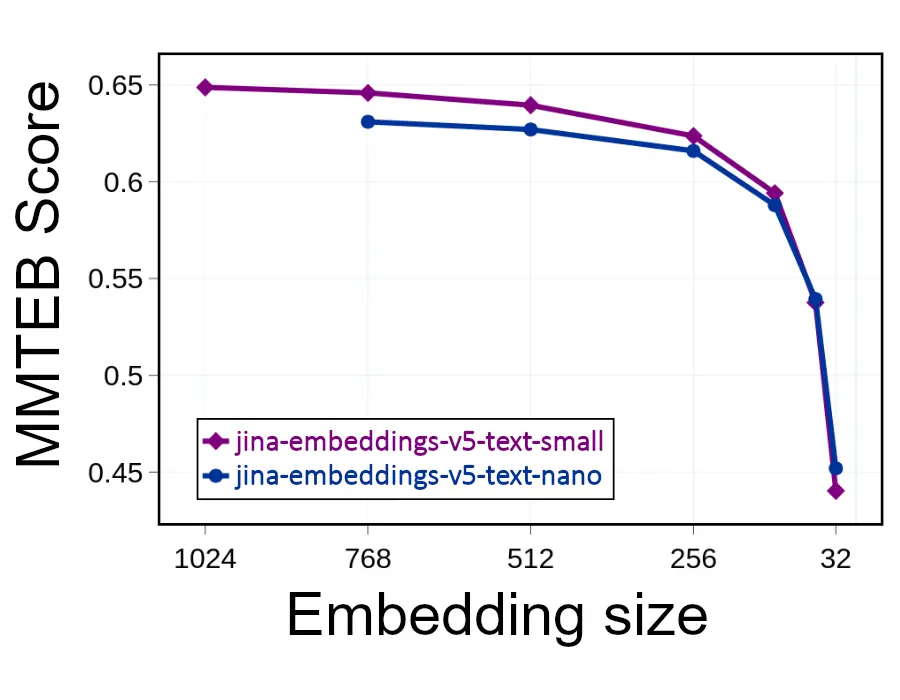
Practical benefit: Smaller vectors without losing much quality
These models are trained with Matryoshka representation learning. That means you can truncate embeddings (reduce the number of dimensions) to reduce storage and speed up vector search, while keeping relevance reasonably stable above a few hundred dimensions.
Getting started in Elasticsearch
If you are using EIS, you can index text with semantic_text and point it at the model you want using inference_id. Elasticsearch handles embedding generation during indexing.
PUT inventory
{
  "mappings": {
    "properties": {
      "item": {
        "type": "semantic_text",
        "inference_id": "jina-embeddings-v5-text-nano"
      }
    }
  }
}For teams that want more control, you can create a custom inference endpoint and choose an embedding size that matches your quality and cost target.
Read more on Elasticsearch Labs.
Blogs, videos, and interesting links
- Elasticsearch vs. OpenSearch: Explore filtered vector search benchmarks of Elasticsearch and OpenSearch by Sachin Frayne. (Spoiler alert: Elasticsearch delivers up to 8.4x higher throughput than OpenSearch.)
- Context engineering: Tomás Murúa demonstrates how context engineering techniques prevent context poisoning in LLM responses.
- Hybrid search: Learn how to use hybrid search in LangChain via its Elasticsearch integrations with Margaret Gu and Eyo Eshetu.
- Observability: Join Patrick Boulanger as he uses Elastic Observability and AI to unify network monitoring, showcasing how to correlate network data, identify root causes, and fix issues. Nastia Havriushenko covers automated log parsing in Streams with machine learning.
- Agent Builder: Sri Kolagani and Ziyad Akmal use Elastic Agent Builder and Elastic Workflows to create an AI agent that automatically performs IT actions.
- Text analysis: Noam Schwartz leverages neural models and the Elasticsearch inference API to improve search for complex languages, such as German and Arabic.
- Security: Check the impact of third-party CVEs on your Elastic deployment with Arsalan Khan.
Check out these videos:
- Using LLMs to search meeting notes by Aparna Roy
- Why logs still matter (and always did) by Luca Wintergerst
- The evolution of search: From keywords to workflows by Jeff Vestal
Featured blogs from the community:
- Real-time Elasticsearch indexing rate and search latency monitoring from your browser: A Chrome extension by Musab Dogan
- From heterogeneous pod Logs to Elasticsearch at scale: EDOT, Logstash, and Elastic ML for Kubernetes by Jyoti Gehlot
- Building a smarter image search with Gemini and Elasticsearch by Carmel Wenga
- 4x performance boost with Elasticsearch v9 upgrade for vector search by Murat Tezgider
Upcoming events
Learn Elastic at no cost: Explore self-paced modules to build your Elastic skills.
Elastic{ON} Tour, the one-day Elastic conference series around the world, is back. Register and join us in:
Tokyo — March 10
Singapore — March 17
Washington, D.C. — March 19
Join your local Elastic User Group chapter for the latest news on upcoming events! You can also find us on Meetup.com. If you’re interested in presenting at a meetup, send an email to meetups@elastic.co
The release and timing of any features or functionality described in this post remain at Elastic's sole discretion. Any features or functionality not currently available may not be delivered on time or at all.
Share
- Share on Twitter
Share on Twitter
- Share on LinkedIn
Share on LinkedIn
- Share on Facebook
Share on Facebook
- Share by Email
Share by Email
- Print this page
Print