How to check the impact of third-party CVEs on your Elastic deployment
The Elastic Support Hub now provides instant self-service lookup for CVE impact statements
_(1).png)

 Share on Twitter
Share on Twitter

 Share on LinkedIn
Share on LinkedIn

 Share on Facebook
Share on Facebook

 Share by Email
Share by Email

 Print this page
Print
Summary
- The Elastic Support Hub now provides instant self-service lookup for CVE impact statements to verify if third-party vulnerabilities affect your Elastic deployment.
- This feature allows you to quickly filter out noise from security scanners and confirm Elastic’s official assessments.
- The data is a direct output of Elastic’s vulnerability management program, ensuring reliable security assessments for users.
- Users can access this information using the Native Search bar or the conversational Elastic Support Assistant built on the Elastic Stack with RAG.
When a new vulnerability hits the news, speed is critical. The Elastic Support Hub now allows you to instantly search for and verify the impact of Common Vulnerabilities and Exposures (CVEs) on Elastic products. You can quickly verify whether a third-party CVE affects your Elastic deployment and take action.
By making our internal knowledge base of security statements customer-facing, we are empowering you to perform primary reviews immediately.
Elastic’s CVE search puts the information you need directly in your hands, allowing you to:
Get immediate answers about vulnerability impacts
Quickly filter out noise from security scanners by verifying Elastic’s official assessments instantly
Security scanners often flag CVEs in underlying libraries like Log4j, Jackson, or Spring that may not actually be exploitable within the Elastic context. Previously, confirming these "non-issues" required a support ticket. Now, CVE impact statements can be accessed directly from the support hub using our native search and Support Assistant.
Backed by Elastic’s vulnerability management program
While our official Elastic Security Advisories (ESAs) remain the source for confirmed vulnerabilities in Elastic code, CVE Impact Statements cover the broader landscape of third-party dependencies.
The impact statements on Support Hub are the direct output of Elastic’s vulnerability management program. Our InfoSec Product Security and engineering teams continuously analyze CVEs to determine if they affect our products. By integrating this data directly into the Support Hub, we bridge the gap between our security researchers and your operations team, giving you the same visibility our internal support engineers have.
How do the self-service CVE impact statements work?
You have two powerful ways to find this information on the Support Hub:
Native search
Elastic Support Assistant
Native search
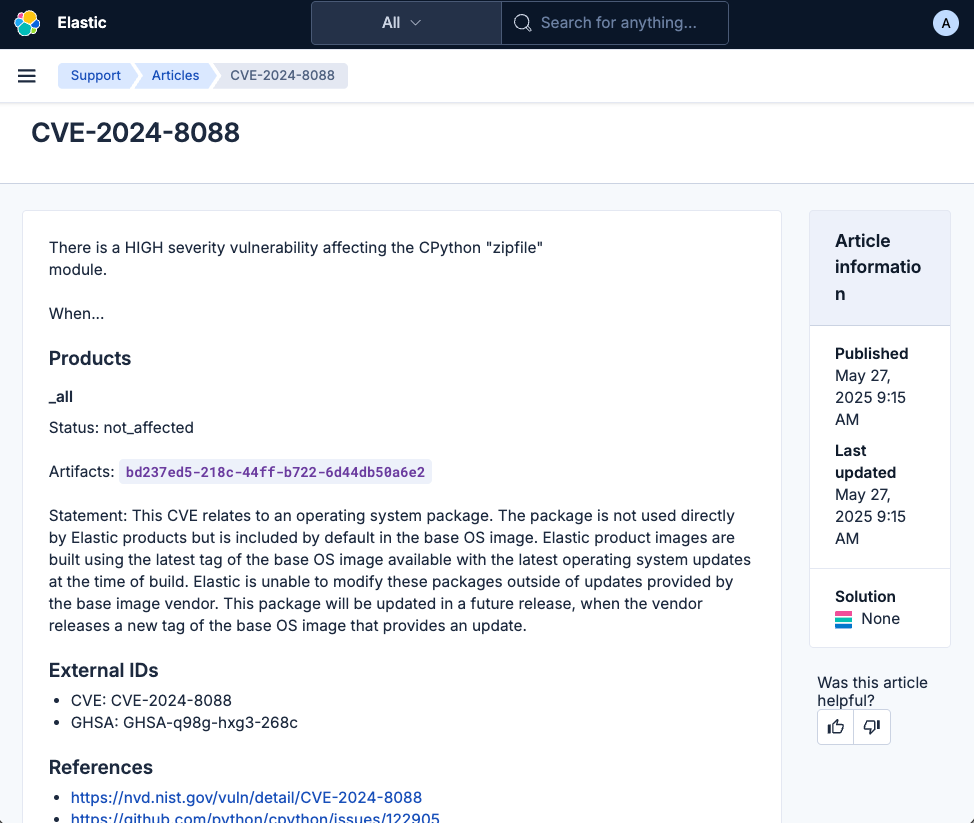
For the most direct approach, simply type the CVE ID (e.g., CVE-2024-8088) into the search bar at the top of the Support portal. You will see a dedicated "CVE" result type that links to the detailed impact statement.

Clicking the result takes you to the official impact statement, detailing affected versions, status (Not Affected or Affected), and remediation.
Elastic Support Assistant
If you prefer a conversational approach, the Elastic Support Assistant is ready to help. Built entirely on the Elastic Stack, the assistant uses retrieval augmented generation (RAG) to securely index and retrieve proprietary vulnerability data. This implementation demonstrates how we use our own Elasticsearch Platform to solve complex business challenges.
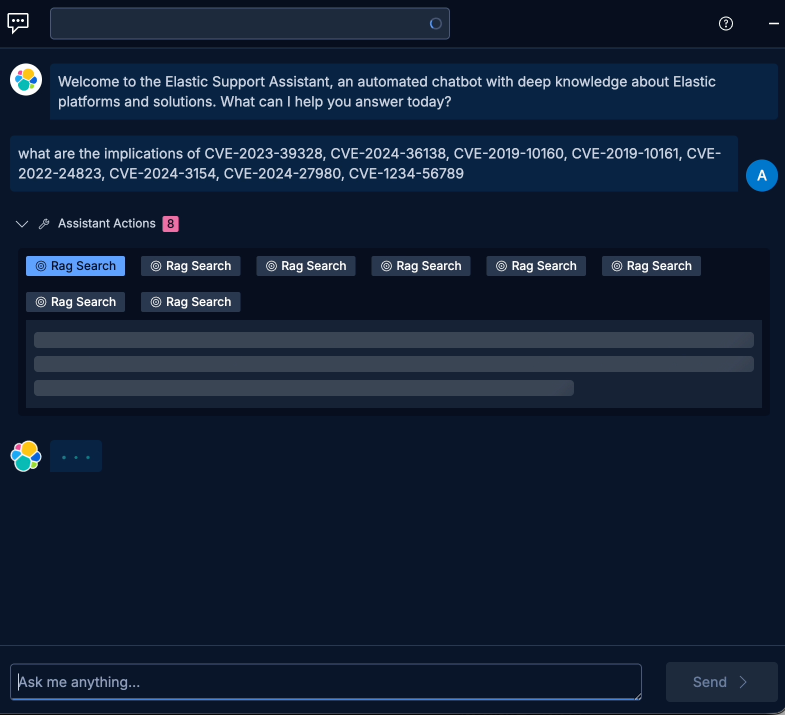
You can ask natural language questions or even paste a list of CVEs to check them in bulk:

When you submit a query, the Support Assistant transparently shows its work. You can see it performing specific "RAG search" actions as it retrieves context from our intern. The user is asking to add a constraint/limit detail within the section describing the Elastic Support Assistant's capability to check CVEs in bulk.
The Support Assistant is currently optimized to process a limited number of CVE IDs per query when checking in bulk. If your list exceeds the system's capacity, please break it into smaller queries.
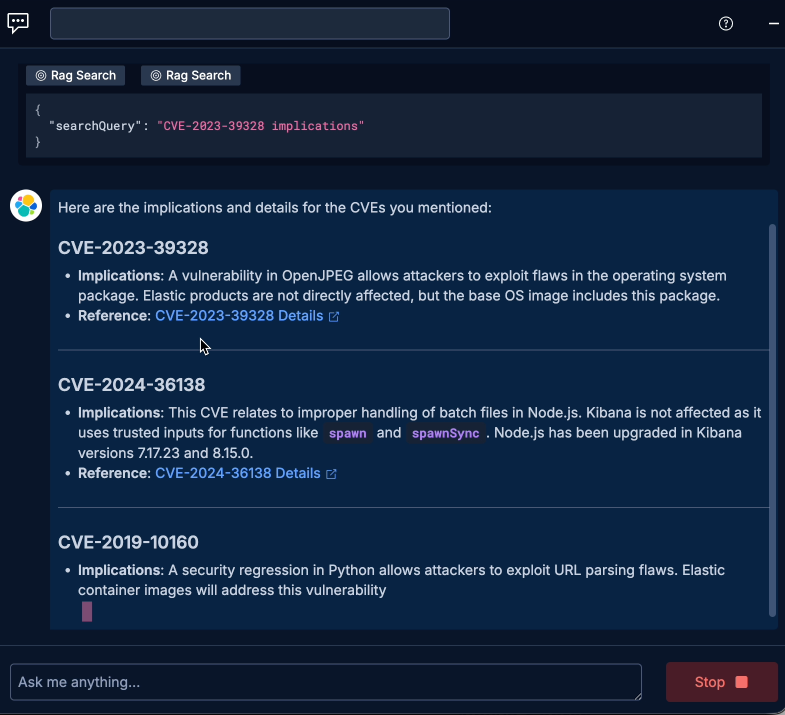
Finally, it delivers a structured response, breaking down the implications for each CVE you requested and providing direct links to the official references.
Elastic Support Assistant best practices
The Support Assistant is designed to enhance your productivity by synthesizing information from across our documentation and knowledge base. However, when dealing with precise security data, accuracy is paramount.
Important: While the Support Assistant provides excellent summaries, we recommend always verifying the details against the native CVE page provided in the search results. Use the native search pages as your source of truth for final validation.
What if I can't find a statement?
We have made hundreds of statements available, but new vulnerabilities are discovered constantly. If you search for a CVE ID and do not find an impact statement, we want to know.
To help our InfoSec and engineering teams provide a fast and accurate assessment, please open a new support case with the following details in the next section.
How do you make a high-quality CVE request?
When submitting a case, providing specific data helps us quickly rule out false positives and determine the true impact on your deployment.
The golden rule: Please, provide your vulnerability scan report in a machine readable format like Text, CSV, or JSON, which includes the following information:
CVE or GHSA ID (required): Ensures universal recognition of the reported vulnerability
Affected component and path: The specific library name and its file path (e.g., /usr/share/logstash/...)
Product version: The specific version of the Elastic product you are running (e.g., Logstash 8.18.4)
By including this “detailed scan report” in your initial case, you enable our InfoSec and engineering experts to investigate and provide a definitive impact statement much faster.
Get started
These capabilities are live today for all paying customers. Log in to the Elastic Support Hub to experience the new self-service CVE impact statement search experience.
The release and timing of any features or functionality described in this post remain at Elastic's sole discretion. Any features or functionality not currently available may not be delivered on time or at all.
In this blog post, we may have used or referred to third party generative AI tools, which are owned and operated by their respective owners. Elastic does not have any control over the third party tools and we have no responsibility or liability for their content, operation or use, nor for any loss or damage that may arise from your use of such tools. Please exercise caution when using AI tools with personal, sensitive or confidential information. Any data you submit may be used for AI training or other purposes. There is no guarantee that information you provide will be kept secure or confidential. You should familiarize yourself with the privacy practices and terms of use of any generative AI tools prior to use.
Elastic, Elasticsearch, and associated marks are trademarks, logos or registered trademarks of elasticsearch B.V. in the United States and other countries. All other company and product names are trademarks, logos or registered trademarks of their respective owners.
Share
- Share on Twitter
Share on Twitter
- Share on LinkedIn
Share on LinkedIn
- Share on Facebook
Share on Facebook
- Share by Email
Share by Email
- Print this page
Print