What's new in ECK: AutoOps Cloud Connected, air-gapped registry support, and composable configuration policies
The latest ECK release introduces automated cluster health monitoring, a self-hosted package registry for disconnected environments, and composable configuration policies for managing Elastic at scale.


 Share on Twitter
Share on Twitter

 Share on LinkedIn
Share on LinkedIn

 Share on Facebook
Share on Facebook

 Share by Email
Share by Email

 Print this page
Print
Summary
- AutoOps Cloud Connected is now GA for all ECK customers, enabling automated root cause analysis and health monitoring for self-managed clusters.
- Self-hosted Elastic Package Registry lets air-gapped environments run Fleet integrations by deploying a local Elastic Package Registry inside the Kubernetes cluster.
- Composable Stack Configuration Policies allow multiple policies to target the same cluster with weight-based priority, enabling layered configurations that are independently managed.
- Operational improvements include customizable remote cluster server services, safer rolling upgrades, and standardized Helm/Kibana labels for better Kubernetes ecosystem consistency.
Elastic Cloud on Kubernetes (ECK) 3.3.1 is here. This release delivers three major capabilities that address the operational challenges teams face when running Elasticsearch at scale on Kubernetes.
Automated performance monitoring through AutoOps Cloud Connected integration
Native support for air-gapped environments with a self-hosted Elastic Package Registry
Modular configuration management through composable Stack Configuration Policies
Whether you're operating a handful of clusters or hundreds across multiple namespaces, ECK 3.3.1 gives you the tools to manage them more efficiently with less manual intervention and more consistency.
The challenge: Operating Elastic at scale on Kubernetes
Running Elasticsearch on Kubernetes unlocks the scalability and automation that modern infrastructure demands. But as environments grow, so do the operational challenges, including:
Monitoring blind spots: When you're running dozens of Elasticsearch clusters across multiple namespaces, spotting performance issues before they impact users requires constant vigilance. Teams spend hours manually analyzing metrics, often finding problems only after they've caused degraded search performance or failed ingestion pipelines.
Air-gapped flexibility: Organizations in regulated industries like finance, defense, government, and healthcare often operate in disconnected environments where reaching the public Elastic Package Registry isn't an option. Now, you have the flexibility to host your own registry directly in your Kubernetes cluster, bringing Fleet integrations to disconnected environments without workarounds.
Configuration management scalability: Maintaining consistent Elasticsearch and Kibana configurations across many clusters is tedious when each cluster can be targeted only by a single configuration policy. Platform teams end up duplicating policy definitions or creating monolithic policies that are hard to maintain and reason about.
ECK 3.3.1 tackles each of these problems head on.
AutoOps Cloud Connected integration: Automated health monitoring for self-managed clusters
AutoOps via Cloud Connected is now generally available (GA) to all ECK customers. AutoOps via Cloud Connected addresses the three core challenges of running Elasticsearch at scale:
Keeping clusters available
Controlling infrastructure costs
Reducing the operational burden on your team
It diagnoses Elasticsearch issues by analyzing hundreds of metrics, providing root-cause analysis and actionable resolution paths. It's been available to Elastic Cloud Hosted and Serverless customers, and now ECK makes it simple to connect your Kubernetes-managed clusters to the same service.
The new AutoOpsAgentPolicy custom resource is designed around a centralized, policy-based approach. Rather than configuring monitoring on each individual Elasticsearch cluster, an ECK administrator defines a single policy that targets clusters by namespace or label selector; ECK handles the rest. It deploys monitoring agents, creates and manages API keys for each Elasticsearch cluster, and automatically streams metrics to AutoOps. You provide a connection to your Elastic Cloud organization, and ECK takes care of the internal wiring.
Getting started requires only a few steps.
Create an account or log in to Elastic Cloud.
Click Connect self-managed cluster.
- Click Get started in the “just want AutoOps” section.
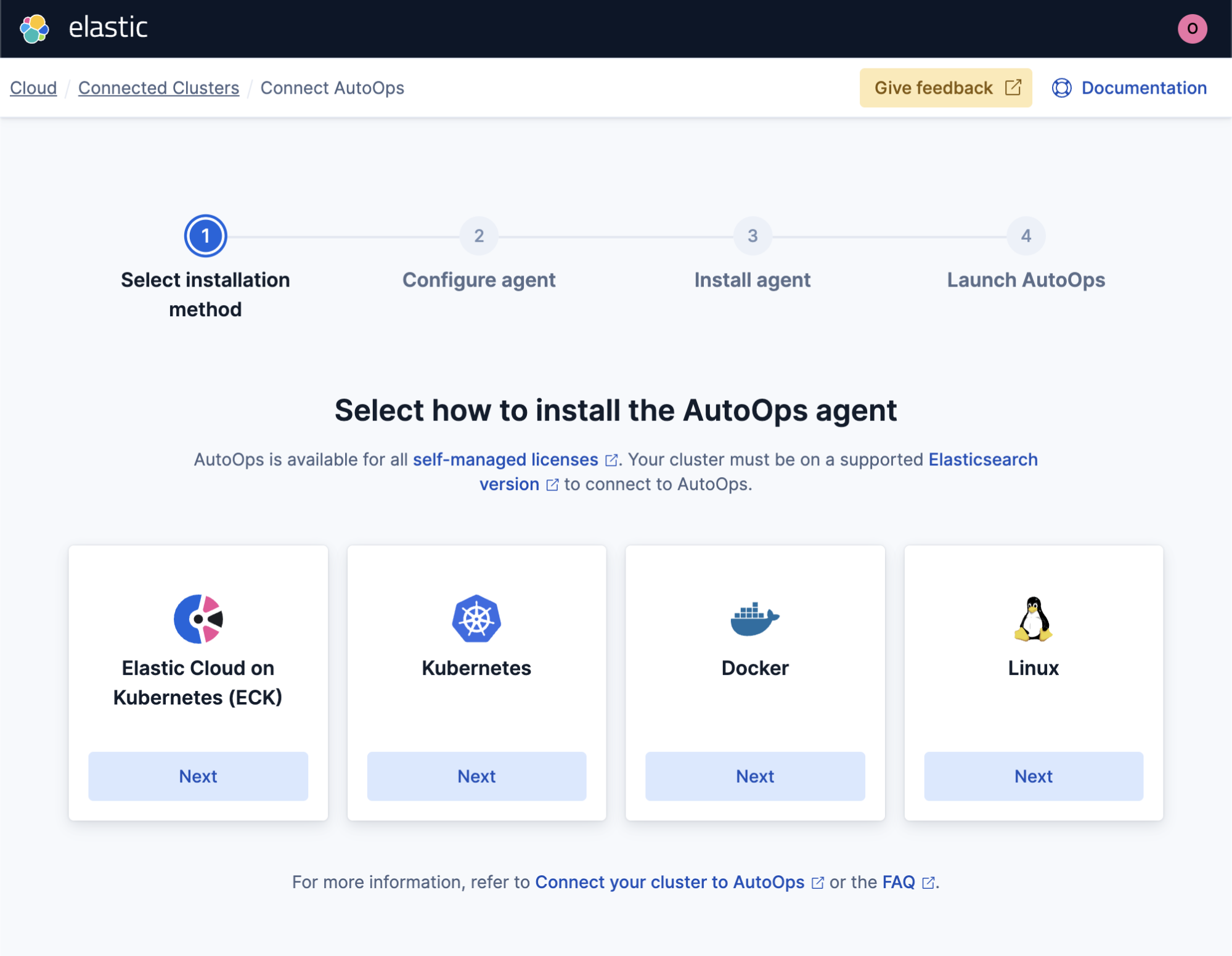
4. Go through the ECK wizard. It will instruct you with creating a CRD containing the secrets required to connect your ECK operator to Elastic Cloud Connected AutoOps.
kubectl create secret generic autoops-config \
  --from-literal=autoops-token='<some token>' \
  --from-literal=autoops-otel-url='https://otel-auto-ops.us-east-2.aws.svc.elastic.cloud' \
  --from-literal=cloud-connected-mode-api-key='<some apikey>' && \
cat <<EOF | kubectl apply -f -
apiVersion: autoops.k8s.elastic.co/v1alpha1
kind: AutoOpsAgentPolicy
metadata:
  name: quickstart
spec:
  version: 9.3.1
  autoOpsRef:
    secretName: autoops-config
  resourceSelector:
    matchLabels:
      autoops: enabled
EOFIt’ll also create the AutoOpsAgentPolicy that references it and select which clusters to monitor.
That's it! Only two resources are used, and every Elasticsearch cluster labeled autoops: enabled is instrumented with AutoOps. New clusters that match the selector are automatically picked up. There’s no need to chase individual Elasticsearch CRDs or manually deploy monitoring agents when new clusters are provisioned.
Once connected, AutoOps provides:
Real-time root-cause analysis for hundreds of issue types from shard imbalances to high CPU, memory pressure, and indexing latency
Customized recommendations with accurate resolution paths tailored to your cluster's configuration
Multi-cluster dashboard to quickly spot issues across all your Elasticsearch clusters from a single view
Configurable notifications through PagerDuty, Slack, Microsoft Teams, or webhooks
For platform teams managing large ECK environments, this eliminates the need to build and maintain a custom monitoring stack just to keep Elasticsearch healthy. AutoOps brings the same proactive monitoring that Elastic Cloud customers rely on to your self-managed Kubernetes clusters with minimal configuration overhead.
Visit the AutoOps documentation page.
Elastic Package Registry: First-class support for air-gapped environments
Running Elastic in a disconnected environment has always required creative workarounds to get Fleet integrations working. Kibana needs access to the Elastic Package Registry to discover, install, and manage integration packages. But in air-gapped environments, there's no path to the public registry.
ECK 3.3.1 introduces the PackageRegistry custom resource, now generally available, which deploys and manages a self-hosted Elastic Package Registry directly in your Kubernetes cluster. ECK handles TLS certificates, service creation, and pod management; you simply point Kibana at the local registry.
Deploy a Package Registry:
apiVersion: packageregistry.k8s.elastic.co/v1alpha1
kind: PackageRegistry
metadata:
  name: package-registry
  namespace: elastic-system
spec:
  version: 9.3.0
count: 1Connect Kibana to use the local registry:
apiVersion: kibana.k8s.elastic.co/v1
kind: Kibana
metadata:
  name: kibana
  namespace: elastic-system
spec:
  version: 9.3.0
  count: 1
  packageRegistryRef:
name: package-registryThat's it! Kibana now discovers and installs integrations from the local registry instead of the public one — no proxy configurations, manual package uploads, or custom scripting.
For teams operating in regulated or classified environments, this turns air-gapped Fleet management from a painful workaround into a supported, declarative workflow.
Visit the Package Registry documentation page.
Multiple Stack Configuration Policies composition: Modular configuration at scale
Previously, each Elasticsearch cluster or Kibana instance could only be targeted by a single Stack Configuration Policy. This forced platform teams to choose between duplicating configuration across policies or creating one large policy that covered everything — neither of which scales well.
ECK 3.3.1 removes that limitation. Multiple StackConfigPolicy resources, now generally available, can target the same cluster or Kibana instance. A weight-based priority system ensures deterministic composition when policies overlap; the policy with the higher weight takes precedence.
For example, a platform team might define a baseline security policy that applies to all clusters, a compliance policy that targets clusters in regulated namespaces, and a team-specific policy with custom ingest pipelines:
# Baseline security policy - applies to all clusters
apiVersion: stackconfigpolicy.k8s.elastic.co/v1alpha1
kind: StackConfigPolicy
metadata:
  name: baseline-security
  namespace: elastic-system
spec:
  weight: 100
  elasticsearch:
    securityRoleMappings:
      sso-users:
        roles: ["viewer"]
        rules:
          field:
            realm.name: "saml1"
        enabled: true
---
# Compliance policy - higher weight overrides baseline where they overlap
apiVersion: stackconfigpolicy.k8s.elastic.co/v1alpha1
kind: StackConfigPolicy
metadata:
  name: compliance-audit
  namespace: elastic-system
spec:
  weight: 200
  resourceSelector:
    matchLabels:
      compliance: required
  elasticsearch:
    clusterSettings:
      xpack.security.audit.enabled: "true"
    snapshotLifecyclePolicies:
      daily-compliance:
        schedule: "0 0 1 * * ?"
        name: "<compliance-{now/d}>"
        repository: compliance-repo
        config:
          indices: ["*"]
        retention:
          expire_after: "365d"
min_count: 1This modular approach lets platform teams build composable, layered configurations — a baseline that applies everywhere, overlays for specific compliance or regulatory requirements, and team-level customizations on top. Each policy is independently versioned and managed, making it easy to update one layer without touching the others.
Visit the Stack Config Policy documentation page.
Other notable improvements
ECK 3.3.1 also includes several operational improvements, such as:
Remote cluster server service customization: You can now customize the Kubernetes Service used by the Elasticsearch remote cluster server, giving you more control over cross-cluster search and replication networking.
Safer rolling upgrades: Master StatefulSets are now upgraded last during Elasticsearch version upgrades, reducing the risk of cluster instability during the upgrade process.
- Standardized Helm labels: The ECK operator pod now uses standard Kibana labels and Helm labels, improving consistency with Kubernetes ecosystem tooling.
Getting started
If you're already running ECK, upgrade to the latest 3.3.1 release with Helm:
helm upgrade elastic-operator elastic/eck-operator -n elastic-systemOr, apply the latest operator manifest directly:
kubectl apply -f https://download.elastic.co/downloads/eck/3.3.1/crds.yaml
kubectl apply -f https://download.elastic.co/downloads/eck/3.3.1/operator.yamlIf you're new to ECK, start with the quickstart guide to get an Elasticsearch cluster running on Kubernetes in minutes.
For the full list of changes, check out the ECK 3.3.1 release notes on GitHub. To start using Elastic Cloud today, log in to the Elastic Cloud console or sign up for a free trial.
The release and timing of any features or functionality described in this post remain at Elastic's sole discretion. Any features or functionality not currently available may not be delivered on time or at all.
Share
- Share on Twitter
Share on Twitter
- Share on LinkedIn
Share on LinkedIn
- Share on Facebook
Share on Facebook
- Share by Email
Share by Email
- Print this page
Print