Is your SIEM actually ready? A new way to find out


 Share on Twitter
Share on Twitter

 Share on LinkedIn
Share on LinkedIn

 Share on Facebook
Share on Facebook

 Share by Email
Share by Email

 Print this page
Print
You've done the work. Logs are flowing. Rules are enabled. Agents are deployed. Dashboards exist.
But if your CISO, an auditor, or a red team report asked if your SIEM is ready to detect and respond to the threats that matter, could you answer confidently?
Most teams can't. Not because they haven't built a capable environment but because there's no single place that ties it all together: the data you have, the detections that depend on it, the health of what's flowing, and whether it'll still be there when an analyst needs to investigate something from three months ago.
That gap is invisible until it isn't. A pipeline silently fails and creates a six-hour blind spot during an active intrusion. A detection rule runs for months against a data source that was never onboarded. An auditor asks for proof of log retention, and the answer lives in several people's heads and a spreadsheet from last quarter.
We built SIEM Readiness to close that gap.
The spreadsheet problem
Talk to any security operations center (SOC) manager about how they track operational readiness, and you'll probably hear some version of the same story.
Coverage tracking lives in a spreadsheet; someone maybe updates it quarterly. Pipeline health gets checked when something breaks. Retention policies were set during initial deployment and haven't been reviewed since. Detection engineers enable rules based on what's available in the rule library without a clear view of whether the required data sources are actually present.
Every team is answering pieces of the readiness question in isolation with different tools on different timelines. The SOC manager has a coverage matrix. The platform engineer monitors ingest rates. The compliance manager collects retention evidence manually before each audit. Nobody has the full picture, and the full picture is what matters.
Starting with the foundation: Visibility Health
SIEM Readiness is a new capability in Elastic Security, available in technical preview as of 9.4, that provides a centralized, continuously updated, and actionable view of your SIEM's operational health.
We're starting with Visibility Health because before you can evaluate whether your detections are effective or your response workflows are operational, you need to know whether the underlying data is even there, correct, flowing, and retained. Visibility is the prerequisite for everything else.
The readiness view is organized around five log categories that represent the core telemetry domains for a modern SOC:
Endpoint/Host: Process, file, registry, and system-level events
Identity: Authentication, access management, and directory services
Network: Firewall, DNS, proxy, and flow data
Cloud: Cloud provider APIs, configuration, and activity logs
Application/SaaS: Business application and SaaS platform events
Within each category, SIEM Readiness evaluates four dimensions of health.
Coverage
Quality
Continuity
Retention
1. Coverage: Do you have the data your detections need?
This is the most fundamental question, and it works at two levels.
At the rule level: SIEM Readiness checks every enabled detection rule against the data sources it depends on. If you've enabled a set of Initial Access rules that require CloudTrail, but CloudTrail isn't flowing into your environment, those rules are enabled in name only. They'll never fire. SIEM Readiness surfaces that gap not just as "CloudTrail is missing," but as "CloudTrail is missing and 23 of your enabled rules across 6 MITRE ATT&CK tactics depend on it."
That context changes how you prioritize. You're not onboarding data sources alphabetically. You're onboarding the one that closes the most detection gaps.
At the category level: SIEM Readiness evaluates your overall coverage across the five log categories against baselines derived from MITRE ATT&CK, NIST CSF, and CIS benchmarks. But it's environment-aware — if you have no cloud infrastructure, cloud coverage isn't counted against you. Your readiness score reflects your environment, not a generic ideal.
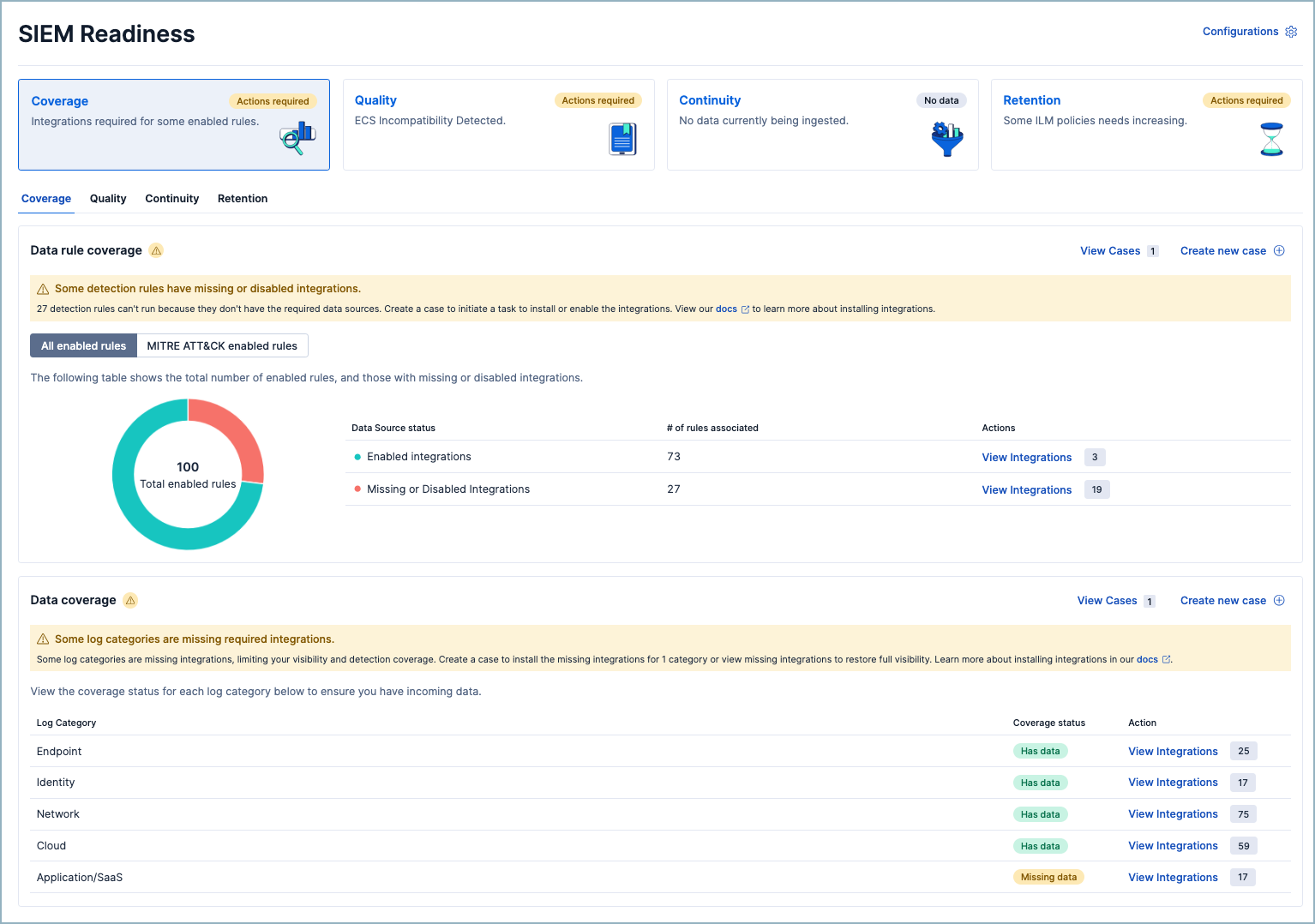
What you can do: Review rules with missing data. Identify the integrations that close the most gaps. Disable rules that don't apply to your environment. Generate a case to assign onboarding work to the right team.
2. Quality: Is your data in the right shape?
Data arriving isn't the same as data being useful. If your logs aren't ECS-compatible, rules that expect process.name won't match, dashboard panels will show blank, and correlations across data sources will silently fail.
This is one of the most common hidden failure modes in a SIEM. The data is there. The rule is enabled. Everything looks fine until you realize the fields don't align and the detection has never actually worked.
SIEM Readiness surfaces ECS incompatibilities at the category level, giving you a high-level signal of where mapping issues exist. It's not a replacement for detailed field-level analysis — Elastic already has an ECS Data Quality Dashboard for that. Instead, it's the early warning that tells you where to look with a direct link to dig deeper.
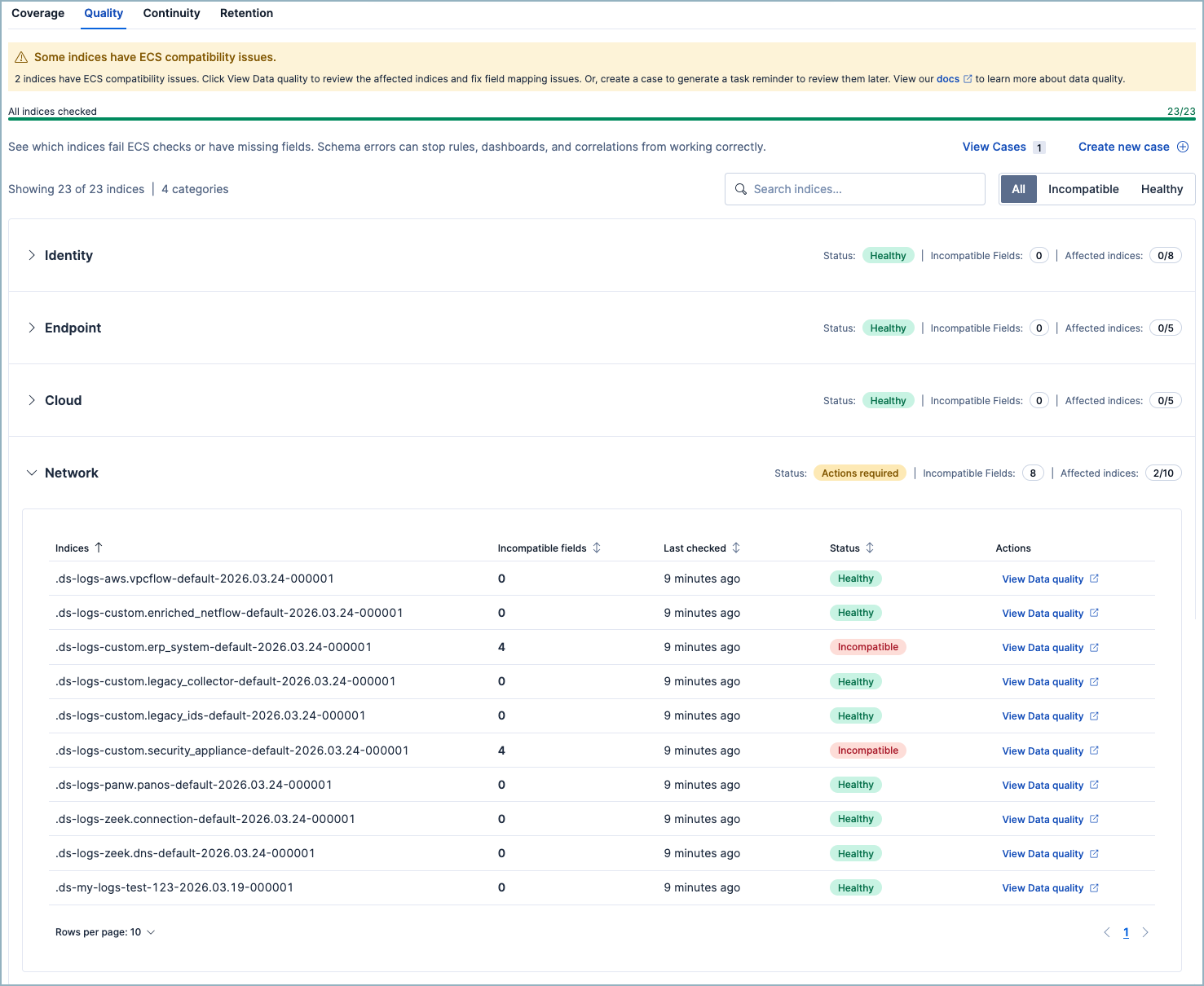
What you can do: Review affected data streams, fix mappings, and prioritize the categories where quality issues are impacting the most detections.
3. Continuity: Is your data actually flowing?
A misconfigured parser, a schema change upstream, a permissions issue after a credential rotation — ingest pipelines fail. It happens. The problem isn't that failures happen; it's that they happen silently.
A pipeline that drops 5% of documents doesn't trigger an alert. There's no empty dashboard to notice. The data just quietly disappears, and the detections that depend on it quietly stop working. You find out when an analyst investigates an incident and discovers a gap in the timeline.
SIEM Readiness monitors pipeline failure rates and flags any pipeline above a 1% failure threshold. Below 1% is healthy. Above 1% requires action.
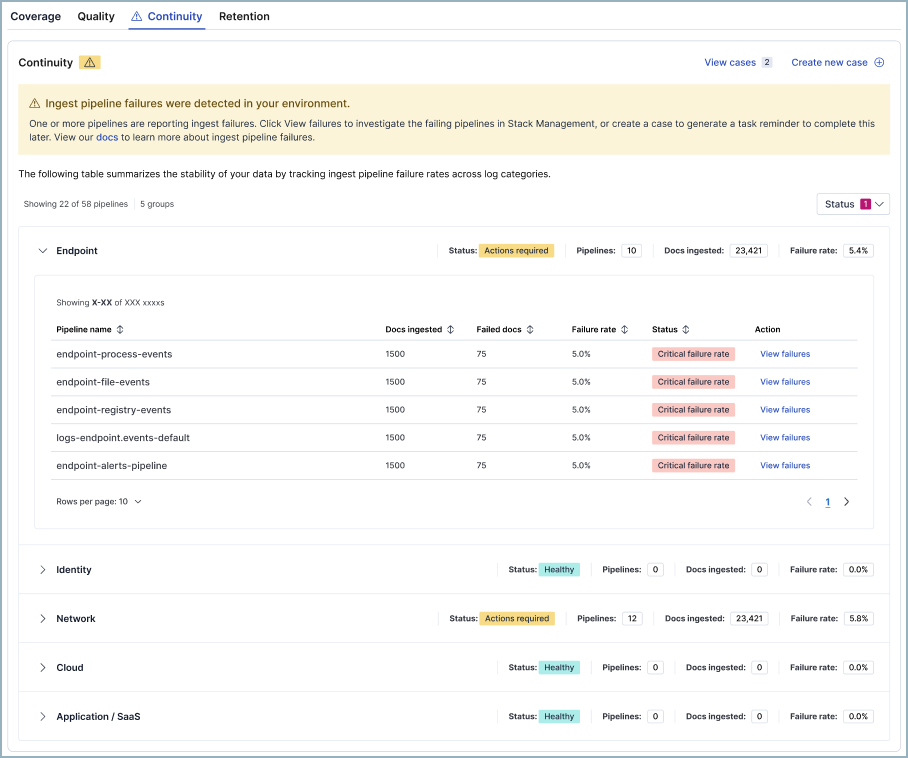
What you can do: View failures in Discover, investigate the root cause, and generate a prefilled case to assign remediation so that the fix is tracked, not just noticed.
4. Retention: Will your data be there when you need it?
Detection is in real time. Investigation is not.
When an analyst triages an alert and pivots to look at the attacker's activity over the past 90 days, the data still needs to exist. When an auditor asks for evidence of log retention, you need an answer that doesn't start with "let me check."
SIEM Readiness evaluates your retention policies against industry benchmarks drawn from FedRAMP, NIST 800-53, SOC 2, and ISO 27001. Each log category has a recommended retention window — 90 days for Endpoint and Network and 180 days for Identity and Cloud — and the readiness view shows you where you fall short.
Retention is calculated across hot, warm, and cold storage tiers because retained is retained regardless of where it lives. What matters is whether the data will be there when someone needs it.
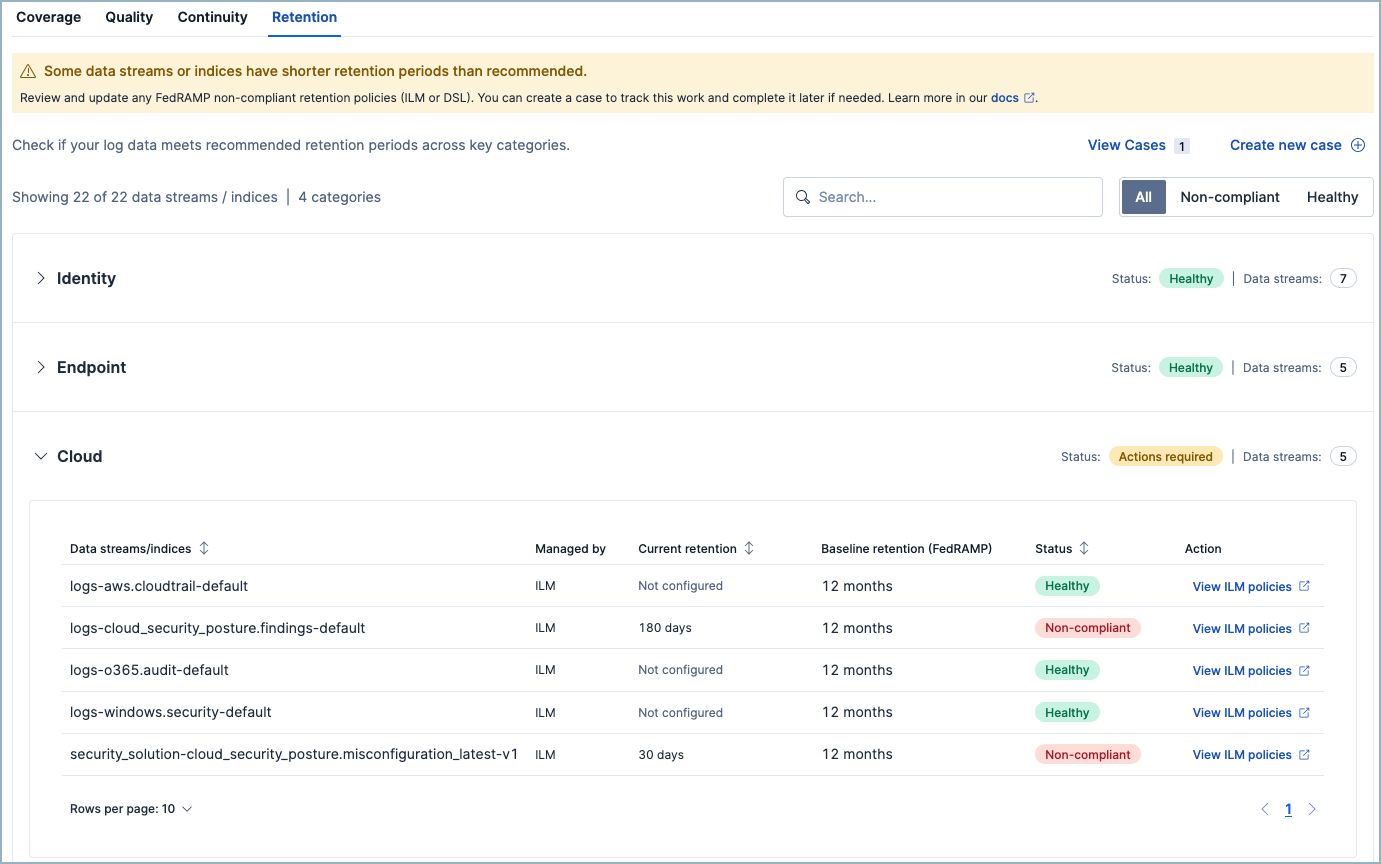
What you can do: Adjust index lifecycle management (ILM) or data lifecycle policies, export a retention report for audit preparation, and generate a case to track policy changes.
Built for action, not just awareness
A quick note on how this is designed, because it matters.
Every signal in SIEM Readiness is tied to an action. There are no charts you look at and wonder "so what do I do about this?" Every metric connects to a next step — onboard a data source, fix a pipeline, adjust a policy, or create a case to assign the work.
The scoring is environment-aware. Your readiness view reflects your actual environment like which cloud providers you use, which integrations you've deployed, and which data streams are active. Categories that don't apply to you are excluded from the denominator, not penalized.
And it's telemetry-driven, not form-driven. SIEM Readiness infers your environment from your data. You don't fill out a configuration form telling it what you have. It looks at what's actually there.
Where SIEM Readiness is heading
Visibility Health is the foundation. It answers: Can your SIEM detect threats given the data it has?
But readiness is a broader question, and we're building toward answering all of it.
Detection Readiness is the next horizon. Beyond "do you have the data?" lies "are your detections actually effective?" Which enabled rules have never fired — are they misconfigured, or is your environment genuinely clean? Which MITRE ATT&CK tactics have strong rule coverage backed by healthy data, and which have gaps? Given your environment, which prebuilt rules should you enable but haven't? Detection Readiness will turn rule management from a library browsing exercise into a guided, coverage-driven workflow.
Response Readiness will follow. Are your response workflows operational? How quickly are alerts triaged and cases resolved? Are your connectors to ticketing and SOAR platforms healthy? Which alert types have automated response actions, and which still require an analyst to manually intervene every time? Response Readiness will close the loop from data through detection to action.
Together, these three layers answer the full question:
Visibility — Can you detect? (Do you have the right data?)
Detection — Will you detect? (Are your rules effective?)
Response — Will you act in time? (Are your workflows operational?)
We're also exploring AI-assisted readiness insights — lightweight summarization that surfaces the top risks and suggests prioritized next steps. Think: "Your Identity coverage is strong, but 18% of your enabled rules lack supporting data. Onboarding CloudTrail would restore Initial Access coverage across 23 rules." It’s not auto-remediation, but clear, prioritized guidance when you need it.
Help us build this right
We're releasing SIEM Readiness because we believe the question "Is my SIEM ready?" deserves a clear, continuous, product-native answer — not a spreadsheet, not a quarterly audit scramble, and not a vector search pipeline you had to build yourself.
We started with Visibility Health because it's the foundation everything else depends on. Detection Readiness and Response Readiness are coming next.
But the teams who'll use this every day know best what it needs to be. We want to hear from you:
What do you check manually today that should be automatic?
What questions do you wish your SIEM could answer about its own operational health?
What would make this feature the first page you open every morning?
Join the conversation:
Have feedback or a capability you’d like prioritized? Share it with your Elastic account team and ask them to file an Enhancement Request for SIEM Readiness.
Reach out to your Elastic team if you want a deeper design partner conversation; we'd love to talk.
The most dangerous SIEM is the one that looks fine. Let's make sure yours actually is.
The release and timing of any features or functionality described in this post remain at Elastic's sole discretion. Any features or functionality not currently available may not be delivered on time or at all.
Share
- Share on Twitter
Share on Twitter
- Share on LinkedIn
Share on LinkedIn
- Share on Facebook
Share on Facebook
- Share by Email
Share by Email
- Print this page
Print