Deploy Elastic in air-gapped and disconnected environments
Elastic is fully operational when deployed in air-gapped and disconnected networks.
.png)

 Share on Twitter
Share on Twitter

 Share on LinkedIn
Share on LinkedIn

 Share on Facebook
Share on Facebook

 Share by Email
Share by Email

 Print this page
Print
Summary
- Elastic air-gapped deployments include self-managed, Elastic Cloud Enterprise (ECE), and Elastic Cloud for Kubernetes (ECK).
- Elastic makes it possible to locally host all required components to ensure Security, EDR, search, observability, and other capabilities are fully operational offline.
- Internal or private Certificate Authorities are easily configurable within Elastic to ensure all communications are secured using TLS.
Government agencies and military organizations often operate their own private, secure networks. Many of these are disconnected and air-gapped networks, meaning they have no access to the public internet. This often complicates what products and services they can use, especially because more and more tools are hosted exclusively in the cloud.
This situation extends beyond the public sector. It’s increasingly common for companies operating in the financial, medical, and research sectors to host resources completely disconnected from the outside world to ensure maximum security. No matter the reason, Elastic provides full offline capabilities for the Elasticsearch Platform, including our search, security, and observability solutions.
In this blog, we’ll walk through the options Elastic provides for air-gapped architecture and services as well as provide step-by-step guidance on how to navigate certificate requirements and trust management.
Deployment methods
Elastic supports multiple deployment models to meet different operational and security requirements. These can be broadly categorized into SaaS and non-SaaS deployments.
In this blog, we’ll focus on non-SaaS deployment models, which enable Elastic to operate in air-gapped or disconnected environments.
Manual installation and operation on virtual machines (VMs) or bare metal
Elastic Cloud on Kubernetes (ECK)
Kubernetes-native operator for managing Elasticsearch, Kibana, Fleet, and related components
Elastic Cloud Enterprise (ECE)
Enterprise-scale orchestration platform for managing multiple Elastic deployments
These deployment models can be used in:
On-premises data centers
Public or government cloud environments, including GovCloud
Deployable or tactical kits with limited or intermittent connectivity
Ships, submarines, or airplanes
Elastic in air-gapped environments
Elastic is fully operational in disconnected and air-gapped environments. All capabilities function the same way as in internet-connected deployments, provided the required supporting services are hosted locally.
Elastic enables customers to mirror or locally deploy all external dependencies, eliminating runtime internet requirements.
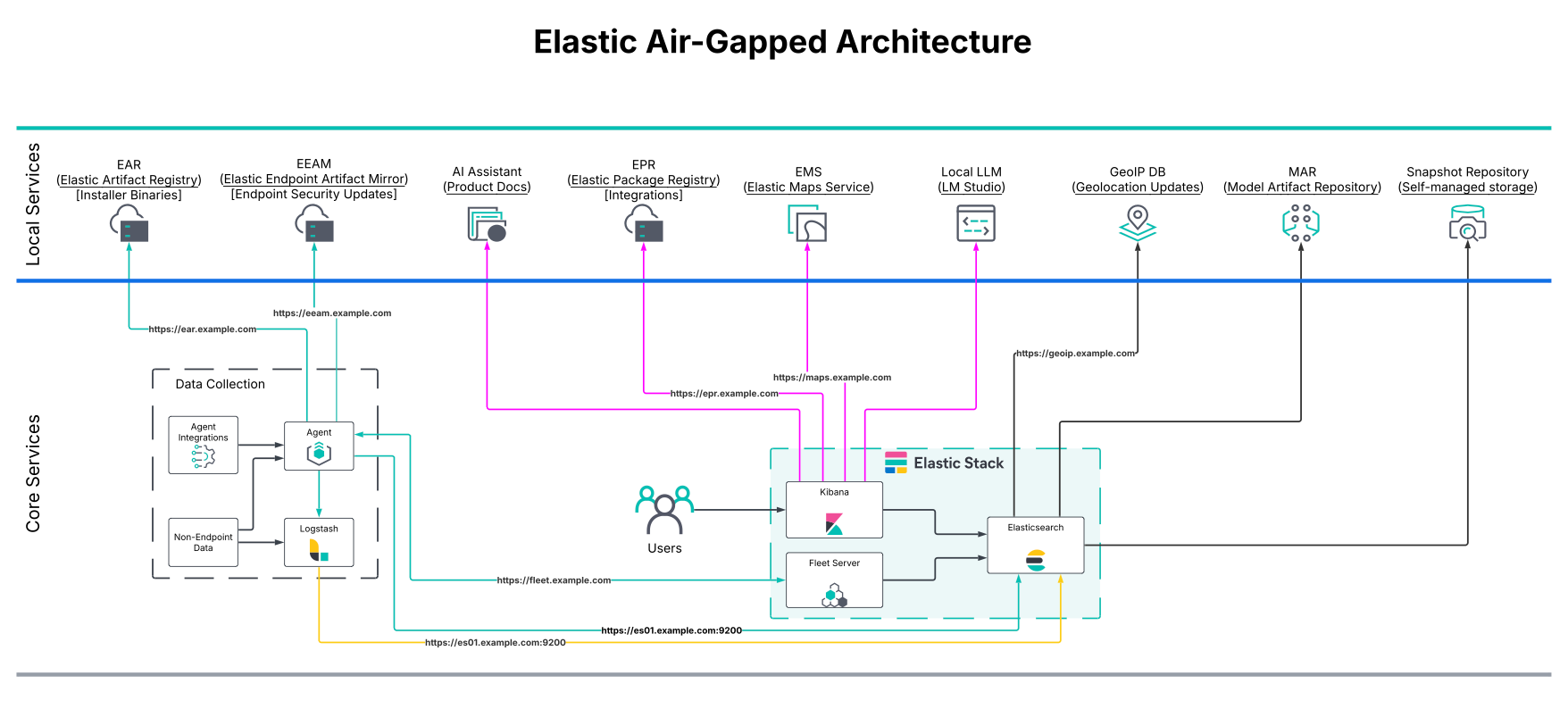
Core services that can be locally hosted
Required for integrations, agent policies, and Fleet-managed content
Provides map tiles and geospatial assets
Elastic Endpoint Artifact Repository
Delivers malware protection artifacts for Elastic Defend
Supports anomaly detection, inference, and other machine learning features
Enables AI-powered search and security workflows using locally hosted models
Elastic air-gapped architecture
Most Elastic supporting services are delivered as containerized applications. The containers can be deployed within Kubernetes or locally on a VM using docker or podman.
Network and access considerations
Services are typically deployed behind a reverse proxy (e.g., NGINX or Apache)
Reverse proxies are commonly used for:
SSL/TLS termination
Centralized access control
Simplified DNS and routing
TLS certificates and trust management
Operating in disconnected environments often requires the use of self-signed certificates or certificates signed by an internal Certificate Authority (CA).
Elastic supports multiple methods to ensure secure communication between clients and Elastic services, such as Elasticsearch, Kibana, and Fleet.
If an organization uses an internal CA, it:
Issues TLS certificates for all Elastic services using that CA
Distributes the CA certificate to:
Host operating systems
Workstations
Container trust stores
This allows native trust validation without additional configuration.
Recommended approach: Elastic internal CA
Elastic ships with an internal CA to configure HTTPS within the Elastic Stack. By default, this CA is set up and signs the certificates that are used during the initial setup of Elasticsearch.
It is recommended to use the Elastic CA to generate the certificates needed for other components, such as Kibana and Fleet.
Alternate approach: Trusted authority CA
If an organization has their own trusted authority CA, you can use the elasticsearch-certutil command to generate the CSR needed to configure HTTPS for Elasticsearch and Kibana.
Configure CA trust from Fleet
It’s not always possible to distribute the CA certificates to all endpoints. In these situations, Elastic also provides the option to define CA trust information within Fleet policies for Elastic Agent communications.
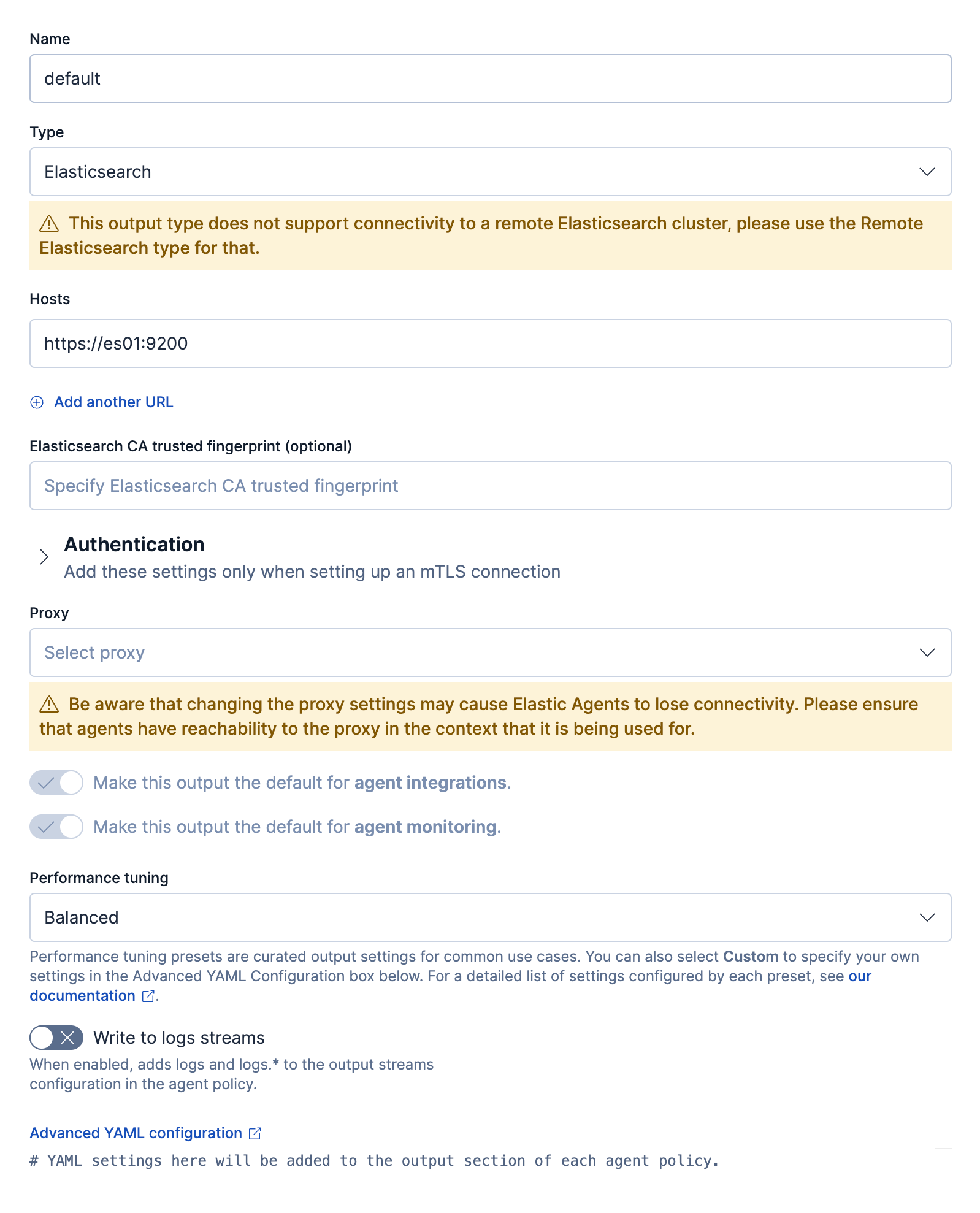
In Fleet, for the Elasticsearch output, you have two options to configure TLS certificate details that all Agents will use to validate the certificates of the Elasticsearch nodes:
Elasticsearch CA trusted fingerprint
Advanced YAML configuration
The benefit of configuring the certificate settings within Fleet is that all agents will then trust the Elasticsearch certificates regardless of whether or not the endpoint has the appropriate CAs added to the local trust store.
Option 1: Elasticsearch CA trusted fingerprint
Obtain the fingerprint of the CA using the following command: openssl x509 -fingerprint -sha256 -in config/certs/http_ca.crt
It’s recommended to use the top-level root CA if you have intermediate certificates. If the fingerprint of the certificate is present anywhere in the certificate chain during the handshake, then the handshake will continue normally.
Option 2: Advanced YAML configuration
For the advanced settings, you have several options to specify which CA should be used.
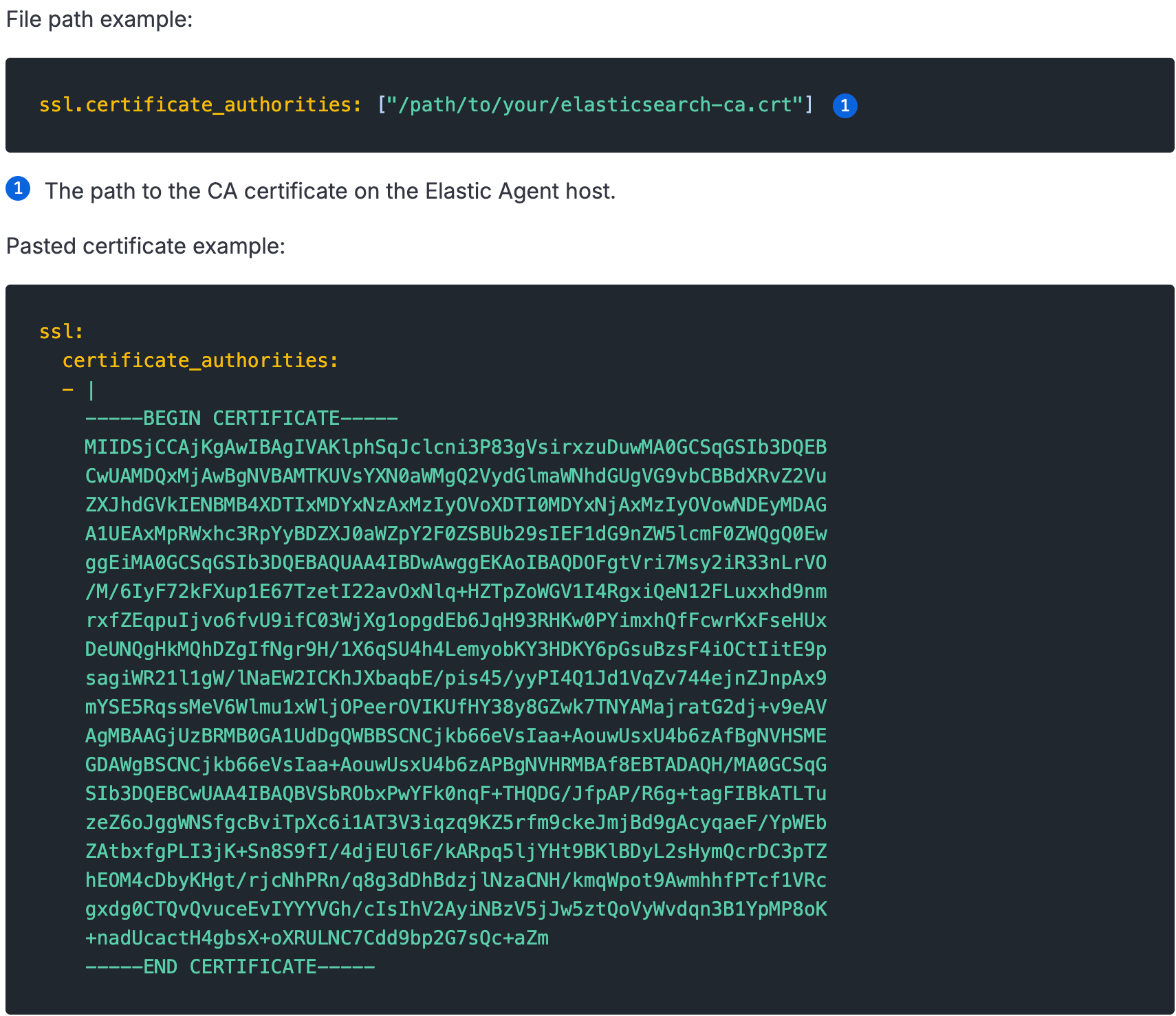
Refer to the Fleet output settings and Fleet secure connections pages for more details on the options allowed for configuring CA trusts.
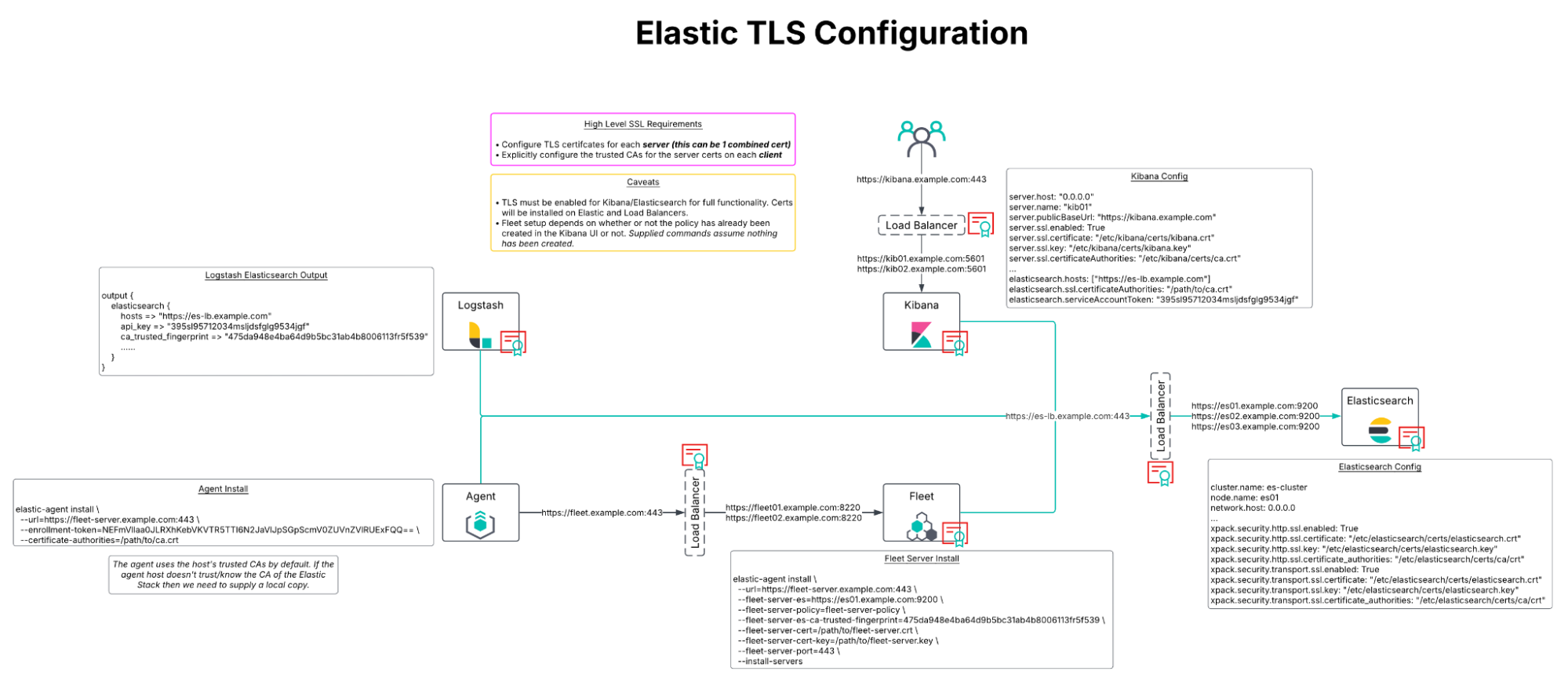
Certificate architecture considerations
Each Elastic component requires its own TLS certificate, including:
Elasticsearch
Kibana
Fleet Server
This requirement applies even when services are deployed behind a reverse proxy or load balancer.
Elastic enforces this model to:
Protect data in transit
Ensure secure service-to-service communication
Support deployments without external proxies or load balancers
Next steps for operating Elastic in air-gapped and disconnected environments
Because Elastic is fully operational in air-gapped and disconnected environments, organizations can deploy the same search, security, and observability platform across both connected and non-connected networks.
As a result, organizations can:
Reduce operational complexity
Minimize tool sprawl
Maintain consistent workflows, detections, and analytics across environments
By supporting secure, local-first architectures without sacrificing functionality, Elastic delivers a unique advantage for mission-critical and regulated environments.
To learn more about what Elastic can do for your organization in these austere environments, reach out to our team.
The release and timing of any features or functionality described in this post remain at Elastic's sole discretion. Any features or functionality not currently available may not be delivered on time or at all.
Share
- Share on Twitter
Share on Twitter
- Share on LinkedIn
Share on LinkedIn
- Share on Facebook
Share on Facebook
- Share by Email
Share by Email
- Print this page
Print