Introducing cross-project search in Elastic Cloud Serverless
Search across all your workloads from a single pane of glass. Instantly query distributed Elastic Cloud Serverless projects as one without moving your data, and egress cost stays low.


 Share on Twitter
Share on Twitter

 Share on LinkedIn
Share on LinkedIn

 Share on Facebook
Share on Facebook

 Share by Email
Share by Email

 Print this page
Print
As organizations scale, data naturally fragments. Elastic Cloud Serverless allows you to organize your data into dedicated projects whether you’re isolating team environments, separating business units, or complying with regional data residency laws. While separating workloads offers great architectural benefits, it traditionally required consolidating data whenever a unified search was needed.
Today, we are announcing the technical preview launch of cross-project search (CPS) for Elastic Cloud Serverless. You can now instantly query distributed Elastic Cloud Serverless projects as one — maintaining native project isolation while querying your entire organization from a single pane of glass.
Global visibility, project-level control
Cross-project search brings a true single-pane-of-glass experience to Elastic Cloud Serverless. The setup is straightforward, and the value is immediate:
One-step linking in cloud console: Administrators select which projects to link, and that’s it! Searches from the origin project will span linked projects by default.
Broad by default, precise when needed: Use UI scope controls, per-space defaults, or directly adjust your queries to narrow searches.
Secure by design: Access is enforced per project using existing roles, so users only see data they’re allowed to see in each linked project.
The outcome is simple: faster cross-project investigations, less operational friction, and no tradeoff between project isolation and unified search.
Get started: Linking and search scope

Getting started with cross-project search takes just a few clicks:
In the Elastic Cloud console, create a new project to use as your origin — the project you’ll search from.
Open that project, choose which other projects to link, save your configuration, and let the Elastic control plane establish the connections.
Once linking is in place, data from linked projects appears in your origin project automatically. In Kibana, use the project picker in the navigation bar to select your project scope, and save your preferred scope to a dashboard, rule, or Discover session when you want it to stick.
Do different teams need different project scopes? Configure project routing per Kibana space so that each team lands on the right scope by default.
Query, visualize, and narrow scope
CPS gives you immediate global visibility; from your origin project, one query spans all linked projects by default. Then, when you need precision, you can narrow scope per request, per workflow, or per team default without changing where data lives.
- Route to exactly the projects you want using project_routing expressions in ES|QL queries (SET project_routing), search APIs, and any CPS-enabled endpoint. In Kibana, use the project picker in the navigation bar to filter or narrow your project scope. As part of general availability release, more granular controls are released to select subsets of projects based on criteria like the project region, cloud provider, or any custom project tags defined by your team.
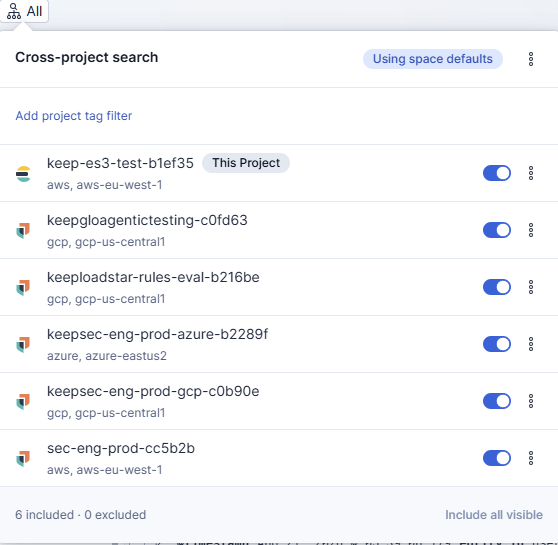
Analyze and aggregate data by linked projects using project tags in your queries. You can group results by region, environment, or team, so patterns become obvious fast without moving or duplicating data.
- Set the right default per Kibana space. Kibana spaces let each team start from the right default view of linked data. Configure a space-level default project scope (e.g., This project) so that dashboards, rules, and daily workflows open in the right slice by default, and analysts can still expand scope when needed.
Programmatic access with Elastic Cloud API keys
To ensure this cross-project visibility extends natively to your automated workflows, we enhanced Elastic Cloud API Keys to authenticate directly against Elasticsearch and Kibana APIs. By relying on unified API keys, the system can automatically evaluate your permissions across all projects simultaneously without requiring you to configure complex trust relationships, certificates, or duplicate credentials on every target project.
Pricing and availability
Cross-project search will be available in general availability starting Sep 16, 2026. CPS will be billed as an add-on after general availability. For observability and security project types, CPS is available on Observability Complete and Security Complete tiers only. There are no plan restrictions for Elasticsearch and Vector DB project types. Cross-project search has two pricing dimensions:
Linked retained data charge: A monthly charge per GB of data retained in each linked project will be billed at the origin project. So, each retained GB in a linked project will be charged at the origin project on a monthly basis.
All project types: There will be a separate charge for data transferred between projects for CPS.
Please refer to Elastic Cloud Serverless pricing estimators for exact rates and billing mechanics.
Ready to get started?
If you would like to start with cross-project search, login to your Elastic Cloud console, and link your first project. If you would like to learn more, read our technical docs.
The release and timing of any features or functionality described in this post remain at Elastic's sole discretion. Any features or functionality not currently available may not be delivered on time or at all.
Share
- Share on Twitter
Share on Twitter
- Share on LinkedIn
Share on LinkedIn
- Share on Facebook
Share on Facebook
- Share by Email
Share by Email
- Print this page
Print