Submitting a pull request
This page covers the end-to-end flow: forking the repo, creating a branch, opening a pull request, signing the CLA, and keeping your PR up to date. For the review philosophy, see Pull request review guidelines.
- Include an explanation of your changes in the PR description.
- Link to relevant issues, external resources, or related PRs. Context is important and saves reviewer time.
- Update any tests that cover your code, and add new tests where appropriate.
- Update or add docs when behavior or usage changes. See Documentation during development.
Kibana has hundreds of developers, some outside of Elastic, so we use a fork-based workflow for branches and pull requests.
- Log in to GitHub.
- Navigate to the Kibana repository.
- Follow the GitHub instructions for forking and cloning.
After cloning your fork and navigating to its directory:
# Start from the branch you want to branch off of
git checkout main

# Create a new branch
git checkout -b fix-typos-in-readme

# Edit some code
vi README.md

# Stage and commit
git add README.md
git commit -m "Fixed all of the typos in the README"

# Push the branch to your fork
git push -u origin fix-typos-in-readme
When you push a new branch, GitHub prints a URL in the terminal that takes you directly to the "create a pull request" page for that branch.
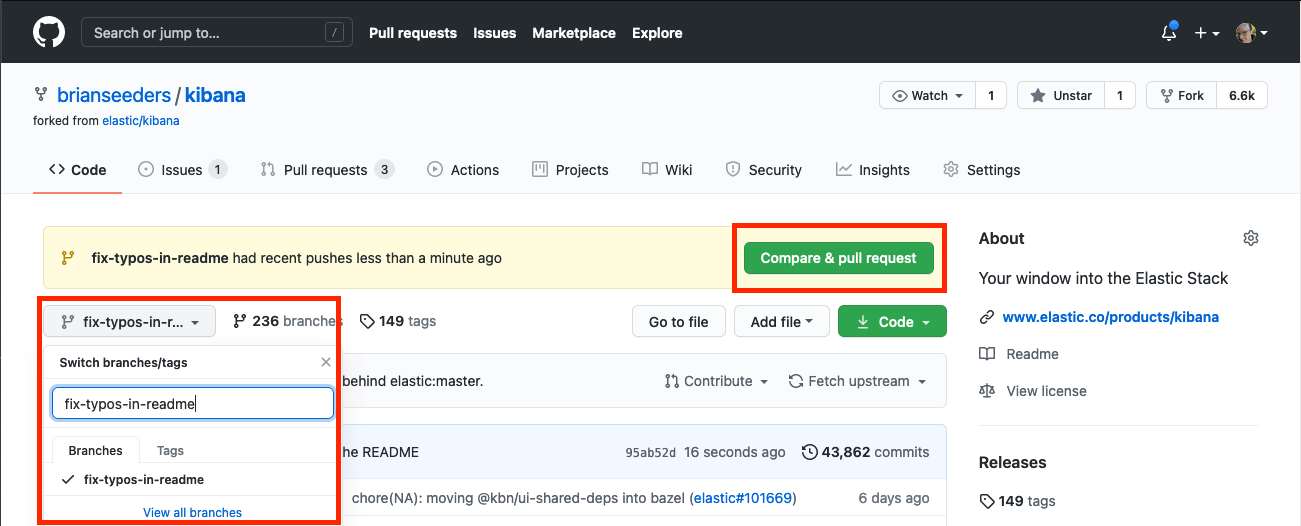
- Navigate to your fork on GitHub.
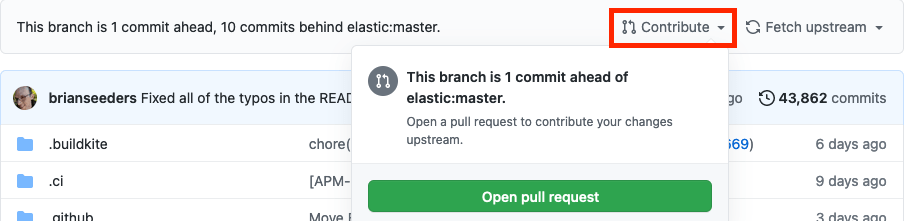
- If your branch is visible at the top of the page with a Compare & pull request button, click it. Otherwise navigate to your branch, click Contribute, then Open pull request.
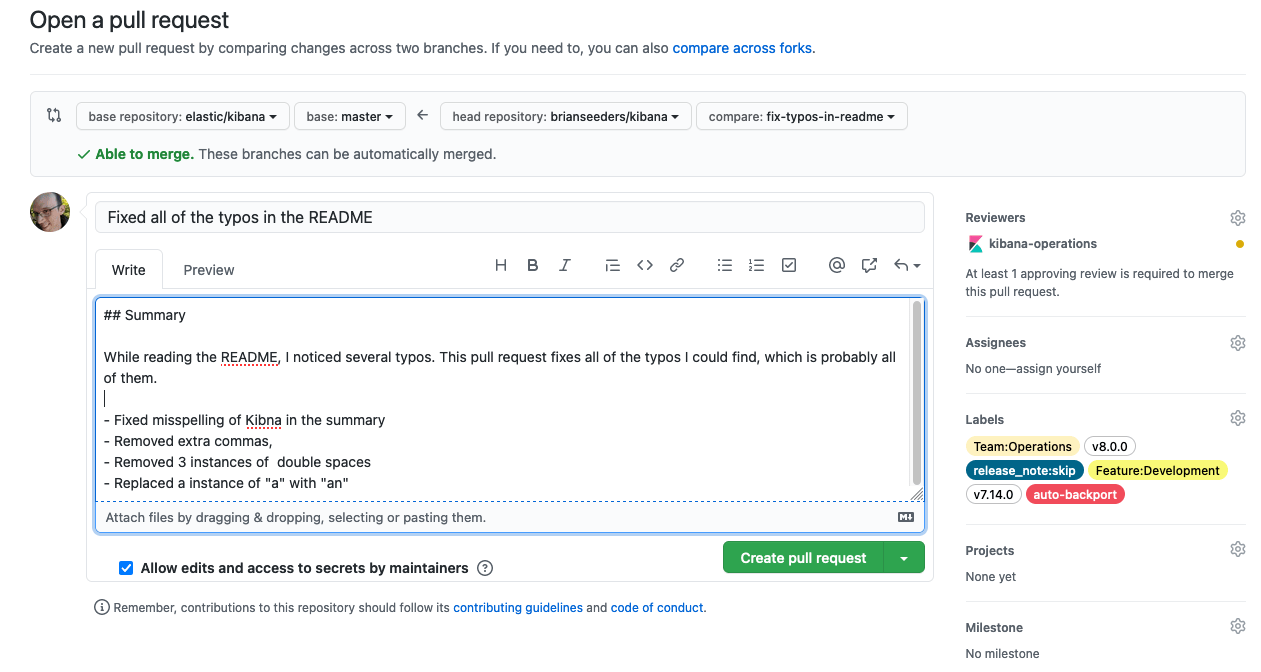
- Fill out the pull request template with the details relevant to your change.
- If your PR relates to an open issue, reference it (for example,
Closes #12345).
- If your PR relates to an open issue, reference it (for example,
- (Elastic employees only) Add the teams or people who need to review under Reviewers. Often one or more teams are auto-assigned based on which part of the codebase changed.
- (Elastic employees only) Add any relevant labels:
- Versions: add a label for each Kibana version the change will ship in (for example,
v8.0.0,v7.14.0). - Features: add labels for relevant feature areas (for example,
Feature:Development). - Team: most PRs should carry at least one
Team:label for the teams responsible for or following the PR. - Release note: add
release_note:skipif the PR should not appear in release notes. - Auto backport: add
backport:versionto automatically backport to all labeled versions.
- Versions: add a label for each Kibana version the change will ship in (for example,
- Submit the pull request. If it's not quite ready, open it as a Draft pull request.
In the PR description itself:
- Describe what the change does and mention the issue where discussion happened, for example
Closes #123. - PRs that will be included in release notes must have clear and concise titles and descriptions that are informative and well-written.
- Assign the
reviewand💝communitylabels if you're not a member of the Elastic organization — this signals that someone needs to give the PR attention. - Do not assign a version label. Elastic staff will assign one when the PR is ready to be merged.
- Target
mainunless the bug is only present in an older version. If the bug affects bothmainand another branch, say so.
On your first pull request, a bot comments asking you to sign the CLA / Contributor Agreement. Your PR cannot be merged until the agreement is signed.
Most PRs go through several iterations of feedback and updates. Depending on scope and complexity, the process can take weeks. Please be patient — we hold the codebase to a high standard.
See Pull request review guidelines for the general review philosophy.
If your pull request hasn't been updated with the latest code from the upstream target branch (for example, main) in the last 48 hours, it can't be merged until it is. This prevents stale code from merging into upstream (for example, something recently merged that's incompatible with your change).
Instead of git commands, leave a comment on your PR with @elasticmachine merge upstream. This automatically updates your branch and kicks off CI.
The easiest way to re-trigger CI is to update your branch (see above) with the latest upstream code. That also ensures your branch is up to date and compatible.