CI
Kibana CI uses Buildkite Pipelines to run checks against each pull request and tracked branch. Pipeline definitions live in the repository under .buildkite/pipelines. Results are posted to pull requests as comments and are viewable in the Buildkite UI.
Comments in pull requests can be used to trigger CI operations:
Run test suites and checks.
Merge in the most recent changes from upstream.
Build documentation from the root docs folder.
Labels can be added to a pull request to run conditional pipelines. Build artifacts are available on the "Artifacts" tab of the "Build Kibana Distribution and Plugins" step.
Not every label is listed here — many are owned by individual teams and control team-specific pipelines. The labels below are commonly useful across the repository.
Some Cypress test suites only run when code changes are made in certain files. Adding this label forces all Cypress tests to run.
Some UI/E2E test suites only run when code changes are made in certain files. Adding this label forces all conditional UI/E2E suites to run.
Run entity store performance tests on Elastic Cloud. A fresh deployment is created for each test run (previous deployments are automatically cleaned up). Results are posted as PR comments.
Turn off selective testing and run the full Jest unit, Jest integration, and FTR suites regardless of which modules the PR affects. (Scout has its own label — see scout:run-all-tests.)
Run evaluations for the GenAI security evaluation suite.
Run FTR tests against Chrome Beta instead of the stable Chrome, to catch upcoming-browser regressions early.
Turn off Scout selective testing and run every Scout test, regardless of which modules the PR affects.
Build Windows, macOS, and Linux archives.
Build an archive that can be used to serve Kibana's static assets.
Build FIPS cloud Docker images that can be used for testing deployments on Elastic Cloud.
Build cloud Docker images that can be used for testing deployments on Elastic Cloud.
Build Docker Wolfi image with FIPS enabled.
Build Docker images, and Debian and RPM packages.
Build serverless Docker images that can be used for testing deployments on Elastic Cloud.
Build and upload storybooks.
Create or update a deployment on Elastic Cloud production.
Prevents an existing deployment from being shutdown due to inactivity.
Create a new deployment on Elastic Cloud. Previous deployments linked to a pull request will be shutdown and data will not be preserved.
Create or update a serverless Security project of type AI for SOC on Elastic Cloud QA.
Create or update a serverless Elasticsearch project on Elastic Cloud QA.
Create or update a serverless Observability project (in the Log Essentials tier) on Elastic Cloud QA.
Create or update a serverless Observability project on Elastic Cloud QA.
Create or update a serverless Security project on Elastic Cloud QA.
Prevents an existing deployment from being shutdown due to inactivity.
Collect APM metrics, available for viewing on the Kibana CI APM cluster.
Skip auto-committing changed files.
When a test fails it is reported to GitHub via GitHub Checks. Tests are bucketed into several categories that run in parallel to make CI faster. Groups like ciGroup{X} get a single check in GitHub; other tests like linting and type checks get their own checks.
Clicking the link next to a check in the Conversation tab takes you to the log output from that section of the tests. If log output is truncated or unclear, Buildkite has more complete information.
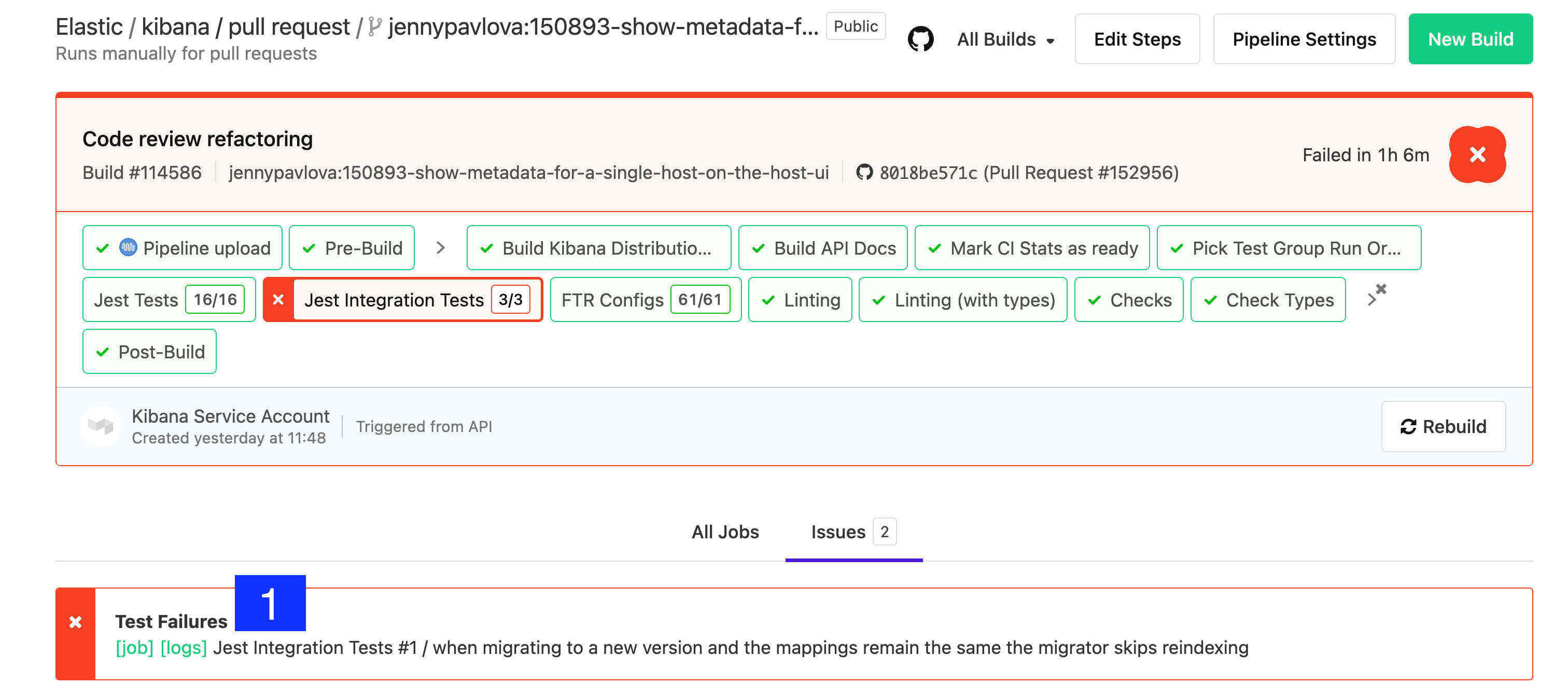
To view the results of a job execution in Buildkite, either click the link in the comment left by @elasticmachine or search for the kibana-ci check in the list at the bottom of the PR.
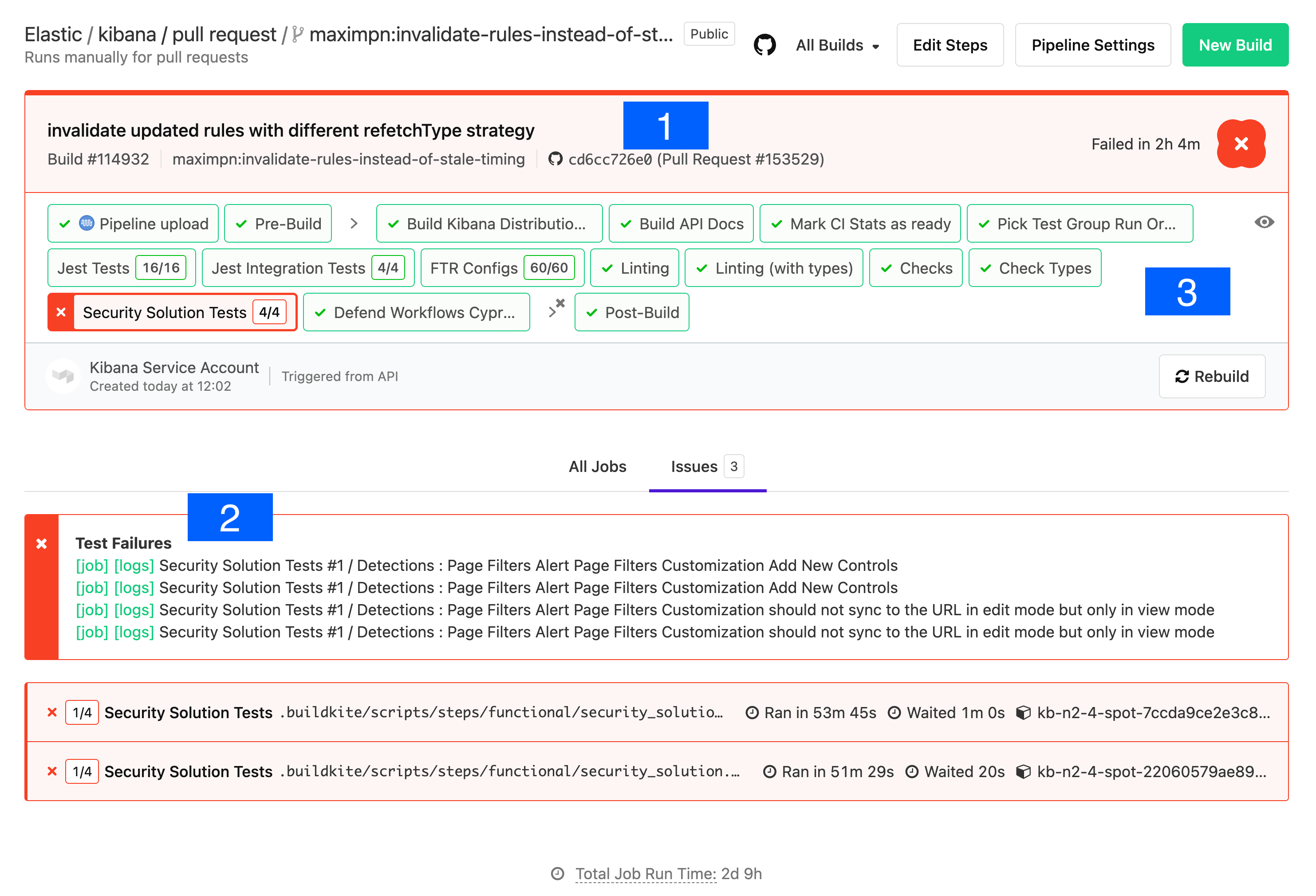
- Git commit: the git commit that caused this build.
- Test Results: a link to the test results screen, plus shortcuts to the logs and jobs of the failed tests. Functional tests capture and store log output from each specific test.
- Pipeline Steps: a breakdown of the pipeline that was executed, along with individual log output for each step.
The logs in Pipeline Steps contain Info level logging. To debug Functional UI tests it is usually helpful to see the debug logging — click through to the test failure details via the logs link.
Look at the error and stack trace first. In the example below, the test failed to find an element within the timeout: Error: retry.try timeout: TimeoutError: Waiting for element to be located By(css selector, [data-test-subj="createSpace"])
The stack trace shows the test file and line number. For example, line 50 of test/accessibility/apps/spaces.ts corresponds to x-pack/platform/test/accessibility/apps/group1/spaces.ts. The failing click was invoked from a page-object method in test/functional/page_objects/space_selector_page.ts.
[00:03:36]             │ debg --- retry.try error: Waiting for element to be located By(css selector, [data-test-subj="createSpace"])
[00:03:36]             │      Wait timed out after 10020ms
[00:03:36]             │ info Taking screenshot "/dev/shm/workspace/parallel/24/kibana/x-pack/platform/test/functional/screenshots/failure/Kibana spaces page meets a11y validations a11y test for click on create space page.png"
[00:03:37]             │ info Current URL is: http://localhost:61241/app/home#/
[00:03:37]             └- ✖ fail: Kibana spaces page meets a11y validations a11y test for click on create space page
Stack trace alone doesn't tell you why the element wasn't found — it might be on the wrong page, or the element might have changed. Just above the ✖ fail: line is info Taking screenshot ..., which names the screenshot to look for in the Google Cloud Storage (GCS) Upload Report.
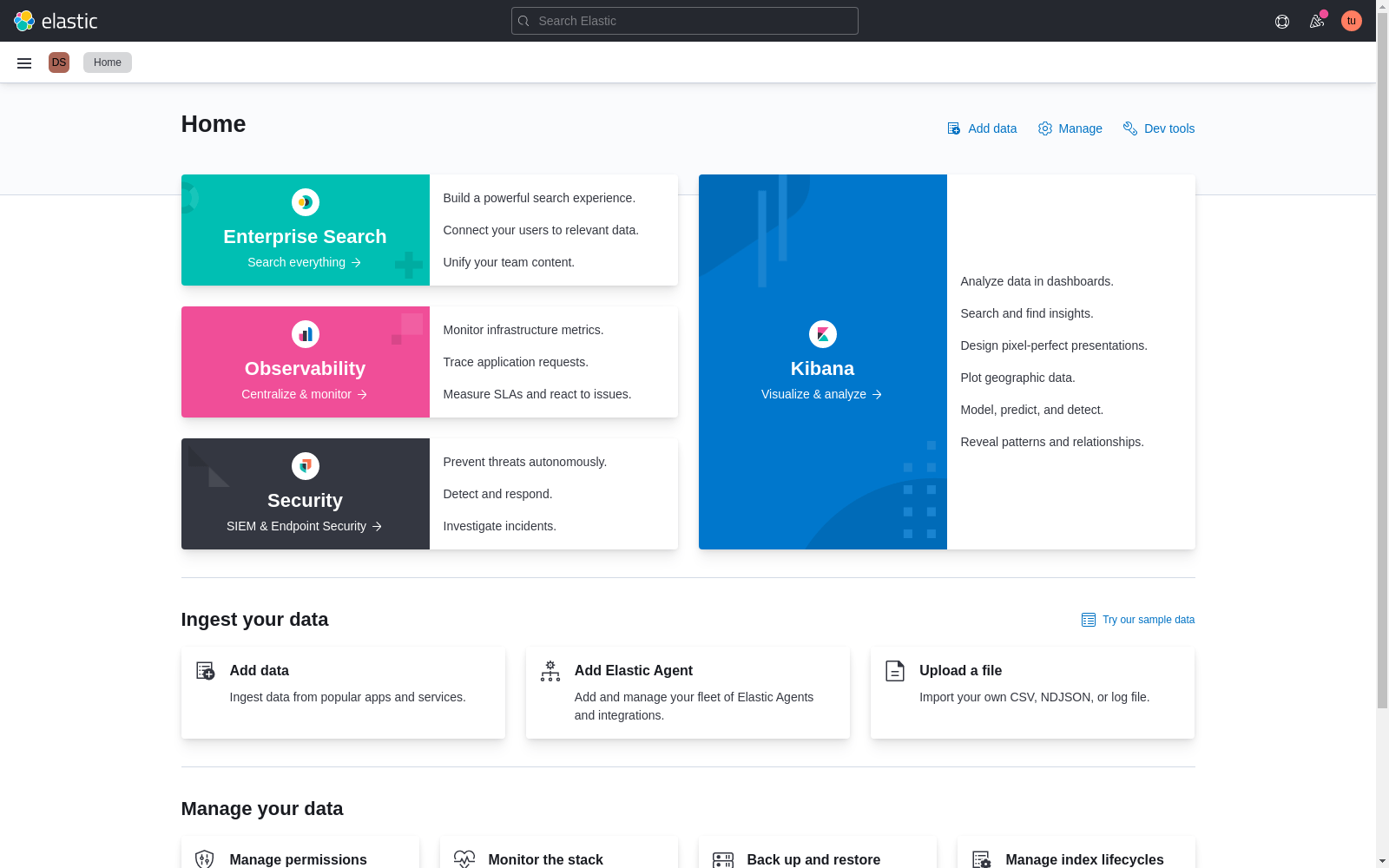
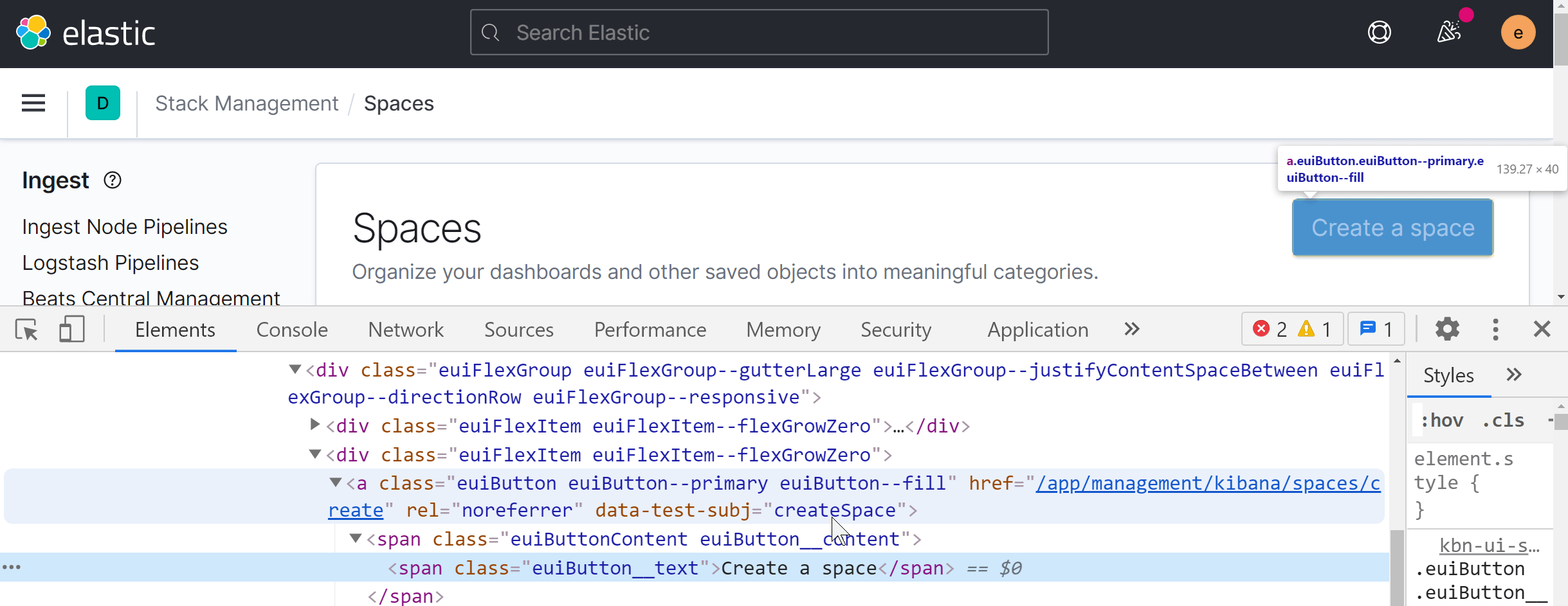
Inspecting a running Kibana instance can confirm which page the data-test-subj attribute belongs to:
If the test arrived at the wrong page, scroll back through the debug log to the first action the test took. Often the failing test depended on a prior test to navigate, and that prior test was skipped:
[00:01:30]           └-> a11y test for manage spaces menu from top nav on Kibana home
[00:01:30]           └-> a11y test for manage spaces page
[00:01:30]           └-> a11y test for click on create space page
[00:01:30]             └-> "before each" hook: global before each for "a11y test for click on create space page"
[00:01:30]             │ debg TestSubjects.click(createSpace)
it.skip('a11y test for manage spaces page', async () => {
  await PageObjects.spaceSelector.clickManageSpaces();
Best practice: every test should be atomic and not depend on other tests. UI test setup is slow, though, so in practice tests within a describe block are often optimized as a group.
In addition to running tests, CI collects metrics about the Kibana build. These metrics are sent to an external service to track changes over time and give PR authors insight into the impact of their changes.
These metrics track the impact of code changes on Kibana bundle sizes, ensuring optimal loading performance.
-
page load bundle size -
The size of the entry file produced for each bundle/plugin. This file is always loaded on every page load, so it should be as small as possible. To reduce this metric, put any code that isn't necessary on every page load behind an
async import().Code that is shared statically with other plugins contributes to the
page load bundle sizeof that plugin. This includes exports from thepublic/index.tsfile and any file referenced by theextraPublicDirsmanifest property. -
async chunks size - Tracks the sum size (in bytes, by plugin/bundle ID) of "async chunks" — created for files imported via
async import()statements. This metric reflects the amount of code downloaded when accessing all components within a bundle. -
miscellaneous assets size - Tracks the sum size (in bytes, by plugin/bundle ID) of assets that are not async or entry chunks, typically images.
-
@kbn/rspack-optimizer bundle module count - The number of separate modules per bundle/plugin. This metric indicates
@kbn/rspack-optimizerbuild time for a bundle, highlighting potentially large module imports.
Distributable size affects both download and archive extraction times. Some metrics aren't reported on PRs because gzip compression produces different file sizes even from identical inputs. All metrics are collected from the tar.gz archive produced for the Linux platform.
-
distributable file count - The number of files included in the default distributable.
-
distributable size - The size, in bytes, of the default distributable. (not reported on PRs)
Elasticsearch limits the number of fields in an index to 1000 by default, and we want to avoid raising that limit.
-
Saved Objects .kibana field count - The number of saved object fields broken down by saved object type.
You can report new metrics via the CiStatsReporter class provided by the @kbn/dev-utils package. This class is automatically configured on CI and its methods noop when running outside of CI. See the CiStatsReporter readme for more.
page load bundle size is limited per plugin. If a PR exceeds this limit — defined in limits.yml — the author must resolve the overage before merging.
Limits are usually high enough that PRs shouldn't trigger overages, but when they do:
Run the optimizer locally with
--profile-stats-only --profile-focus {pluginId}to produce a webpack-compatiblestats.jsonscoped to your plugin. Focus on the chunk namedplugin-{pluginId}; the async chunks make up theasync chunks sizemetric (currently unlimited), which is the main way to move code off the initial page load.node scripts/build_kibana_platform_plugins --dist --profile-stats-only --profile-focus {pluginId} # full build; writes target/public/bundles/stats.json with module-level detail for {pluginId}Tools:
- Official Webpack tool: http://webpack.github.io/analyse/
- Webpack visualizer: https://chrisbateman.github.io/webpack-visualizer/
Create stats for the upstream branch as well and compare side by side in Webpack visualizer.
For smaller changes, try Beyond Compare on the two
stats.jsonfiles.If the diff is too large, reduce each
stats.jsonto a sorted module-id list via jq:jq -r .modules[].id target/public/bundles/stats.json | sort - > moduleids.txtAs a last resort, compare the bundle source directly using the production build:
node scripts/build_kibana_platform_plugins --dist
npm install -g prettier
prettier -w target/public/bundles/chunks/*.js
# repeat for upstream and compare in Beyond Compare
If all else fails, reach out to Operations for help.
After identifying the files that were added, stick them behind an async import. If the size increase is unavoidable, raise the limit in limits.yml directly, or run:
node scripts/build_kibana_platform_plugins --update-limits
This runs a full optimizer build in distributable mode, which takes longer than a dev build. Changes to limits.yml trigger review from the Operations team, who verify the increase is justified — findings from the steps above help that review.
For broader guidance on lazy-loading patterns, see Plugin performance and optimization.
In many regressions, a short workflow is enough to avoid raising limits:
If you are using a coding agent with repository skills, run the /optimize-bundle-size skill command to start this workflow for you and help reduce plugin page load bundle size.
Build dist metrics and confirm the current value for your plugin in
target/public/bundles/metrics.json:node scripts/build_kibana_platform_plugins --distProfile the plugin and identify the largest modules in the entry chunk:
node scripts/build_kibana_platform_plugins --dist --profile-stats-only --profile-focus {pluginId} entry_id=$(jq -r '.chunks[] | select((.names|index("plugin-{pluginId}")) != null) | .id' target/public/bundles/stats.json) jq -r --argjson cid "$entry_id" '.modules[] | select((.chunks|index($cid)) != null) | [.size, (.name- .identifier)] | @tsv' target/public/bundles/stats.json | sort -nr | head -40
Move optional UI and large dependencies behind
async import()boundaries.Avoid importing wide barrel files (
index.ts) from plugin entry paths; import only required modules.Re-run the dist build and verify that
page load bundle sizeis below the existing limit before considering a limit increase.
While you're tracking down changes that will improve the bundle size, run this locally:
node scripts/build_kibana_platform_plugins --dist --watch
This builds the front-end bundles in distributable mode. When you make changes, the bundles rebuild and you can inspect target/public/bundles/metrics.json to see if your changes lower page load bundle size.
To check limits.yml against the discovered plugins without building:
node scripts/build_kibana_platform_plugins --validate-limits
Distributable builds apply production optimizations to get the right sizes, so they take significantly longer than a dev build.