Decrease the disk usage of data nodes
To decrease the disk usage in your cluster without losing any data, you can try reducing the replicas of indices.
AutoOps is a monitoring tool that detects issues in your Elasticsearch cluster in real time and recommends how to resolve them and improve performance. Learn more about AutoOps.
Reducing the replicas of an index can potentially reduce search throughput and data redundancy. However, it can quickly give the cluster breathing room until a more permanent solution is in place.
Some permanent solutions you can investigate are:
- Storing less frequently accessed data in searchable snapshots, which require less disk space
- Increasing available disk space by scaling up your cluster
- Deleting data that is no longer needed
Open your deployment’s side navigation menu and go to the Index Management page. You can find this page using the navigation menu or the global search field.
In the list of all your indices, click the
Replicascolumn twice to sort the indices based on their number of replicas starting with the one that has the most. Go through the indices, and pick one by one the index with the least importance and higher number of replicas.WarningReducing the replicas of an index can potentially reduce search throughput and data redundancy.
For each index you chose, click on its name, then on the panel that appears click
Edit settings, reduce the value of theindex.number_of_replicasto the desired value and then clickSave.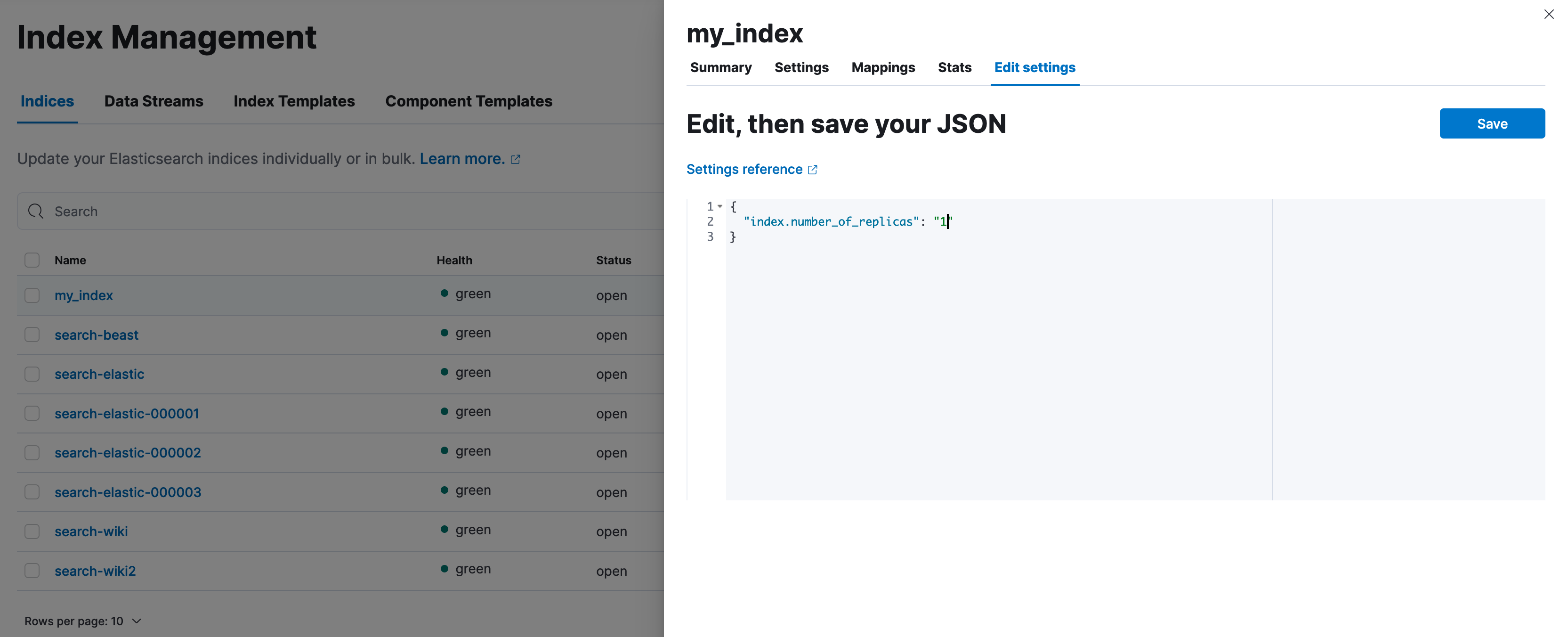
- Continue this process until the cluster is healthy again.
To estimate how many replicas need to be removed, first you need to estimate the amount of disk space that needs to be released.
First, retrieve the relevant disk thresholds to determine how much space should be released. The relevant thresholds are the high watermark for all the tiers apart from the frozen one and the frozen flood stage watermark for the frozen tier. The following example demonstrates disk shortage in the hot tier, so you can retrieve only the high watermark:
GET _cluster/settings?include_defaults&filter_path=*.cluster.routing.allocation.disk.watermark.high*The response looks like this:
{
  "defaults": {
    "cluster": {
      "routing": {
        "allocation": {
          "disk": {
            "watermark": {
              "high": "90%",
              "high.max_headroom": "150GB"
            }
          }
        }
      }
    }
  }
}
The above means that, to resolve the disk shortage, we need to either drop our disk usage below the 90% or have more than 150GB available, read more on how this threshold works here.
The next step is to find out the current disk usage; this indicates how much space should be freed. For simplicity, our example has one node, but you can apply the same for every node over the relevant threshold.
GET _cat/allocation?v&s=disk.avail&h=node,disk.percent,disk.avail,disk.total,disk.used,disk.indices,shardsThe response looks like this:
node                disk.percent disk.avail disk.total disk.used disk.indices shards
instance-0000000000           91     4.6gb       35gb    31.1gb       29.9gb    111
The high watermark configuration indicates that the disk usage needs to drop below 90%. Consider padding the amount of disk space you make available, so the node doesn't immediately exceed the threshold again. In this example, let’s release approximately 7GB.
The next step is to list all the indices and choose which replicas to reduce.
NoteThe following command lists indices in descending order by the number of replicas and primary store size. This can help you identify which replicas to reduce, based on the assumption that:
- More replicas generally mean lower risk when removing a copy.
- Larger replicas free up more disk space when removed. This is only a suggestion and does not account for any functional or business requirements. Review your cluster’s needs before making changes.
GET _cat/indices?v&s=rep:desc,pri.store.size:desc&h=health,index,pri,rep,store.size,pri.store.sizeThe response looks like:
health index                                                      pri rep store.size pri.store.size
green  my_index                                                     2   3      9.9gb          3.3gb
green  my_other_index                                               2   3      1.8gb        470.3mb
green  search-products                                              2   3    278.5kb         69.6kb
green  logs-000001                                                  1   0      7.7gb          7.7gb
Using the information returned by the API, we can determine that, if we reduce the replicas to one for the indices
my_indexandmy_other_index, the required disk space is released. It is not necessary to reduce the replicas ofsearch-productsandlogs-000001does not have any replicas anyway. Reduce the replicas of one or more indices with the index update settings API:WarningReducing the replicas of an index can potentially reduce search throughput and data redundancy.
PUT my_index,my_other_index/_settings{ "index.number_of_replicas": 1 }