Try out vector search for yourself using this self-paced hands-on learning for Search AI. You can start a free cloud trial or try Elastic on your local machine now.
A picture is worth 1.5x the words: What we learned benchmarking product search embeddings
Combining image and text into one embedding beats either alone, and the gap isn't small. In our tests, averaged image and text embeddings put the correct product in the top spot up to 1.5 times as often as image embeddings alone. We benchmarked 5,000 real apparel and footwear products in English and German across two Jina embedding models, jina-clip-v2 and jina-embeddings-v5-omni-small, to see which model and which indexing strategy actually wins for ecommerce search. The older, narrower Contrastive Language–Image Pre-training–style (CLIP-style) model beat the newer, more general one, and that wasn't what we expected. This post walks through the data, the method, and what we'd recommend doing with it.
jina-clip-v2 vs. jina-embeddings-v5-omni-small: What's different
Multimodal embedding models work by generating representative semantic vectors for inputs of different kinds in a single high-dimensional space.
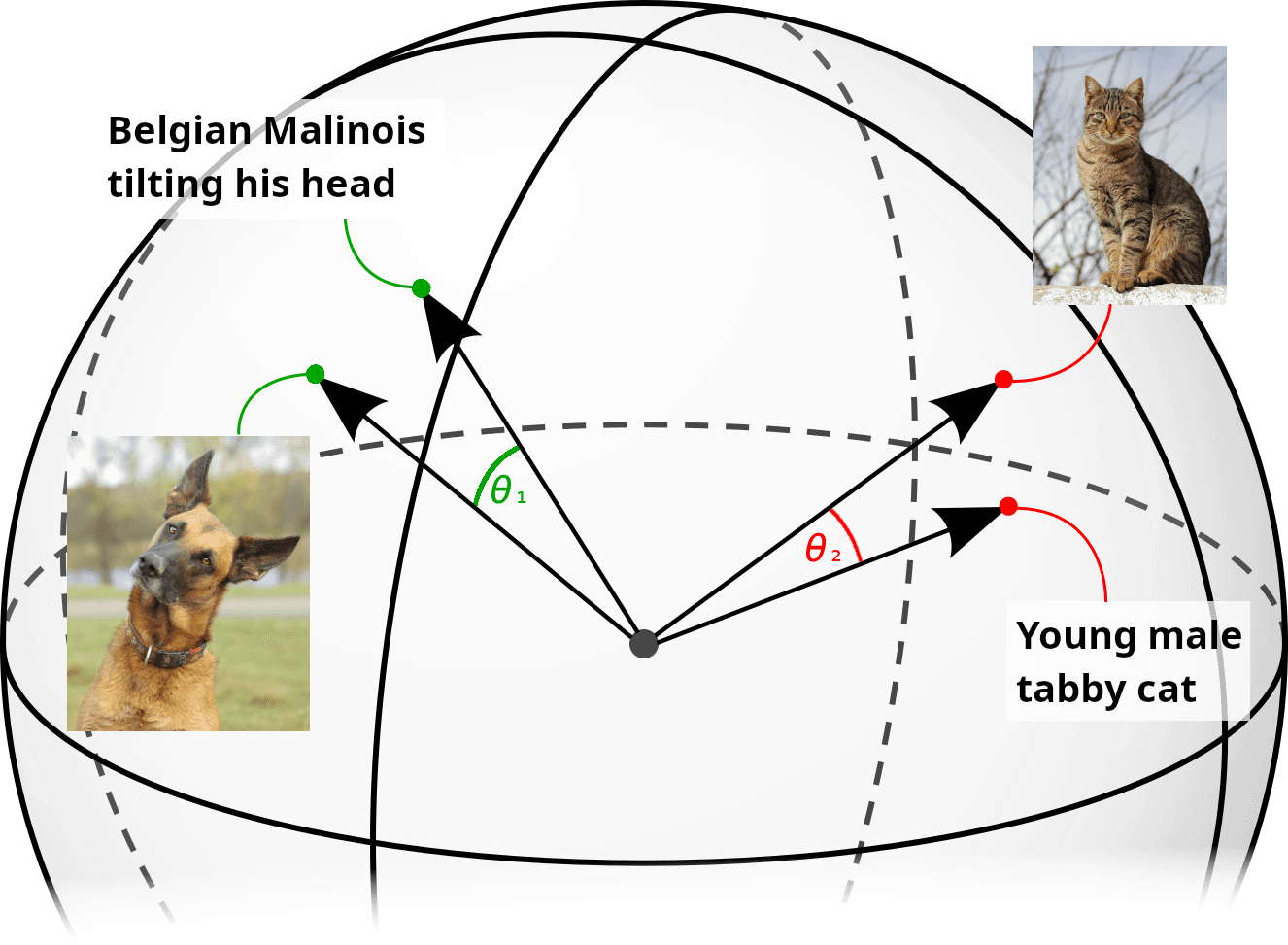
We used two models that do this:
| jina-clip-v2 | jina-embeddings-v5-omni-small | |
|---|---|---|
| Architecture | Dual encoder (separate text + image towers) | Single shared backbone + frozen encoders |
| Parameters | ~865M total | ~1.74B total |
| Embedding dimensions | 1024 | 1024 |
| Max input | 512×512 images, 8k tokens text | 32k tokens |
| Language coverage | Broad multilingual | ~100 languages |
| Modality handling | Text ↔ image alignment (purpose-built) | Text, image, audio, video via projectors |
jina-clip-v2 is a CLIP-style dual encoder: a text tower (Jina XLM-RoBERTa, 561M parameters) and a separate image tower (EVA02-L14, 304M parameters), about 865M parameters in total. The two towers are independently trained but fine-tuned to output to a common semantic space. It produces 1024-dimensional embeddings, handles images up to 512×512 and up to 8k tokens of text, and has broad multilingual support. It has been engineered specifically to support text-to-image, image-to-text, and text-to-text matching.
jina-embeddings-v5-omni-small has a broader scope. It extends the jina-embeddings-v5-text model to support images, audio, and video by attaching frozen vision and audio encoders to the frozen text backbone. The encoders connect through cross-modal projectors, small trained layers that map each encoder's output into the text model's embedding space. These projectors are the only part of the model to receive additional training. The resulting model produces 1024-dimensional embeddings, supports a 32k-token input context, and covers roughly 100 languages. It encodes queries and documents asymmetrically: a query with the retrieval.query task, a document with retrieval.passage.
There’s an important functional difference between the two models: jina-clip-v2 is really two separate models trained to work together, but jina-embeddings-v5-omni-small uses a single shared backbone that produces embeddings for all its supported media types. Every modality maps into one shared vector space. In principle, it can handle text, images, audio, or video, or combine materials of different media types into one input, yielding one embedding that encompasses all the data. However, there are two important caveats when using jina-embeddings-v5-omni-small: Combining image and text into one input is a documented weak spot for the model, and the Jina API only allows users to embed one modality per request. Theoretically, it can create a joint image and text vector, but in practice, you can’t with the API (and shouldn’t anyway).
The ecommerce product dataset we used
For this article, we downloaded the Fashion Product Images dataset from Kaggle. It contains roughly 44,000 catalog entries for products from a real fashion retailer, each with a high-resolution photo and structured metadata. We only used the Apparel and Footwear categories (about 30,600 products) and sampled 5,000 from them with a fixed random seed.
For each product, the dataset contains three records:
- Each product is pictured in a 1800×2400 JPEG against a clean background.
- Metadata with the labels
gender,masterCategory,subCategory,articleType,baseColour,season,year,usage, andproductDisplayName. - A collection of additional information with labels like
Neckline,Pattern,Sleeve Length,Fit, andFabric, and a free-text description in English.
For example, item #13885 is labelled "Scullers Men Check Black Shirts," with an accompanying image (see below) and a description that reads "Black and white checked shirt, made of 100% cotton, full length buttoned placket, long sleeves with buttoned cuffs."
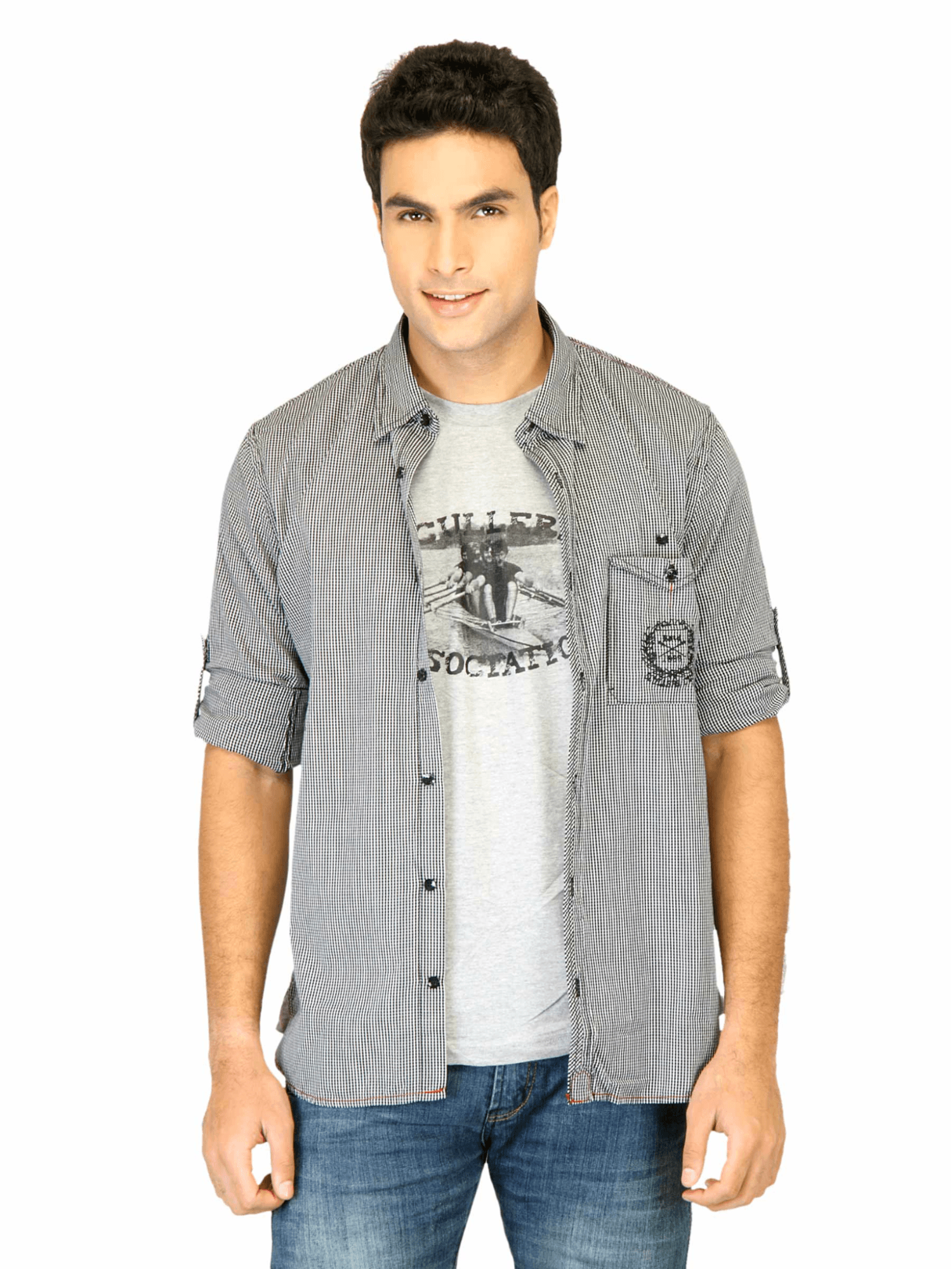
Item #13885, "Scullers Men Check Black Shirts."
How we generated the search queries
We generated our test queries without an AI language model, using rules and substitution lists.
For each product, we started from its color and article type and added one descriptive modifier, drawn at random from the product’s available metadata: neckline, pattern, sleeve length, length, surface styling, fit, fabric, season, or usage. We then reworded the query by substituting words from a fixed synonym table. This avoids making queries that reuse the catalog's own words. For example, ″t-shirt″ becomes ″tee″, ″regular fit″ becomes ″classic cut″, ″printed″ becomes ″with graphic design″, ″sleeveless″ becomes ″no sleeves″. The longest phrase with a synonym was replaced first, so we swapped ″sports shoes″ rather than ″shoes″. Because the pipeline is rule-based and seeded, query production is reproducible and all variation is accounted for. German queries were generated the same way, using a German term table, and then a native speaker corrected them for natural retail phrasing.Some examples:
The German queries used their own term table, mapping the same catalog attributes to natural German retail phrasing (later checked by a native speaker). Some examples:
The six embedding configurations we tested
We tested retrieval in six configurations, using the same text queries in each test condition and the same 5,000 product indexed dataset. For both jina-clip-v2 and jina-embeddings-v5-omni-small, we tested three different ways of generating embeddings for indexing:
- Image-only. We generated embeddings from the images alone without any other data.
- Text-only. We generated embeddings for the free text descriptions alone.
- Averaged image and text. For each product, we generated embeddings for the image and text description separately and then averaged the two vectors into one.
We used the Jina API to generate document and query embeddings for product images and free text descriptions, as shown in the code below. All images were resized to fit into a 512x512px square before processing.
We combined images and texts by embedding them separately, averaging the two vectors, and then normalizing the result so we can speed up calculating cosines. This works for multimodal models because both embeddings share the same semantic space. The sum of the two vectors is a new vector with the semantic features of both.
This is very easy to do using the numpy package in Python. We used the code below:
For this article, we did exact retrieval, calculating the cosine between queries and all 5,000 stored product embeddings. In Elasticsearch, we would use a shortcut to approximate the same result. From the ranked results, we calculate Recall@1, Recall@5, Recall@10, Mean Reciprocal Rank (MRR), and Normalized Discounted Cumulative Gain at position 10 (nDCG@10).
Each query has exactly one correct answer, so Recall@K is the share of queries whose product lands in the top K. MRR scores the results by how close the correct answer is to the top. nDCG@10 is a standard metric that penalizes putting the best answer lower on the results list.
Product search benchmark results
The table below is the German cross-lingual run. We evaluated German queries to find products with English descriptions:
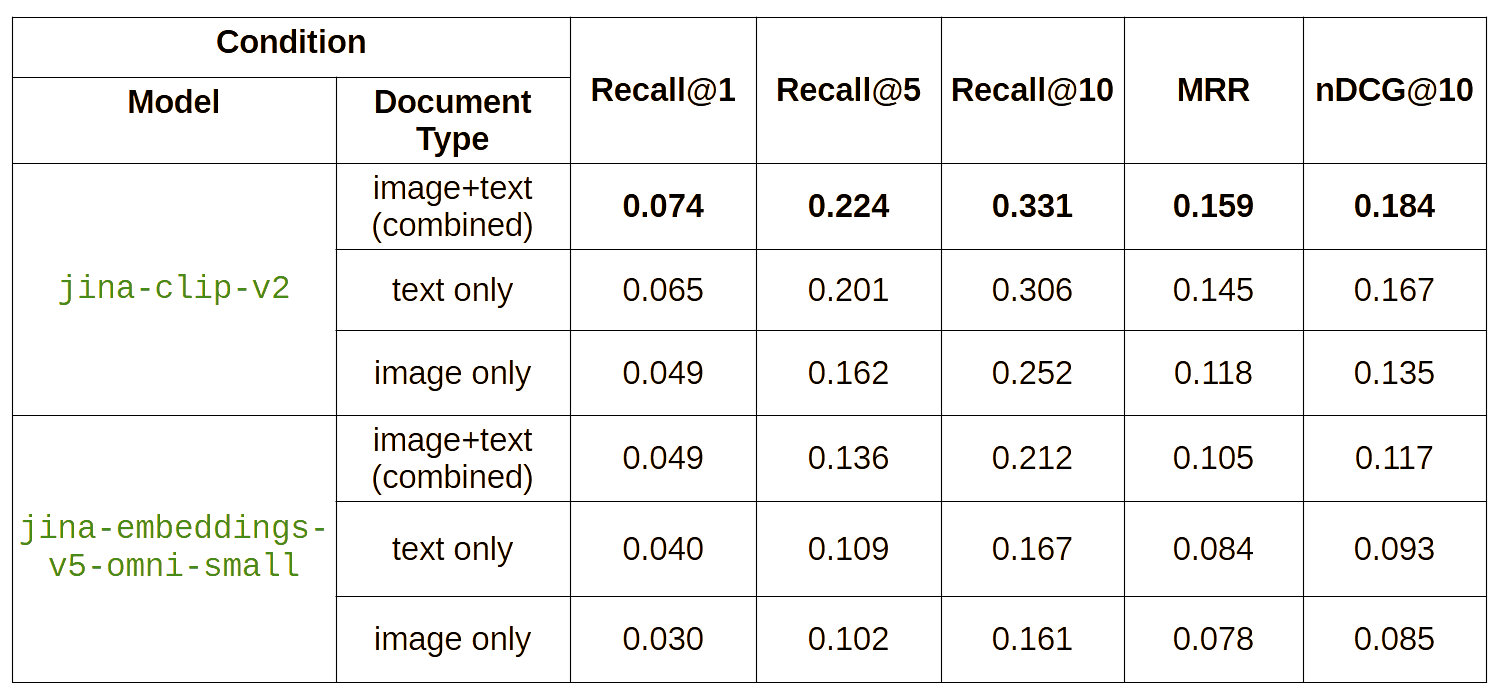
Query benchmark results for jina-clip-v2 and jina-embeddings-v5-omni-small using German-language text queries and the images and English descriptions of garments.
The averaged image/text embeddings score the best, both using jina-clip-v2 and jina-embeddings-v5-omni-small. Surprisingly, averaged vectors from jina-clip-v2 lead the table. It ranks the correct product first about 1.5 times as often as the image-only setup and significantly more often than the text-only setup. Furthermore, it beats every jina-embeddings-v5-omni-small condition. Results for the same tests using English-language queries:
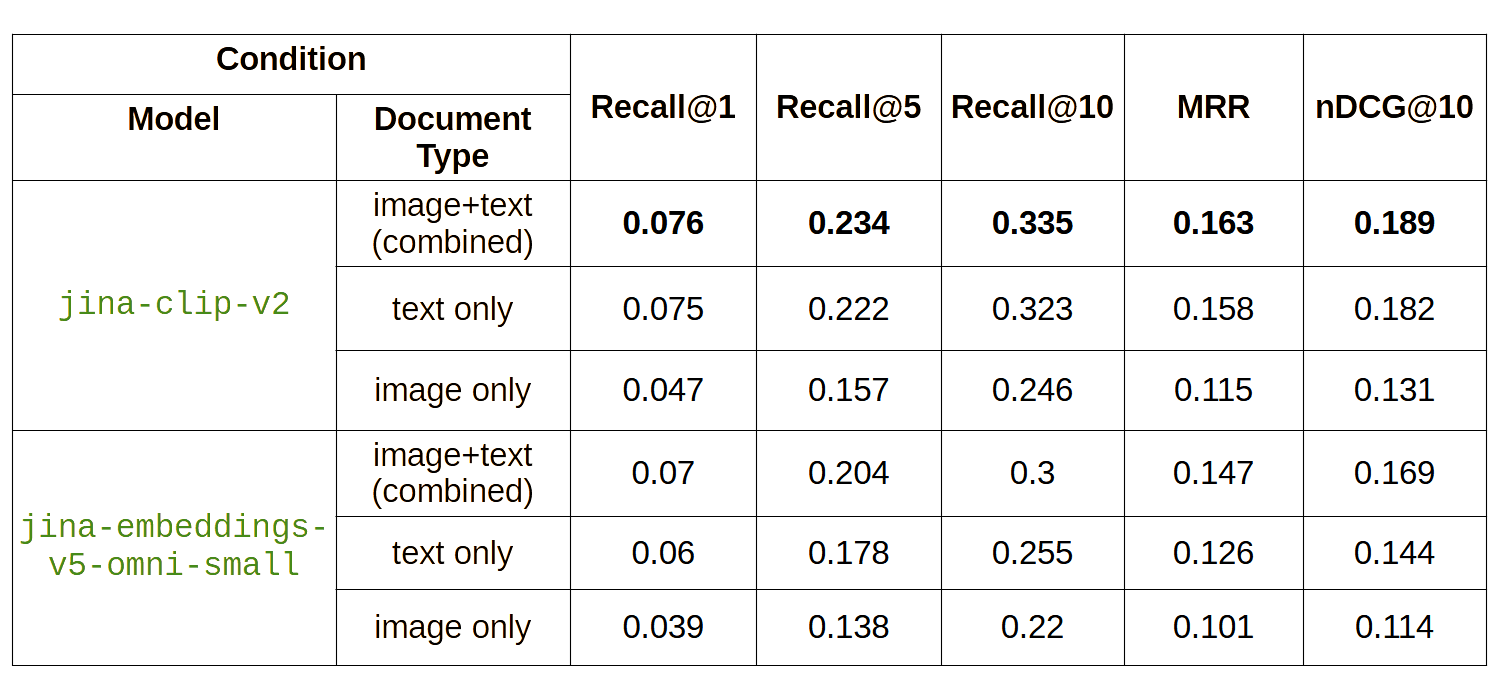
Query benchmark results for jina-clip-v2 and jina-embeddings-v5-omni-small using English-language text queries and the images and English descriptions of garments.
The English run, on the same 5,000 products, tells the same story. The main difference is that the jina-embeddings-v5-omni-small scores are significantly closer to those of jina-clip-v2, although still lower.
What the benchmark scores actually mean
The relatively low scores in the German and English benchmark tables above are to be expected. This is a real-world dataset full of near duplicates. A search for a "black tee with classic cut" has to sort through dozens of basic black T-shirts, and even on the best ecommerce sites, you would expect a result like this. The important thing to understand is the difference in scores between the different conditions, not their absolute values. Our key finding is that combining text and image embeddings yields better performance than either one alone, highlighting how multimodal AI-driven search can use different information sources to produce better performance than non-multimodal strategies.
When a picture is worth a thousand words, and when it isn’t
The gain from adding images to text embeddings isn’t evenly distributed. We did a deep dive to see if there was a pattern to the results and discovered a few things:
- Images add a lot for visually distinctive items and attributes. For example, on footwear, image-only retrieval is on par with text-only: 0.029 versus 0.028 for Recall@1. Shoe styles have distinctive shapes, so the picture does the work (image-only 0.029 versus text 0.028). The same holds for visible attributes more broadly (color, pattern, sleeve length), where fusing image and text gives the biggest lift over text-only (0.085 versus 0.073).
- Images help the least with things the model can’t see. For example, if we query for fabric types, adding images to embeddings adds next to nothing. Humans and AI models alike struggle to see that something is or isn’t made of linen or polyester or some other fabric type. That information is only in the text description and metadata.
As a rule of thumb, we find that searches for clothing lean more heavily on accurate text descriptions, while footwear leans more on the semantics of images. But in both cases, merging the two embeddings either improves results or doesn’t make them worse. This highlights how use-case–specific considerations drive optimal search strategies.
Cross-language queries gain a lot from multimodal embeddings
The gap in performance between text-only and combined image and text embeddings using jina-clip-v2 is much larger for German queries (0.074 versus 0.065 Recall@1) than for English ones (0.076 versus 0.075). This implies that English queries can take advantage of being in the same language as the product descriptions. Whether that’s due to overlaps in the words or that the model is simply more competent with single-language semantics than cross-language doesn’t matter. But adding images to the text embeddings compensates almost completely for the model’s shortcomings in cross-language retrieval.
This gap is even larger for jina-embeddings-v5-omni-small. In any kind of cross-language or multilingual context, multimodal embeddings seem to significantly improve retrieval performance.
Can AI-generated product descriptions replace human ones?
AI-generated descriptions scored worse than human-written ones in our tests. We tried replacing human-authored product descriptions with ones written by jina-vlm based on the image. For this test, we used a 1,000-product random subset. The results were much worse than with the original human text. This was what we expected: The automatically generated description was less accurate and less oriented toward the salient features of the product than the human authored one.
So it turns out that not everyone’s job can be replaced by AI. People who write blurbs for catalogs ought to be safe for now.
How should you index your ecommerce data?
Our tests aren’t totally scientifically rigorous, but they do offer some insights into the issues you might face if you have similar data. We offer the following as provisional conclusions:
- If you have aligned texts and images (and most catalogs do), combine them in your embeddings. In every case, using a multimodal embedding model like the ones Jina AI by Elastic provides and then averaging the image and text embeddings significantly outperformed all other options. The combination adds no computing costs at inference time but does create additional costs at embedding time. For each product, you’ll need to generate two embeddings and combine them, roughly doubling the cost.
- Use the right model. You need to identify a model that supports all the modalities and languages you plan to use. All the inputs have to be embedded in the same semantic vector space or none of this will work. It won’t do to get two single-modality models or multiple language-specific text models, average their outputs, and hope for the best. Jina AI by Elastic currently supports texts in up to 100 languages, including computer code and technical terminology images of all kinds, such as scans and infographics, as well as audio and video data. You can change your mind about your models later, but only if you’re willing to reindex all your data.
- Whatever you pick, test it on your own data. The only way to know what the best model is for you, your data, and your use case is to try them out. We were very surprised that our older CLIP-style model outperformed our latest on this dataset, but it was trained almost specifically for this use case. Your data and use case could easily show the opposite. This result is from one catalog, with one style of photography and one kind of query. The ranking between two models can flip with a different domain, image style, or query mix. Run the same sort of benchmark on a sample of your own products before you commit. It’s the only way to know which model really fits your case.
- Use generated descriptions to fill gaps, not to replace good text. AI isn’t a replacement for good work done by conscientious people. Replacing human-made descriptions with machine-made ones made results worse. AI should only replace humans when it has to, like when data is missing or needs to be augmented and it’s impractical to have humans fill in the gaps. Yes, we have tools that work in those situations, but they aren’t necessarily good substitutes. They’re OK substitutes, sometimes.
Average your embeddings. Semantic embeddings are very robust, and averaging them is a relatively cheap solution that doesn’t affect inference-time costs at all. This is a real boon over methods that index each modality separately and require multiple queries to satisfy a single request. But they do require compatible multimodal models.
Limitations of this product search benchmark
A few things to keep in mind before generalizing too much from this experiment:
This article doesn’t perfectly match real-world use cases. Human users make messier queries and have more ambiguous matching criteria. The queries we used were generated specifically for this data. A test with actual customer-made queries from system logs would be a better one.
Embedding averaging isn’t the same as a true joint embedding. Embedding models rely on the different parts of their input to interact in order to extract a semantic representation of the whole. The approach used here is a bit of a hack, one that relies on the robust nature of semantic embedding spaces to get the job done. We expect future models from Jina AI to produce better embeddings by supporting more than one input modality at a time.
This is one dataset in one domain with distinctive features. Fashion photography is very foreground-focused and the descriptions are attribute-rich. Other kinds of materials, even for ecommerce, may look very different. It’s important to test as much as possible with your own data or something very similar.
How to get started with multimodal product search embeddings
jina-clip-v2 and jina-embeddings-v5-omni-small are available through the Jina API, Elastic Inference Service (EIS), and Hugging Face. The omni models are free to download under a CC-BY-NC-4.0 license and free for noncommercial use, with commercial licensing through Elastic. If you use Elasticsearch, EIS exposes both models through the semantic_text field type, with non-text media in Base64 encoding.
The takeaway from this article is intended to be practical and actionable: For product search, a picture and its description aren’t the same signal. Both add information, and you don’t have to pick one. Average your multimodal embeddings, and benchmark the results with your own data to get a good picture of the kinds of results you can expect.
Related Content
July 13, 2026
The disk that never woke up: what actually decided our Qdrant vector search benchmark rematch
On the same hardware, Elasticsearch and Qdrant land in the same range at 56 QPS. The io_uring disk scorer and memory claims turned out to be the two things that mattered least.
July 10, 2026
How BBQ shrinks Jina v5 embeddings by 29x without losing recall in Elasticsearch
A hands-on test comparing BBQ and float32 vector indices in Elasticsearch, measuring memory, disk and recall@10 across five languages.
How to build search analytics on Elastic using OpenTelemetry, no extra pipeline required
How to instrument your search application to use modern Open Telemetry standard to drive insights in to your search and users.
July 7, 2026
Short queries, formal documents: how HyDE improved semantic search precision by 50% in Elasticsearch
HyDE boosts semantic search precision and recall by 50% on short queries. Here's how to implement it in Elasticsearch with the Inference API and semantic_text.
July 2, 2026
A simdvec deep-dive: How Elasticsearch uses neural-net and video-codec CPU instructions for vector search
Four ways Elasticsearch's vector search engine reuses neural-network, video-codec and cryptography CPU instructions for up to 6x speedups; with the math, the failed attempts and the benchmarks.