Agent Builder is available now GA. Get started with an Elastic Cloud Trial, and check out the documentation for Agent Builder here.
Long-running research queries require planning, delegation, and cross-checking across multiple sources. A single agent with tools can handle simple lookups, but it struggles with context limits and provides no way to validate conclusions. This article shows how to use LangChain's Deep Agents framework to build a research pipeline that:
- Plans research angles using a TODO list managed by an orchestrator.
- Delegates each angle to a specialized sub-agent with its own isolated context.
- Stores structured findings in Elasticsearch with semantic search.
- Provisions an Elastic Agent Builder agent so the team can explore results without writing queries.
How will the research pipeline work?
It asks a complex question, for example, What is the best LLM for biochemical analysis of cancer cells in mice?, and produces a structured, cross-validated set of findings stored in Elasticsearch, ready for any team member to explore through Kibana.
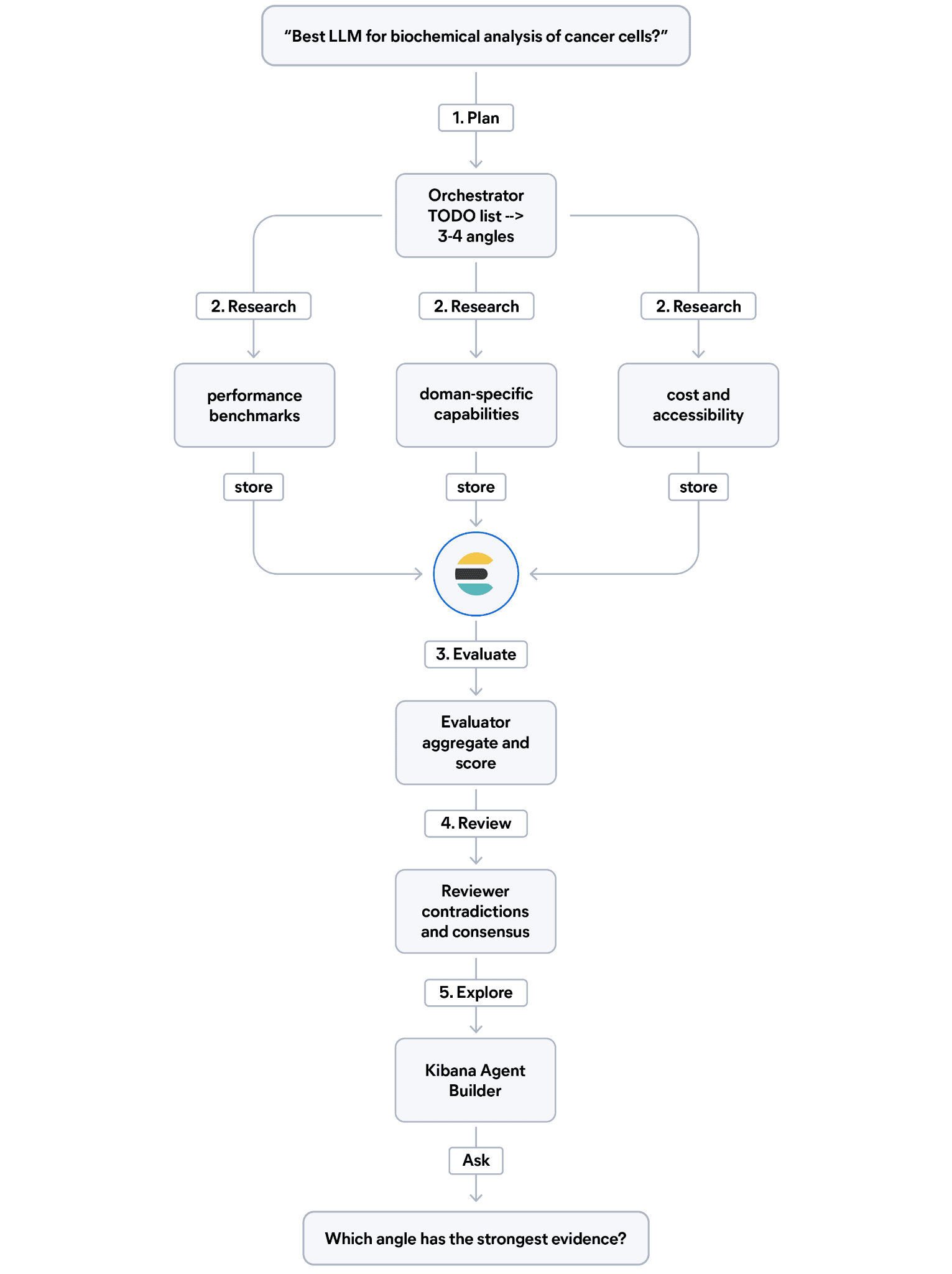
The pipeline runs in five steps:
- Plan: The orchestrator reads the question and writes a TODO list to break it into three or four research angles (for example, performance benchmarks, domain-specific capabilities, cost, and accessibility).
- Research: For each angle, a specialized sub-agent searches the web and indexes each finding in Elasticsearch with structured metadata: evidence type, relevance score, and source credibility.
- Evaluate: An evaluator sub-agent queries Elasticsearch to aggregate findings by angle and score evidence quality.
- Review: A cross-reviewer sub-agent reads all findings, flags contradictions, and identifies consensus across sources.
- Explore: An Elastic Agent Builder agent is provisioned automatically so your team can ask questions about the findings in natural language.
Prerequisites
- Elasticsearch cluster 9.3+
- Python 3.10+
- API keys for Elasticsearch, Google Gemini, and Tavily
KIBANA_URLfor your cluster
What is LangChain Deep Agents?
Deep Agents is LangChain's agent harness, a pre-assembled framework built on top of LangGraph that gives your agents capabilities that a plain large language model (LLM) with tools doesn’t have out of the box: reading and writing files, managing long-running tasks with a structured TODO list, spawning specialized sub-agents with isolated context windows, and persisting state across many steps.
Here’s how it fits in the LangChain ecosystem:
| Framework | Best for | Example |
|---|---|---|
| LangChain | Composable building blocks: prompt, LLM, output | Summarize a document, answer a question |
| LangGraph | Custom stateful workflows with branching and cycles | Multistep approval pipelines, chatbots with tool use |
| Deep Agents | Long-running autonomous research with planning, sub-agents, and memory | Systematic review with multi-agent evaluation |
Deep Agents isn’t a replacement for LangGraph. It’s a higher layer that provides a pre-assembled architecture on top of it. When you call create_deep_agent(), you get back a compiled LangGraph graph with full streaming, persistence, and checkpointing support.
The key additions Deep Agents brings over a plain LangGraph agent include:
write_todos: A built-in tool that forces the orchestrator to break down a complex task before acting. This is a context engineering strategy, not just a visual aid. It keeps long-running workflows on track.task: A built-in tool that lets the orchestrator spawn sub-agents, each with its own isolated context window. The orchestrator context stays clean, while specialists do deep work.- File I/O tools:
read_file,write_file,edit_file, and others for offloading large results to disk instead of keeping everything in context.
For a systematic research query, a plain agent with tools would search and store findings, but it wouldn’t plan research angles, delegate each angle to a specialist, or cross-evaluate the results. Deep Agents automates that pattern.
Designing the research index
A key decision in this pipeline is how to store research findings. Raw text is not ideal because you would need to answer questions like, Which findings have peer-reviewed evidence? or Which research angles have the strongest sources?
The solution is to combine structured metadata fields with a semantic_text field backed by Jina Embeddings v5:
The copy_to pattern routes the query, title, and content fields into a single semantic_text field. Elasticsearch generates embeddings automatically at index time, no ingest pipeline required. The structured metadata fields (research_angle, evidence_type, relevance_score, source_credibility) stay separate for filtering and aggregation.
This design lets you filter by angle, group by credibility, and run semantic search over all findings, all in a single query.
The tool set
Each agent in the pipeline gets only the tools it needs. This keeps sub-agent behavior predictable and reduces the risk of a specialist doing work outside its role.
Three tools power the pipeline:
web_search: Wraps Tavily to retrieve and format web results. Used only by the researcher sub-agent.store_finding: Indexes a structured document into Elasticsearch. It enforces the metadata schema: The caller must provideresearch_angle,evidence_type(benchmark, case_study, peer_reviewed, expert_opinion),relevance_score(1.0-10.0), andsource_credibility(peer_reviewed, preprint, industry_report, blog, documentation). Used only by the researcher sub-agent.query_elasticsearch: Accepts a raw JSON Elasticsearch query body and returns the response. This gives agents full query flexibility: Match queries, aggregations, term filters, and more. Used by the evaluator and reviewer sub-agents to analyze stored findings without writing new ones.
The docstring in query_elasticsearch includes example query bodies. This is intentional: The LLM uses the docstring to understand what queries are possible, so concrete examples improve the sub-agents' output quality.
Orchestrator and sub-agents
The pipeline has four stages: Plan, Research, Evaluate, Review. The orchestrator drives all four by delegating to three specialized sub-agents.
First, define the sub-agents. Each one gets only the tools it needs. The angle-researcher cannot query findings; the finding-evaluator and cross-reviewer cannot store new ones. This separation prevents the evaluator from adding findings during evaluation, which would corrupt the assessment.
Now, create the orchestrator and wire the sub-agents to it. The orchestrator system prompt enforces the four-stage sequence as a numbered procedure; this is how you get reliable behavior from a long-running agent. Sub-agents have isolated context windows: Each call to task starts a fresh context, so the orchestrator's context does not grow with each delegation. This is the core architectural advantage of Deep Agents for long-running work.
Running the pipeline
The pipeline runs with streaming to show progress in real time. The subgraphs=True flag exposes events from sub-agents alongside the orchestrator's own events:
During execution, you can observe the orchestrator calling write_todos with the research angles before delegating. Each task call hands off to a sub-agent, and the events in chunk["ns"] let you distinguish sub-agent output from the orchestrator's own steps.
The pipeline handles multiple queries in the same session. Findings from all queries accumulate in the same Elasticsearch index, which makes the final Agent Builder exploration more interesting. For example, running both What is the best LLM for biochemical analysis? and What is the best front-end framework for a Deep Agent service? stores findings from different domains in the same index, and the Agent Builder can compare patterns across both.
Exploring findings with Elastic Agent Builder
After the pipeline runs, all findings are in Elasticsearch, but most team members cannot write Elasticsearch queries. What makes Elastic Agent Builder a good fit here is how fast you go from indexed data to a working agent that your team can use, in this case, a few API calls are enough to create an agent grounded in the research findings. Let's create one programmatically so people can explore the findings through the Kibana UI.
First, create an Elasticsearch Query Language (ES|QL) tool that aggregates the research index:
Then create the Agent Builder agent, and attach the tool:
Once created, the Research Explorer appears in Kibana's Agent Builder UI. Team members can open it and ask questions in natural language:
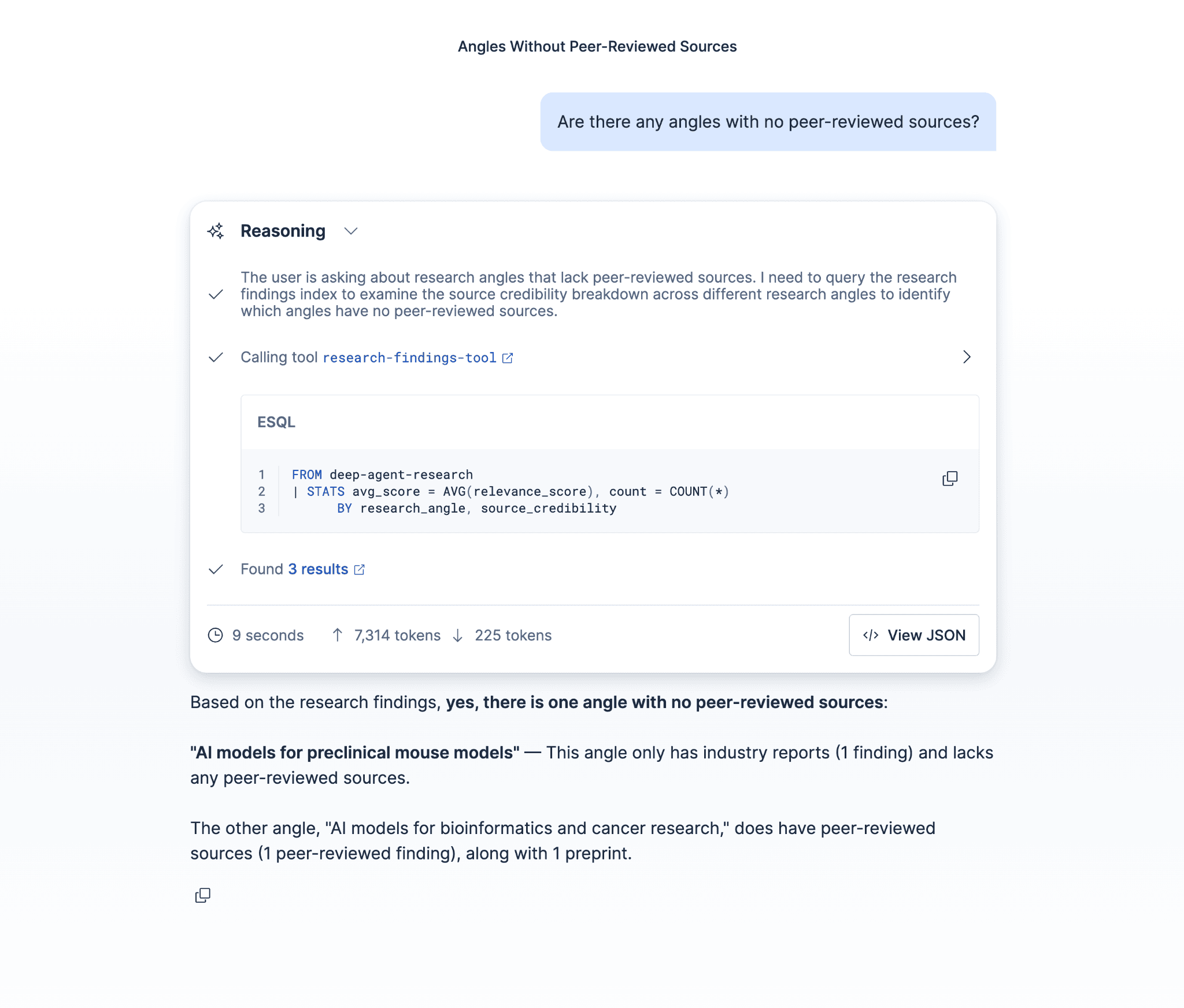
The agent uses the ES|QL tool to query the index and summarizes the results. No query writing required.
This is the full cycle: Deep Agents does the systematic research, Elasticsearch stores structured findings, and Agent Builder makes those findings accessible to anyone on the team.
Conclusion
What we covered:
- Deep Agents for long-running research:
write_todosforces planning before execution, and thetasktool delegates each research angle to a sub-agent with an isolated context window. This pattern handles queries that would overwhelm a single agent. - Elasticsearch as a structured knowledge store: Storing
research_angle,evidence_type,relevance_score, andsource_credibilityalongsidesemantic_textenables both semantic search and structured aggregation over research quality. Raw text storage would not support the evaluator and reviewer agents. - Agent Builder as the access layer: Provisioning the Kibana agent programmatically at the end of the pipeline means findings are immediately explorable through the UI, without any manual setup.
This pattern applies to any domain where you need to research a question from multiple angles and cross-validate the results: competitive intelligence, scientific literature reviews, regulatory compliance research, or multisource fact-checking.
Next steps
- Try the full notebook on GitHub.
- Add human-in-the-loop approval gates to the pipeline using LangGraph's interrupt pattern.
- Look how to build a reference architecture for agentic applications using the Elastic Agent Builder and Model Context Protocol (MCP).
- Extend the ES|QL tool in Agent Builder to support parameterized queries for filtering by angle or date range.
関連記事
2026年7月20日
AI shopping agents: Why context comes before the query
AI shopping agents that guess at your vocabulary make expensive mistakes. Pre-computed catalog context stops the guessing before the first tool call.
2026年6月30日
Building a multilingual voice agent with Elastic Agent Builder & Sarvam AI
A working demo combining Sarvam AI speech with Elastic Agent Builder: identity verification, per-customer ES|QL queries, and mid-call language switching across 22 Indian languages without multilingual indices.
2026年6月26日
Talk to your Elasticsearch data: building a real-time voice agent with Google ADK and MCP in 3 components
Wire Google ADK's real-time voice streaming to your Elasticsearch data via Agent Builder's built-in MCP server; no custom integration code required.
2026年6月22日
Your data analyst doesn't need SQL: wiring Elastic Agent Builder to AWS AgentCore for natural-language Elasticsearch queries
Wire plain-English questions to your Elasticsearch data using Elastic Agent Builder MCP, AWS Bedrock AgentCore and the Strands SDK. Python code included.
2026年7月6日
Who grades the grader? LLM-as-a-Judge inside Elasticsearch Workflows
Find out if your RAG agent is ready to ship. Score it on correctness, faithfulness and retrieval quality using only Elasticsearch Workflows and two Claude models.