Elasticsearch has native integrations with the industry-leading Gen AI tools and providers. Check out our webinars on going Beyond RAG Basics, or building prod-ready apps with the Elastic vector database.
To build the best search solutions for your use case, start a free cloud trial or try Elastic on your local machine now.
We’ve integrated Azure OpenAI chat completions in the inference API, which allows our customers to build powerful GenAI applications based on chat completion using large language models like GPT-4 Azure and Elasticsearch developers can utilize the unique capabilities of the Elasticsearch vector database and the Azure AI ecosystem to power unique GenAI applications with the model of their choice.
This blog quickly goes over the catalog of supported providers in the open inference API and explains how to use Azure’s OpenAI chat completions to answer questions through an example.
The inference API is growing…fast!
We’re heavily extending the catalog of supported providers in the open inference API. Check out some of our latest blog posts on Elastic Search labs to learn more about recent integrations around embeddings, completions and reranking:
- Elasticsearch open inference API adds support for Azure Open AI Studio
- Elasticsearch open inference API adds support for Azure Open AI embeddings
- Elasticsearch open inference API adds support for OpenAI chat completions
- Elasticsearch open Inference API adds support for Cohere’s Rerank 3 model
- Elasticsearch open inference API adds support for Cohere Embeddings
- ...more to come!
Azure OpenAI chat completions support is available through the open inference API in our stateless offering on Elastic Cloud. It’ll also be soon available to everyone in an upcoming versioned Elasticsearch release. This also complements the capability to use the Elasticsearch vector database in the Azure OpenAI service.
Using Azure’s OpenAI chat completions to answer questions
In my last blog post about OpenAI chat completions we’ve learned how to summarize text using OpenAI’s chat completions. In this guide we’ll use Azure OpenAI chat completions to answer questions during ingestion to have answers ready ahead of searching. Make sure you have your Azure OpenAI api key, deployment id and resource name ready by creating a free Azure account first and setting up a model suited for chat completions. You can follow Azure's OpenAI Service GPT quickstart guide to get a model up and running. In the following example we’ve used `gpt-4` with the version `2024-02-01`. You can read more about supported models and versions here.
In Kibana, you'll have access to a console for you to input these next steps in Elasticsearch without even needing to set up an IDE.
First, we configure a model, which will perform completions:
You’ll get back a response similar to the following with status code `200 OK` on successful inference creation:
You can now call the configured model to perform completion on any text input. Let’s ask the model what’s inference in the context of GenAI:
You should get back a response with status code `200 OK` explaining what inference is:
Now we can set up a small catalog of questions, which we want to be answered during ingestion. We’ll use the Bulk API to index three questions about products of Elastic:
You’ll get back a response with status `200 OK` back similar to the following upon successful indexing:
We’ll create now our question and answering ingest pipeline using the script-, inference- and remove-processor:
This pipeline prefixes the content with the instruction “Please answer the following question: “ in a temporary field named `prompt`. The content of this temporary `prompt` field will be sent to Azure’s OpenAI Service through the inference API to perform a completion. Using an ingest pipeline allows for immense flexibility as you can change the pre-prompt to anything you would like. This allows you to summarize documents for example, too. Check out Elasticsearch open inference API adds support for OpenAI chat completions to learn about how to build a summarisation ingest pipeline!
We now send our documents containing questions through the question and answering pipeline by calling the reindex API.
You'll get back a response with status 200 OK similar to the following:
In a real world setup you’ll probably use another ingestion mechanism to ingest your documents in an automated way. Check out our Adding data to Elasticsearch guide to learn more about the various options offered by Elastic to ingest data into Elasticsearch. We’re also committed to showcase ingest mechanisms and provide guidance on how to bring data into Elasticsearch using 3rd party tools. Take a look at Ingest Data from Snowflake to Elasticsearch using Meltano: A developer’s journey for example on how to use Meltano for ingesting data.
You're now able to search for your pre-generated answers using the Search API:
In the response you'll get back your pre-generated answers:
Pre-generating answers for frequently asked questions is particularly effective in reducing operational costs. By minimizing the need for on-the-fly response generation, you can significantly cut down on the amount of computational resources required like token usage. Additionally, this method ensures that every user receives the same, precise information. Consistency is crucial, especially in fields requiring high reliability and accuracy such as medical, legal, or technical support.
More to come!
We’re already working on adding support for more task types using Cohere, Google Vertex AI and many more. Furthermore we’re actively developing an intuitive UI in Kibana for managing Inference endpoints. Lots of exciting stuff to come! Bookmark Elastic Search Labs now to keep with Elastic’s innovations in the GenAI space!
관련 콘텐츠
2026년 7월 7일
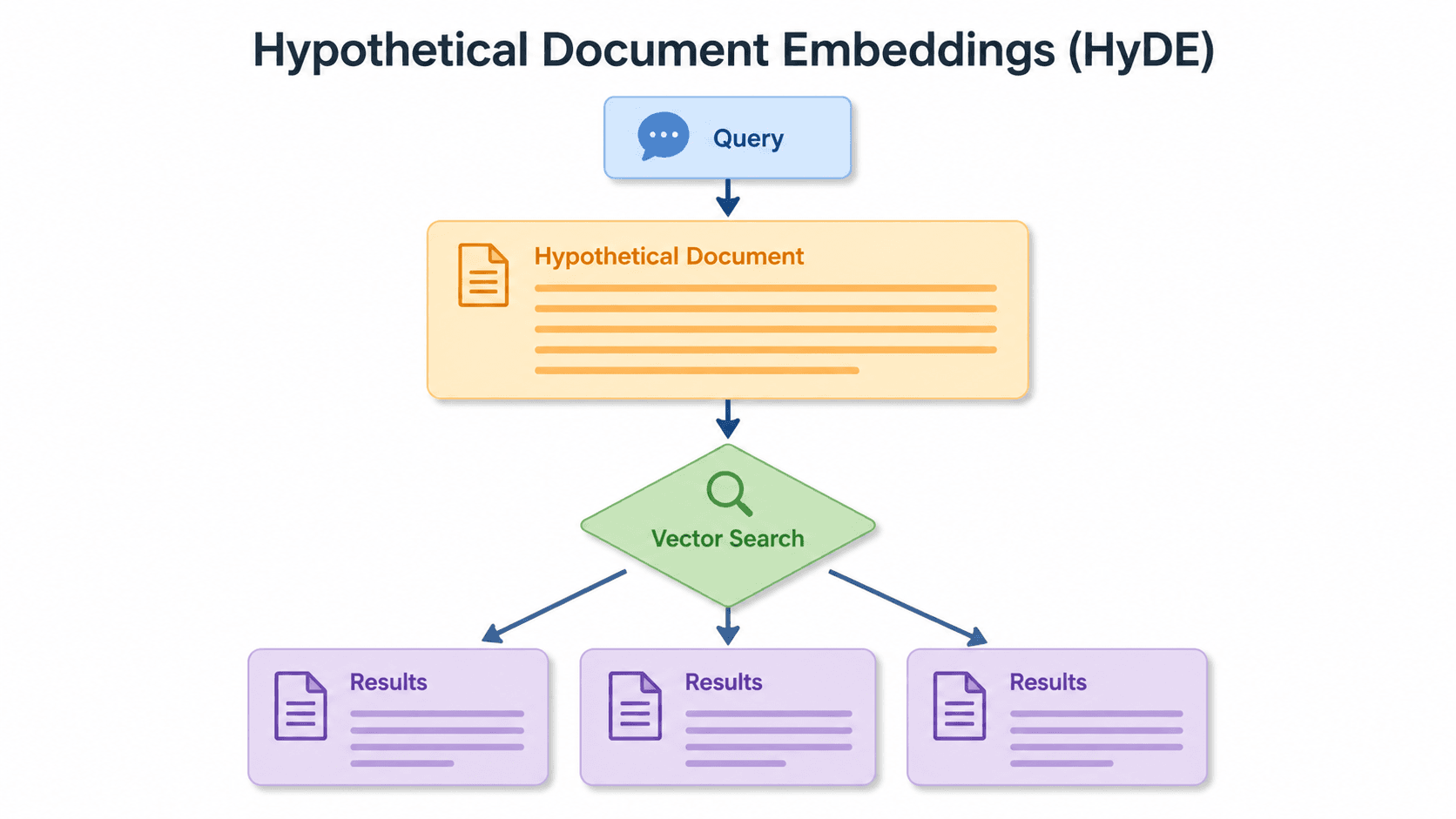
Short queries, formal documents: how HyDE improved semantic search precision by 50% in Elasticsearch
HyDE boosts semantic search precision and recall by 50% on short queries. Here's how to implement it in Elasticsearch with the Inference API and semantic_text.
2026년 6월 24일
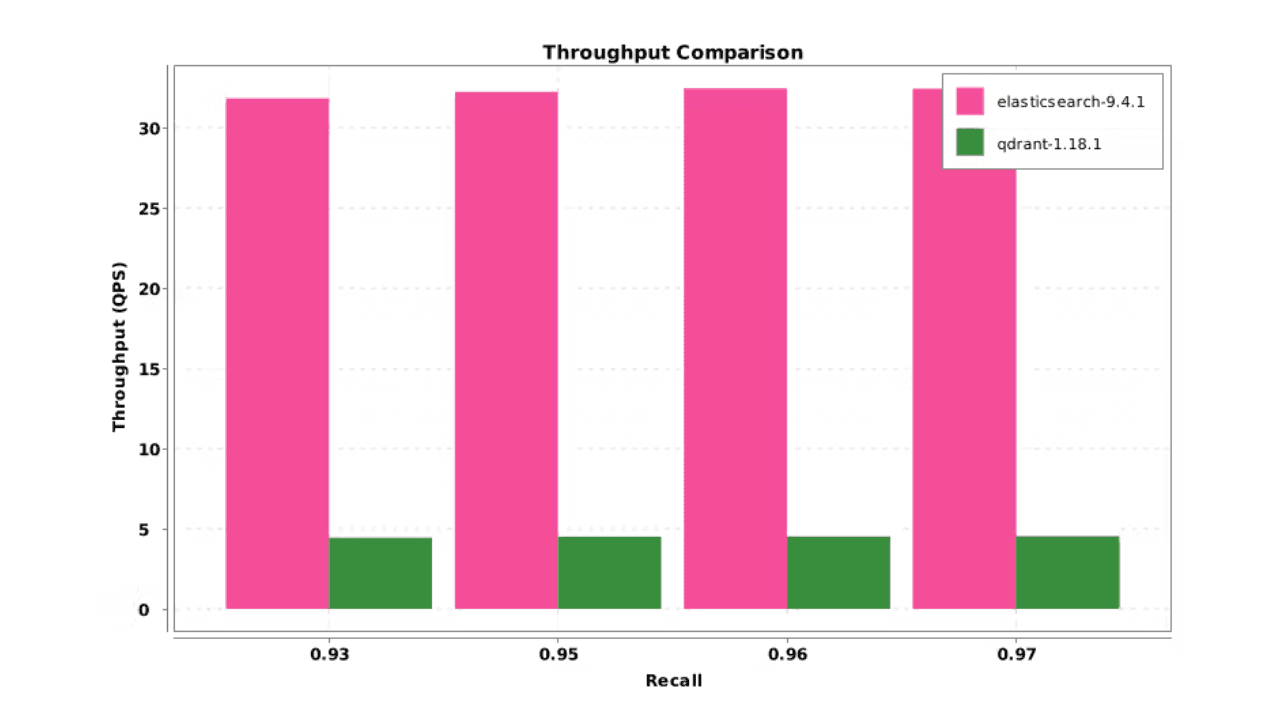
Elasticsearch DiskBBQ delivers 7x faster vector search than Qdrant on network-attached storage
Elasticsearch DiskBBQ achieves up to 7x higher vector search throughput than Qdrant at comparable recall on network-attached storage. Explore the benchmark methodology and full results.
2026년 7월 6일
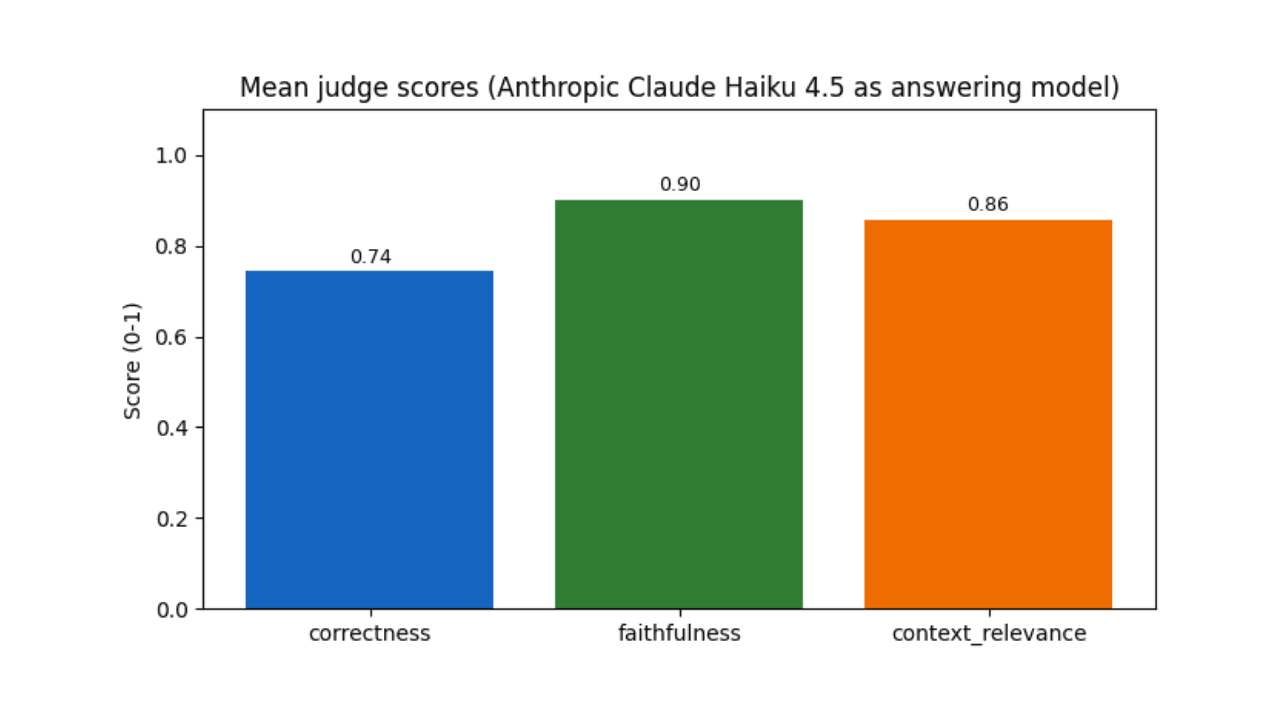
Who grades the grader? LLM-as-a-Judge inside Elasticsearch Workflows
Find out if your RAG agent is ready to ship. Score it on correctness, faithfulness and retrieval quality using only Elasticsearch Workflows and two Claude models.

2026년 6월 15일
Your search index is already an agent memory system: Persistent agent memory for Claude Code with Elasticsearch
Give your AI agent persistent cross-session memory using Elasticsearch: Hybrid recall, a knowledge graph, and cross-device handoffs. Three commands to install.

2026년 6월 15일
Your FAQ bot doesn't need a PhD: LLM query routing with Elastic Workflows
Route LLM queries by complexity using Elasticsearch search metadata: Mistral Small for FAQ questions, Claude Sonnet for multi-source synthesis.