Agent Builder is available now GA. Get started with an Elastic Cloud Trial, and check out the documentation for Agent Builder here.
Build a complete RAG evaluation pipeline inside Elasticsearch Workflows: no external eval framework, no extra infrastructure. A small model answers questions from your knowledge base; a stronger model scores each answer on correctness, faithfulness and context relevance. On a 35-case HotpotQA test, Claude Haiku 4.5 scored 0.74 correctness and 0.90 faithfulness: enough to pinpoint exactly where retrieval or reasoning breaks down. The knowledge base, judgement list, workflow execution and scored results all live in the same system.
Prerequisites
- An Elastic Cloud cluster or self-managed Elasticsearch/Kibana 9.4+. You can start a free trial if you don't have one.
- Python 3.13
What is LLM-as-a-Judge?
LLM-as-a-Judge uses a stronger language model to automatically score the outputs of a weaker one, replacing inconsistent, unscalable manual review.
Evaluating a RAG system by hand works for a few questions, but it doesn’t scale. If you change your retrieval strategy, your prompt, or your model, you need to recheck every answer. That takes time, and humans are inconsistent scorers.
The LLM-as-a-Judge pattern solves this by typically using a strong language model to score the outputs of a weaker one. The idea is straightforward: If a language model can reliably tell whether an answer is correct, you can automate quality checks across hundreds of test cases in minutes.
In this article, the pipeline has two stages:
- Stage 1 (Answer): Claude Haiku 4.5 receives a question plus passages retrieved from a knowledge base and produces an answer. This is the model you’re evaluating.
- Stage 2 (Judge): Claude Sonnet 4.6 receives the same question, the ground-truth answer (the known correct answer), the candidate answer (Stage 1's output), and the passages. It scores the response on three axes.
The three RAG evaluation metrics: correctness, faithfulness, context relevance
| Metric | What it measures | What a low score means |
|---|---|---|
| correctness | Does the candidate match the ground truth? | The agent answered the wrong thing. |
| faithfulness | Is the answer grounded in the retrieved passages? | The agent hallucinated (made something up). |
| context_relevance | Are the retrieved passages relevant to the question? | Retrieval brought the wrong documents. |
Together, these three metrics tell you where a problem lives. A high correctness with low context_relevance is a red flag: The model answered correctly despite poor retrieval, likely by falling back on its own training data. That works for public knowledge, like Wikipedia, but breaks on private data the model has never seen. A complementary approach using Ragas metrics with Elasticsearch explores these evaluation dimensions from a framework-based perspective.
How to load and index the HotpotQA dataset
The pipeline uses HotpotQA in the distractor configuration: multi-hop questions, each paired with 10 context paragraphs, stored across two Elasticsearch indices. You can follow along with the complete notebook for this article, which includes the setup, connection, and all helper code. For this tutorial, you’ll need your ELASTICSEARCH_URL and an ELASTICSEARCH_API_KEY, which you can obtain by following the connection details guide, and your KIBANA_URL, found on the Kibana access page.
The pipeline uses two AI connectors configured in Kibana: Anthropic Claude Haiku 4.5 as the answering model (small, cheap, fast) and Anthropic Claude Sonnet 4.6 as the judge (more capable). This pipeline answers the question: Is Haiku good enough on this task to be used in production?
We use HotpotQA in the distractor configuration. Each question ships with 10 context paragraphs: two that support the answer and eight distractors. These paragraphs are indexed into the knowledge base that Stage 1 retrieves from. The questions are multi-hop, meaning the answer requires combining information from two different paragraphs.
We sample a subset of questions, flatten their context paragraphs into a knowledge base index, and store the question-answer pairs in a separate judgement list. The data ends up in two Elasticsearch indices:
Knowledge base: Context passages
hotpot-knowledge-base holds the context passages that the answering model retrieves from. Each document has a title and a passage:
The passage field is copied to semantic_content (mapped as semantic_text) so Stage 1 can retrieve relevant passages using a natural language query without managing embeddings manually.
Elasticsearch automatically generates the embeddings for the indexed passages and for the queries at semantic search time.
Judgement list: Questions and expected answers
hotpot-judgement-list holds the evaluation cases. Each document has a question and an answer (the ground truth):
The answer field contains the right answer. The judge in Stage 2 compares the answering model's output against it.
How the Elasticsearch Workflow runs the evaluation
This introduction to building automation with Elastic Workflows covers the core concepts of triggers, steps, and data flow in detail.
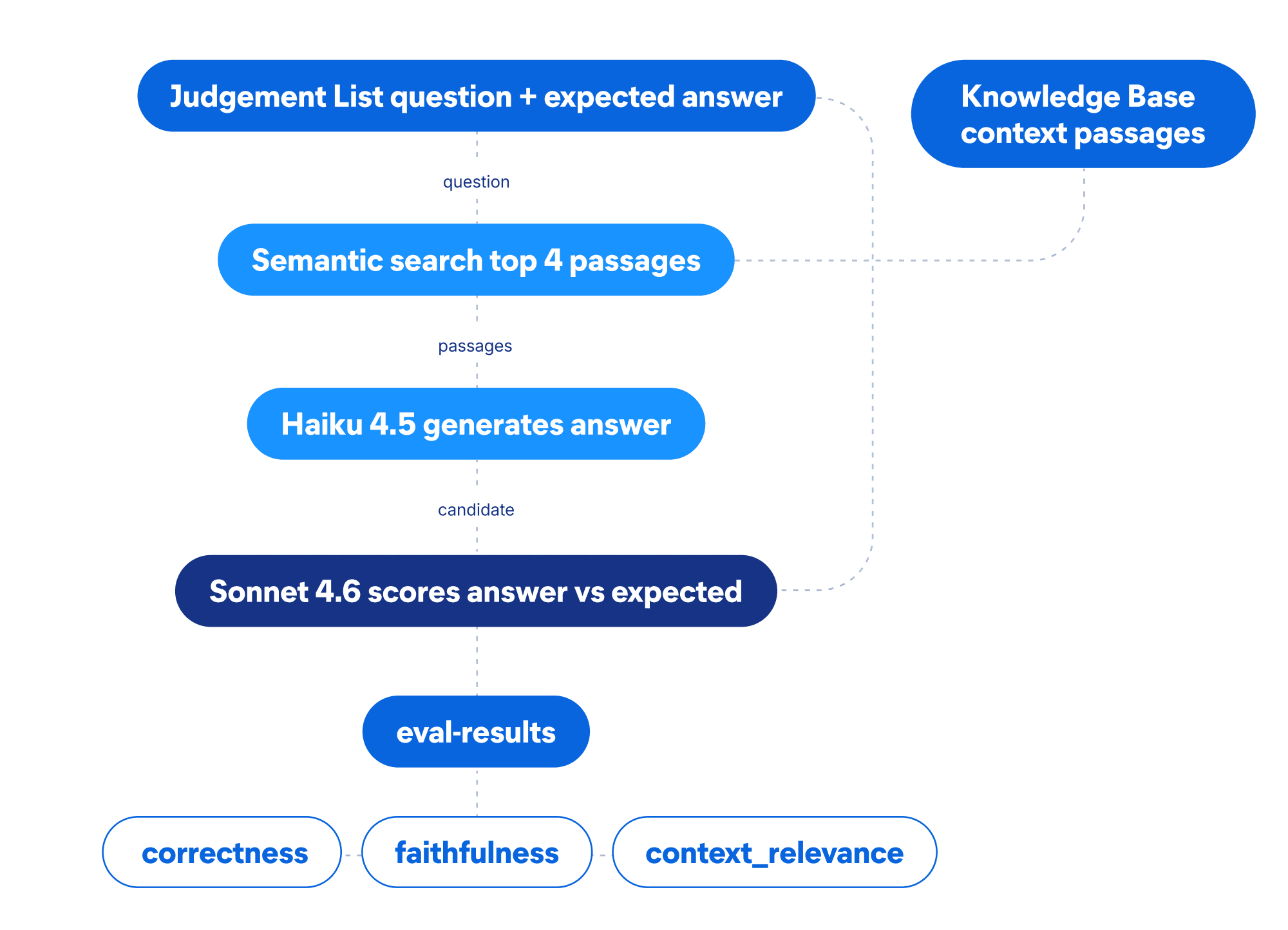
Workflow definition
The workflow is defined in YAML and uploaded via the Workflows API (Elastic 9.4+). Here’s the complete definition:
Let's walk through the key parts:
consts: Named constants for index names. This keeps the YAML clean and makes it easy to point the same pipeline at a different dataset.load_cases: Anelasticsearch.searchstep that pulls all test cases from the judgement list.eval_loop: Aforeachstep that iterates over the search results. Each iteration runs the four nested steps:retrieve: Runs a semantic search against the knowledge base using the question as the query.agent_answer: Anai.promptstep that sends the question plus the top four retrieved passages to Haiku. Theconnector-idfield references the Kibana AI Connector.judge: Anotherai.promptstep, this time hitting Sonnet. Theschemablock forces the model to return a typed JSON object with exactly the fields we need. No markdown fences, no regex, no parsing on read. Theminimumandmaximumconstraints keep scores in the 0–1 range.save: Anelasticsearch.indexstep that writes each scored case to the results index. Because the judge output is already parsed JSON (thanks toschema), we can reference individual fields directly:{{ steps.judge.output.content.correctness }}.
Upload and run the workflow
Elastic 9.4 ships a REST API for workflows. We use three endpoints:
POST /api/workflowsto create the workflow from YAML.POST /api/workflows/{id}/runto start an execution.GET /api/workflows/executions/{id}to poll until it finishes.
With 35 test cases, the workflow takes a few minutes to complete. Each iteration involves a semantic search, a large language model (LLM) call for the answer, another LLM call for the judge, and an index operation.
How to read and interpret RAG evaluation results
Each scored case is already a document in the eval-results index with typed score fields. No parsing needed: We query the index and compute the mean for each metric.
Aggregated RAG evaluation scores across 35 test cases
The bar chart below shows the mean score for each metric across all 35 test cases (Haiku as answering model):
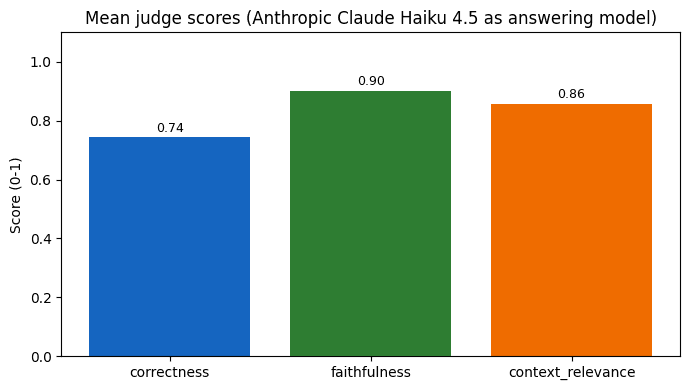
In this evaluation run using Claude Haiku 4.5 as the answering model, the results were::
- correctness: 0.74: It got roughly 7 out of 10 questions right. For multi-hop Wikipedia questions, this is reasonable but leaves room for improvement.
- faithfulness: 0.90: When Haiku does answer, it stays grounded in the passages. Hallucination is not a major problem here.
- context_relevance: 0.86: The semantic retrieval brought relevant passages most of the time, though some multi-hop questions needed passages that weren’t in the top four.
The gap between faithfulness (0.90) and correctness (0.74) tells us the model is not making things up, it just misses the right answer on harder questions. That’s a retrieval or reasoning problem, not a hallucination problem. Increasing the number of retrieved passages or switching to a stronger model for the hardest cases are both viable paths forward.
What the RAG evaluation results mean for production
We built a complete evaluation pipeline that runs entirely inside Elasticsearch. The knowledge base, the judgement list, the workflow execution, and the scored results all live in the same system.
The workflow YAML is version-controllable, replayable, and can be triggered via the API. If you update your knowledge base or change your answering model, you rerun the same pipeline and compare the new scores against the old ones.
For this specific dataset, the numbers suggest that Haiku is faithful but not always correct on multi-hop questions. Whether that’s good enough depends on your use case, with your own data. The point of the eval pipeline is to give you the data to make that decision with confidence, instead of guessing.
Next steps
From here, you can:
- Expand the judgement list with domain-specific questions that reflect your actual production traffic.
- Swap the answering model to compare how different models perform on the same test set.
- Schedule the workflow to run automatically after new documents are indexed.
- Build a Kibana dashboard over the
eval-resultsindex to track quality over time.
Related articles:
관련 콘텐츠
How to instrument your search API with OpenTelemetry and query it with ES|QL
Add custom attributes to OpenTelemetry spans and run six ES|QL queries that reveal your top searches, zero-result rate and slowest queries.
2026년 7월 20일
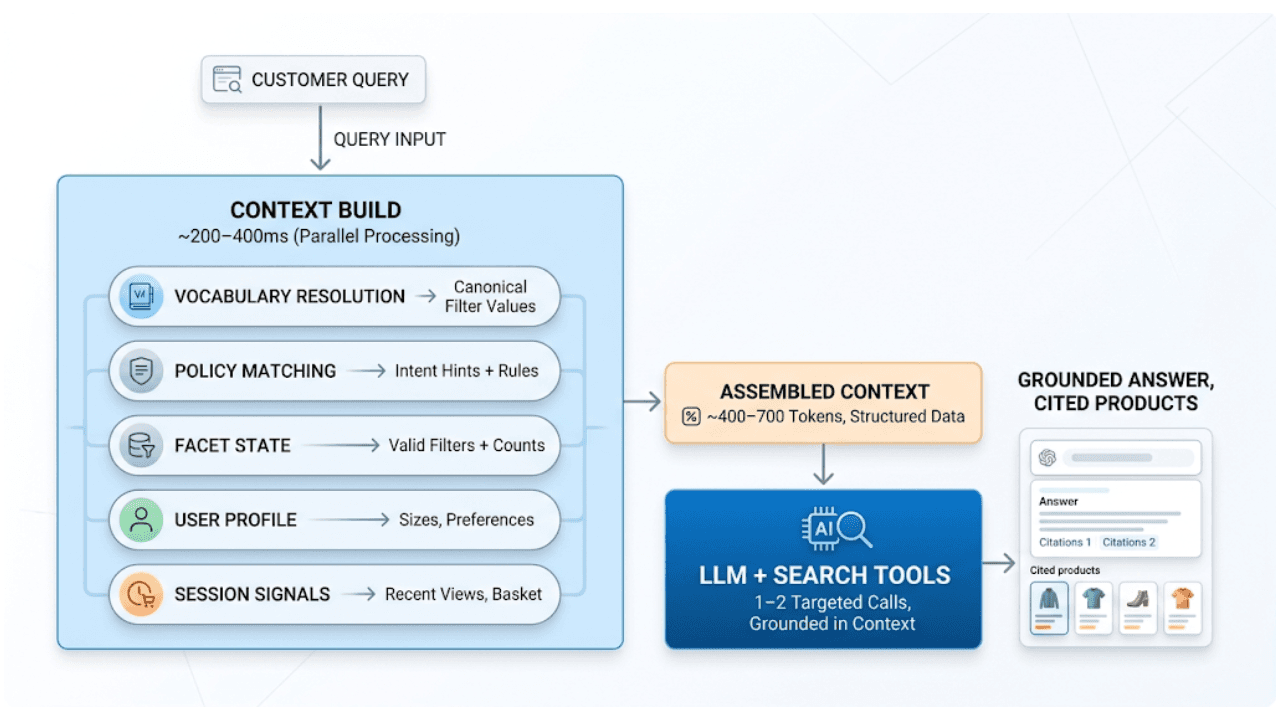
AI shopping agents: Why context comes before the query
AI shopping agents that guess at your vocabulary make expensive mistakes. Pre-computed catalog context stops the guessing before the first tool call.
2026년 7월 7일
Short queries, formal documents: how HyDE improved semantic search precision by 50% in Elasticsearch
HyDE boosts semantic search precision and recall by 50% on short queries. Here's how to implement it in Elasticsearch with the Inference API and semantic_text.
2026년 6월 30일
Building a multilingual voice agent with Elastic Agent Builder & Sarvam AI
A working demo combining Sarvam AI speech with Elastic Agent Builder: identity verification, per-customer ES|QL queries, and mid-call language switching across 22 Indian languages without multilingual indices.
2026년 6월 24일
Elasticsearch DiskBBQ delivers 7x faster vector search than Qdrant on network-attached storage
Elasticsearch DiskBBQ achieves up to 7x higher vector search throughput than Qdrant at comparable recall on network-attached storage. Explore the benchmark methodology and full results.