

 Share on Twitter
Share on Twitter

 Share on LinkedIn
Share on LinkedIn

 Share on Facebook
Share on Facebook

 Share by Email
Share by Email

 Print this page
Print
Hello from the Elastic DevRel team! In this newsletter, we cover the new Agent Builder feature, free on-demand trainings, the latest blogs and videos, and upcoming events.
What’s new?
The journey of AI agents and Model Context Protocol (MCP) in Elasticsearch has quickly evolved. Some milestones include:
Exposing APIs through a stand-alone MCP gateway
- To search templates with placeholders
- Integrating Elastic AI Agent Builder directly in Kibana
While still in preview and behind a feature flag, you can already experiment with it on Elastic Cloud Serverless to transform ES|QL queries into reusable tools, group them into agents, and use them to solve multistep tasks on top of your Elasticsearch data:
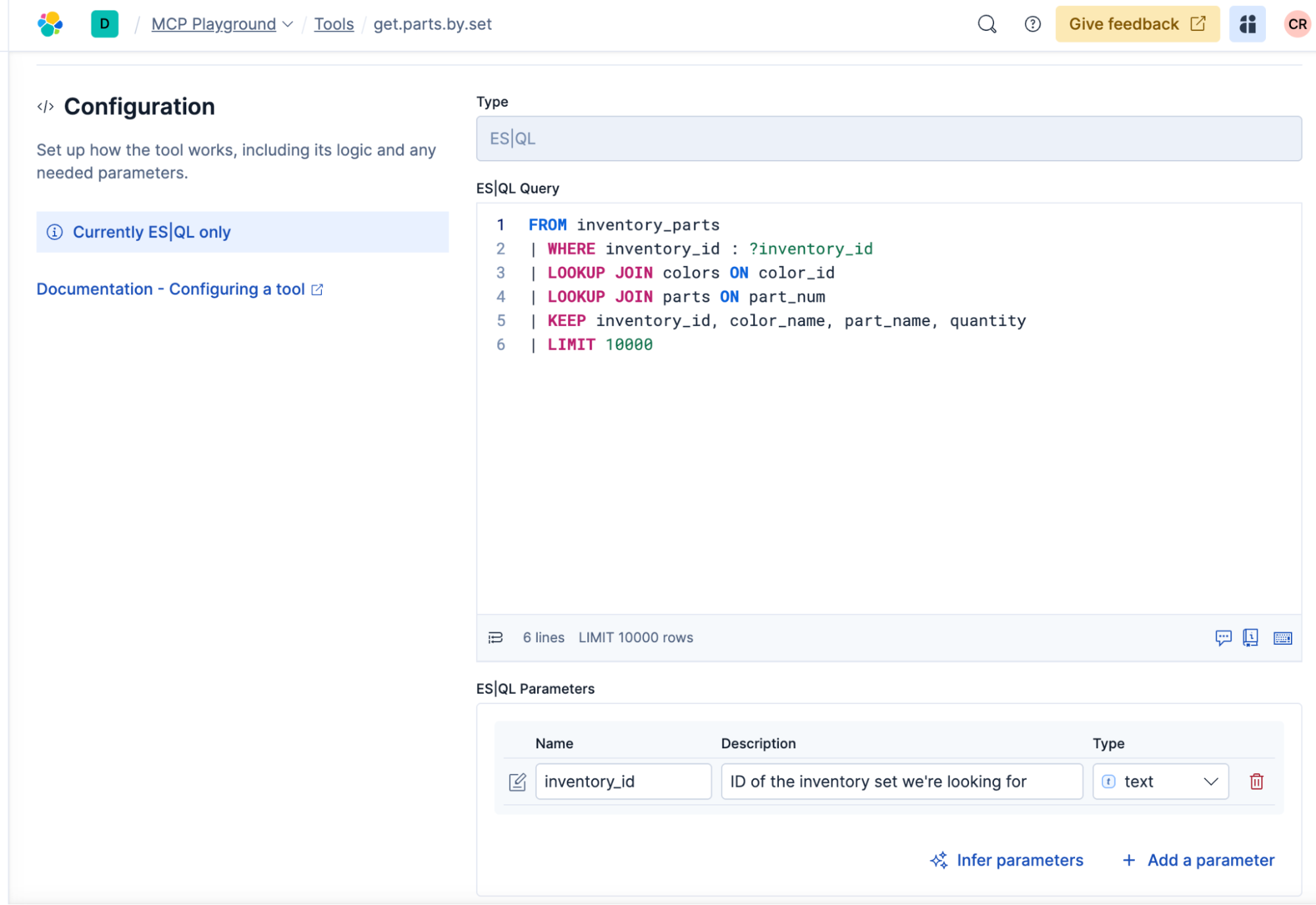
ES|QL as tools: Any ES|QL query — with joins, aggregations, vector or hybrid search, and geo queries — can be turned into a tool. Kibana ships with a set of defaults like get mappings or get documents by ID, but you can define your own domain-specific ones.
Agents and Agent2Agent (A2A) orchestration: Tools can be combined into agents that execute sequences of steps automatically. With A2A support, those agents can even call each other, making it possible to compose workflows that cross boundaries between use cases.
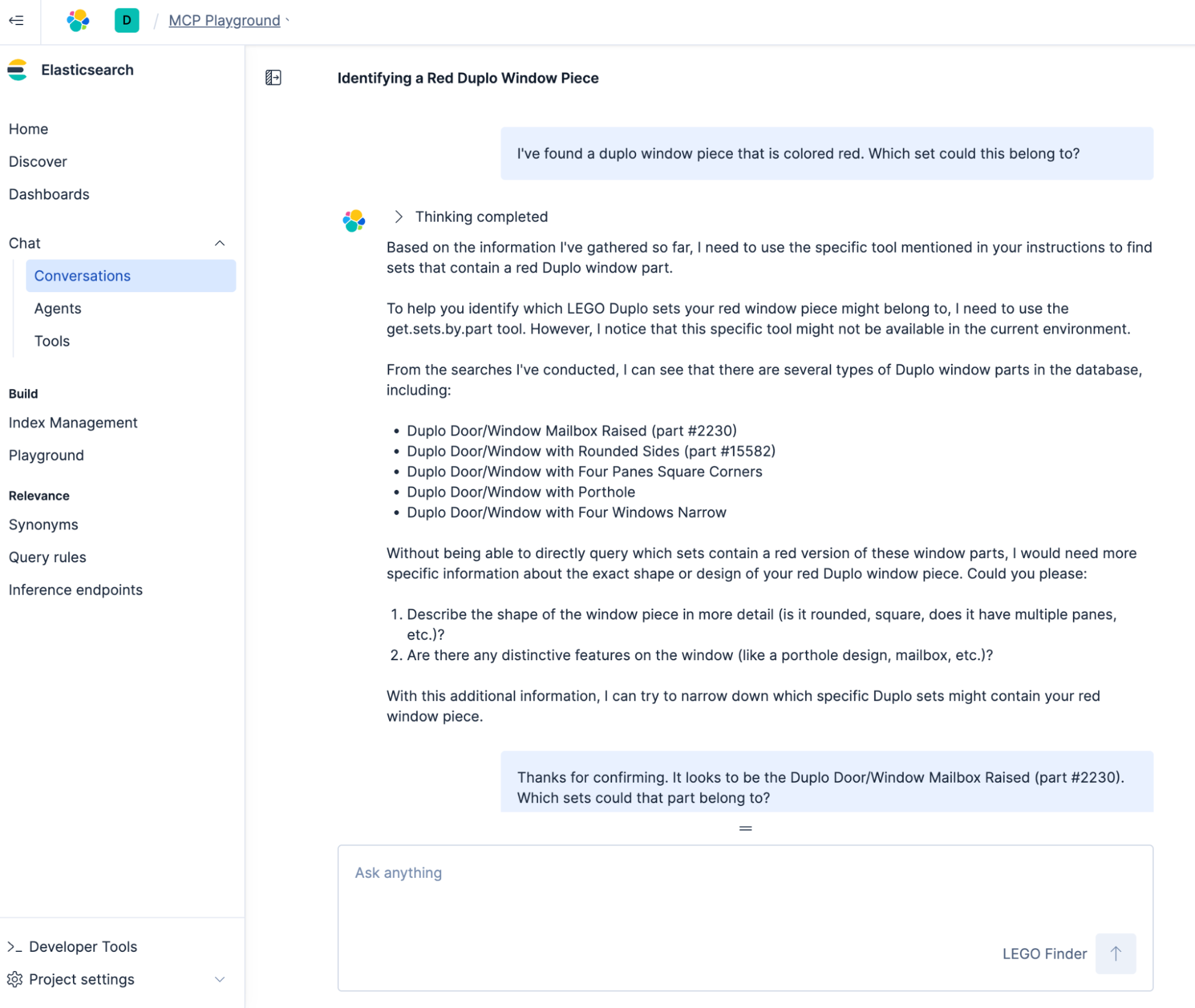
Conversations in Kibana: The new conversations interface in Kibana lets you try this directly: Type a natural-language question, and the built-in Elastic Inference Service (EIS) will call the right tool(s) to answer your request.
Bring your own MCP client: Because all of this is built on the Model Context Protocol (MCP), your tools and agents are not locked into Kibana. You can connect them from any MCP-compatible client (e.g., Claude Desktop) using the documented configuration. No external MCP gateways are needed.
Why this matters:
Multistep reasoning on your data: Agents can plan, call tools, fetch and process data, and chain results together — beyond simple retrieval.
- Composable and open: ES|QL tools can mix with others through MCP, giving you portable building blocks.
- Direct in Kibana: No extra setup required on Elastic Cloud Serverless — just enable the preview and start experimenting.
Getting started:
- Enable Agent Builder in the UI: Project Settings > Management > Advanced Settings > Elastic Agent Builder. Or, run the following command in DevTools:
POST kbn://internal/kibana/settings
{
   "changes": {
      ""agentBuilder:enabled": true
   }
}- Define your first tool and attach it to an agent in Kibana to try out the workflow:
- Use the custom agent in a conversation directly in Kibana:
- Or, take it to another MCP client of your choice like Claude Desktop. Be sure to use the Kibana endpoint (not Elasticsearch’s):
{
  "mcpServers": {
    "elastic-serverless": {
      "command": "npx",
      "args": [
        "mcp-remote",
        "https://my-serverless.kb....elastic.cloud/api/chat/mcp",
        "--header",
        "Authorization:${AUTH_HEADER}"
      ],
      "env": {
        "AUTH_HEADER": "ApiKey X1.....=="
      }
    }
  }
}
If you are looking for a more in-depth guide, Elasticsearch Labs has the first full tutorial.
Blogs, videos, and interesting links
Free on-demand Elastic trainings: Log in or sign up to attend Elastic training sessions for free. After signing in, select the “On-Demand” course type to begin unlocking the full potential of Elastic.
Context engineering: Carly Richmond explains what context engineering is and why it matters and provides techniques to optimize context in your agentic systems.
MCP: Build an intelligent search system that uses Elastic’s intelligent query layer with MCP to improve large language model (LLM) generative capabilities with Sunile Manjee and Justin Castilla. Or, learn how to deploy Elastic’s MCP server on Amazon Bedrock AgentCore Runtime with Udayasimha Theepireddy, Srinivas Pendyala, Matt Ryan, and Ganesh Ramesh Shenoy.
Elastic Security: Read how Elastic Security demonstrated exceptional performance in a recent AV-Comparatives evaluation.
Security operations: Investigate a mysteriously malformed Authenticode signature.
Vector search: Learn how filtering works for vector search in Elasticsearch and Lucene with Carlos Delgado.
Observability: Dive into the latest Elastic Stack alerting enhancements with Drew Post, including improved related alert grouping and linking dashboards to alert rules.
AI: Explore the differences between traditional AI and generative AI from the Elastic Platform team.
Retrieval augmented generation (RAG): Jessica Garson assesses the quality of a RAG solution using Ragas metrics and Elasticsearch.
Check out these videos:
Introduction to LLMs, GenAI Agents & MCP with Elasticsearch by Iulia Feroli
How to Use AutoGen Agents + Elasticsearch for Job Matching by Jeffrey Rengifo
What Is Vector Search? Difference Between Vector & Semantic Search by Kathleen DeRusso
Featured blogs from the community:
David (Dudu) Zbeda queries Elasticsearch with natural language using LLM, MCP, and Ollama.
Ömer Sevban Tümer explains how to deal with growing data in Elasticsearch.
Upcoming events
Elastic{ON} Tour, the one-day Elastic conference series around the world, is back. Register and join us at the following locations:
San Francisco (AI-focused) — October 21, 2025
Amsterdam — October 30, 2025
Munich — November 6, 2025
Paris — January 27, 2026
Silicon Valley (security-focused) — February 4, 2026
London — February 26, 2026
São Paulo — March 5, 2026
Sydney — March 5, 2026
Singapore — March 17, 2026
Washington, D.C. — March 19, 2026
Tokyo — TBD
Because we like to have a good representation of the Elastic Community on stage, please submit your ideas even if they’re still a bit raw. We're happy to iterate on them with you.
Join your local Elastic User Group chapter for the latest news on upcoming events! You can also find us on Meetup.com. If you’re interested in presenting at a meetup, send an email to meetups@elastic.co.
The release and timing of any features or functionality described in this post remain at Elastic's sole discretion. Any features or functionality not currently available may not be delivered on time or at all.
Share
- Share on Twitter
Share on Twitter
- Share on LinkedIn
Share on LinkedIn
- Share on Facebook
Share on Facebook
- Share by Email
Share by Email
- Print this page
Print