Elasticsearch has native integrations with the industry-leading Gen AI tools and providers. Check out our webinars on going Beyond RAG Basics, or building prod-ready apps with the Elastic vector database.
To build the best search solutions for your use case, start a free cloud trial or try Elastic on your local machine now.
A common answer when you need persistent memory for an AI agent is a purpose-built memory layer, such as dedicated memory orchestration services and standalone vector databases. These are real solutions. But they're also another service, another API, another thing to build and maintain. If Elasticsearch is already in your stack, you may already have what you need.
The problem with session-only memory
Claude Code agents are stateless. Every session starts fresh. Your agent has no memory of the decision it made yesterday, the file it refactored last week, or the blocked dependency it flagged three days ago. It can read files if you point it at them. But reading files is not the same as recalling relevant context.
The concrete cost shows up in a few ways:
- Re-deriving conclusions. An agent that doesn't remember previous reasoning will re-read the same files, re-examine the same trade-offs, and sometimes reach a different answer. Developers end up with inconsistent agent behavior across sessions without understanding why.
- Multi-device friction. Developers who work across multiple machines face this acutely. Without cross-device memory, switching machines means loading the agent's context from scratch:
git pull, grep for relevant files, and manually paste project state into the conversation. That's a friction tax on every handoff. - Lost inter-session context. The most useful things an agent produces — architecture decisions, task IDs for blocked dependencies, rationale for approach changes, context anchors that explain why a particular path was chosen — live in working memory and disappear when the session ends. File commits capture artifacts; they don't capture reasoning.
The common answer is a purpose-built memory layer or a standalone vector database. These are solid tools. But if you're already running Elasticsearch, adding another service to your stack is overhead you might not need.
What your search index already does
Before looking at agent-memory specifically, it's worth establishing what Elasticsearch brings to this problem without any customization.
- Hybrid search out of the box. Elasticsearch combines BM25 lexical scoring with dense vector search. The
semantic_textfield type handles embedding generation automatically. Map a field assemantic_text, point it at an inference endpoint, and you get hybrid recall without managing embedding pipelines yourself. - Query expressiveness via ES|QL. In Elasticsearch, your memories are documents queryable with a full query language. ES|QL gives you filtering by type, date range, agent ID, access scope, or any combination, plus aggregations, temporal functions, and
FUSEfor multi-retrieval fusion. ES|QL is a full query language with aggregations, temporal functions, and FUSE, which is broader than the metadata filtering most vector stores expose. Some dedicated vector stores offer more expressive query interfaces, but the gap is widest against the lightweight filtering APIs common in the category. - Metadata filtering before semantic scoring. Scoped memory across agents, temporal windowing, type-based filtering: all of this is standard Elasticsearch query behavior. You're not building custom logic; you're composing existing primitives.
- Temporal decay via
BRIDGE_MEMORY_DECAY_WINDOW. More on this in the hybrid recall section, but the system applies recency weighting so recent memories rank higher than stale ones. This uses the ElasticsearchDECAYfunction in ES|QL. Note:DECAYrequires Elasticsearch 9.3+ or Elasticsearch Serverless. Use the interval literal syntax —45 days(not the quoted string"45d") — as some Serverless deployments reject the quoted form. If you still see a type error (third argument of [DECAY(...)] must be [time_duration]), use the fallback scoring instead:EVAL final_score = _score / (1 + DATE_DIFF("day", created_at, NOW()) / 45.0). The fallback produces equivalent recency weighting and works on all versions. - The ops story you already have. Monitoring, alerting, index lifecycle management, backup: you already own this for your Elasticsearch deployment. Adding more indices doesn't add a new operational surface.
The actual index mapping for the memory store shows how straightforward the schema is:
The semantic_text fields (title_semantic, content_semantic) are where the Jina v5 embeddings live. Elasticsearch handles the embedding generation at index time through the inference endpoint. You write a memory document; the embeddings are computed automatically. On Elasticsearch Serverless, semantic_text defaults to Jina v5 text-small via the Elastic Inference Service.
Two things actually differentiate Elasticsearch here:
- Query expressiveness. ES|QL is a full query language, not a filter API. You can combine embedding-based retrieval, exact match, temporal decay, and aggregations in a single query.
- Operational consolidation. If Elasticsearch is already in your stack, this is another index, not another service. Other vector databases also let you define schema. The difference is what you can do with it once you've defined it, and whether you're adding a new operational dependency.
The agent-memory architecture
agent-memory is the layer that makes Elasticsearch useful as agent memory specifically for Claude Code. The entry point is a CLI called bridge. Seven Elasticsearch indices sit behind it.
Here's how the pieces fit together:
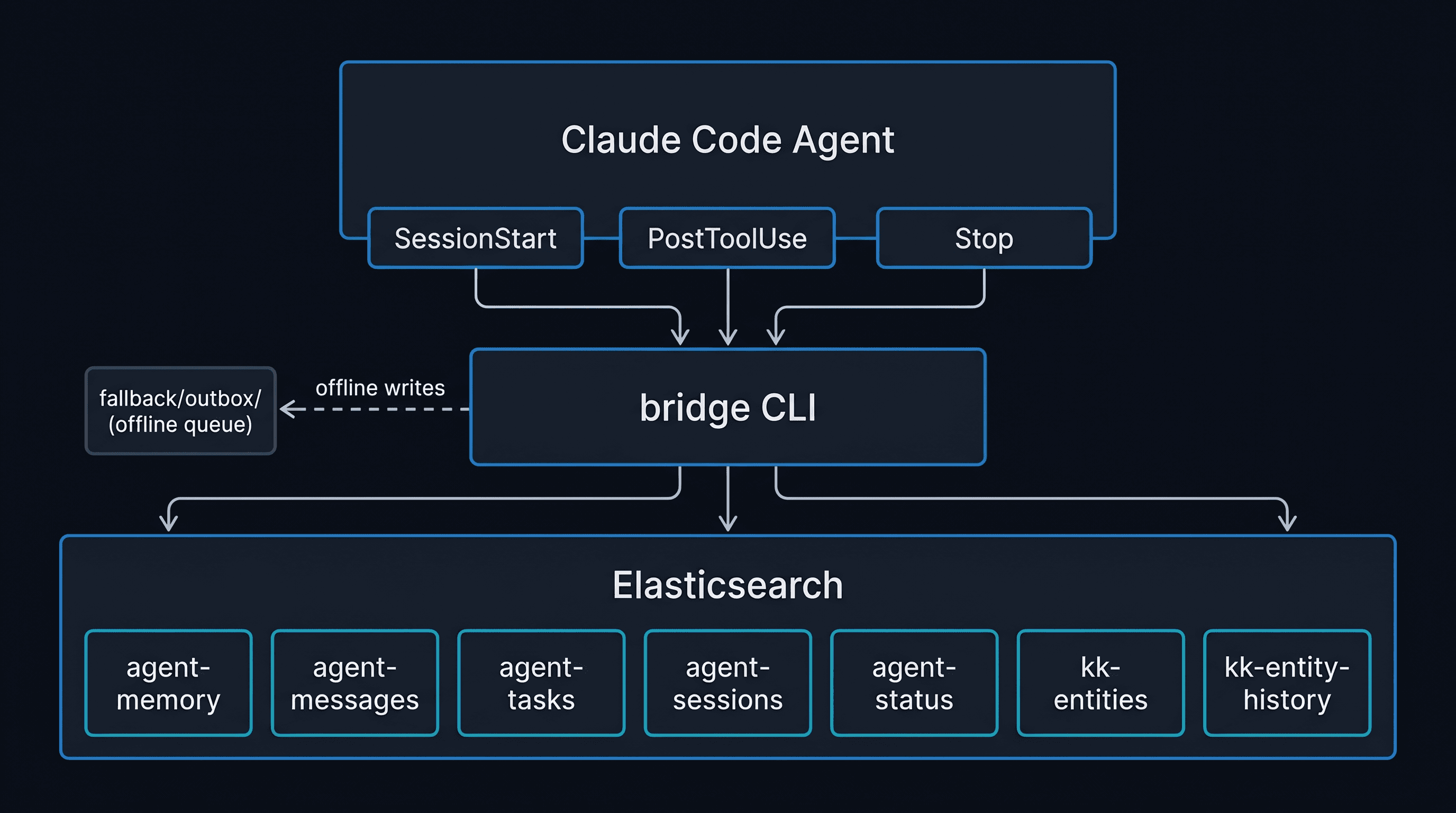
The Claude Code agent communicates with Elasticsearch entirely through the bridge CLI. Three hooks wire bridge into the agent lifecycle automatically; no explicit calls required from the agent. When Elasticsearch is reachable, bridge writes directly. When offline, writes go to a local fallback/outbox/ queue as JSON files, which bridge sync flushes via bulk API on the next online session.
Behind bridge, Elasticsearch holds seven indices: agent-memory (decisions, patterns, context), agent-messages (inter-agent communication), agent-tasks (task lifecycle), agent-sessions (action history), agent-status (heartbeats), {agent}-entities (the markdown knowledge graph), and {agent}-entity-history (temporal snapshots for diffs). The bridge graph commands (search, related, check-blockers, semantic-diff, and gen-handoff, reconcile) operate against the entity indices.
The seven indices
| Index | What it stores |
|---|---|
| agent-memory | Decisions, patterns, context, feedback (the memory store) |
| agent-messages | Typed messages between agents, with thread and priority support |
| agent-tasks | Task lifecycle from created through completed or failed |
| agent-sessions | Session-level action log, queryable by agent, time range, or tag |
| agent-status | Heartbeat records: which agents are active and on which machines |
| {agent}-entities | Markdown files as searchable knowledge graph entities |
| {agent}-entity-history | Snapshots of entity state for temporal diffs |
Hook integration
The integration point is the hooks. Three Claude Code hooks wire the system into normal agent behavior without requiring explicit calls:
- SessionStart: runs
bridge sync-memoriesto sync auto-memory files into Elasticsearch, andbridge heartbeatto register the agent as active. - PostToolUse (triggers on Write, Edit, MultiEdit): calls
bridge entity index-fileon every.mdwrite. Your project files are continuously indexed as you work. - Stop: logs a session-end event to
agent-sessions.
The result: the agent doesn't have to remember to update memory. It happens automatically. SessionStart sync hashes local memory files and re-indexes only changed ones — unchanged files are skipped. First-session sync (all files new) takes longer than subsequent sessions.
The offline queue
When Elasticsearch is unreachable, writes don't fail. They land in fallback/{agent}/outbox/ as JSON files. bridge sync (called automatically on SessionStart) flushes the queue via bulk API when connectivity returns. You can work offline; nothing is lost. Reads (bridge recall, bridge graph search) fail gracefully with a non-zero exit code when ES is unreachable. No local read cache exists. Still, the agent session continues normally with degraded memory. The fallback queue has no automatic size limit. For extended offline periods, sync with bridge sync --batch-size 100 to avoid oversized bulk requests.
The bridge CLI commands that an agent uses directly:
Hybrid recall: how memory retrieval actually works
Many agent memory implementations use a single vector lookup. Query goes in, cosine similarity finds the nearest neighbors, and results come back. This works for semantic recall but fails on two common patterns: exact term matching and recency.
The agent-memory hybrid recall uses two fusion strategies. The memory recall query uses ES|QL's FUSE (Reciprocal Rank Fusion, k=60, the ES|QL default). The graph entity query uses FUSE LINEAR with explicit weights — 0.3 BM25 / 0.7 semantic — because entity search benefits more from semantic matching. Here's the memory recall query from lib/memory.sh:
The FORK runs two retrievals in parallel: a BM25 lexical search across title, content, and tags in the first branch; a semantic search against the content_semantic field in the second. FUSE merges the two ranked lists using Reciprocal Rank Fusion. The DECAY function applies temporal weighting based on created_at.
Why hybrid beats pure semantic for agent memory
Keyword lookup catches exact references that semantic search misses. If an agent stored a memory about "task ID kk-task-20260428-deploy-blocker", a semantic query for "deploy blocker" will find conceptually similar content, but the specific task ID will only rank highly in the BM25 branch. Without it, you get the concept but not the reference you need.
Semantic search catches related concepts that exact matching misses. A memory titled "switched default chunking strategy to sentence-level for better recall on short queries" is relevant to a query about "chunking config" even though those words don't overlap. The semantic branch finds it; keyword search alone wouldn't.
The BRIDGE_MEMORY_DECAY_WINDOW variable (defaulting to 45d) sets the half-life for the temporal decay function. A memory written today scores higher than the same memory written 90 days ago, everything else equal. This reflects how agent memory actually works in practice: recent context is almost always more relevant than old context, even when the old context is semantically closer to the query.
The graph search in lib/graph.sh uses FUSE LINEAR (rather than plain FUSE) because entity recall benefits more from semantic match than keyword precision. Here's that query:
The FUSE LINEAR syntax with explicit weights is how you tune the BM25/semantic balance in ES|QL. Shift the weights toward 0 for more keyword precision; toward 1 for more semantic generalization.
The knowledge graph layer
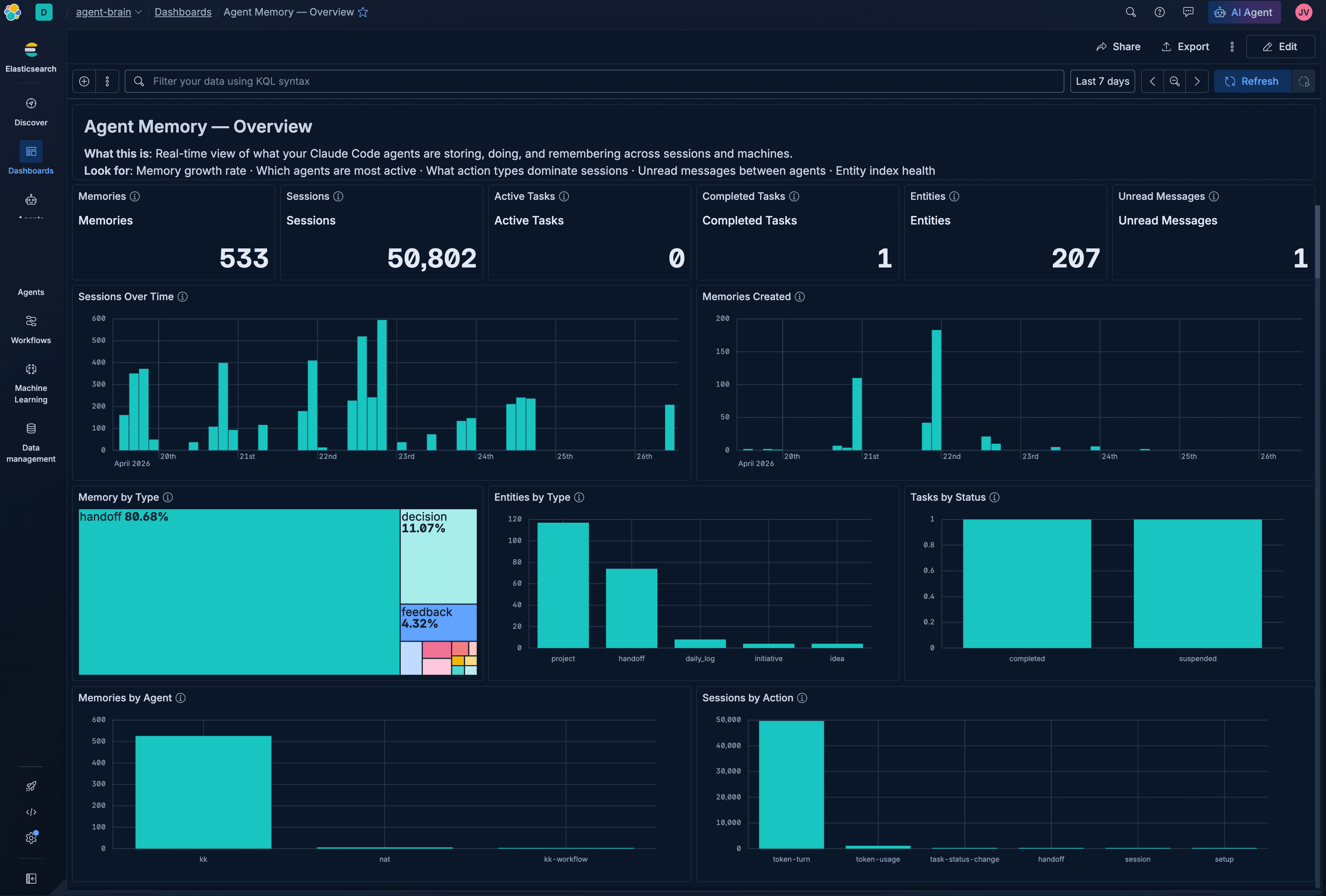
The numbers from a running instance: every project, decision, and blocked dependency tracked across sessions; roughly 1,364 relationship edges parsed from frontmatter fields (initiative, blocked_by, depends_on). These are real figures from a Kuchi Kopi agent instance that's been running across two laptops for several months.
To be clear upfront: this is not a graph database. Traversal is capped at depth 2, there's no Cypher query language or property graph model, and coherence depends entirely on consistent frontmatter. What it is: a queryable entity layer with enough relationship data to surface blockers and diffs across your agent's work.
What this index holds is a record of the agent's own work over time (decisions, project state, and blocked dependencies), not a curated knowledge base of external facts or world knowledge. Retrieval is by embedding similarity and BM25 over that working record.
The entity layer is a knowledge graph built on top of Elasticsearch documents. Every markdown file in the watched directories gets indexed as an entity via the PostToolUse hook. Entity IDs are {agent}-{type}-{slug}, which makes re-indexing idempotent. Rewrite a file and the entity updates in place. Relationship edges are extracted from three frontmatter fields: initiative (parent grouping), blocked_by (dependency), and depends_on (soft dependency). Entity IDs are namespaced per agent via the {agent} prefix — cross-agent collisions are not checked, so teams running multiple agents should enforce unique agent identifiers.
The graph commands work against this index:
The relationship edges are inferred from frontmatter fields (initiative, blocked_by, depends_on) that exist in the markdown files themselves. The graph doesn't require a separate relationship store. It reads your existing document structure.
The graph is coherent because the markdown files have structured frontmatter, and the system reads that structure consistently. Schema discipline is what makes it work. If your files don't have consistent frontmatter fields, the graph degrades to a flat entity search. Missing or malformed frontmatter fields cause relationship edges to be skipped silently; the entity is still indexed, but won't appear in graph traversal. Run bridge graph reconcile to surface entities with missing relationships. Entity deletion does not cascade, and bridge graph reconcile also prunes edges pointing to deleted entities.
Scale-wise, this has been tested with several hundred entities across multiple months of active use. Elasticsearch should handle significantly larger corpora, but agent-memory has not been load-tested at scale. For very large entity sets, use --types and --days filters to scope traversal.
The graph semantic-diff command is one of the more useful applications. It compares entity state snapshots between two dates: new entities, status changes, newly blocked work, and completed items. Running it before a weekly sync gives you a structured changelog of what your agent has been doing, without reading every session log. Note: if no entity snapshots exist for the requested date range, the command returns an error (Cannot iterate over null). Run bridge entity index-all first to populate the initial snapshot baseline.
Cross-device memory in practice
I started a session on my travel laptop three days after working on a project from my desk workstation on both company machines. The agent recalled the relevant memory entries within one search round-trip. No git pull waiting. No file-scanning to reconstruct context. The cross-device handoff happened through Elasticsearch.
Here's why: I work across two machines, and Elasticsearch is accessible from both. The shared index is the source of truth, not the local filesystem. The agent calls bridge recall and gets context from the shared index, regardless of which machine stored it.
Without agent-memory: nothing beyond what's in the git repository. The agent can read files, but it can't recall the reasoning from the previous session, the decisions made that aren't captured in any commit, or the blocked dependencies flagged but not yet resolved.
With agent-memory: the SessionStart hook runs bridge sync-memories, which reads the Claude Code auto-memory files (~/.claude/projects/<cwd>/memory/*.md), hashes each one, and re-indexes only changed files into Elasticsearch. Local memory files are treated as the source of truth on each machine and bridge sync-memories pushes local state to Elasticsearch. Edits made on another machine that weren't pushed before the switch will be overwritten by the new machine's local state. Concurrent writes from two devices at the same time are handled correctly by Elasticsearch's document versioning. No data is lost, but the last write wins per document, so avoid editing the same memory file simultaneously on both machines.
Honest caveat: this requires Elasticsearch Serverless (or any Elasticsearch instance accessible from both machines). Self-managed Elasticsearch behind a VPN or firewall works, but the connectivity requirement is real. This isn't a local-only solution.
The bridge graph gen-handoff command produces a structured JSON payload covering entities updated in the window, active blockers, and recent session logs. With the optional --synthesize flag, it pipes through an Agent Builder agent to generate a narrative paragraph. That payload is what a new session loads to reconstruct context without reading individual files.
When this is the right answer (and when it isn't)
This approach works well when:
- Elasticsearch is already in your stack. Adding indices to an existing deployment is low friction. The ops story is familiar.
- Query expressiveness matters. You want to query memories as data using a full query language, not a vendor filter API.
- Your agent produces structured artifacts. Markdown files with consistent frontmatter are what make the knowledge graph coherent. If your agent doesn't produce structured output, the graph layer doesn't add much.
- You need cross-device or cross-agent memory. A shared Elasticsearch index gives you this without additional infrastructure.
A purpose-built memory service wins when:
- You have no existing search infrastructure. Starting with Elasticsearch to solve a memory problem is legitimate, but it's a meaningful infrastructure commitment.
- You want pure semantic recall with zero schema management. Dedicated vector database services abstract away the index mapping entirely. If you don't want to think about mappings and fields, that tradeoff has value.
- You expect frequent schema evolution. The schema you control is also the schema you maintain. If your memory structure needs to change over time, the migration overhead of self-managed index mappings may outweigh the flexibility. Purpose-built services often handle schema evolution for you.
- You need a managed SaaS with minimal ops. Elasticsearch Serverless reduces this gap significantly, but it's not zero.
The honest summary: agent-memory is not the universal answer. It's the right answer if you're already running Elasticsearch and want to avoid adding another dependency to your AI stack.
Get started
Three commands to a running system:
install.sh walks you through credentials interactively (or reads an existing .env), creates the Jina v5 semantic inference endpoint if one doesn't already exist, creates all seven indices with the correct mappings, and installs the Claude Code hooks. It's idempotent. Re-run it if something goes wrong or if you add a new machine.
A few things to know before running the installer:
- Jina v5 inference endpoint: On self-managed Elasticsearch, the installer creates this endpoint, but it requires a Jina API key in
service_settings. On Elasticsearch Serverless, the Elastic Inference Service provides Jina v5 automatically and no API key is needed; the installer detects Serverless and skips this step. - Elasticsearch Serverless vs. 9.3+: Both work. The
DECAYfunction andFUSEsyntax used in recall queries requires Serverless or Elasticsearch 9.3+. - Dashboard import: The Kibana dashboard (in
setup/dashboards/) is imported automatically byinstall.shwhenKIBANA_URLis set in.env. If you skipped that step, setKIBANA_URLand re-runinstall.sh(it's idempotent).
You'll need:
- An Elasticsearch Serverless endpoint (or Elasticsearch 9.3+).
- An API key with index permissions on the
agent-*indices. jqinstalled locally (brew install jqon macOS).
After bridge status confirms connectivity, run:
Then add the hooks from hooks/settings.json.template to your Claude Code settings.json. From that point, every session start, file write, and session end updates the memory store automatically.
The full source, including a Kibana dashboard for memory analytics, is at github.com/jeffvestal/agent-memory.
Go try it on your agent. If you hit an issue or extend it for a different AI framework, open an issue or PR.
よくあるご質問
What is agent memory and why do AI agents need it?
AI agents like Claude Code are stateless between sessions: they have no memory of previous conversations, decisions, or context once a session ends. Agent memory is a persistent store that lets agents recall prior reasoning, decisions, and project context across sessions and devices. Without it, agents re-derive conclusions, lose context on multi-device workflows, and can't build on prior work.
Can Elasticsearch replace a purpose-built vector database for agent memory?
For teams already running Elasticsearch, yes, and with meaningful advantages. Elasticsearch provides hybrid BM25 + semantic search via semantic_text fields, structured query access to memories via ES|QL, metadata filtering, and temporal decay scoring. The tradeoff is that you own the schema and the ops story. Purpose-built vector databases abstract this away, which is the right choice if you have no existing search infrastructure.
How does hybrid search improve agent memory recall compared to pure semantic search?
Pure semantic search matches conceptually similar content but misses exact references: task IDs, file names, specific version numbers. Pure keyword search catches exact matches but misses related concepts. Hybrid search (BM25 + Jina v5 dense vectors combined via Reciprocal Rank Fusion) handles both. In practice, this means recalling the right memory whether you're searching for a concept or a specific identifier.
What is the agent-memory project and how do I install it?
agent-memory is an open-source layer that gives Claude Code agents persistent, cross-session, cross-device memory backed by Elasticsearch. Install it with three commands. The install script creates the Elasticsearch indices and inference endpoint automatically.
How does cross-device memory work across multiple machines?
On session start, the SessionStart hook runs bridge sync-memories, which syncs Claude Code's auto-memory files into Elasticsearch. Because both machines point at the same Elasticsearch instance, recalled memories are consistent regardless of which machine wrote them. Switching laptops requires no git pull or manual context reconstruction. The agent calls bridge recall and gets context from the shared index.
What are the limitations of using Elasticsearch as an agent memory system?
The main limitations: Elasticsearch Serverless (or a network-accessible cluster) is required for cross-device memory, which is not a local-only solution. The knowledge graph traversal depth is capped at 2. The graph coherence depends on consistent frontmatter in your markdown files; loose schema discipline degrades graph quality. Elasticsearch also requires more initial setup than a hosted memory SaaS service. For extended outages, run sessions locally and sync manually with bridge sync when connectivity returns; nothing is lost from the fallback queue. To export or archive memory: bridge export --format ndjson produces an Elasticsearch bulk-importable file.
What is the BRIDGE_MEMORY_DECAY_WINDOW setting and how does it affect recall?
BRIDGE_MEMORY_DECAY_WINDOW sets the temporal decay half-life applied to memory recall scores. The default is 45d (45 days). A memory written today scores higher than the same memory written 90 days ago, everything else equal. This reflects how agent context actually works: recent decisions are almost always more relevant than old ones, even when the old decision is semantically closer to the query. Increase the window if you want older memories to compete more equally; decrease it to weight recency more aggressively.
関連記事
2026年7月7日
Short queries, formal documents: how HyDE improved semantic search precision by 50% in Elasticsearch
HyDE boosts semantic search precision and recall by 50% on short queries. Here's how to implement it in Elasticsearch with the Inference API and semantic_text.
2026年6月24日
Elasticsearch DiskBBQ delivers 7x faster vector search than Qdrant on network-attached storage
Elasticsearch DiskBBQ achieves up to 7x higher vector search throughput than Qdrant at comparable recall on network-attached storage. Explore the benchmark methodology and full results.
2026年7月6日
Who grades the grader? LLM-as-a-Judge inside Elasticsearch Workflows
Find out if your RAG agent is ready to ship. Score it on correctness, faithfulness and retrieval quality using only Elasticsearch Workflows and two Claude models.

2026年6月15日
Your FAQ bot doesn't need a PhD: LLM query routing with Elastic Workflows
Route LLM queries by complexity using Elasticsearch search metadata: Mistral Small for FAQ questions, Claude Sonnet for multi-source synthesis.

Describe it, don't draw it: AI-native Kibana dashboards via MCP and ES|QL
From prompt to dashboard. Learn how to build Kibana dashboards with natural language, using example-mcp-dashbuilder: an open source MCP application that writes ES|QL queries, creates interactive charts and exports fully functional dashboards directly to Kibana.