Elasticsearch has native integrations with the industry-leading Gen AI tools and providers. Check out our webinars on going Beyond RAG Basics, or building prod-ready apps with the Elastic vector database.
To build the best search solutions for your use case, start a free cloud trial or try Elastic on your local machine now.
Sending every customer support query to a large model means your simple FAQ answers are as slow and as expensive as your most complex ones. This post shows how to build a two-model routing system in Elastic Workflows: Mistral Small handles straightforward questions directly from a single FAQ article; Claude Sonnet synthesizes answers across multiple knowledge base sources when the query needs it. The routing decision is made from search metadata alone, keeping classification cheap and fast on every query.
Prerequisites
- Elastic Cloud deployment running Elasticsearch 9.3+ or start a free trial
- Workflows enabled (Advanced Settings)
- Python 3.9+
- A Mistral API key
How LLM query routing works in this system
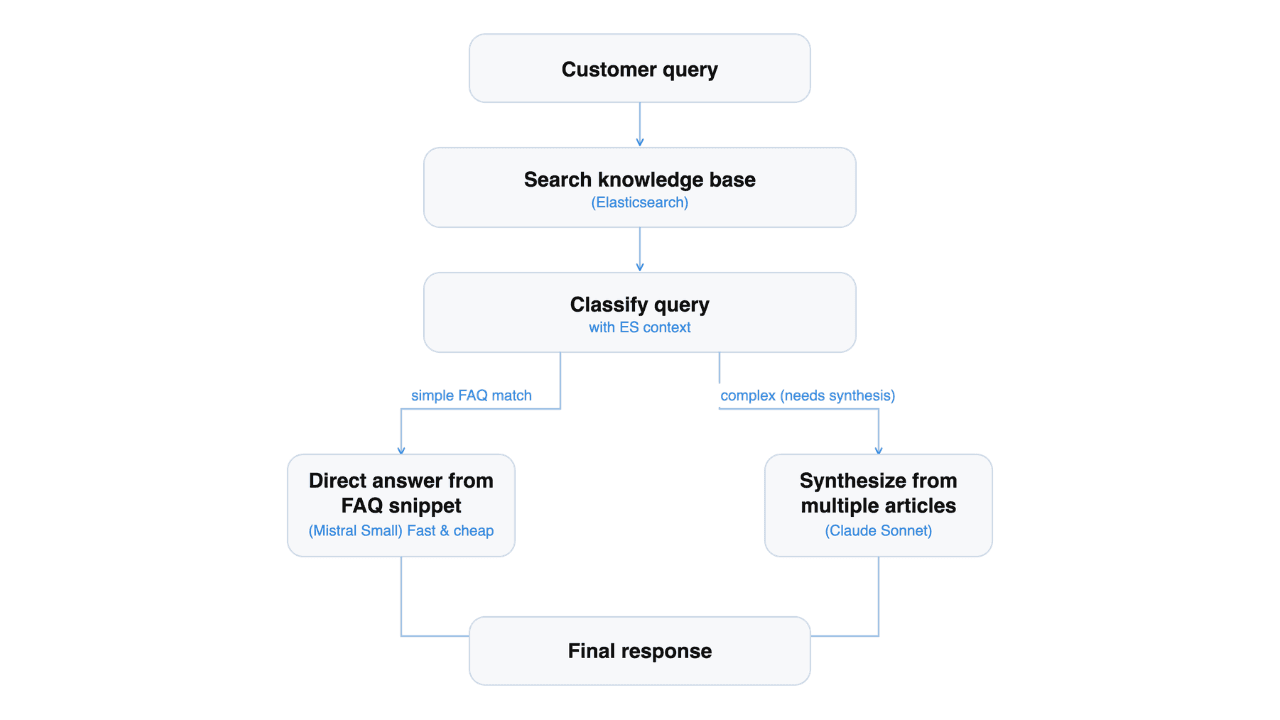
We're going to build a two-stage system: a router that decides how to answer, and an answering model that produces the response.
The router looks at the query and the metadata of the top search hits, like scores, categories, and complexity labels. From that, it picks one of two strategies: Answer directly from the top FAQ article, or synthesize across multiple articles with citations. That decision can be made from structured signals alone, so a small, fast model handles it.
The answering step varies. A single-article answer is bounded work that a small model does well and returns quickly. A multisource synthesis with citations benefits from a more capable model, and the extra time is worth it. Matching each query to the model that fits keeps simple answers fast and complex answers good.
Why use a small model for routing instead of the large model?
Because the router runs on every query, including the simple ones. A slow router makes every answer slow, even the ones a small model could have produced in a fraction of the time.
The key design choice is that the routing step only sees metadata, not full documents. A query like "my OTG isn't heating evenly" only needs to know that the top hits are in the "Product Troubleshooting - Appliances" category with issue_complexity: medium, not the full conversation transcripts. This keeps the classification prompt tiny (a few hundred tokens) and cheap. The full article content is only loaded in the response step once.
Set up AI connectors
We use two AI connectors for the workflow:
| Connector | Model | Type | Role |
|---|---|---|---|
| Mistral Small | mistral-small-latest | Custom (OpenAI-compatible) | Classify query complexity from metadata, answer simple FAQ-style questions |
| Anthropic Claude Sonnet 4.6 | Claude Sonnet | Elastic Managed LLM | Synthesize complex answers from multiple articles, with citations |
Both connectors are billed per million tokens, with the smaller model costing significantly less. Routing simple queries to it saves money on top of the latency win. To learn more about Elastic Managed LLM, see this documentation.
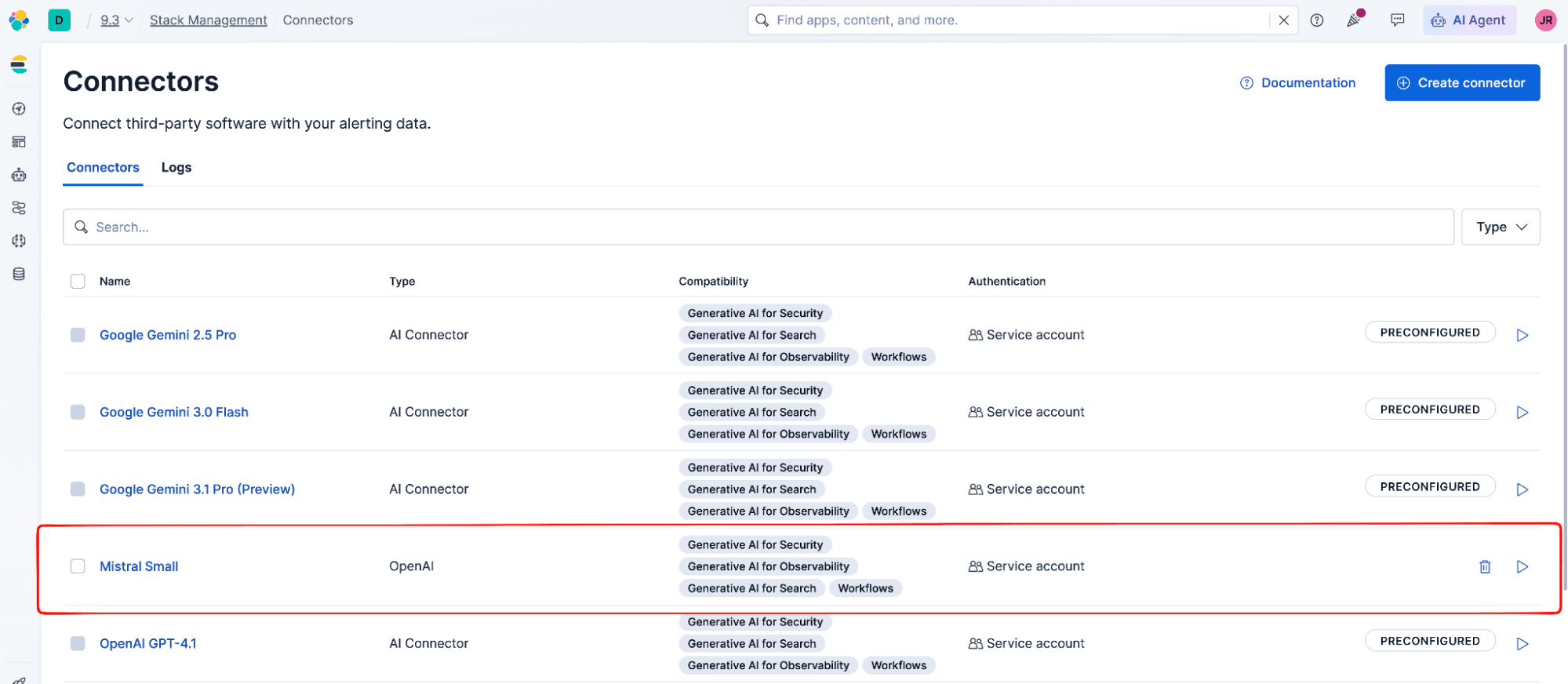
The Claude Sonnet connector is already available as an Elastic Managed large language model (LLM). We only need to create a custom connector for Mistral using the .gen-ai connector type, which supports any OpenAI-compatible API. You can also create it through the Kibana UI.
All the setup code in this article is available in the companion notebook. You can run each section there as you follow along.
The connector ID is auto-generated by Kibana. We let the platform handle this instead of trying to set it manually.
Once created, the connector appears in the Connectors UI:
Load and index the dataset
We use the e-commerce-customer-support-qa dataset from Hugging Face. It contains 1,000 real customer support interactions from an ecommerce platform (BrownBox) with customer questions, agent solutions, issue categories, complexity levels, and customer sentiment.
The index mapping uses semantic_text with the .jina-embeddings-v5-text-small model from Elastic Inference Service. This field handles semantic search end-to-end: embedding generation, chunking, and querying. We use copy_to to aggregate the conversation and QA summary into a single searchable field:
Defining the query routing workflow in Elastic Workflows YAML
The routing workflow has four steps: semantic search, metadata-only classification, conditional branching, and a model-appropriate response step.
We use Elastic Workflows to encapsulate this routing logic. Workflows let us:
- Expose the triaging as a tool in Elastic Agent Builder, so a conversational agent can call it.
- Trigger it directly via manual execution, schedules, or alerts.
This flexibility means the same logic serves both programmatic and conversational interfaces without duplicating code.
Workflows are defined in YAML and configured directly in the Workflow UI (Elasticsearch > Workflows > Create a New Workflow). Each step can query Elasticsearch, call Kibana APIs, or prompt an LLM.
Here’s the complete workflow definition:
The workflow has four key parts:
search_esuseselasticsearch.searchwith a semantic query to find the five most relevant articles.classify_querysends the customer query plus only metadata from the search results to Mistral Small. The prompt includes scores, categories, complexity labels, and product categories. This keeps the classification step cheap, preventing the use of large amounts of tokens.route_by_complexityuses anifstep to branch based on the classifier's output.- The response step depends on the route. For simple queries, Mistral Small gets the top FAQ article and rephrases it. For complex queries, Claude Sonnet gets all five articles and synthesizes a detailed response with citations. This is the only step where full document content is loaded.
Using the workflow as a tool in Agent Builder
Beyond the default triggers (manual, schedule, alerts), workflows can also be exposed as tools in Agent Builder. This adds a conversational layer where users interact through a chat interface, and the agent decides when to call the workflow.
We use the Agent Builder APIs to create the tool and the agent. After creating the workflow in the Kibana UI, copy its ID and use it to register the workflow as a tool:
Then create an agent that uses the tool:
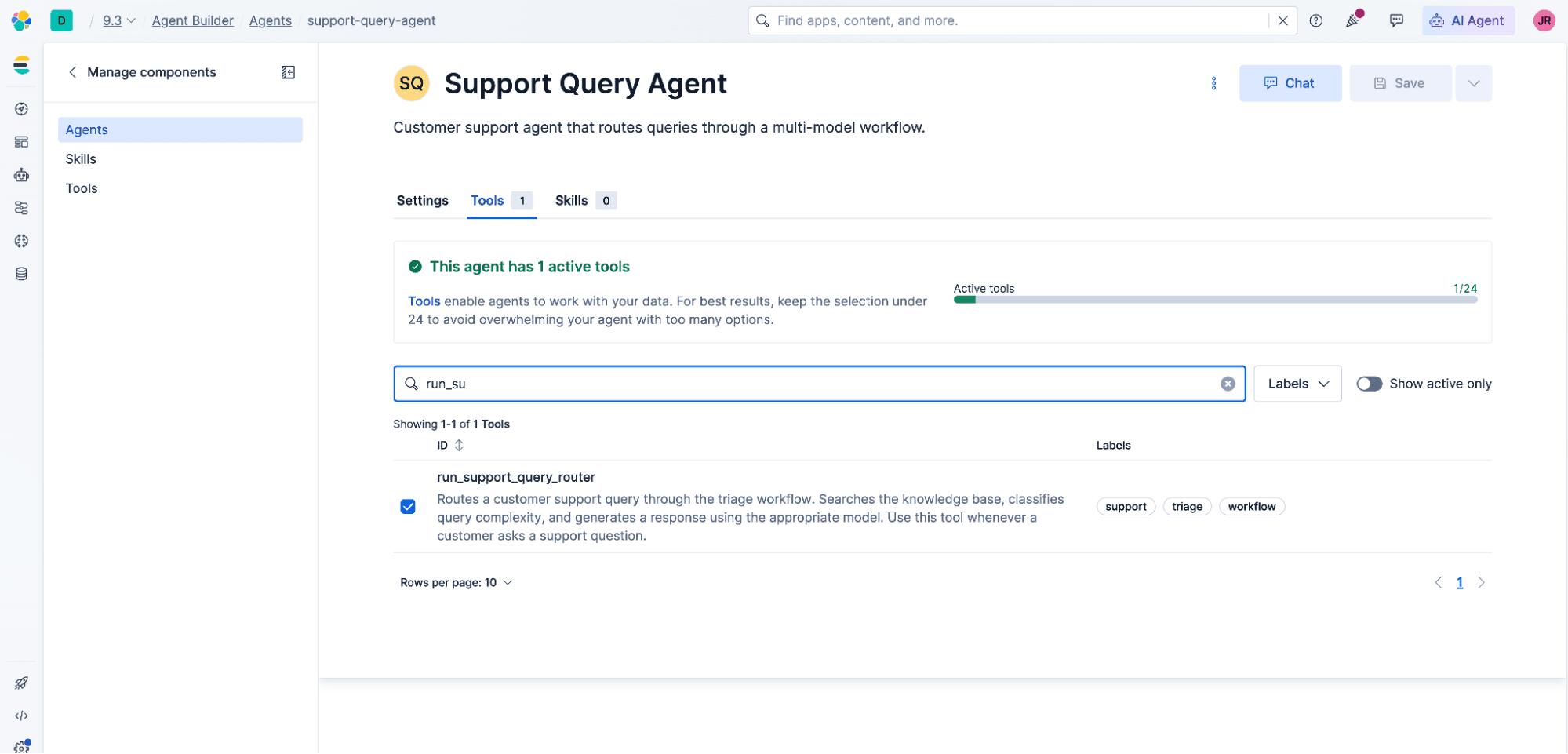
The agent is now available in the Agent Builder UI in Kibana. You can also create the agent and its tools directly through the Agent Builder UI.
Once created, the agent appears in the Agent Builder UI with the workflow tool assigned:
Testing simple vs. complex query routing
Simple query
The workflow searches the knowledge base, finds a direct match in the FAQ articles about order tracking, classifies it as simple, and routes to Mistral Small. The response is concise and drawn directly from the matched article: instructions for using the "My Orders" section or the tracking number from the confirmation email.
Complex query
This query involves three distinct issues (damaged product, duplicate charge, address update) across different support categories. The workflow classifies it as complex and routes to Claude Sonnet, which synthesizes information from multiple knowledge base articles, addresses each issue separately, cites the relevant articles, and provides clear resolution steps for each.
Conclusion
Routing LLM queries by complexity in Elasticsearch reduces latency and cost for simple queries without sacrificing quality on complex ones. The small model answers FAQ-style queries in a fraction of the time the larger model would take, and the larger model is reserved for the queries that actually benefit from its capabilities. Cost savings come along for the ride: Simple queries routed to the smaller model are cheaper, too.
The pattern that makes this work is searching the knowledge base before routing. Without that context, the router is guessing based on surface-level cues. With it, the structure of the search results, like scores, categories, and complexity labels, tells the router whether the answer lives in a single article or needs synthesis across several. That's the actual signal for how to handle the query.
Elastic Workflows makes this possible without writing orchestration code. The entire routing logic lives in YAML inside Kibana, using native steps for search, LLM prompts, and conditional branching. Combined with Agent Builder, the same workflow serves programmatic triggers and conversational interfaces.
Next steps
- Try the notebook with the complete implementation.
- Add LLM monitoring with OpenRouter to track cost per routing tier.
- Explore Elastic Workflows for other automation patterns.
- Learn more about Agent Builder and how to expose workflows as conversational tools.
- Read about building AI agentic workflows with Elastic Agent Builder.
Questions fréquentes
What is LLM query routing and why does it matter for customer support?
LLM query routing is the practice of sending queries to different AI models based on their complexity. In customer support systems, simple FAQ questions can be answered by a small, fast model like Mistral Small, while complex multi-issue queries benefit from a more capable model like Claude Sonnet. Routing reduces both latency and cost: simple queries handled by the smaller model return faster and cost less per token.
How does Elasticsearch metadata enable LLM query routing?
After a semantic search in Elasticsearch, each result includes a relevance score, issue category, complexity label, and product category. A classifier model reads only these metadata fields (not the full document content) to decide whether a query maps to a single FAQ article or needs multi-source synthesis. This keeps the classification prompt small (a few hundred tokens) and cheap on every query.
What models does this Elasticsearch query routing pattern use?
The example uses Mistral Small for classification and simple FAQ answers, and Claude Sonnet 4.6 (an Elastic Managed LLM) for multi-source synthesis. Mistral Small is registered as a custom connector using the .gen-ai connector type, which supports any OpenAI-compatible API. The split is cost- and capability-driven: simple bounded tasks go to the smaller model; complex synthesis tasks go to the larger one.
Can I use different models in this Elastic Workflows routing pattern?
Yes. The routing logic in Elastic Workflows is connector-based: any OpenAI-compatible API can be registered as a custom connector via the .gen-ai connector type. The pattern is model-agnostic; the architectural requirement is that the classification step uses a cheaper, faster model and the synthesis step uses a more capable one.
What are the limitations of metadata-only routing in Elasticsearch?
Routing based on search result metadata depends on the quality of structured fields like issue_complexity and issue_category in the index. If those fields are sparsely populated or inconsistently labeled, the classifier's signal degrades and routing accuracy drops. Full-document classification is more robust but increases token cost and adds latency on every query.
How does Elastic Workflows simplify LLM query routing compared to custom code?
Elastic Workflows defines routing logic in YAML inside Kibana, using native steps for Elasticsearch semantic search, LLM prompts (via AI connectors), and conditional branching. No orchestration framework or custom code is required. The same workflow can serve programmatic triggers (manual, schedule, alerts) and conversational agent interfaces through Agent Builder, without duplicating logic.
Pour aller plus loin
23 juillet 2026
On-prem in under 5 minutes: Jina embedding models now available for on-prem deployment
All 28 Jina AI models, including rerankers, as ready-to-deploy Docker containers, with zero telemetry and no license server. Drop-in compatible with OpenAI, Cohere, Voyage AI and Elastic Inference Service APIs.

21 juillet 2026
4 NVIDIA AI tasks, 1 Elasticsearch API: Embeddings, chat, completion, and rerank
Set up NVIDIA hosted models in Elasticsearch with one API key and a model ID. No custom integration code needed.
7 juillet 2026
Short queries, formal documents: how HyDE improved semantic search precision by 50% in Elasticsearch
HyDE boosts semantic search precision and recall by 50% on short queries. Here's how to implement it in Elasticsearch with the Inference API and semantic_text.

1 juillet 2026
One command. Natural language. Your Elasticsearch data, straight to the terminal.
Query your Elasticsearch data from the terminal in plain English. The official Elastic GitHub Copilot CLI plugin generates and runs ES|QL queries against your cluster. No Kibana, no manual syntax.
30 juin 2026
Building a multilingual voice agent with Elastic Agent Builder & Sarvam AI
A working demo combining Sarvam AI speech with Elastic Agent Builder: identity verification, per-customer ES|QL queries, and mid-call language switching across 22 Indian languages without multilingual indices.