Elastic's Kibana navigation refresh in 9.2 from user feedback
Learn how the Elastic team made it easier to navigate in Kibana 9.2 with an on-hover menu access, a visible menu in collapsed mode, and icon-driven navigation.
Test Elastic's leading-edge, out-of-the-box capabilities. Dive into our sample notebooks in the Elasticsearch Labs repo, start a free cloud trial, or try Elastic on your local machine now.
Kibana navigation refresh
When you’re on Elastic Cloud Hosted or on a local deployment, you can configure your space to show a single solution view, Security, Observability or Elasticsearch features, instead of the traditional classic view, which shows them all at once.
We introduced solution views along with serverless in November 2024. Since then, we received lots of feedback from our customers and community. Over 70% were frustrated with the new navigation. Important apps, like Stack Monitoring, were missing. Admins in particular struggled with Stack Management, because it disappeared whenever you switched between submenus, like Users and Roles, doubling the number of clicks and mouse hover time to complete their workflows. Collapsed mode required multiple clicks just to access the menu.
Open-text responses, May 2025 extract
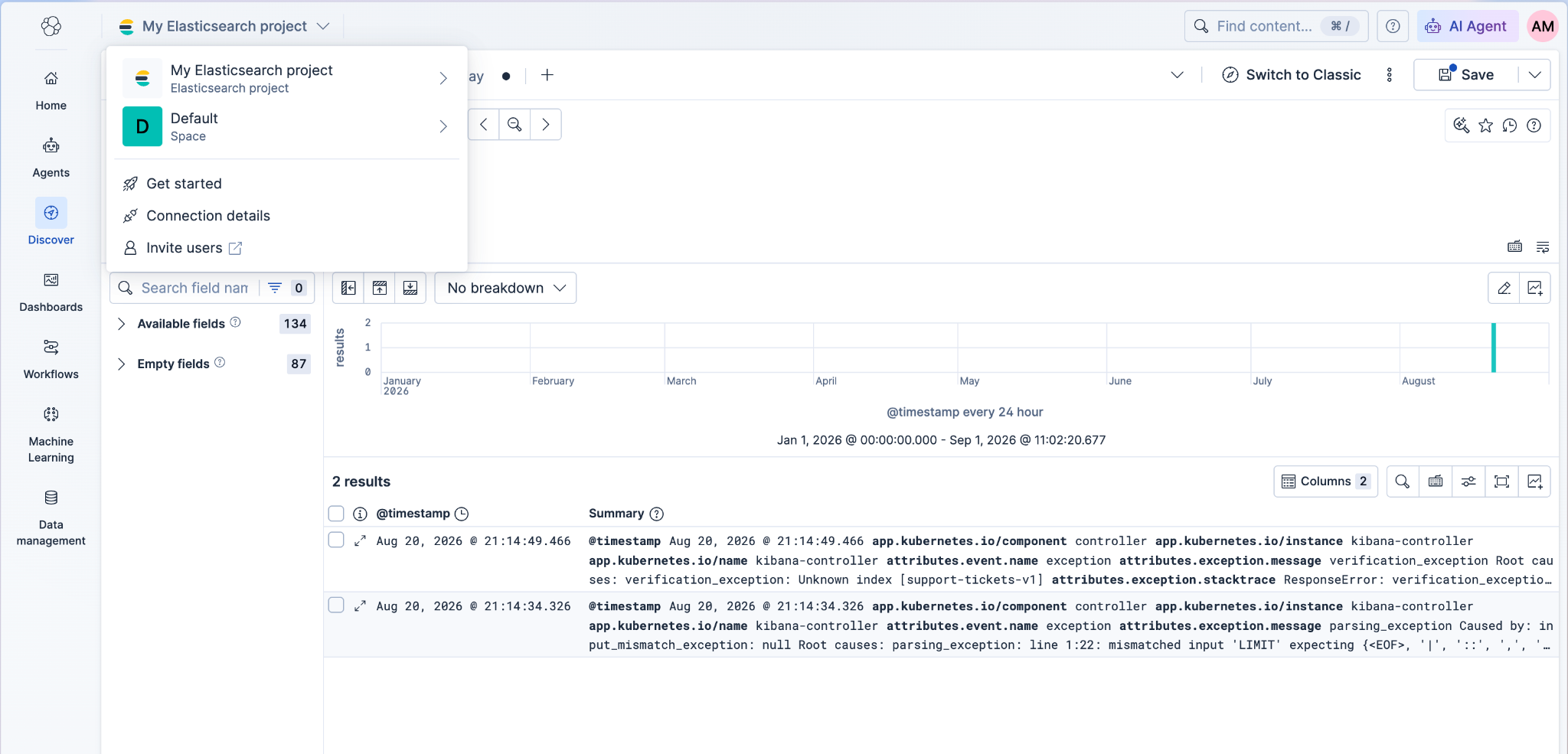
In 9.2, the updated navigation system addresses these problems and makes navigating in both expanded and collapsed modes faster and more intuitive. The refreshed navigation is on Elastic Cloud Serverless, and on any space with solution views enabled in Elastic Cloud Hosted and on-premises.
What’s new with the navigation refresh?
You can now enjoy Kibana in full-width without compromising navigation efficiency. Here’s what you get:
More screen real estate – The navigation menu takes up less space, giving you more room for Dashboards and Discover.
Improved collapsed mode – Access both main and submenu items with just one click.
Menus on hover – Navigate quickly without extra clicks.
Always-visible secondary navigation panel – Easily switch between pages like Index Management and Integrations without losing your place.
Responsive to browser resize – The menu adapts smoothly to browser resizing. When the height is restricted, overflowing menu items can be accessed under “More”.
If you’re on Elastic Cloud Hosted or working locally, set your space to a solution view to benefit from these changes.
Coordinating a multi-product nav redesign
One technical and organizational challenge was shipping new navigation components and a new hierarchy across many product flavors at once (Elasticsearch, Security, Observability, and their Serverless variants, and more). We needed to coordinate across teams without blocking each other, avoid a giant long-lived branch, and roll out safely.
Each product flavor owns a navigation tree (JSON) that drives both the side nav and breadcrumbs. Teams register their tree with the Kibana platform; Kibana renders the side navigation from that tree by mapping it to the side nav component props.
Example of the navigation tree structure:
{
  id: 'security',
  title: 'Elastic Security',
  children: [
{ title: Get started', link: '/getting-started' },
{ title: 'Discover', link: '/discover' },
{ title: Dashboard, link: '/dashboard'},
….
]
}
To roll out the change, we needed to ship the new side nav and update trees while keeping the old nav working. We solved this by:
One tree, two renderers: the same tree feeds both the legacy nav (v1) and the new nav (v2). Developers could see the new sidenav in the main branch by flipping the feature flag. We also had a developer-only “both” mode that allowed developers to see the two side navigations next to each other and compare the changes visually, ensuring they could polish the new navigation without breaking the old one.
Compatibility mapper: transforms the same navigation tree for both navs (e.g., flattens groups and accordions for new nav and ignores v1 only configuration settings) and logs warnings for things that are misconfigured for v2.
Version-scoped tweaks, no forks: optional props like
sideNavVersion(show/hide tree branch per version) andiconV2: 'home'(show icon only in v2 nav) let teams polish v2 without breaking v1.
Result: each team iterated on its tree independently, main and serverless users kept a stable v1, and we avoided duplicate trees and a risky “big bang” PR. When v2 is default, we’ll remove v1 and the temporary shims.
Why an icon-driven navigation?
To deliver a fully functional collapsed mode—a highly requested feature—we developed a navigation system that can condense into a column of icons. Early UX testing showed that this design was well received by users. By visually associating Kibana’s abstract concepts with distinct icons, the navigation becomes more intuitive, memorable, and efficient. For example, Explore in Discover leverages the same Discover icon in the navigation, which makes it easier to recognize it. We also support optional text labels, visible in expanded mode and as tooltips when collapsed. Finally, this approach allows both navigation panels to be displayed simultaneously when needed—something previously impractical due to limited screen space.
A new home for data management
Our user research with developers confirmed that data management is not considered a setting or a Stack Management feature. In card sorting exercise, developers separated features like Fleet, Index Management and Data Streams from admin-related tasks. These user insights led us to introduce a dedicated data management section in Kibana.
Previously, pages like Index Management were buried inside Stack Management, making them harder to locate. Now, they’re grouped together under a single, clearly defined section including Fleet, Index Management, Integrations, Ingest Pipelines.
This gives you a consistent home for managing indices and data lifecycle tasks, faster access to data-related pages without navigating through Stack Management and a clearer mental model of where data management belongs in Kibana.
Looking ahead
All improvements to the navigation are directed towards making you more efficient in searching and managing your data in Kibana, while reducing clutter and unnecessary menu items. To that end, here are features we’re exploring in the mid-term:
Customize your navigation
Some of you might want to hide or show menu items depending on your use case. We're actively looking into allowing you to customize the navigation on both a space and user level.
Improved global and navigation menu search
To speed things up when searching through lengthy menus, we’re investigating adding text search in secondary navigation and improving global search for faster response times and more relevant results across Kibana.
Refreshed look and feel and dedicated sidebar apps
We’re also refactoring legacy code to introduce a new CSS grid layout that will organize the chrome in designated containers, with a persistent sidebar that will allow you to interact with a chat agent while navigating through Kibana.
Looking for feedback!
We’re excited to deliver these improvements and can’t wait for you to try them out. And we’ve made it easier than ever to share your thoughts—the feedback option is now built directly into the navigation, so you can let us know what’s working (or what isn’t) at any time.
How helpful was this content?
Related Content

The fastest work is the work you never do: 100x faster sorted queries in Elasticsearch

Check 100 candidates, not 10 million documents: Faster kNN filters in Elasticsearch

How Elasticsearch Serverless hollow shards cut indexing-node shutdowns by 30%
GPU-accelerated vector indexing in Elasticsearch with NVIDIA cuVS: 138M vectors in under 10 minutes