Stopping USB-borne attacks at the endpoint with Elastic Security Device Control

 Share on Twitter
Share on Twitter

 Share on LinkedIn
Share on LinkedIn

 Share on Facebook
Share on Facebook

 Share by Email
Share by Email

 Print this page
Print
In today’s enterprise environments, endpoints are more than just laptops and desktops. They are the critical bridge where people, applications, and data intersect. While much attention is given to malware prevention and threat detection, one security layer is often underestimated: device control.
With the release of 9.2, Elastic Security now includes Device Control, which helps protect your organization from data loss, malware, and unauthorized access by managing which devices can connect to your computers. Specifically, it restricts which external USB storage devices can connect to hosts that have Elastic Defend installed.
What is Elastic Security Device Control?
Device Control from Elastic Security empowers security teams to define and enforce policies that govern the use of removable media and other connected devices. This isn't about completely blocking all external devices, which can hinder productivity. Instead, it's about intelligent management, allowing necessary access while preventing potential threats.
Why is device control important?
Device control isn't just a security feature; it's a critical line of defense that addresses some of the most overlooked and dangerous security gaps in modern organizations. By managing the physical interface between endpoints and removable storage, it secures a significant blind spot that standard network protections often miss. The necessity and impact of this feature can be boiled down to four core pillars that protect your organization from both internal and external threats.
Preventing data exfiltration
Blocking malware ingress
Supporting compliance and governance
Providing visibility and auditability
1. Preventing data exfiltration
One of the easiest ways for sensitive data to leave an organization is through a USB drive. According to DataLocker’s 2024 State of USB Connected Devices Report, 52% of organizations experienced data theft via USB devices in the past two years. Device control policies prevent unauthorized transfers, closing off a major insider threat vector.
2. Blocking malware ingress
Removable media remains a popular malware delivery channel. Honeywell’s 2024 USB Threat Report revealed that 51% of malware attacks were designed for USB devices — a sixfold increase since 2019. Device Control helps stop malicious files at the point of entry, reducing the attack surface.
3. Supporting compliance and governance
Many regulatory frameworks, such as HIPAA, PCI DSS, GDPR, require strict handling of portable storage. Device Control ensures only approved devices are used, adhering to compliance standards.
4. Providing visibility and Auditability
Beyond blocking or allowing devices, Elastic Defend provides detailed logs of device activity. Honeywell’s 2025 Cyber Threat Report found that 1 in 4 incidents involved a USB plug‑and‑play event, showing that visibility and logging are key for timely investigations and forensic readiness.
Elastic Security Device Control key capabilities and benefits
Being part of Elastic Defend policy, Device Control offers a streamlined management experience:
- New policies are created and deployed from a central console, simplifying administration across a large fleet of endpoints.
- Device Control will be turned on by default for all new policies with the option to block all devices.
- The user-friendly interface makes it easy for security analysts to define, monitor, and adjust Device Control settings from a new Elastic Defend policy:
-
Allow read, write, and execute: USB storage devices can be used without any restrictions.
-
Allow read only: Read-only action is available for external devices, preventing the unauthorized transfer of sensitive information.
-
Allow read and write access: Users can read and write files from USB storage devices, but they aren’t allowed to execute any file.
-
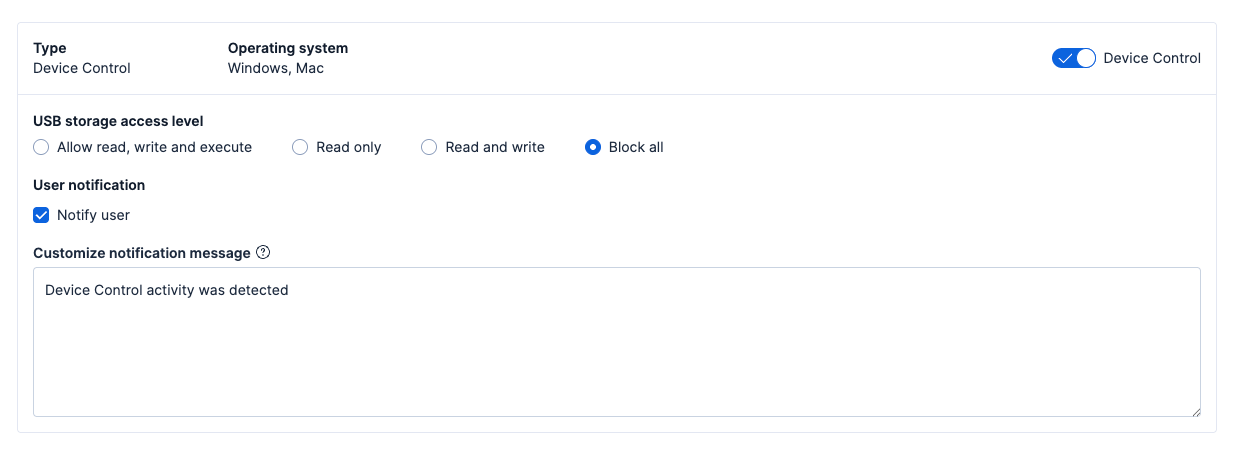
For the existing policies (configured prior to Device Control being added to Elastic Defend), Device Control will be added but turned off by default to prevent unintended blocking of devices for endpoints associated with an existing policy.
Giving you granularity: Trusted devices
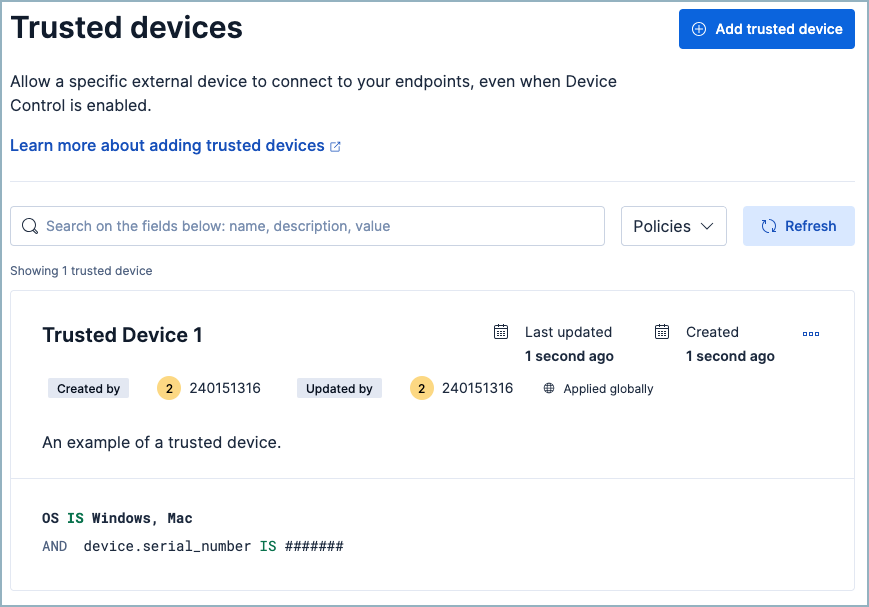
In most environments, there will be a need for exceptions — for example, allowing certain users, groups, or devices to use USB storage when required; all these cases can be managed through the trusted devices section. Similar to trusted applications, users can define a list of trusted devices that are allowed to be used but with more filters available:
Username: The name of the user that is allowed to access and use USB storage devices
Host: The machine that is allowed to access USB storage devices regardless of which user is connected to the machine
Device ID: Identifier for the device
Manufacturer: Identifier for the producer
Product ID: Identifier for the device model
After adding entries for trusted devices, these can be applied to a specific policy or globally to the entire organization.
Single view: Device Control dashboard
We understand that device control isn’t just about configuring the policies. That’s why we’ve also released the Device Control dashboard, giving you a centralized overview for Device Control activity that contains graphs and statistics about:
Blocked events and devices
Devices that are connected to the endpoints grouped by manufacturer or product ID
Host events related to Device Control
Now, you can easily view and maintain your Device Control activity in one simple location. Access the dashboard by searching for device control in the Custom Dashboards section.
Real‑world use cases for USB storage devices
Are you still wondering how device control applies to your organization? It’s truly more common than you’d think. We’ve observed four common use cases where device control was a critical security layer:
Contractor access control: A manufacturing or defense company might allow contractors to connect only preapproved encrypted USB drives. This ensures that sensitive design files cannot be copied to personal devices.
Incident containment: During an investigation, a security team may temporarily block all USB devices enterprise‑wide to prevent exfiltration while the incident is being resolved.
Forensic read‑only mode: In regulated industries, investigators may allow USB drives but enforce read‑only mode to preserve chain of custody while still enabling evidence collection.
Higher education: Universities can block mass‑storage devices in computer labs to prevent students from loading pirated software or malware onto lab machines.
While we’ve included some of the most common real-world threats and scenarios where Device Control played a key role, there are countless more.
Device Control strengthens endpoint security
Elastic Security's Device Control feature is an essential component of a comprehensive endpoint security strategy. By providing granular control, robust threat prevention, and detailed visibility, it empowers organizations to protect their data and systems from the risks associated with external devices without unduly impacting productivity.
By emphasizing Device Control as part of a holistic endpoint security strategy, security teams can strengthen their defenses where it matters most: at the intersection of users, devices, and data.
Get started with Elastic Security
Join the growing number of businesses that trust Elastic Security to protect their organization against attacks. Experience the peace of mind that comes with knowing that your endpoints and organization as a whole are secure against the latest threats. Start your Elastic Security free trial, and discover the difference that our protection can make. Visit elastic.co/security to learn more.
The release and timing of any features or functionality described in this post remain at Elastic's sole discretion. Any features or functionality not currently available may not be delivered on time or at all.
Share
- Share on Twitter
Share on Twitter
- Share on LinkedIn
Share on LinkedIn
- Share on Facebook
Share on Facebook
- Share by Email
Share by Email
- Print this page
Print