Try out vector search for yourself using this self-paced hands-on learning for Search AI. You can start a free cloud trial or try Elastic on your local machine now.
Building a modern AI application means stitching together a lot of moving parts: an embedding model provider, a vector store, a hybrid retrieval layer, a large language model (LLM) orchestrator, and some kind of script to interact with the parts. Most tutorials show you how to wire up each piece separately. This one shows you how to build all of them with Elasticsearch alone. I chose Elasticsearch as my vector database because it supports hybrid search and out-of-the-box quantization, so you get semantic understanding, keyword precision, and fast similarity search without bolting on extra infrastructure. Along the way, it explains why each architectural decision matters.
We'll use Python to demonstrate each tip, but none of them are language-specific; you could follow along just as well with the Kibana Dev Tools console, the Kibana UI, or any Elasticsearch client.
Prerequisites
- Elasticsearch 9.3+ (Elastic Cloud Serverless or self-managed). Start a free trial.
- Kibana access with an API key that has full privileges for Analytics (required for Elastic Agent Builder and Elastic Workflows)
- Python 3.9+
- Environment variables in a
.envfile:
What we're building
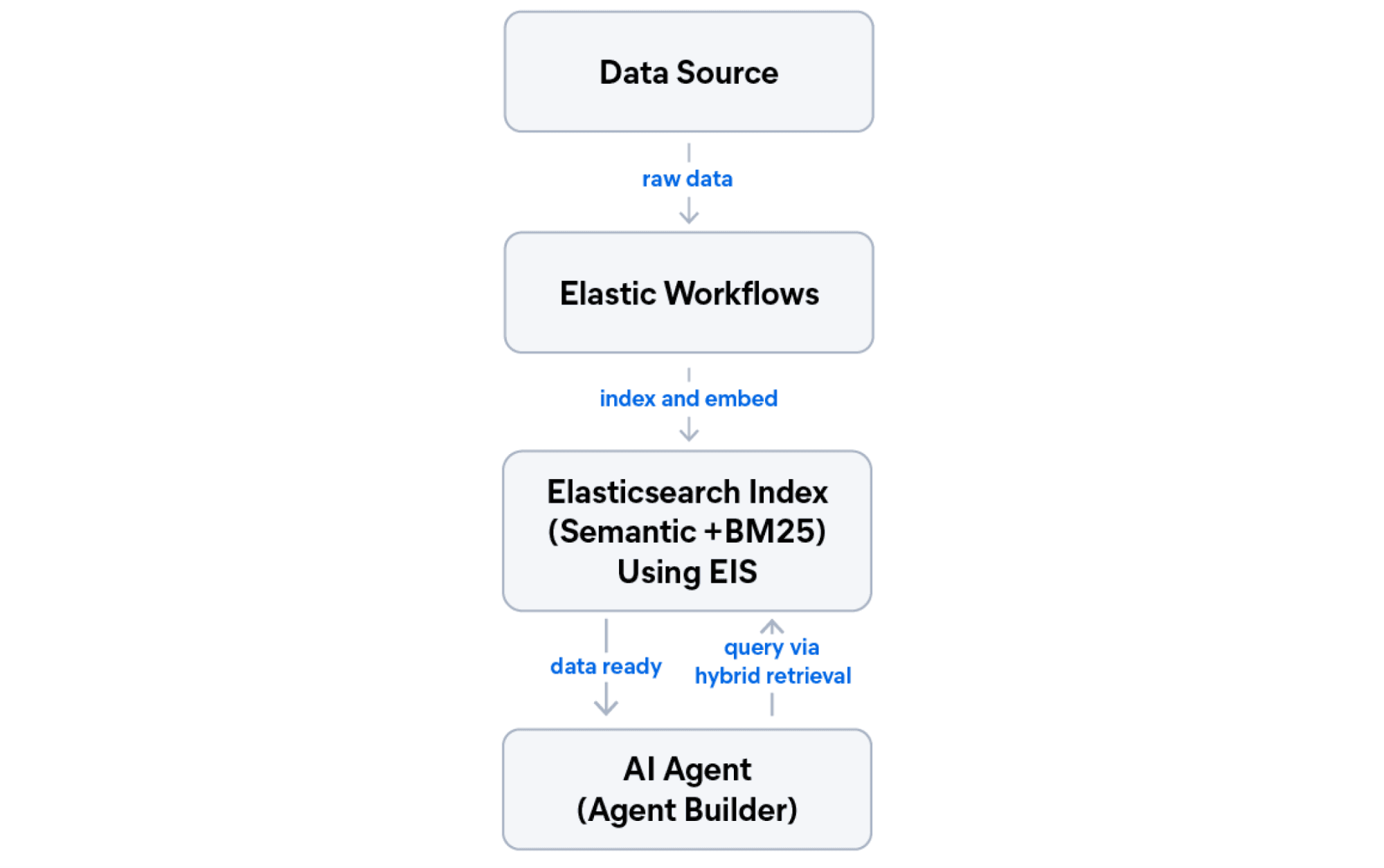
By the end of this tutorial, you'll have a working app with five layers running on Elastic. If you want to skip ahead and run the code, grab the companion notebook.
- Managed inference: Embeddings without managing machine learning (ML) infrastructure.
- Semantic index: An index designed for both BM25 and semantic search.
- Hybrid retrieval (reciprocal rank fusion [RRF]): The best of lexical and semantic search combined.
- AI agent: A natural language interface over your data.
- Automated workflow: A scheduled pipeline that fetches, indexes, and summarizes new content.
Elastic allows you to use all five layers in just one deployment.
Tip 1: Use managed inference instead of external embedding APIs
The first decision in any vector search project is where to generate embeddings. The obvious answer is to call an external API (OpenAI, Cohere, Jina AI) directly, but this means managing a separate billing account, API key rotation, rate limit monitoring, and network latency on every document you index.
Another option is to use Elastic Inference Service (EIS), a managed GPU-accelerated inference layer built into Elasticsearch. You configure it once, and embeddings are generated inside the Elastic infrastructure as documents are indexed.
For this tutorial, we’ll use jina-embeddings-v5-text, an out-of-the-box model with high performance for retrieval-optimized embeddings.
When to use EIS vs. an external API
Use EIS when you want a single Elastic billing account and your organization doesn’t have a default model for all its systems. Use an external provider when your team has chosen an unsupported model across systems and needs the same embeddings everywhere for consistency.
The inference endpoint is now ready. Elasticsearch will call it automatically whenever you index a document into a field that uses semantic_text.
Tip 2: Design hybrid-ready indices from day one
A common mistake is designing your index for semantic search and later trying to add hybrid search. Hybrid search requires both semantic retrieval and BM25. Retrofitting this after you have millions of documents means a full reindex.
The correct pattern is to use copy_to at mapping time. Keep the original text fields for BM25, and automatically copy their content into a dedicated semantic_text field for vector search.
A few things to understand about this mapping:
titleis atextfield with akeywordsubfield, available for BM25 full-text search and for aggregations and filtering viatitle.keyword.contentis a standardtextfield, used for full-text search.copy_to: "semantic_field"means Elasticsearch automatically populatessemantic_fieldfromtitleandcontentat ingest time. You don't need to sendsemantic_fieldin your documents.semantic_textwithinference_idtells Elasticsearch to call the EIS endpoint to generate embeddings forsemantic_fieldautomatically.
To understand why to use copy_to instead of separate semantic fields, see the Elasticsearch guidance on searching as few fields as possible.
Tip 3: Use bulk operations for scalable ingestion
Never index documents one at a time in a production application. Each individual index request is a separate HTTP call.
Elasticsearch exposes the _bulk API for batching multiple index operations into a single HTTP request. Combine it with a generator function to avoid loading your entire dataset into memory.
Generator pattern vs. list
Loading all documents into a list before calling helpers.bulk() works, but it loads everything into memory at once. A generator yields documents on demand, which means your memory usage stays constant regardless of dataset size.
Tip 4: Use a hybrid search strategy
Hybrid search combines BM25 (lexical) and semantic retrieval to get the benefits of both: the precision of term matching and the contextual understanding of dense vector search. With your index already designed to support both BM25 and semantic search, the question is how to merge the two ranked result lists.
Elasticsearch provides built-in methods to combine semantic and full-text strategies through its retrievers framework. In this blog post, we’ll talk about RRF and linear combination, the two methods that were designed to fuse semantical and BM25 results. Each takes a different approach to combining results, and the right choice depends on your data and how much tuning you want to invest.
Reciprocal rank fusion
RRF is the recommended starting point for hybrid search, as it ignores raw scores and merges results based on rank positions alone. A document ranked third in semantic and fifth in BM25 gets a combined score based on those positions, not the raw numbers. This makes it robust against mismatched score scales; it requires almost no tuning and works well out of the box. The tradeoff is that RRF discards score magnitude: A document that scores dramatically higher than others in one retriever won't get extra credit for that gap.
Elasticsearch also supports weighted RRF for scenarios where you need to boost one retriever over another without switching to score-based merging.
Reranking with jina-reranker-v3
RRF is fast and reliable, but it ranks by position and has no way to model how well a document actually answers the question. A reranker fixes that. It takes the top-N candidates from RRF and rescores them using a cross-encoder model that reads the query and each document together, producing a relevance score grounded in meaning rather than rank position.
jina-reranker-v3 is available through EIS and uses listwise reranking. It evaluates up to 64 documents in a single inference call using cross-document context, which gives it a global view of the candidate set rather than scoring each document independently.
First, create the reranker inference endpoint:
Then wrap the RRF retriever inside text_similarity_reranker:
RRF does the heavy lifting; it efficiently narrows thousands of candidates to the top 25 using rank fusion. The reranker then reads the query and document together and reorders those 25 by true semantic relevance.
Tip 5: Add AI reasoning with Agent Builder
That's where Elastic Agent Builder comes in, allowing you to quickly create LLM-powered agents that utilize your Elasticsearch data as the source using natural language queries. Unlike LangChain or LlamaIndex (which require you to bring your own LLM, manage prompts, and configure retrieval pipelines), Agent Builder is native to Kibana: It has built-in tracing, uses your existing Elasticsearch indices, and supports Elasticsearch Query Language (ES|QL) for precise data access alongside semantic search. It also provides communication with external systems via Model Context Protocol (MCP) server, or agent-to-agent (A2A) servers.
The agent for this tutorial uses the Elastic Managed LLM by default, which is available on Elastic Cloud with no additional API key or connector configuration.
Once created, you can chat with the agent programmatically:
The agent has access to three tools:
platform.core.search: For semantic and keyword search over your index.platform.core.execute_esql: For ad-hoc analytical queries using ES|QL.tech-articles-recent: A custom ES|QL tool with a predefined query for date-filtered browsing.
The LLM decides which tool to use based on the question. Custom tools let you expose specific query patterns that the agent can invoke safely.
When to use Agent Builder vs. LangChain/LlamaIndex
Use Agent Builder when you want native Kibana integration, built-in execution tracing, and direct access to ES|QL without custom tool implementation. Use LangChain or LlamaIndex when you need to connect multiple data sources beyond Elasticsearch, use model providers not yet supported by Agent Builder, or require custom agent architectures (multi-agent or reflection loops, among others).
Tip 6: Automate with Elastic Workflows
Search pipelines often have a recurring pattern: Fetch new data from an external source, index it, and then trigger some action. You can implement this using external tools, but Elastic Workflows gives you a YAML-based alternative that runs inside Elasticsearch.
Workflows is a technical preview feature that lets you define multistep automation pipelines using declarative YAML. It supports HTTP calls, Elasticsearch operations, conditional logic, loops, and (most relevantly here) invoking AI agents as a step.
Note: Workflows is in technical preview as of Elasticsearch 9.3. The API and YAML syntax may change in future releases. To enable the Workflows UI, go to Kibana: Stack Management > Advanced Settings, and set workflows:ui:enabled to true. Find detailed information here.
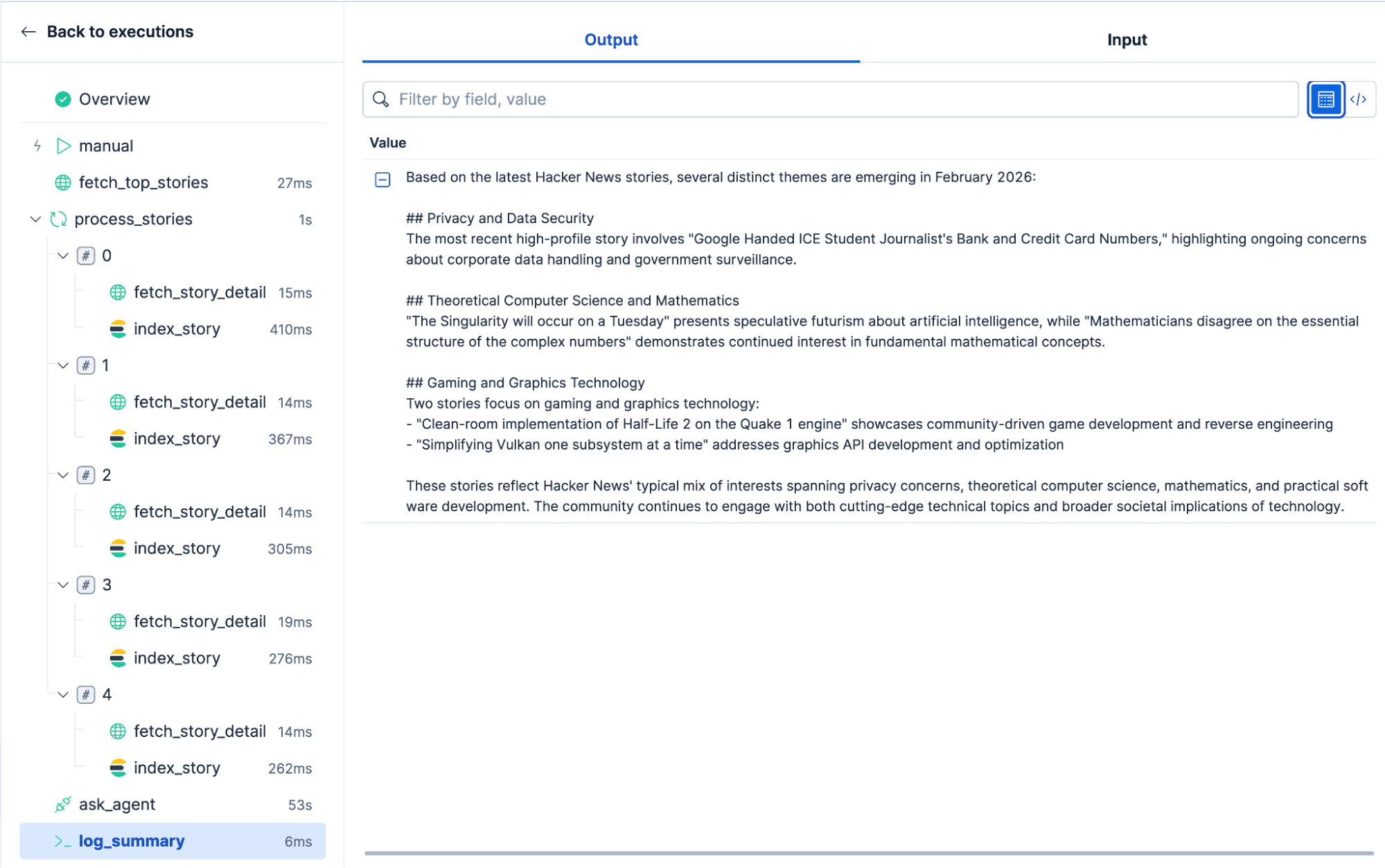
The workflow below is a Hacker News digest: It fetches the top five stories from the Hacker News API, indexes each one into our tech-articles index (with automatic embedding via EIS), and then asks the AI agent to summarize the article's topics.
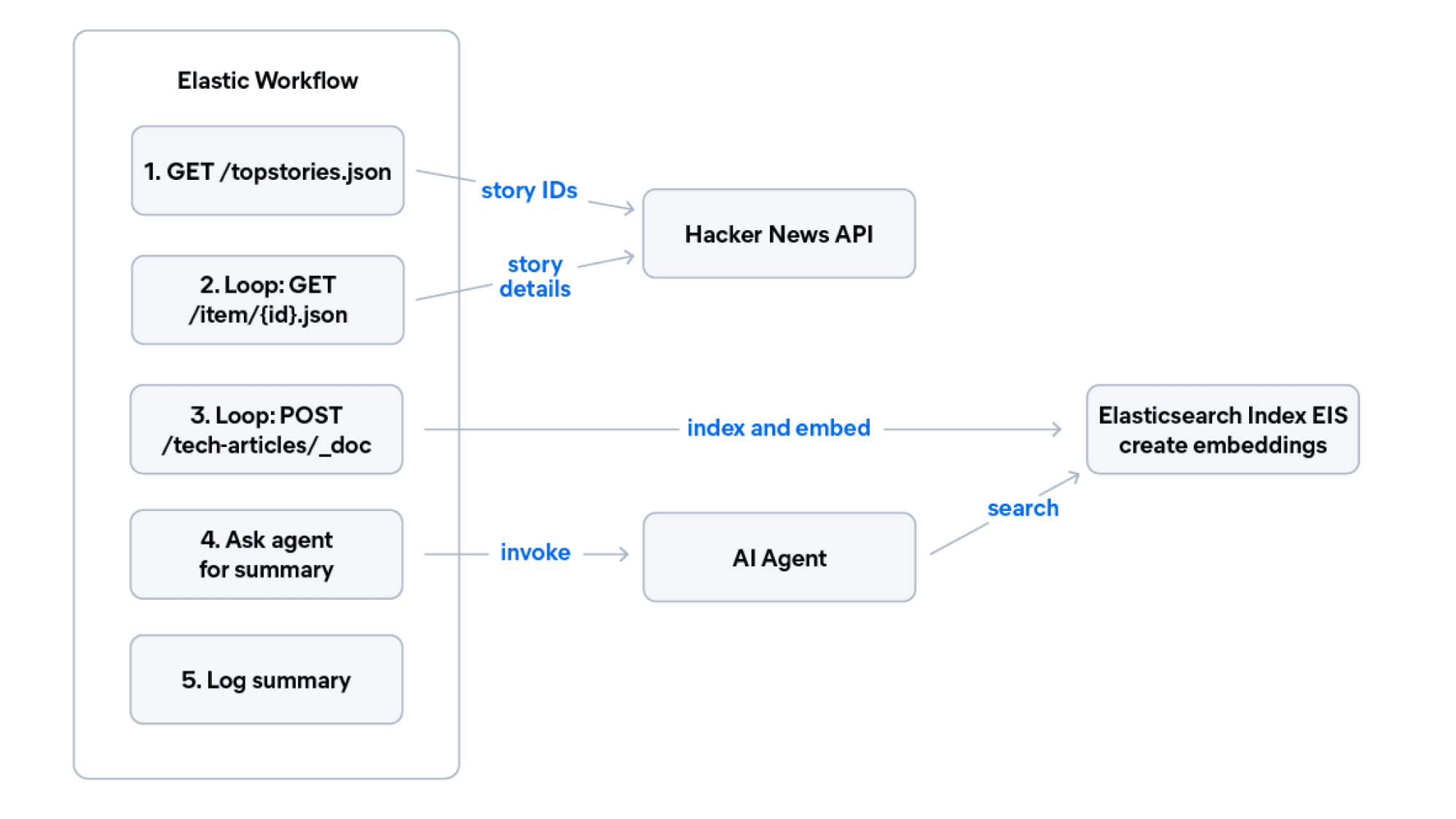
Create this workflow by pasting the YAML into the Kibana Workflows UI:
The ai.agent step in the workflow calls the Agent Builder agent you'll create in the next section. This is the bidirectional agent-workflow pattern: Workflows handle deterministic tasks (HTTP calls, indexing, looping) and delegate reasoning to agents. Agents handle open-ended questions and delegate structured execution to workflows.
Here you can see the final results of the workflow:
Conclusion
We walked through six tips for building a modern AI search application entirely on Elasticsearch, from managed inference and hybrid-ready index design, through scalable ingestion and hybrid retrieval with RRF, to automated workflows and AI agents. Together, these practices give you a production-grade AI search application running entirely on Elasticsearch, without external orchestrators, separate vector databases, or additional embedding API accounts.
Recommended lectures
- Deep dive on
semantic_textchunking options for long documents. - Weighted RRF for fine-tuning hybrid search relevance.
- Agent Builder GA announcement for the full feature overview.
- jina-embeddings-v5-text models just released February 2026.
관련 콘텐츠
2026년 7월 16일
A picture is worth 1.5x the words: What we learned benchmarking product search embeddings
We benchmarked two embedding models on 5,000 real products and found that combining image and text beats either alone by up to 50%. Here's the data and the model that won.

2026년 7월 13일
The disk that never woke up: what actually decided our Qdrant vector search benchmark rematch
On the same hardware, Elasticsearch and Qdrant land in the same range at 56 QPS. The io_uring disk scorer and memory claims turned out to be the two things that mattered least.
2026년 7월 10일
How BBQ shrinks Jina v5 embeddings by 29x without losing recall in Elasticsearch
A hands-on test comparing BBQ and float32 vector indices in Elasticsearch, measuring memory, disk and recall@10 across five languages.
2026년 7월 7일
Short queries, formal documents: how HyDE improved semantic search precision by 50% in Elasticsearch
HyDE boosts semantic search precision and recall by 50% on short queries. Here's how to implement it in Elasticsearch with the Inference API and semantic_text.

2026년 7월 2일
A simdvec deep-dive: How Elasticsearch uses neural-net and video-codec CPU instructions for vector search
Four ways Elasticsearch's vector search engine reuses neural-network, video-codec and cryptography CPU instructions for up to 6x speedups; with the math, the failed attempts and the benchmarks.