Good search is incredibly difficult. That's why we have an ecosystem full of search algorithms, tooling, and even dedicated stacks like Elastic’s, not to mention an entire field called information retrieval. In modern context engineering, AI agents search and retrieve context from many different sources, including local files, the web, or memory files. Giving agents access to tools to interact with data stored in a database allows them to ground their answers in proprietary information or even complete analytical tasks.
However, if these interfaces aren’t carefully engineered, agents can search the wrong index, generate invalid SQL/Elasticsearch Query Language (ES|QL) queries, or return large amounts of irrelevant data. During the development of Elastic Agent Builder, we’ve seen these failure modes multiple times. While collaborating with dozens of internal teams to build tools for interacting with Elasticsearch data and integrating them to improve our internal processes with agentic workflows, such as our internal laptop refresh process, we found that the most successful teams carefully design database retrieval tools as curated interfaces to their data.
In this blog, we share the best practices we follow when building database retrieval tools. In fact, the principles we share are based on common patterns we saw during iteratively improving our prebuilt tools and helping internal teams build custom tools.
Key challenges of agentic retrieval
Coding and search are among the best use cases of agents. Even though coding agents have recently made substantial progress with new concepts, such as filesystem-oriented tools and code-specific embeddings, search agents (specifically for database retrieval) lack reported breakthroughs.
Agent use cases are challenging for multiple reasons: They can ignore the available tools to accomplish a task; they can call the wrong tools; and they can call the right tools with the wrong parameters. In addition to these general challenges, we believe that database retrieval use cases are challenging for the following three key reasons:
- Identifying the right index of data requires the large language model (LLM) to understand what it contains. But sometimes, the number of indices can already be so large that even representing those to select may cause context length problems.
- Generating efficient queries that balance retrieving relevant information with minimizing latency and resource usage can be challenging.
- Avoiding context bloat with tool responses requires the tool response to be optimized for contextual relevance and token efficiency. This isn’t always easy, especially when the agent generates the query from scratch. Once the context is no longer relevant to answer a user’s query, offloading the data for later reference is another challenge.

During the development of Agent Builder and integrating it into our own processes, we faced these challenges multiple times. In fact, the principles we share in the following sections are based on common patterns we saw during iteratively improving our built-in and custom tools and our internal workflows built on top of them.
Principles for building effective database retrieval tools
In this section, we translate our learnings into guiding principles for building effective database retrieval tools: deciding which tools to build, making sure the agent finds the right index to search and calls the right tool with appropriate parameters, optimizing the tool responses, handling errors, and safeguarding the data.
Building the right database retrieval tools (“low floor, high ceiling”)
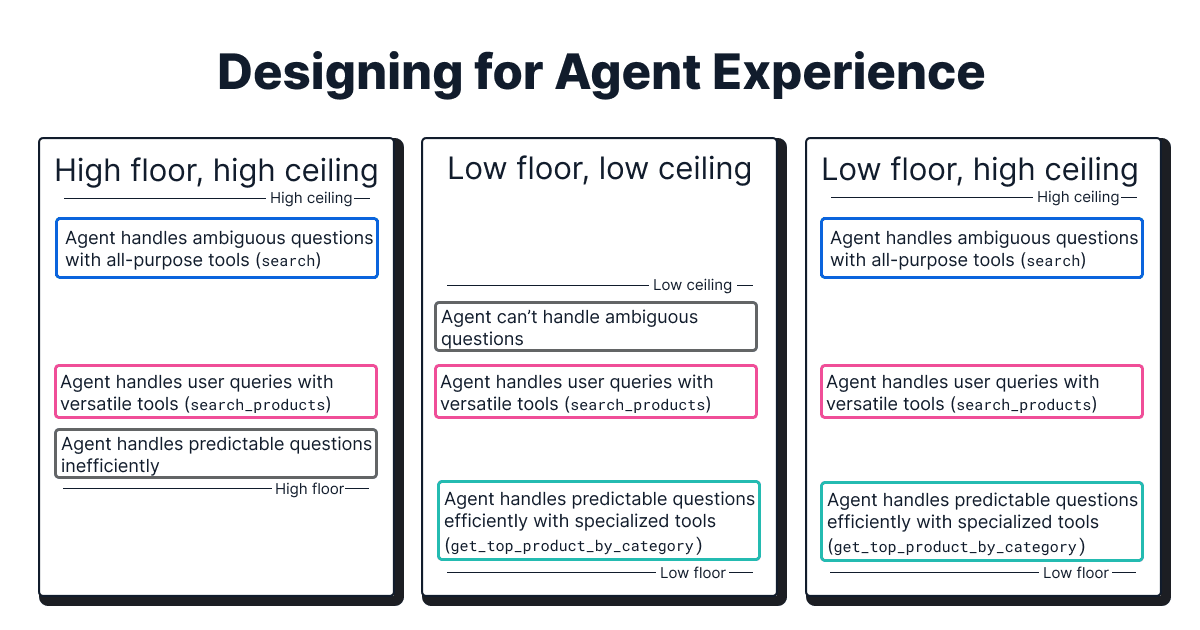
When deciding on what database retrieval tools to build, we follow the principle of “low floor, high ceiling” for good agent experience:
- High ceiling: Tools that don’t limit the agent's potential to handle ambiguous user queries in the worst case. In the context of database retrieval, these are general-purpose tools that, for example, allow the agent to write full SQL/ES|QL queries from scratch. These come with the trade-off of reasoning overhead of the agent and result in higher latency, higher cost, and lower reliability.
- Low floor: Tools with high accessibility that the agent can use successfully on the first try with minimal reasoning overhead for repeating user queries. In the context of database retrieval, these are specialized tools that, for example, wrap specific queries. These have the benefit of lower latency, lower cost, and higher reliability than general-purpose tools. However, they require engineering effort, and realistically, it may not be possible for engineers to anticipate every possible user query.
For example, in our experience, a generic search tool is mandatory to allow the agent to handle unique and ambiguous user queries in the worst case. However, we found it necessary to reduce reasoning overhead and increase efficiency by creating specialized tools (for example, get_top_performing_products(category)).
Another lesson we learned is to consider the level of abstraction of a tool. During our preview phase, the agent had access to a large number of atomic general-purpose tools (for example, get_index_mappings, generate_esql, execute_query, and others). In practice, this had two downsides: When faced with a complex, open-ended question, the agent would confuse tools and their expected order, despite guiding instructions. Combining multiple tools in an agentic workflow also requires hand-off of information via the context window, which leads to filling up the context window with information that’s only temporarily important. To overcome this inefficiency, we wrapped the functionality of multiple atomic tools into one self-contained search tool.
Finding the right index
While the majority of tools that interact with a database will focus on querying the database, in some use cases, like for index selection, the tool will allow the agent to interact with the database’s metadata to decide which indices to search against based on a user’s query and intent.
Initially, our naive index selection relied on the index names and a sample of their schema definitions. This worked well in our internal testing, but when internal teams experimented with it, we realized real use cases often don’t have index names that are distinct and descriptive but are instead vague (for example, users, logs, flight_travels versus web-logs-2026.01, web-logs-2026.02).
To overcome this, we started exposing each index’s metadata and schema definitions in the tool. This significantly improved the selection by allowing engineers to add descriptions to translate technical names into natural language on two levels:
- Index-level descriptions: What data is stored in the index and how documents relate to one another.
- Field-level hints: Specific guidance on a field's format, expected values, or business meaning (for example,
”Use this field for exact ID matches only”).
In another iteration, we decided to add data sampling. For each index, we sample some of the data present in each field to let the agent have a clearer understanding of the type of data in the index. While it significantly improved the efficiency of index selection, it comes at the cost of increased tool response data.
Calling the right database retrieval tool
Guiding an agent to call the right tool is already challenging enough in general. This section discusses what helped us make sure the agent calls a tool to ground their response, as well as calling the right database retrieval tool.
Naming and namespacing: Standardizing identifiers for reliable selection
A tool’s name acts as a skimmable header that agents use to decide which one to investigate further. In practice, this means using descriptive and distinct tool names. Additionally, tool selection is more reliable when their names are consistent in formatting (for example, standardize on snake_case) and wording. Using action-oriented verbs helps the LLM map the user’s intent to the tool’s purpose, although the exact wording of the tool names is less critical in practice (for example, search versus find).
Namespacing tools to group related tools under common prefixes or suffixes is similarly helpful. In the case of databases, namespacing tools by index or domain helps the LLM understand tool relationships and prevents naming collisions (for example, finance.search_ticker or support.get_ticket_details).

Tool description: Instructing the agent on proper usage
The description is the most crucial component of any tool definition because it instructs the agent on when and how to use it, especially when tools have similar names (for example, search_logs and find_errors).
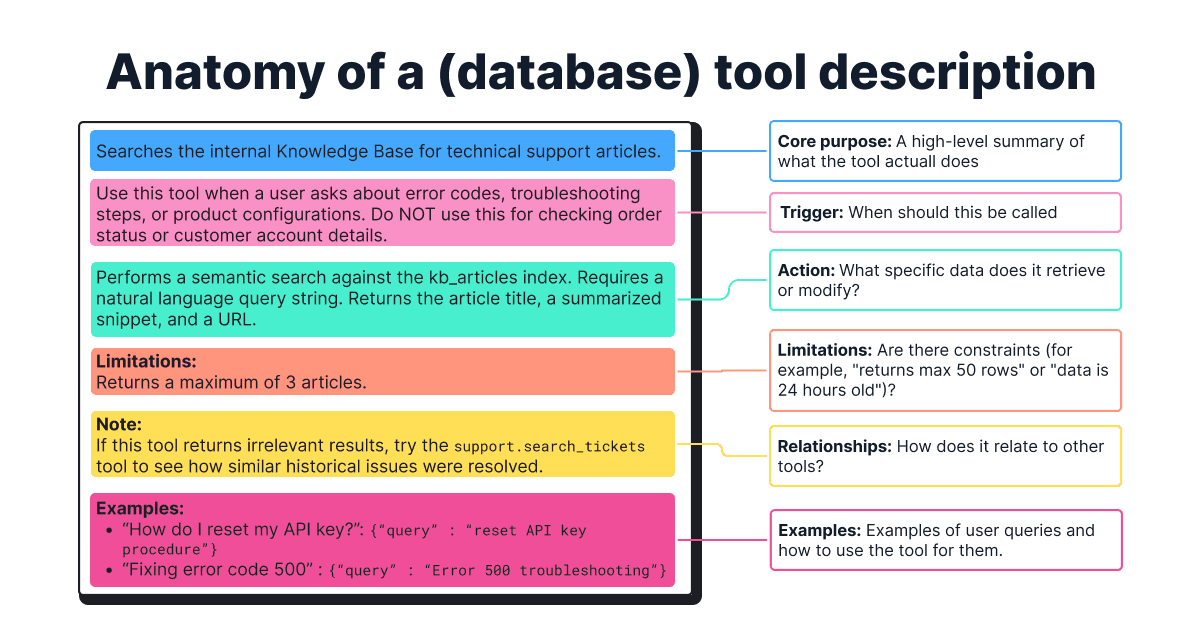
Consider this template for complex tools:
- Core purpose: A high-level summary of what the tool does.
- Trigger: When the tool should be used (and when it should not).
- Action: Which specific data the tool retrieves or modifies, and what type of questions it can answer.
- Limitations: What important limitations and constraints exist, such as specific query languages or formats.
- Relationships with other tools: Does one tool affect another tool, or are there any preconditions?
- Examples: Specific few-shot examples of user queries and how to use the tool for them, such as how to determine the optimal search strategy or when to use which operator.
A note on model sensitivity: While top-tier models like Claude 4.5 Sonnet are forgiving, smaller models often need clearer and more elaborate descriptions to select the right tool.
Adding reasoning parameters
Inspired by the paper on think-augmented function calling, we added a reasoning parameter. This approach improves the parameter accuracy by providing a scratchpad for the LLM to process its thoughts and facilitates a more transparent user experience.
This works well for complex tool calls or when a large number of tools are exposed to the agent. However, it can lead to regression in simple scenarios, and the benefits are further diminished for thinking-based LLMs. In our Agent Builder implementation, the reasoning parameter is often optional and stripped before execution and is only used for tool selection and parameter filling.
Support: Reinforcing instructions in the agent prompt
A common error we observed is that the LLM would sometimes ignore the available tools and instead use its innate knowledge to generate a (hallucinated) response. For example, when asked ”Can you tell me more information about Elasticsearch’s ES|QL language?”, it would assume it was fine to answer by itself instead of calling the tool, which was specifically designed to fetch documentation about Elastic products.
To mitigate this problem, we added repeated, explicit instructions in the system prompt of the agent itself to guide the agent to find the right balance between using its innate knowledge and grounding its answer in a tool response. Our testing indicates that this is especially effective when multiple tools with similar purposes are exposed to the agent.
Forcing tool usage
Beyond reinforcing the instructions in the agent prompt, we found it helpful to force tool usage when mandatory by explicitly binding tools using tool_choice: ‘any’.
Calling database retrieval tools with appropriate values and writing queries
Another challenge is to enable the agent to call a tool with appropriate parameter values. We’ve observed a consistent pattern where a strong definition, the number of parameters, and their complexity play an important role in reducing errors.
Parameter definition
A strong parameter definition significantly improves the parameter accuracy. General best practices for parameter definitions in agent tools are:
- Unambiguous name: Clearly identifies the purpose (for example,
user_idversususer). - Strong typing: Uses integer, string, or enums, among others, for finite sets of valid values.
- Detailed description: Explains what the parameter means and when and how to use it. Specifies default values for missing values, document formats (for example, for dates), hidden rules (for example,
”at least one of agent_id | user_id is required”), and includes small examples.
Number of parameters
Agents struggle to call a tool with a large number of parameters with appropriate values, especially mandatory ones. As a general rule of thumb, we try to keep the mandatory parameters below five and the total parameters below 10.
Parameter complexity
Reducing the complexity of the input parameter when possible leads to fewer mistakes. For example, it requires reasoning overhead to let an LLM generate a search term than generating full SQL or ES|QL queries from scratch. Especially for repeating user queries, “pre-canning” search queries reduces latency, cost, and error rates (although modern LLMs are good at using well-known languages, such as SQL).
To follow the principles of “low floor, high ceiling,” we gravitated toward wrapping a specific query inside a tool and letting the agent only provide the search term. Below is an example of input parameters with varying complexity for the same user query, "Find the 5 most relevant 'resolved' support tickets based on a new problem description to find previous solutions."
Model sensitivity
Models have a strong impact on parameter accuracy and query generation. Our internal benchmarking showed that switching from Claude 3.7 Sonnet to Claude 4.5 Sonnet reduced the syntax errors of the generated ES|QL queries from ~28% to ~4%.
Input validation
Although the above techniques increase parameter accuracy, they don’t eliminate the possibility of errors. Instead of trusting the LLM's input, we gravitated toward always validating and sanitizing it to ensure queries adhere to the expected schema.
Optimizing database retrieval tool responses
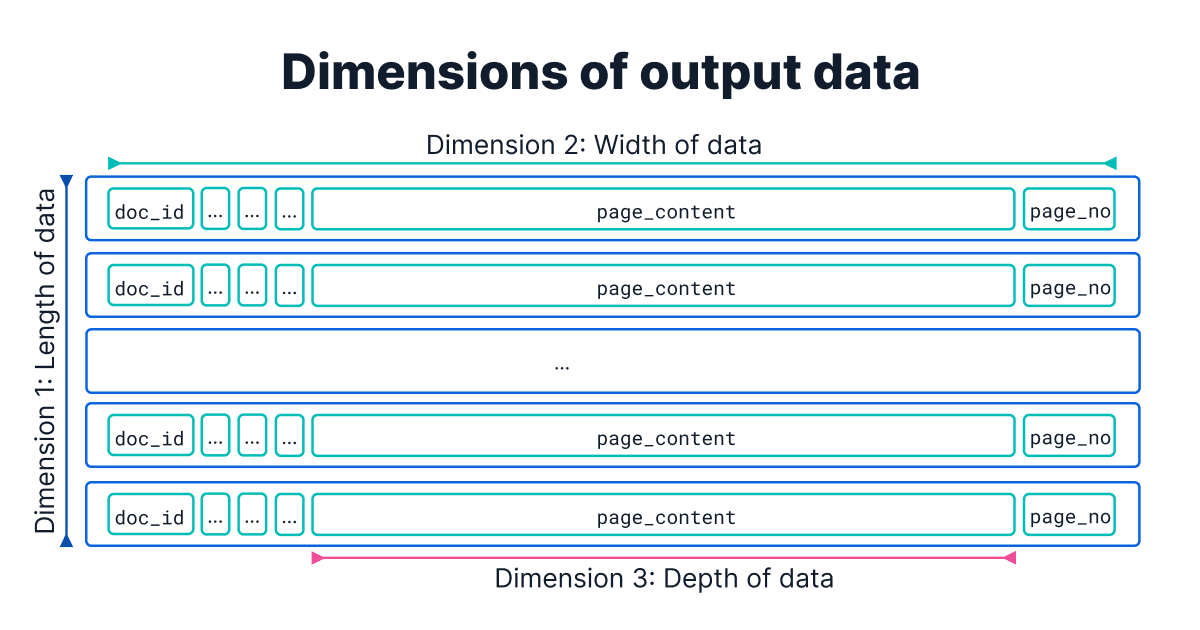
One common mistake is neglecting the size of the tool’s output. Because the tool’s output is what goes into the agent’s context window, not optimizing it for contextual relevance (quality) can distract the agent, and not optimizing it for token efficiency (quantity) can increase cost and risk exceeding the LLM’s context window limit. Working alongside internal teams, we’ve identified three dimensions for reviewing the return values:
The first dimension is length: The number of search results. A recurring pitfall we’ve observed among teams is the failure to limit search results, which can lead to overflowing the context window. While vector search queries inherently require a limiting parameter, other search methods often do not. We recommend including limit clauses (for example, 10 - 20) in all query types. This prevents returning low-signal results and ensures token efficiency.
The second dimension is width: The number of fields per data object. Instead of returning all properties, including cluttering ones (for example, timestamps and internal IDs, among others), curating a set of relevant fields can help improve both the user experience and the agent behavior.
Consider the following examples:
- Returning identifiers with a concise set of properties of a data object allows the agent to retrieve full information about a data object later when it needs it (“just-in-time context engineering”), rather than cluttering the context window.
- Returning metadata for citations (for example, page numbers in large PDF documents) can help build trust for the user.
- Returning the number of search results and status messages can help the agent reason the status of the search query.
The third dimension is depth: The size of a single field. Consider a case where the documents themselves are large (for example, in the 10s of MB scale). Those can’t just be passed back to the agent in full, as context length will instantly reach its limit. To mitigate this, we recommend truncating long text fields when an excerpt is sufficient. We found features such as Elasticsearch’s highlighting are helpful for this without the need for another LLM API call.
But even when working with smaller documents, letting the tool format the data into an easily digestible format for the LLM, such as sanitizing the content (for example, stripping HTML tags), formatting for readability (for example, tables to Markdown tables or links as “[Title](url)”), improved downstream performance.
While using only one of these techniques is often not sufficient for improving the contextual relevance, combining all of them might reduce the retrieval recall (for example, limiting the number of search results might risk not retrieving all of the relevant documents). In practice, this requires evaluating different combinations of these approaches to find the best balance.
Handling errors and enabling self-correction
We’ve observed that agents can get stuck in infinite loops or hallucinate responses when they encounter an error. Even if an agent follows its instructions perfectly, if a tool doesn’t provide any error message, only returns an error code, or at best provides a short, nondescriptive error message, the agent has no chance to self-correct from an error it doesn’t understand.
An informative error message enables the agent to understand why the error is happening and how to recover from it. For this, engineers need to think about the “not so happy” paths and the anticipated edge cases, such as the following examples:
If an error occurred because of a wrongly formulated search query, the agent should be able to reason over the failure and reformulate the query. In this example, returning the number of search results and the generated query can help the agent self-correct.
In general, engineers need to consider whether “zero results” is an expected behavior or an error for a given tool. In cases where an empty result likely indicates an error, both an error message and agent instructions can be helpful.
When encountering an API failure due to an expired API key, strictly limit retries (for example, a maximum of two or three) to prevent the agent from repeatedly trying a failing deterministic flow.
Safeguarding data
The primary engineering challenge for production-grade agent applications with different tools lies in identity propagation, specifically the distinct requirements of authentication (verifying who the user is) and authorization (verifying what they can access). While an initial layer (for example, Okta) can provide the base authentication, downstream systems (for example, ServiceNow, Elasticsearch, and others) maintain their own nonuniform authorization architectures with varying levels of granularity.
The most successful implementations we’ve seen enforce identity verification at every touchpoint within the tool's logic. This prevents the agent from accidentally accessing data that the end user isn't allowed to see. By verifying identity at every system level, we ensure that the agent respects privacy even when navigating complex, multisystem workflows. Be aware of the downside; this introduces intentional, security-mandated latency.
Beyond verifying the identity at every touchpoint, managing credentials securely is critical. Exposing sensitive API keys in tool definitions or hardcoding database credentials in YAML configuration files is a high-risk vulnerability. Instead, we recommend that engineers use secure credential management systems.
Evaluating database retrieval tools
The development of database retrieval tools for agentic systems is an iterative, evaluation-driven process. To evaluate the effectiveness of our database retrieval tools and uncover issues, our internal teams maintain evaluation datasets with realistic user queries and the expected tool calls (for example, ”Am I eligible for a laptop refresh?” expects the check_eligibility tool). We’ve used the following metrics for evaluation of our database retrieval tools and for benchmarking different LLMs for model selection:
- Tool selection accuracy: How often the correct tool was selected for a specific query type (for example, retrieval, analytical, hybrid, adversarial).
- First-pass success rate: A critical metric for us was distinguishing between eventual success and immediate success. Does the agent pick the right tool on the first try, or does it require a self-correction loop? (High self-correction indicates poor tool descriptions.)
- Average tool calls per answer: We track the efficiency of the agent. If the average number of tool calls to answer a simple question jumps from 1.5 to 4, it usually indicates that the agent is getting lost or that the tools are too granular.
- Tool-specific recall/precision: For dedicated database retrieval tools, we measure standard retrieval metrics to ensure that the documents returned are relevant to the arguments passed by the LLM.
- Failure rate: We strictly monitor the rate of malformed tool calls (for example, missing parameters) to identify which models need more "hand-holding" in the prompt instructions.
Once live, our teams at Elastic continue to monitor agentic health and log telemetry data (for example, every success and failure and the time taken for the agent to complete the task) in Kibana. This allows our ITOps teams to build dashboards to answer meta-questions like, "What is the failure rate this week?," "How many laptop requests came from California?," "How many requests were fulfilled?," without building a custom analytics engine.
Summary
During the iterative, evaluation-driven development process of Elastic Agent Builder, we identified consistent patterns in what makes database retrieval tools effective for context engineering. When implementing tools to search, retrieve, and manipulate data, we try to follow the following core principles:
- Building the right database retrieval tools by following the “low floor, high ceiling” principle.
- Helping the agent call the right database retrieval tool with appropriate parameter values through careful and reinforced prompting and interface design.
- Avoid context flooding by optimizing the tool response for context relevancy (quality) and token efficiency (quantity).
However, there remain open challenges, and we’re actively working on improving these techniques:
- Context bloat is a primary hurdle for agent performance because retrieved data remains in the context window as the conversation progresses. A future direction is to dynamically off-load large chunks of data, such as tool responses or attachments, in a file store and allow the agent to retrieve them on demand.
- Efficient discovery of large volumes of tools and data attachments will be central for building production-grade agents. We plan to introduce agent skills with the functionality of progressive disclosure (loading information only as needed) and implementing a semantic metadata layer.
Acknowledgements
Written by Leonie Monigatti with valuable contributions from colleagues across Search Solutions Engineering (Sean Story, Pierre Gayvallet, Abhimanyu Anand) and Enterprise Applications (Sri Kolagani).
Agent Builder is available now GA. Get started with an Elastic Cloud Trial, and check out the documentation for Agent Builder here.
相关内容

2026年7月9日
Why Elasticsearch is becoming a columnar database
Elasticsearch is becoming a first-class columnar database. Columnar Mode ships in 9.5, storing data once alongside the existing modes and cutting storage footprints while speeding up analytical queries.

2026年7月7日
Your compliance posture just got an upgrade: Elasticsearch now supports FIPS 140-3
Elastic 9.4 brings FIPS 140-3 support for Elasticsearch and Kibana to GA. Here's what changes for federal, defense and regulated deployments, and how to migrate from 140-2.

2026年7月2日
A simdvec deep-dive: How Elasticsearch uses neural-net and video-codec CPU instructions for vector search
Four ways Elasticsearch's vector search engine reuses neural-network, video-codec and cryptography CPU instructions for up to 6x speedups; with the math, the failed attempts and the benchmarks.
2026年6月30日
Building a multilingual voice agent with Elastic Agent Builder & Sarvam AI
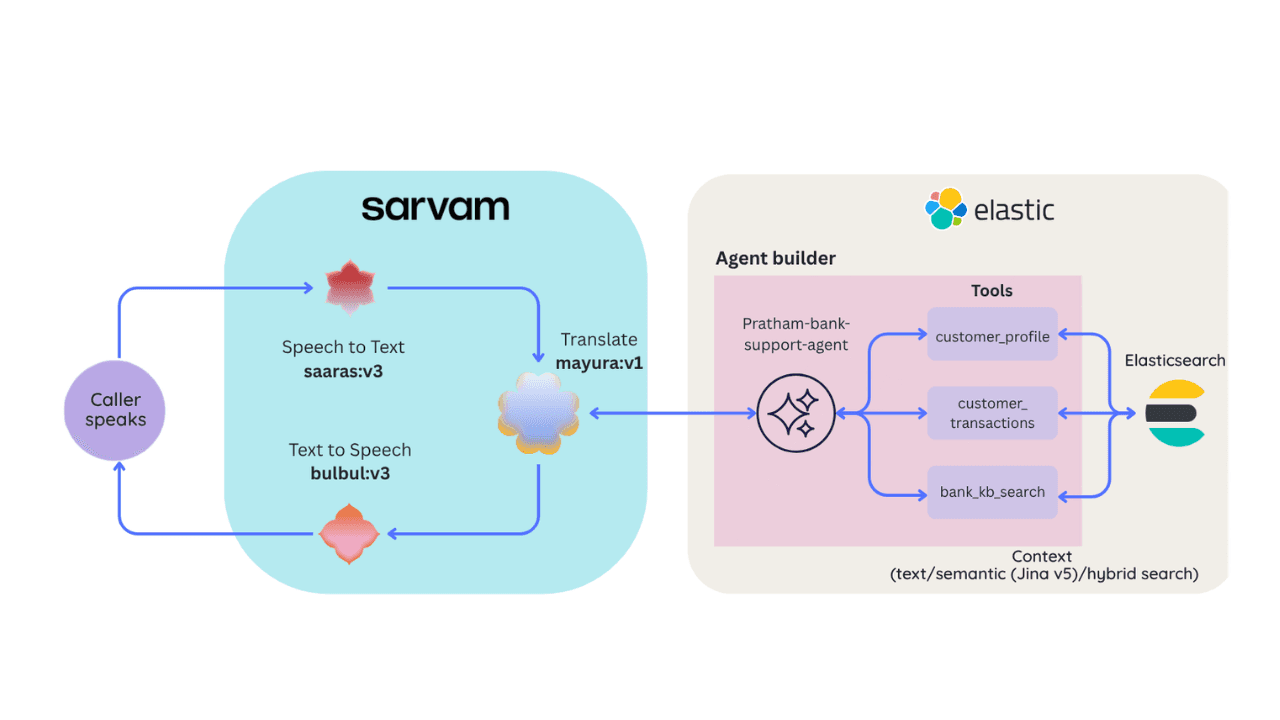
A working demo combining Sarvam AI speech with Elastic Agent Builder: identity verification, per-customer ES|QL queries, and mid-call language switching across 22 Indian languages without multilingual indices.

2026年6月29日
Bringing it together: How we rebuilt Elasticsearch as a columnar metrics engine; 6.6x less storage, 160x faster queries
Elasticsearch metrics in version 9.4 run on a fully columnar engine: 6.6x less storage, 160x faster queries, native PromQL and OTel support.