What is the Model Context Protocol (MCP)?
Why was MCP created? The need for a standard integration layer
The Model Context Protocol (MCP) was created to address a fundamental challenge in building agentic AI applications: connecting isolated large language models (LLMs) to the outside world. By default, LLMs are powerful reasoning engines, but their knowledge is static, tied to a training cut-off date, and they lack the native ability to access live data or execute actions in external systems.
Connecting LLMs to external systems has traditionally been done through direct, custom API integrations. This approach is effective, but it requires each application developer to learn the specific API of every tool, write code to handle queries and parse results, and maintain that connection over time. As the number of AI applications and available tools grows, this presents an opportunity for a more standardized and efficient method.
MCP provides this standardized protocol, drawing inspiration from proven standards like REST for web services and the Language Server Protocol (LSP) for developer tools. Instead of forcing every application developer to become an expert on every tool's API, MCP establishes a common language for this connectivity layer.
This creates a clean separation of concerns. It opens the door for platform and tool providers to expose their services through a single, reusable MCP server that is inherently LLM-friendly. The responsibility for maintaining the integration can then shift from the individual AI application developer to the owner of the external system. This fosters a robust and interoperable ecosystem where any compliant application can connect to any compliant tool, drastically simplifying development and maintenance.

How MCP works: The core architecture
MCP architecture
MCP operates on a client-server model designed to connect a reasoning engine (the LLM) to a set of external capabilities. The architecture starts with the LLM and progressively discloses the components that enable it to interact with the outside world.
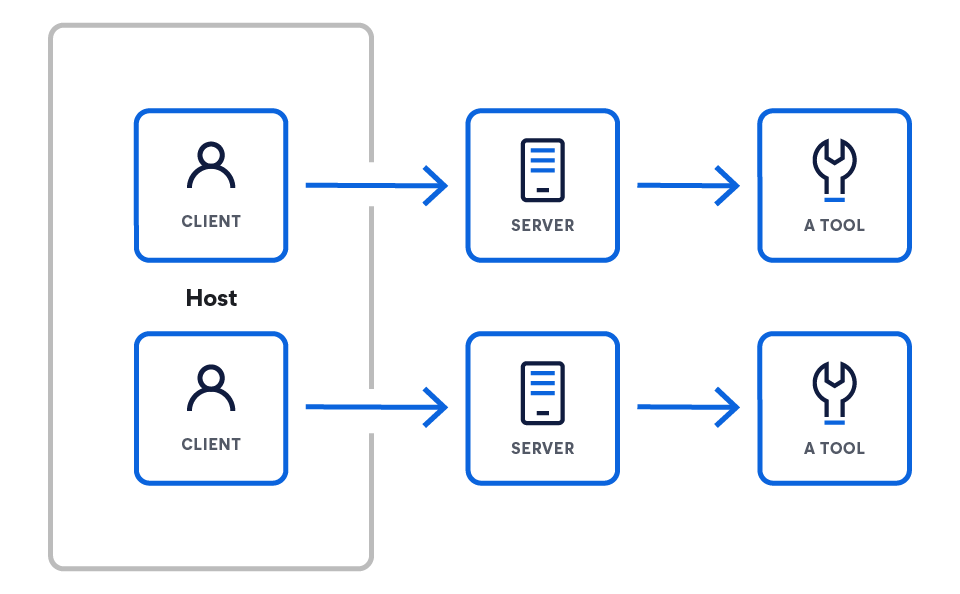
This architecture consists of three key components:
- Hosts are LLM applications that want to access data through MCP (e.g., Claude Desktop, IDEs, AI agents).
- Servers are lightweight programs that each expose specific capabilities through MCP.
- Clients maintain 1:1 connections with servers, inside the host application.
MCP clients or hosts

MCP clients or hosts are the applications that orchestrate the interaction between LLMs and one or more MCP servers. The client is critical; it contains the app-specific logic. While servers provide the raw capabilities, the client is responsible for using them. It peruses the following functionality to do so:
- Prompt assembly: Gathering context from various servers to construct the final, effective prompt for the LLM
- State management: Maintaining conversational history and user context across multiple interactions
- Orchestration: Deciding which servers to query for which information and executing the logic when an LLM decides to use a tool
MCP clients connect to servers via standard network requests (typically over HTTPS) to a known server endpoint. The power of the protocol is that it standardizes the communication contract between them. The protocol itself is language agnostic, with a JSON-based format. So, any client, regardless of the language it is built on, can correctly communicate with any server.
Client examples from the MCP's specification
MCP servers
An MCP server is a backend program that acts as a standardized wrapper for a specific data source or tool. It implements the MCP specification to expose capabilities — such as executable tools or data resources — over the network. Essentially, it translates the unique protocol of a specific service (like a database query or a third-party REST API) into the common language of MCP, making it understandable to any MCP client.
Server examples from the MCP's specification
Hands on: How can you create your first MCP server?
Let's take the example of a server that exposes tools (more on what tools are below). This server needs to handle two main requests from the client:
- Install the SDK.
# Python
pip install mcp

# Node.js
npm install @modelcontextprotocol/sdk

# Or explore the specification
git clone https://github.com/modelcontextprotocol/specification
- Create your first server.
from mcp.server.fastmcp import FastMCP import asyncio mcp = FastMCP("weather-server") @mcp.tool() async def get_weather(city: str) -> str: """Get weather for a city.""" return f"Weather in {city}: Sunny, 72°F" if __name__ == "__main__": mcp.run() - Connect to Claude Desktop.
{
  "mcpServers": {
    "weather": {
      "command": "python",
      "args": ["/full/path/to/weather_server.py"],
      "env": {}
    }
  }
}
Official SDKs and resources
You can start building your own MCP clients and servers using the official, open source SDKs:
MCP tools
A tool is a specific, executable capability that an MCP server exposes to a client. Unlike passive data resources (like a file or document), tools represent actions the LLM can decide to invoke, such as sending an email, creating a project ticket, or querying a live database.
Tools interact with servers in the following way: An MCP server declares the tools it offers. For example, an Elastic server would expose a `list_indices` tool, defining its name, purpose, and required parameters (e.g., `list_indices`, `get_mappings`, `get_shards`, and `search`).
The client connects to the server and discovers these available tools. The client presents the available tools to the LLM as part of its system prompt or context. When the LLM's output indicates an intent to use a tool, the client parses this and makes a formal request to the appropriate server to execute that tool with the specified parameters.
Example of tool patterns from the MCP specification
Hands on: A low-level MCP server implementation
While the low-level example is useful for understanding the protocol's mechanics, most developers will use an official SDK to build servers. SDKs handle the protocol's boilerplate — like message parsing and request routing — allowing you to focus on the core logic of your tools.
The following example uses the official MCP Python SDK to create a simple server that exposes a get_current_time tool. This approach is significantly more concise and declarative than the low-level implementation.
import asyncio
import datetime
from typing import AsyncIterator

from mcp.server import (
    MCPServer,
    Tool,
    tool,
)

# --- Tool Implementation ---
# The @tool decorator from the SDK handles the registration and schema generation.
# We define a simple asynchronous function that will be exposed as an MCP tool.

@tool
async def get_current_time() -> AsyncIterator[str]:
    """
    Returns the current UTC time and date as an ISO 8601 string.

    This docstring is automatically used as the tool's description for the LLM.
    """
    # The SDK expects an async iterator, so we yield the result.
    yield datetime.datetime.now(datetime.timezone.utc).isoformat()


# --- Server Definition ---
# We create an instance of the MCPServer, passing it the tools we want to expose.
# The SDK automatically discovers any functions decorated with @tool.

SERVER = MCPServer(
    tools=[
        # The SDK automatically picks up our decorated function.
        Tool.from_callable(get_current_time),
    ],
)


# --- Main execution block ---
# The SDK provides a main entry point to run the server.
# This handles all the underlying communication logic (stdio, HTTP, etc.).

async def main() -> None:
    """Runs the simple tool server."""
    await SERVER.run()


if __name__ == "__main__":
    asyncio.run(main())
This hands on example demonstrates the power of using an SDK to build MCP servers:
- @tool decorator: This decorator automatically registers the get_current_time function as an MCP tool. It inspects the function's signature and docstring to generate the necessary schema and description for the protocol, saving you from writing it manually.
- MCPServer instance: The MCPServer class is the core of the SDK. You simply provide it with a list of the tools you want to expose, and it handles the rest.
- SERVER.run(): This single command starts the server and manages all the low-level communication, including handling different transport methods like stdio or HTTP.
As you can see, the SDK abstracts away nearly all of the protocol's complexity, allowing you to define powerful tools with just a few lines of Python code.
The 3 core primitives
MCP standardizes how an LLM interacts with the outside world by defining three core primitives that a server can expose. These primitives provide a complete system for connecting LLMs to external functionality.
- Resources: Providing context
- Function: Data access
- Analogy: GET endpoints
- Resources are the primary mechanism for providing context to an LLM. They represent sources of data that the model can retrieve and use to inform its responses, such as documents, database records, or the results of a search query. They are typically read-only operations.
- Tools: Enabling action
- Function: Actions and computation
- Analogy: POST or PUT endpoints
- Tools are executable functions that allow an LLM to perform actions and have a direct impact on external systems. This is what enables an agent to go beyond simple data retrieval and do things like send an email, create a project ticket, or call a third-party API.
- Prompts: Guiding interaction
- Function: Interaction templates
- Analogy: Workflow recipes
- Prompts are reusable templates that guide the LLM's interaction with a user or a system. They allow developers to standardize common or complex conversational flows, ensuring more consistent and reliable behavior from the model.
The Model Context Protocol itself
Core concepts
The MCP provides a standardized way for LLM applications (hosts) to integrate with external data and capabilities (servers). The specification is built on the JSON-RPC 2.0 message format and defines a set of required and optional components to enable rich, stateful interactions.
Core protocol and features
At its core, MCP standardizes the communication layer. All implementations must support the base protocol and lifecycle management.
- Base protocol: All communication uses standard JSON-RPC messages (Requests, Responses, and Notifications).
- Server features: Servers can offer any combination of the following capabilities to clients:
- Resources: Contextual data for the user or model to consume
- Prompts: Templated messages and workflows
- Tools: Executable functions for the LLM to invoke
- Client features: Clients can offer these features to servers for more advanced, bidirectional workflows:
- Sampling: Allows a server to initiate agentic behaviors or recursive LLM interactions
- Elicitation: Enables a server to request additional information from the user
MCP base protocol
The MCP is built on a required foundation of a Base Protocol and Lifecycle Management. All communication between clients and servers must adhere to the JSON-RPC 2.0 specification, which defines three message types:
- Requests: Sent to initiate an operation. They require a unique string or integer id for tracking and must not reuse an id within the same session.
- Responses: Sent in reply to a request. They must include the id of the original request and contain either a result object for successful operations or an error object for failures.
- Notifications: One-way messages sent without an id that do not require a response from the receiver.
Client features: Enabling advanced workflows
For more complex, bidirectional communication, clients can also offer features to servers:
- Sampling: Sampling allows a server to request an inference from the LLM via the client. This is a powerful feature for enabling multistep agentic workflows where a tool might need to "ask a question back" to the LLM to get more information before completing its task.
- Elicitation: Elicitation provides a formal mechanism for a server to ask the end user for more information. This is crucial for interactive tools that might need clarification or confirmation before proceeding with an action.
Server features: Exposing capabilities
Servers expose their capabilities to clients through a set of standardized features. A server can implement any combination of the following:
- Tools: Tools are the primary mechanism for enabling an LLM to perform actions. They are executable functions that a server exposes, allowing the LLM to interact with external systems, such as calling a third-party API, querying a database, or modifying a file.
- Resources: Resources represent sources of contextual data that an LLM can retrieve. Unlike tools, which perform actions, resources are primarily for read-only data retrieval. They are the mechanism for grounding an LLM in real-time, external information, forming a key part of advanced RAG pipelines.
- Prompts: Servers can expose predefined prompt templates that a client can use. This allows for the standardization and sharing of common, complex, or highly optimized prompts, ensuring consistent interactions.
Security and trust
The specification places a strong emphasis on security, outlining key principles that implementers should follow. The protocol itself cannot enforce these rules; the responsibility lies with the application developer.
- User consent and control: Users must explicitly consent to and retain control over all data access and tool invocations. Clear UIs for authorization are essential.
- Data privacy: Hosts must not transmit user data to a server without explicit consent and must implement appropriate access controls.
- Tool safety: Tool invocation represents arbitrary code execution and must be treated with caution. Hosts must obtain explicit user consent before invoking any tool.
Why is the MCP so important?
The core benefit of MCP lies in its standardization of the communication and interaction layer between models and tools. This creates a predictable and reliable ecosystem for developers. Key areas of standardization include:
- Uniform connector API: A single, consistent interface for connecting any external service
- Standardized context: A universal message format for passing critical information like session history, embeddings, tool outputs, and long-term memories
- Tool invocation protocol: Agreed-upon request and response patterns for calling external tools, ensuring predictability
- Data flow control: Built-in rules for filtering, prioritizing, streaming, and batching context to optimize prompt construction
- Security and auth patterns: Common hooks for API key or OAuth authentication, rate-limiting, and encryption to secure the data exchange
- Lifecycle and routing rules: Conventions that define when to fetch context, how long to cache it, and how to route data between systems
- Metadata and observability: Unified metadata fields that enable consistent logging, metrics, and distributed tracing across all connected models and tools
- Extension points: Defined hooks for adding custom logic, such as pre- and post-processing steps, custom validation rules, and plugin registration
At scale: Solving the "M×N" or multiplicative scaling integration nightmare
In the rapidly expanding AI landscape, developers face a significant integration challenge. AI applications (M) need to access numerous external data sources and tools (N), from databases and search engines to APIs and code repositories. Without a standardized protocol, developers are forced to solve the "M×N problem," building and maintaining a unique, custom integration for every application-to-source pair.
This approach leads to several critical issues:
- Redundant developer efforts: Teams repeatedly solve the same integration problems for each new AI application, wasting valuable time and resources.
- Overwhelming complexity: Different data sources handle similar functions in unique ways, creating a complex and inconsistent integration layer.
- Excessive maintenance: The lack of standardization results in a brittle ecosystem of custom integrations. A minor update or change in a single tool's API can break connections, requiring constant, reactive maintenance.
MCP transforms this M×N problem into a much simpler M+N equation. By creating a universal standard, developers only need to build M clients (for their applications) and N servers (for their tools), drastically reducing complexity and maintenance overhead.
Comparing agentic approaches
MCP is not an alternative to popular patterns like retrieval augmented generation (RAG) or frameworks like LangChain; it is a foundational connectivity protocol that makes them more powerful, modular, and easier to maintain. It solves the universal problem of connecting an application to an external tool by standardizing the "last mile" of integration.
Here’s how MCP fits into the modern AI stack:
Powering advanced RAG
Standard RAG is powerful but often connects to a static vector database. For more advanced use cases, you need to retrieve dynamic information from live, complex systems.
- Without MCP: A developer must write custom code to connect their RAG application directly to the specific query language of a search API like Elasticsearch.
- With MCP: The search system exposes its capabilities via a standard MCP server. The RAG application can now query this live data source using a simple, reusable MCP client, without needing to know the underlying system's specific API. This makes the RAG implementation cleaner and easier to swap out with other data sources in the future.
Integrating with agentic frameworks (e.g., LangChain, LangGraph)
Agentic frameworks provide excellent tools for building application logic, but they still require a way to connect to external tools.
- The alternatives:
- Custom code: Writing a direct integration from scratch, which requires significant engineering effort and ongoing maintenance
- Framework-specific toolkits: Using a prebuilt connector or writing a custom wrapper for a specific framework (This creates a dependency on that framework's architecture and locks you into their ecosystem.)
- The MCP advantage: MCP provides an open, universal standard. A tool provider can create a single MCP server for their product. Now, any framework — LangChain, LangGraph, or a custom-built solution — can interact with that server using a generic MCP client. This approach is more efficient and prevents vendor lock-in.
Why a protocol simplifies everything
Ultimately, MCP's value is in providing an open, standardized alternative to the two extremes of integration:
- Writing custom code is brittle and incurs high maintenance costs.
- Using framework-specific wrappers creates a semi-closed ecosystem and vendor dependency.
MCP shifts the ownership of the integration to the owner of the external system, allowing them to provide a single, stable MCP endpoint. Application developers can then simply consume these endpoints, drastically simplifying the work needed to build, scale, and maintain powerful, context-aware AI applications.
Getting started with the Elasticsearch MCP server
Elasticsearch now provides a fully managed, hosted MCP server. This eliminates the need for standalone Docker containers or local Node.js environments, providing a persistent and secure gateway for any MCP-compliant host.
Access the hosted endpoint
Starting with version 9.3 and serverless, the MCP server is enabled by default for Search Projects. For Observability and Security users, the MCP server can be exposed by enabling Agent Builder via the AI Assistant configuration
For full implementation details and platform-specific instructions, refer to the official Agent Builder documentation.
Configure your MCP client
Once enabled, you simply need to point your MCP host (such as Claude Desktop, VS Code, or Cursor) to your unique Elastic endpoint.
Example configuration for Claude Desktop:
JSON
{
  "mcpServers": {
    "elastic": {
      "command": "npx",
      "args": [
        "-y",
        "@elastic/mcp-server-elasticsearch",
        "--hosted-url",
        "https://YOUR_KIBANA_URL/api/agent_builder/mcp"
      ],
      "env": {
        "ES_API_KEY": "YOUR_ELASTIC_API_KEY"
      }
    }
  }
}
By using the hosted version, you leverage Elastic's native security layers and ensure your context-aware agents have 24/7 access to your data without any local process management.
Engage with us on MCP and AI
Dive deeper into building with Elastic
Stay informed on all things related to AI and intelligent search applications. Explore our resources to learn more about building with Elastic.
- LLM functions with Elasticsearch for intelligent query transformation
- AI agents and the Elastic AI SDK for Python
- Model Context Protocol for Elasticsearch
Start building now with the free, hands-on workshop: Intro to MCP with Elasticsearch MCP Server.