Test Elastic's leading-edge, out-of-the-box capabilities. Dive into our sample notebooks in the Elasticsearch Labs repo, start a free cloud trial, or try Elastic on your local machine now.
Elastic Workflows is an automation engine built into the Elasticsearch platform. You define workflows in YAML; what triggers (starts) them, what steps they take, what actions they perform, and the platform handles execution. A workflow can query Elasticsearch, transform data, branch based on conditions, call external APIs, and integrate with services like Slack, Jira, PagerDuty and more through connectors you've already configured.
In this blog post, we'll cover the core concepts of Workflows and build an example workflow together.
Workflows are declarative and defined in YAML
Workflows are composable. You define what should happen, and the platform handles execution, error recovery, and logging. Every workflow is defined as YAML and lives inside Kibana.
A workflow is composed of a few key parts: triggers, inputs, and steps.
Triggers determine when a workflow runs. An alert trigger runs when a Kibana alerting rule fires, with full access to the alert context. A scheduled trigger runs on an interval or cron pattern. A manual trigger runs on demand from the UI or API. A workflow can have multiple triggers.
Inputs define parameters that can be passed to the workflow at runtime. These let you create reusable workflows that accept different values depending on how they're invoked.
Steps are the actions a workflow takes. They execute in sequence, and each step can reference outputs from previous steps. Step types include:
- Internal actions for actions you perform inside Elasticsearch and Kibana, like querying indices, running Elasticsearch Query Language (ES|QL) queries, creating cases, or updating alerts.
- External actions for actions you perform on external systems, like sending a Slack message or creating a Jira ticket. Use any connector you've configured in Elastic, with the flexibility to hit any API or internal service using HTTP steps.
- Flow control for defining the logic of your workflow with conditionals, loops, and parallel execution.
- AI for everything from prompting a large language model (LLM) to enabling agents as workflow steps, unlocking agentic workflow use cases.
Getting practical: Your first workflow
Let's build a workflow that demonstrates core capabilities: working with Elasticsearch indices, conditional logic, and data flow between steps. We'll create a simple demo that sets up a National Parks index, loads sample data, and searches it.
Enable Workflows
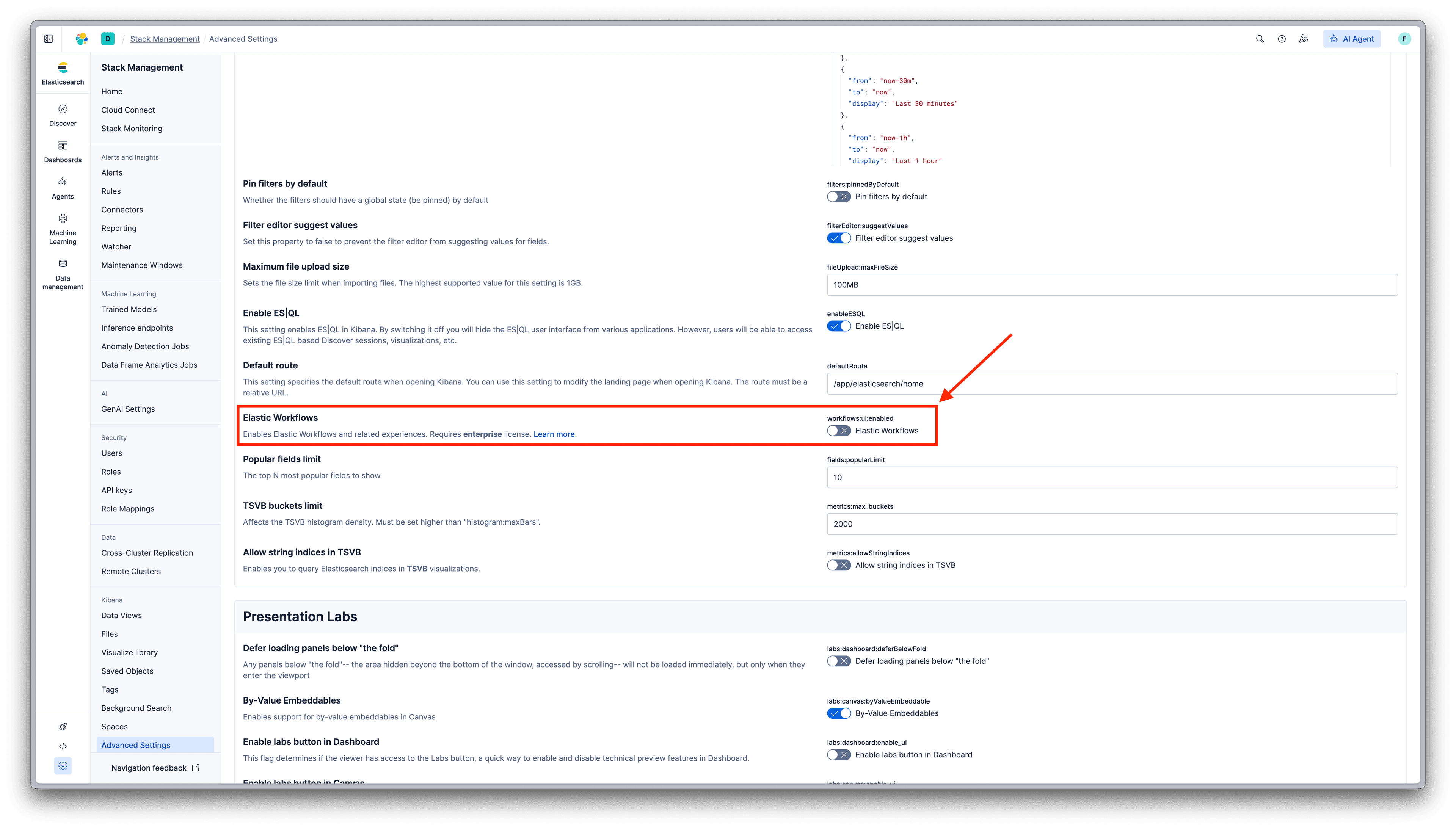
Workflows is available in Elastic 9.3 (Technical Preview). Go to Stack Management → Advanced Settings, and enable Elastic Workflows:
Create a workflow
Navigate to Workflows in Kibana. If this is your first time, you'll see the Get Started screen:
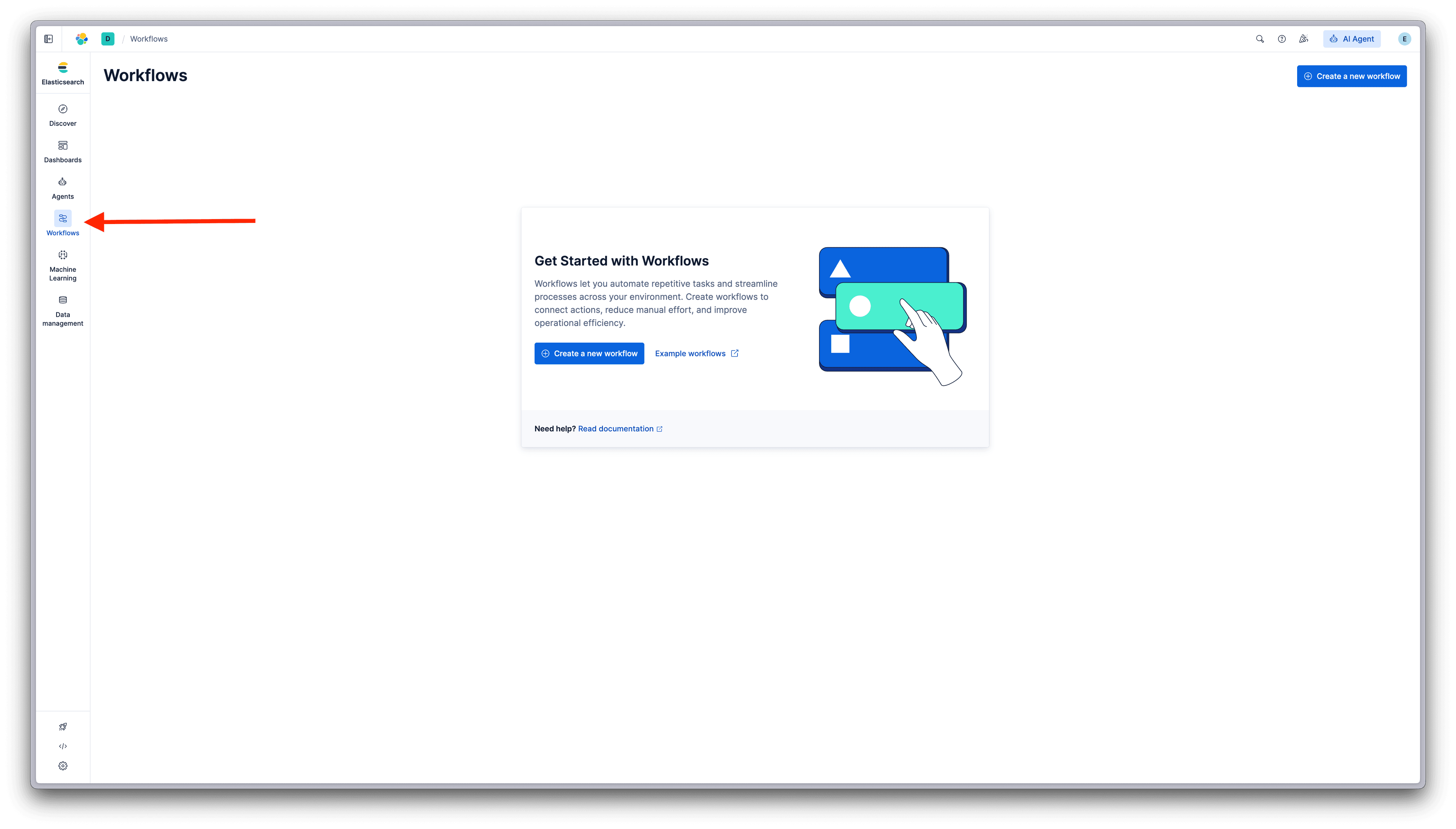
Click Create a new workflow to open the editor. You can also explore Example workflows to see the Elastic Workflow Library, a collection of ready-to-use workflows for search, observability, and security use cases.
The workflow editor
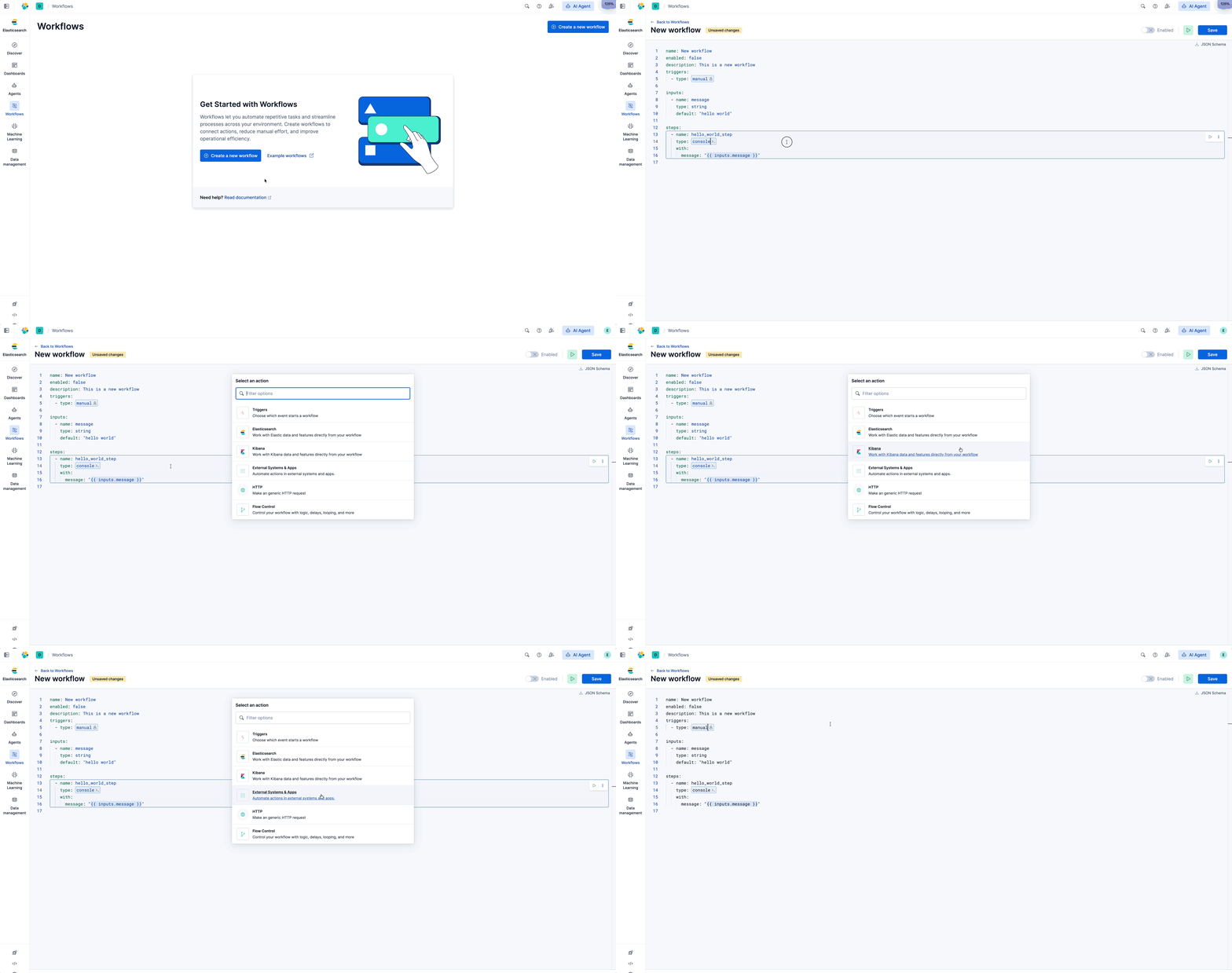
The editor gives you YAML editing with autocomplete and validation. Start typing a step type, and suggestions appear. Use the quick action menu (Cmd+K / Ctrl+K) to browse available triggers, steps, and actions by category:
Build the workflow
Here's our National Parks demo workflow:
This workflow demonstrates several capabilities:
- Constants: Define reusable values, like
indexName, that can be referenced throughout. - Elasticsearch operations: Check whether an index exists, delete it, create it with mappings, index a document, and search.
- Conditional logic with branches: If the index exists, log a message and delete it. If not, log that it wasn't found. Either way, continue to create the index.
- Data flow: Each step references outputs from previous steps using
steps.<name>.output.
Notice the {{ }} syntax throughout. This is Liquid templating for passing data between steps. consts contains workflow constants. steps.<name>.output references the output of a previous step.
Run the workflow
Save the workflow and click the Play button next to the Save button to execute it.
The workflow begins executing, and you'll see the execution view. Each step appears in the side panel as it runs, showing status and timing:
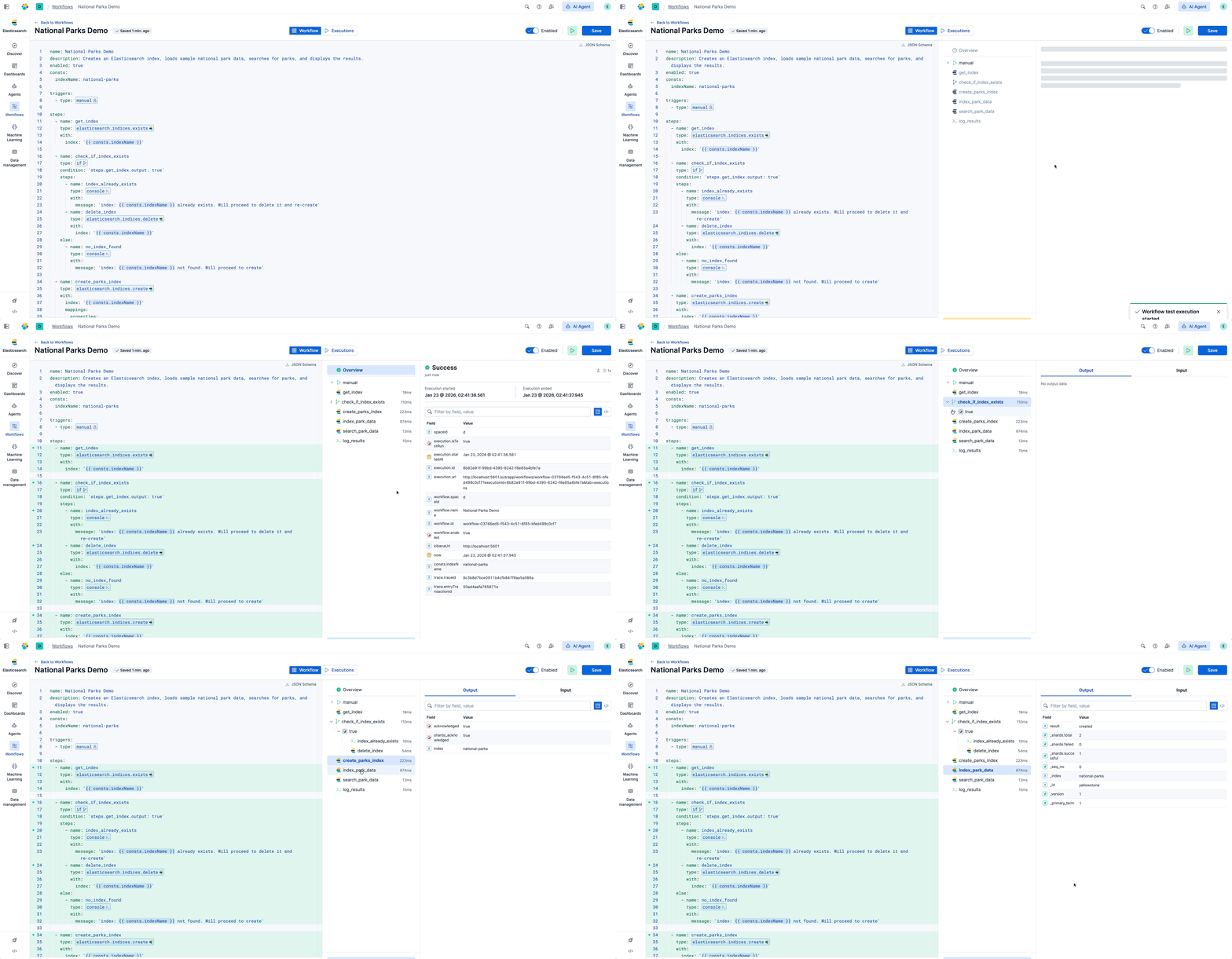
Click on any step to see its inputs and outputs. The side panel shows exactly what data the workflow received and produced at each step. This makes debugging straightforward: You see what went in, what came out, and where things went wrong if a step fails.
Extending the workflow
Let's extend this workflow with AI and external notifications. We'll add a step that generates a poem about the park using an LLM and then sends it to Slack.
Add these steps after log_results:
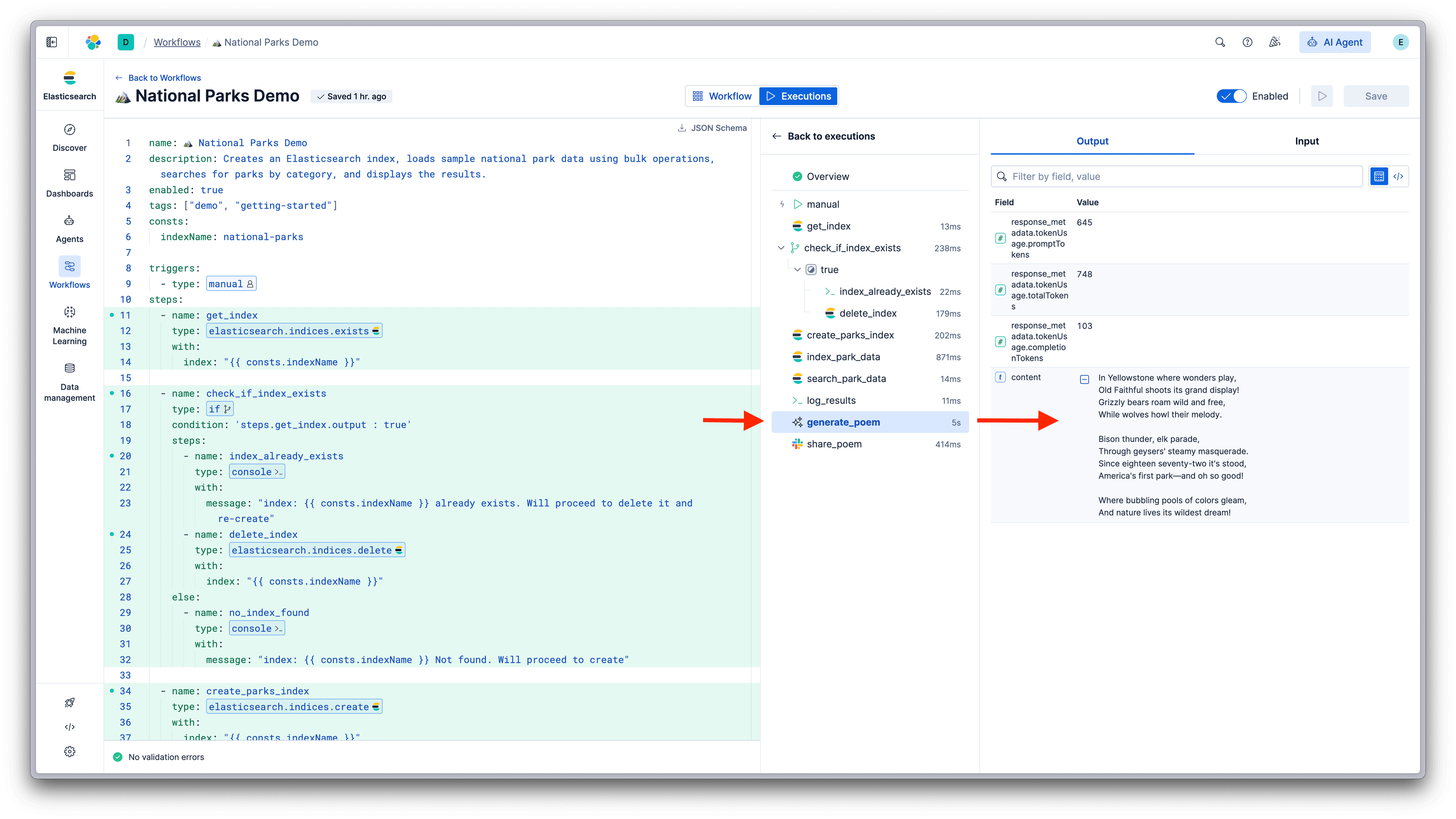
Now the workflow creates the index, loads data, searches it, generates a poem with AI, and shares it to Slack. The same patterns apply throughout: Add steps, reference their outputs, and let the workflow handle execution.
This is a simple example, but the same approach scales to real use cases. Replace national parks with security alerts, observability metrics, or any data in Elasticsearch. Replace the poem with an AI summary or assessment. Replace Slack with Jira, PagerDuty, or any connector you've configured.
Workflows and Elastic Agent Builder
The National Parks example demonstrates the core components of Workflows: triggers, steps, conditional logic, data flow, AI prompts, and external notifications. These components can be combined to build automations that orchestrate outcomes within Elasticsearch, Kibana, external systems, and AI.
This covers processes where the steps are known. But what about processes where they aren't, where the right action depends on what you find, and what you find depends on where you look?
This is where Agent Builder expands what's automatable. An agent grounded in your operational context can do the initial analysis or investigation that an analyst or developer would normally do manually. It can explore, reason across data sources, and surface findings. Then the workflow continues with the structured steps that follow.
Workflows integrate with Agent Builder, and the integration works both directions.
Agents as workflow steps
Use the ai.agent step type to invoke an agent from within a workflow:
The agent uses its configured tools to query indices, correlate data, and reason across results. The workflow waits for findings and continues with the next steps.
Workflows as agent tools
Workflows can also be exposed to Agent Builder as tools, allowing agents to invoke them when action is required.
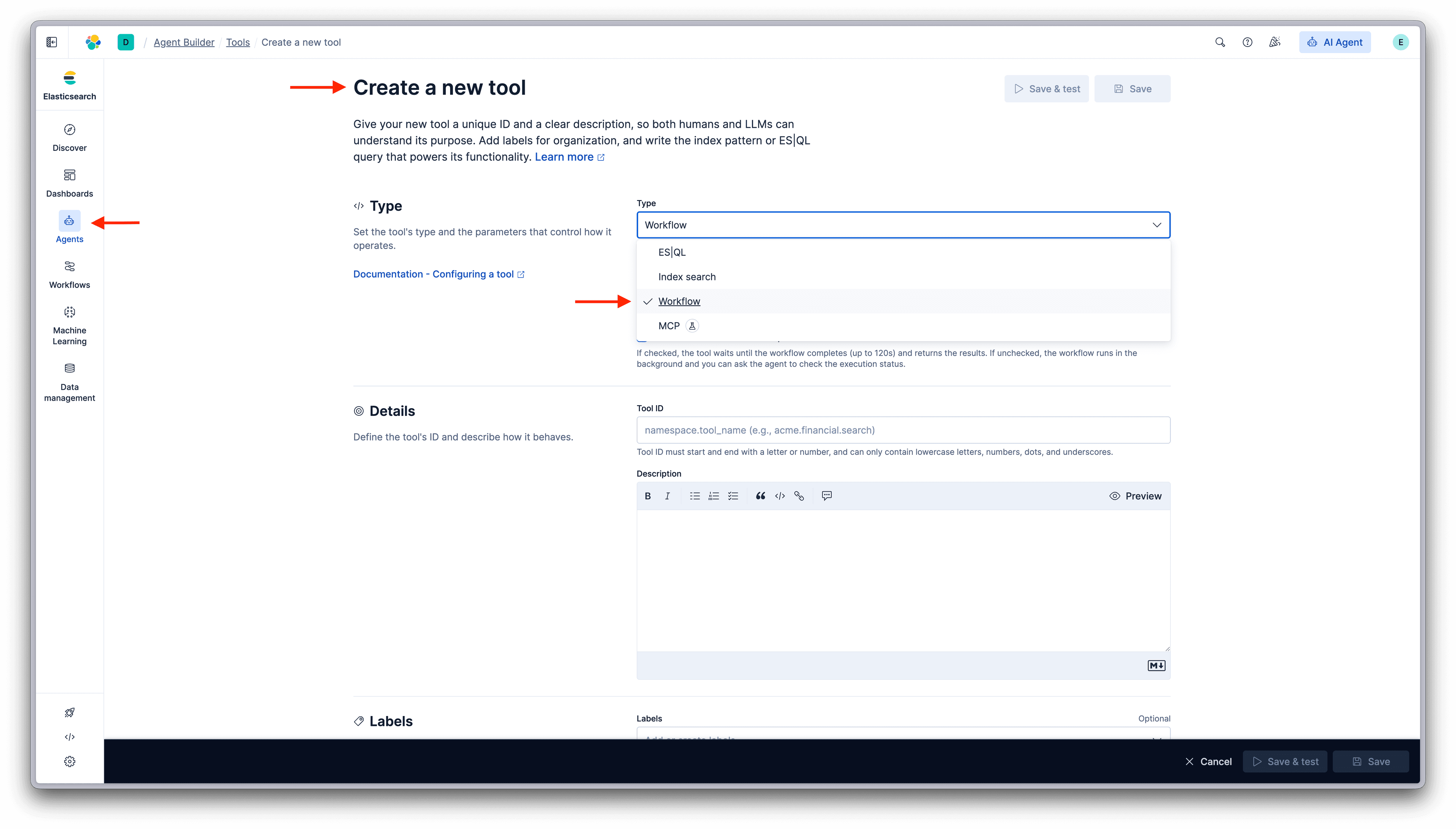
This pattern is useful when an agent determines what should be done, but the how should follow a known and repeatable process. Agents are well suited for reasoning, exploration, and judgment, especially when information is incomplete or evolving. Workflows are well suited for executing established procedures that involve multiple steps, external systems, and state changing actions.
By exposing a workflow as a tool, you separate decision making from execution. An agent can conclude that a specific outcome is needed, such as declaring an incident or initiating a response, and then delegate the execution to a workflow that encodes the correct sequence of actions. That workflow handles coordination across systems, applies the same logic every time, and makes the result observable and auditable.
This also enables reuse and consistency. The same workflow can be invoked by different agents or run manually, while enforcing a shared process and set of controls. Instead of teaching every agent how to carry out complex actions safely and correctly, that responsibility lives in one place.
Together, this creates a clear contract. Agents decide when an action is needed. Workflows ensure that the action follows the right process, every time.
Looking ahead
This technical preview establishes Workflows as a core capability of the Elasticsearch platform. The foundation is here: triggers, steps, data flow, AI integration, and the bidirectional connection with Agent Builder.
What comes next builds on this foundation by expanding how workflows are authored and where they show up. In addition to new step types and broader connector support, Workflows will support multiple authoring modes. These include natural language intent, where AI helps translate what you want to achieve into a working workflow, as well as visual, drag and drop builders. As these capabilities are embedded directly into solution specific experiences across Elastic, they change not just how workflows are built, but how work actually gets done.
For Developers, this means AI assistants that go beyond conversation. Agents that can actually do things: query systems, update records, trigger processes, and return results. Reasoning backed by reliable execution.
In Observability, this means correlating signals from logs, metrics, and traces. Surfacing likely root causes. Orchestrating remediation steps. Closing the loop between detection and resolution without waiting for someone to intervene.
In Security, this means investigation that begins the moment an alert fires. Enriching findings with context from internal and external sources. Coordinating response actions across tools. Updating cases and notifying the right people. Work that used to require manual effort, handled automatically.
The patterns you learn today apply directly to these experiences. Workflows is the automation layer that makes them possible.
Get started with Elastic Workflows
Elastic Workflows is available now as a technical preview. Get started with an Elastic Cloud trial, and check out the documentation or library of example workflows to learn more.
관련 콘텐츠

2026년 7월 9일
Why Elasticsearch is becoming a columnar database
Elasticsearch is becoming a first-class columnar database. Columnar Mode ships in 9.5, storing data once alongside the existing modes and cutting storage footprints while speeding up analytical queries.

2026년 7월 7일
Your compliance posture just got an upgrade: Elasticsearch now supports FIPS 140-3
Elastic 9.4 brings FIPS 140-3 support for Elasticsearch and Kibana to GA. Here's what changes for federal, defense and regulated deployments, and how to migrate from 140-2.

2026년 7월 2일
A simdvec deep-dive: How Elasticsearch uses neural-net and video-codec CPU instructions for vector search
Four ways Elasticsearch's vector search engine reuses neural-network, video-codec and cryptography CPU instructions for up to 6x speedups; with the math, the failed attempts and the benchmarks.

2026년 6월 29일
Bringing it together: How we rebuilt Elasticsearch as a columnar metrics engine; 6.6x less storage, 160x faster queries
Elasticsearch metrics in version 9.4 run on a fully columnar engine: 6.6x less storage, 160x faster queries, native PromQL and OTel support.

2026년 6월 11일
How Elasticsearch cut metrics storage by 41% by dropping sequence numbers after replication
Find out how Elasticsearch trims sequence numbers at merge time to cut TSDS storage by 41%, what you give up, and why it's safe for metrics workloads.