Percolador do Elasticsearch para governança de busca em comércio eletrônico: traduzindo consultas ambíguas em estratégias de recuperação controladas
Aprenda como usar o percolador do Elasticsearch para implementar a governança de busca. Neste blog, delineamos os padrões necessários para criar um motor de políticas governado em produção e criar uma estratégia de recuperação controlada.
Quer dar uma olhada no Elastic Cloud? Assine o Elastic Cloud no AWS Marketplace ou no Microsoft Azure Marketplace para receber até $ 1.000 em créditos de faturamento.
Este artigo é uma análise técnica aprofundada da implementação do Elasticsearch da arquitetura do plano de controle descrita na Parte 3, mostrando como construí-la usando o percolador do Elasticsearch. Ele descreve os padrões usados para implementar um motor de políticas determinístico e governado na produção.
Da arquitetura à implementação
A parte 3 descreveu a arquitetura do plano de controle: correspondência reversa como uma primitiva de pesquisa, documentos de política que separam a correspondência da ação e transformações em cascata que compõem várias políticas em um único plano de execução. Este artigo explora na prática o recurso do Elasticsearch que viabiliza a busca de políticas: a consulta percolator.
O percolador é uma solução natural para governança porque inverte a direção da busca exatamente da forma que um plano de controle precisa. Este post percorre a implementação passo a passo, começando com uma explicação clara do que o percolador faz e por que isso importa, e depois passando pelo design do índice, armazenamento de políticas, avaliação em tempo de consulta e composição de múltiplas políticas.
Como funciona a busca normal
Em um sistema de comércio eletrônico, você pode ter centenas de milhares ou milhões de documentos de produto contendo campos como title, category e price. Quando um usuário busca documentos correspondentes, você está pedindo ao Elasticsearch para comparar a string de busca do usuário com um ou mais campos armazenados nesses documentos de produto. O analisador padrão do Elasticsearch, o analisador padrão, converte texto em minúsculas e o divide em tokens. Uma busca por "laranjas" corresponde a "Laranjas" por causa da conversão para minúsculas. Com um analisador sensível à linguagem que inclui a redução ao radical, ele também corresponde a "laranja" porque ambas as formas se reduzem ao mesmo radical. Por exemplo, a seguinte consulta de correspondência retorna documentos que têm "laranja" ou "laranjas" em seu campo “title”.
POST products/_search
{
  "query": {
    "match": {
      "title": "oranges"
    }
  }
}
Então, para a consulta acima, o Elasticsearch retorna os documentos do produto cujo campo title corresponde a "laranjas", que podem incluir resultados como "Pasta de Fruta de Laranja", "Suco de Laranja", "Laranjas Suculentas", "Marmelada de Laranja" e assim por diante. O ponto principal a ser lembrado é que o Elasticsearch é comumente usado para comparar uma string de busca com documentos e retornar os documentos que correspondem à string de busca.
O problema da governança: encontrar políticas relevantes antes de buscar produtos
Conforme estabelecido nas Partes 1 a 3, um sistema de busca governado não envia a string de busca do usuário diretamente para o catálogo de produtos. Primeiro, verifica se alguma política se aplica àquela string de busca.
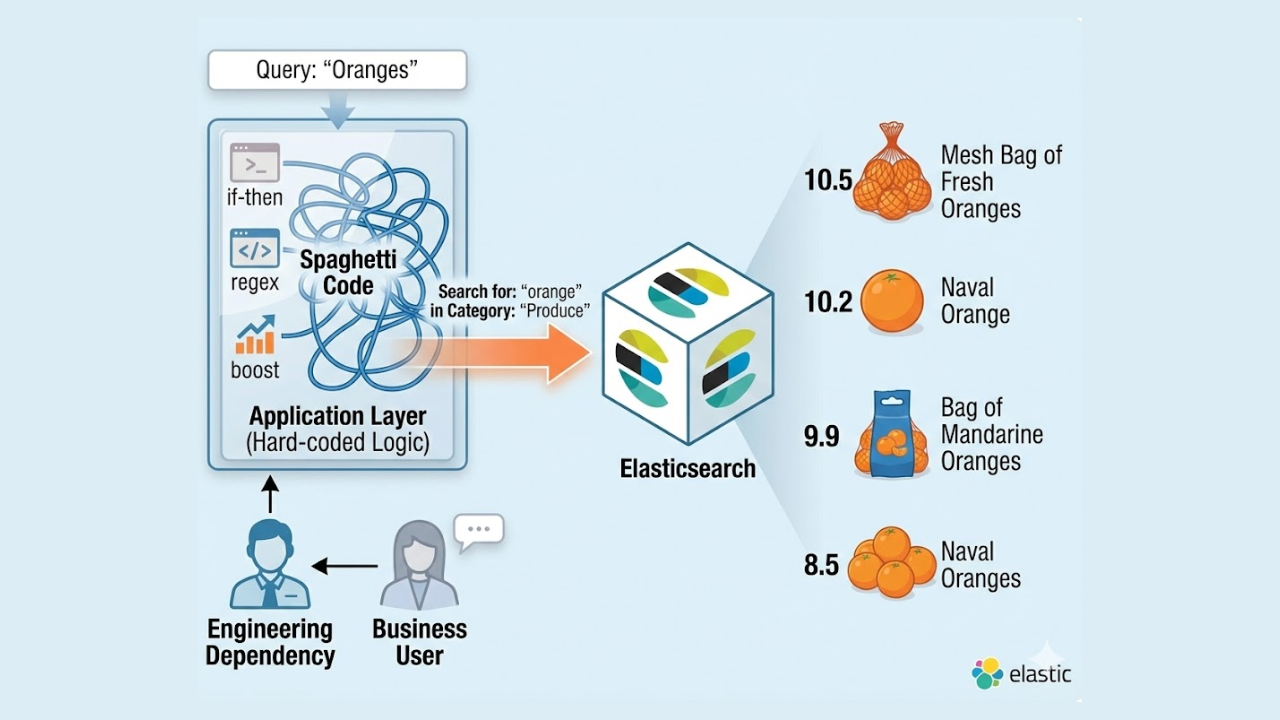
Um comerciante decidiu que, quando alguém busca exatamente por "laranjas", os resultados devem ser restritos à categoria Laranjas, eliminando suco de laranja, geleia de laranja e refrigerante de laranja. Essa decisão de negócios é armazenada como uma política. Quando um usuário digita "laranjas", o plano de controle precisa encontrar essa política, ler as instruções e modificar adequadamente a busca no catálogo de produtos. Para isso, o plano de controle precisa descobrir quais políticas armazenadas são relevantes para essa string de busca.
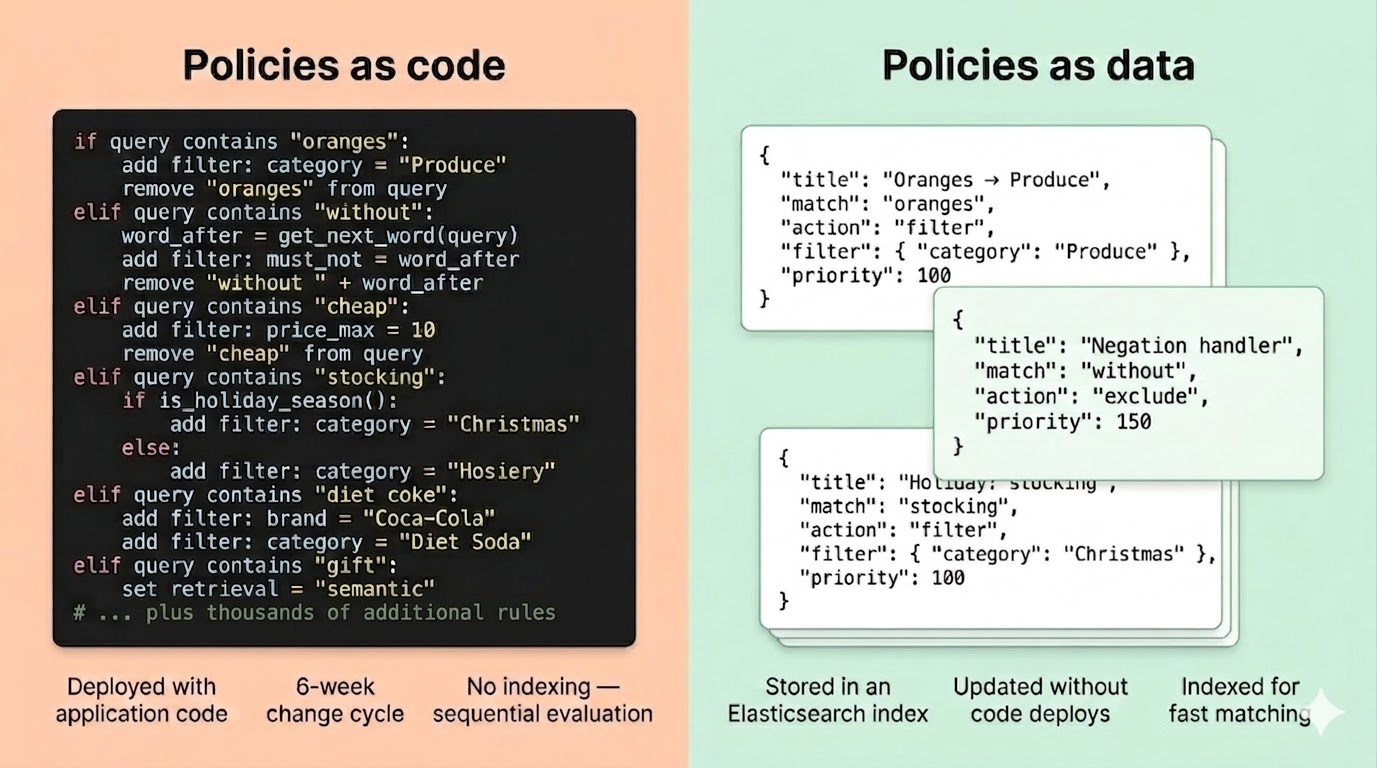
Uma implantação corporativa pode ter centenas ou milhares dessas políticas. Verificá-las uma por uma com a lógica if/else é o antipadrão da camada de aplicação descrito na Parte 2. O que precisamos é de uma maneira de armazenar todas essas políticas em um índice e encontrar instantaneamente aquelas que correspondem a uma determinada string de busca. É aqui que entra o percolador.
Invertendo a direção: O percolador
Anteriormente mencionamos que, em uma busca normal, o Elasticsearch é comumente usado para comparar uma string de busca com documentos e retornar os documentos que contêm essa string de busca.
O percolador inverte isso. Com um percolador, você tem um índice em que cada documento armazena um padrão de consulta e, em seguida, uma string de busca recebida é verificada em relação a essas consultas armazenadas para determinar quais desses padrões de consulta armazenados foram acionados.
Para governança, os "padrões de consulta armazenados" são políticas. Cada política contém um padrão que descreve o tipo de string de busca que ela deve corresponder. Por exemplo, a string de busca corresponde exatamente a "laranjas" ou também contém "azeite de oliva"? A string recebida é o texto de busca do usuário, que chega no momento da consulta e precisa ser verificada contra todos os padrões de políticas armazenados. Isso é abordado em um vídeo relacionado ao PRISM em 4:09.
Passo a passo: como uma busca por "laranjas" encontra sua política
A política
Um comerciante criou uma política que corresponde ao caso de um usuário buscar exatamente por "laranjas" sem outras palavras. Uma vez que o percolador encontra correspondência, o restante do documento inclui as regras que o plano de controle usará para construir a consulta do Produto; neste exemplo, uma das regras é restringir (filtrar) os resultados à categoria Frutas.
{
  "percolator": {
    "match_phrase": { "query": "START oranges END" }
  },
  "rule_type": "filter",
  "rule_args": {
    "filters": [
      {
        "field": "categories",
        "values": ["Fruits"],
        "mode": "hard_filter",
        "on_conflict": "soft_boost",
        "on_conflict_boost_weight": 1.0
      }
    ]
  },
  "priority": 0,
  "enabled": true
}
O campo percolator contém o padrão que define quando essa política deve ser acionada. Nesse caso, ele corresponde à frase "START oranges END". Os campos rule_type e rule_args definem o que a política deve fazer quando for acionada. Os tokens START e END são marcadores de limite, que explicaremos em breve.
Você pode ver como uma política é criada na interface do usuário do PRISM Studio às 2:52 do vídeo relacionado do PRISM.
O usuário realiza a busca.
Um comprador digita "laranjas" na barra de busca.
O plano de controle verifica se há políticas correspondentes.
Antes de buscar o catálogo de produtos, o plano de controle intercepta a string de busca do usuário, envolve-a em marcadores de limite e a envia para o percolador:
POST policies/_search
{
  "query": {
    "percolate": {
      "field": "percolator",
      "document": {
        "query": "START oranges END"
      }
    }
  }
}
A string "START oranges END" é verificada contra todos os padrões de políticas armazenados. Internamente, o Elasticsearch executa os padrões de políticas armazenados contra essa string e retorna as que coincidem. Esse é o percolador. A string de busca do usuário foi verificada em relação a todos os padrões de políticas armazenados, e os que coincidiam eram retornados. Não há cadeias if/else. Sem avaliação sequencial. O índice cuida da correspondência.
O plano de controle aplica a política
O plano de controle lê as ações das políticas correspondentes. A política acima instrui o plano de controle a restringir os resultados à categoria Frutas. O plano de controle constrói a consulta final do Elasticsearch com base no catálogo de produtos da seguinte forma:
POST products/_search
{
  "query": {
    "bool": {
      "must": [
        { "match": { "title": "oranges" } }
      ],
      "filter": [
        { "terms": { "categories": ["Fruits"] } }
      ]
    }
  }
}
O usuário buscou por "laranjas". O catálogo de produtos recebe uma consulta para "laranjas" restrita à categoria Frutas. Por causa dessa limitação, suco de laranja, geleia de laranja e refrigerante de laranja são excluídos.
Por que "marmelada de laranja" NÃO aciona a política das laranjas
Suponha que outro usuário busque por "geleia de laranja". O plano de controle encapsula a string e a percola: "START orange marmalade END". O padrão da política de laranjas é match_phrase: "START oranges END". A política de laranjas não corresponde; portanto, ela não é aplicada, e os resultados não ficam restritos à categoria Frutas.
Este é o propósito dos marcadores de limite START e END. Sem elas, uma política que corresponde à palavra "laranjas" poderia acidentalmente ser acionada em uma consulta como "orange marmalade". Ao envolver a string de busca do usuário com START e END e incluir esses marcadores no padrão da política, garantimos que a política só seja acionada quando "oranges" for a string completa de busca, sem outras palavras. Isso corresponde tanto à intenção dos compradores quanto à do comerciante.
Uma segunda política: "azeite de oliva" no campo com redução ao radical
Nem toda política precisa de uma correspondência exata de string. A política do "azeite de oliva" corresponde a um campo com redução ao radical, então ela dispara independentemente de pequenas variações na forma das palavras:
{
  "percolator": {
    "bool": {
      "should": [
        { "match_phrase": { "query.stemmed": "START olive oil END" } }
      ]
    }
  },
  "rule_type": "filter",
  "rule_args": {
    "filters": [
      {
        "field": "categories",
        "values": ["Olive oils"],
        "mode": "hard_filter",
        "on_conflict": "soft_boost",
        "on_conflict_boost_weight": 1.0
      }
    ]
  },
  "priority": 300,
  "enabled": true
}
O padrão dessa política corresponde a query.stemmed em vez de query. Quando a string de busca do usuário chega, ela é armazenada em um campo query (o texto exato) e em um campo query.stemmed (analisado com um analisador de redução ao radical que reduz as palavras aos seus radicais, de modo que "olivas" e "oliva" são reduzidos ao mesmo radical, assim como "azeites" e "azeite"). O padrão da política é verificado em relação à versão com redução ao radical da string, portanto, ela é acionada independentemente de pequenas variações na forma da palavra.
Os marcadores de limite START e END também funcionam no campo com redução ao radical, garantindo que essa política só seja acionada quando "azeite de oliva" for toda a string de busca, e não quando aparecer como parte de algo mais longo.
O restante deste artigo aborda os detalhes de implementação que tornam isso pronto para uso em produção: o mapeamento de índice que suporta ambos os modos de correspondência, como os destaques direcionam a remoção de frases e o rastreamento de frases consumidas, e como várias políticas conflitantes se combinam em um único plano de execução.
O mapeamento do índice de políticas
O índice de política precisa de um campo percolador para manter padrões de consulta armazenados e um campo de texto que espelhe a estrutura da string de busca recebida com a qual o percolador fará a correspondência. O mapeamento abaixo é simplificado para maior clareza. Uma implantação de produção é mais complexa, usando analisadores personalizados para lidar com marcadores de limite, correspondência de padrões variáveis (por exemplo, reconhecer que "menos de US$ 4" contém um valor de moeda) e outros tipos de análise.
PUT policies
{
  "mappings": {
    "properties": {
      "percolator": {
        "type": "percolator"
      },
      "query": {
        "type": "text",
        "fields": {
          "stemmed": {
            "type": "text",
            "analyzer": "stemming"
          }
        }
      },
      "rule_type": { "type": "keyword" },
      "rule_args": { "type": "object", "enabled": false },
      "priority": { "type": "integer" },
      "enabled": { "type": "boolean" }
    }
  }
}
O índice é denominado policies porque cada documento representa uma política governada completa, conforme definida na Parte 2. Isso inclui critérios de correspondência, ação, prioridade e metadados. Os campos rule_type e rule_args contêm o componente de ação da política, que contém as instruções que o plano de controle usará para compor a consulta para execução no catálogo de produtos.
O campo query é a string contra a qual o percolador faz a correspondência. Possui duas variantes: uma versão exata e uma versão com redução ao radical. Quando a string de busca do usuário chega, ela é inserida neste campo no índice temporário em memória. Políticas que correspondem a query veem a string exata; políticas que correspondem a query.stemmed veem a versão com redução ao radical.
Percolação com destaques, filtragem e ordenação
Os exemplos simples acima mostraram pedidos mínimos de percolação. Na prática, o plano de controle adiciona destaque, filtra políticas desativadas e ordena por prioridade:
POST policies/_search
{
  "query": {
    "bool": {
      "must": [
        {
          "percolate": {
            "field": "percolator",
            "document": {
              "query": "START olive oil END"
            }
          }
        },
        {
          "term": { "enabled": true }
        }
      ]
    }
  },
  "highlight": {
    "fields": {
      "query": {
        "matched_fields": ["query.stemmed"]
      }
    }
  },
  "sort": [
    { "priority": { "order": "desc" } }
  ]
}
A configuração de destaque usa "query" como chave de campo com "query.stemmed" em matched_fields. Isso diz ao destacador unificado do Elasticsearch para retornar destaques no campo query principal, mas também para considerar correspondências do subcampo query.stemmed ao determinar quais tokens destacar. Isso é o que permite que uma política que corresponde ao campo com redução ao radical ainda produza destaques precisos no texto original, que o plano de controle precisa para remoção e rastreamento de frases consumidas.
O filtro enabled: true garante que as políticas desativadas sejam ignoradas. A prioridade sort garante que as políticas de maior prioridade sejam retornadas primeiro, para que o plano de controle possa processá-las na ordem correta para transformações em cascata. O campo highlight é a adição mais importante; ela nos diz exatamente quais palavras na string de busca do usuário acionaram cada partida.
A resposta para uma busca por "azeite de oliva" pode ser a seguinte:
{
  "hits": {
    "hits": [
      {
        "_id": "en_2c3021c8",
        "_source": {
          "rule_type": "filter",
          "rule_args": {
            "filters": [
              {
                "field": "categories",
                "values": ["Olive oils"],
                "mode": "hard_filter",
                "on_conflict": "soft_boost",
                "on_conflict_boost_weight": 1.0
              }
            ]
          },
          "priority": 300
        },
        "highlight": {
          "query": ["<em>START olive oil END</em>"]
        }
      }
    ]
  }
}
Por que os destaques são importantes
Observe o destaque na resposta: "<em>START olive oil END</em>". O Elasticsearch nos diz exatamente quais palavras na string de busca do usuário fizeram a política corresponder. Isso não é cosmético. Os metadados de destaque determinam dois comportamentos críticos subsequentes:
Remoção de frases. Algumas políticas precisam remover o texto correspondente da string de busca antes de construir a consulta do catálogo de produtos. Por exemplo, uma política que corresponda a "barato" remove essa palavra e a converte em um filtro de preço. O destaque identifica exatamente qual trecho da string de busca correspondeu à política, para que o sistema saiba o que remover.
Rastreamento de frases consumidas. Conforme descrito na Parte 3, quando várias políticas correspondem à mesma string de buscar, uma política de prioridade mais alta pode remover palavras que também foram correspondidas por uma política de prioridade mais baixa. Ao comparar o destaque de cada política com a string de busca atual (em evolução), o sistema pode detectar que uma frase foi consumida e ignorar a política de menor prioridade. Isso evita o processamento duplo e garante um comportamento determinístico.
Você pode saber mais sobre como os destaques funcionam neste artigo.
Da percolação ao plano de execução
O percolador retorna um conjunto de políticas correspondentes. Mas como a Parte 3 descreveu, a pesquisa é apenas metade da história. A outra metade é compor essas correspondências em um plano de execução coerente. Veja como fica para uma consulta concreta.
Exemplo resolvido: "Chocolate barato" durante uma campanha de Natal
Suponha que o sistema tenha duas políticas ativas: a política "Chocolate barato" (prioridade 210) e a política "Chocolates de Natal" (prioridade 300), ambas descritas em detalhes na Parte 3.
Etapa 1: Percolação. O usuário busca por "chocolate barato". O plano de controle encapsula a string de busca como "START cheap chocolate END" e a envia para o percolador. Duas políticas coincidem: o padrão da política "chocolate barato" corresponde à expressão "chocolate barato"; e o padrão da política de "chocolates de Natal" corresponde ao "chocolate" pelo campo com redução ao radical.
Etapa 2: Ordenação por prioridade. O percolador retorna ambas as políticas, ordenadas por prioridade em ordem decrescente. A política de "chocolates de Natal" (300) é processada primeiro, seguida pela política de "Chocolate barato" (210).
Etapa 3: Aplicação da transformação em cascata. Este é o modelo initial state → [Policy A] → state' → [Policy B] → state'' → execution plan da Parte 3.
A política "chocolates de Natal" (prioridade 300) aplica-se primeiro:
Adiciona um filtro rígido por categoria: "Comidas e bebidas de Natal", "Doces de Natal".
Adiciona um filtro de preço: menos de US$ 7.
Adiciona um impulso leve na categoria: "Calendários do Advento" (3x).
A política "Chocolate barato" (prioridade 210) é a próxima a ser aplicada ao estado modificado:
Tenta adicionar um filtro rígido de categoria: "Chocolates", "Chocolates ao leite"; mas a política de Natal já definiu esse campo com
on_conflict: override, então as categorias de chocolate barato foram descartadas.Tenta adicionar um filtro de preço: US$ 2, a política de Natal definiu
on_conflict: restrictpara o preço, e US$ 2 é mais restritivo do que US$ 7, então US$ 2 vence.Remove "barato" da string de busca.
Etapa 4: Criação da consulta do Elasticsearch. O plano de controle monta o plano de execução em uma única consulta Elasticsearch contra o catálogo de produtos:
POST products/_search
{
  "query": {
    "function_score": {
      "query": {
        "bool": {
          "must": [
            { "match": { "title": "chocolate" } }
          ],
          "filter": [
            { "terms": { "categories": ["Christmas foods and drinks", "Christmas sweets"] } },
            { "range": { "price": { "lt": 2 } } }
          ]
        }
      },
      "functions": [
        {
          "weight": 1
        },
        {
          "filter": { "terms": { "categories": ["Advent calendars"] } },
          "weight": 3
        }
      ],
      "score_mode": "sum",
      "boost_mode": "multiply"
    }
  }
}
A string original de busca era "chocolate barato". A consulta que chega ao catálogo de produtos é um plano de recuperação governado e orientado pela intenção: a palavra "barato" foi consumida e convertida em uma restrição de preço, os resultados são restritos a categorias sazonais de Natal, os produtos de calendários do Advento recebem um impulso de classificação, e o limite de preço reflete o valor mais restritivo da política de menor prioridade. Toda transformação é determinística, rastreável e explicável.
Para uma visão geral rápida sobre como esses multiplicadores interagem com a pontuação básica do BM25, consulte 8:45 no vídeo PRISM relacionado, onde discutimos brevemente os aumentos multiplicativos.
Por que isso escala
O percolador é eficiente para este caso de uso devido à assimetria: um sistema de comércio eletrônico empresarial pode ter milhões de produtos, mas apenas centenas ou milhares de políticas de governança. O percolador está verificando uma string de busca recebida contra esse conjunto de padrões de política armazenadas, não escaneando o catálogo completo de produtos. O custo é proporcional ao número de políticas, e o Elasticsearch aplica otimizações internas (indexação de termos de padrões de consulta armazenados, curto-circuito lógico) para manter a correspondência rápida.
Adicionar uma nova política é apenas indexar um novo documento. Desativar um é apenas uma atualização de campo. Sem alterações de código, sem implantações, sem reinicializações.
Da pesquisa à recuperação governada
O percolador fornece a primitiva de correspondência reversa rápida que torna a arquitetura do plano de controle da Parte 3 viável em grande escala. Políticas são dados que são armazenados e indexados, e eficientemente comparados com as strings de busca recebidas. O plano de controle compõe políticas correspondentes em um plano de execução governado por meio da transformação em cascata e da resolução de conflitos por campo descritas na Parte 3. E o motor de recuperação executa o plano de execução governado contra o catálogo de produtos.
O resultado é um sistema onde um comerciante pode criar uma nova política sem tocar no código da aplicação, testá-la contra consultas representativas, promovê-la para produção e imediatamente ver o efeito. O percolador agiliza a pesquisa de políticas; o plano de controle torna a composição da política determinística; e o fluxo de trabalho governado torna todo o processo seguro.
O que vem a seguir nesta série
O próximo post desta série estende o plano de controle governado para novos territórios. Ele introduz uma arquitetura de busca em múltiplos níveis, explicando como orquestrar uma recuperação rigorosa, relaxada e semântica, mantendo a estabilidade da paginação e das facetas.
Coloque em prática o buscar governado de comércio eletrônico
O plano de controle baseado em percolador descrito neste post — desde mapeamentos de índice e marcadores de limite até o rastreamento de frases com base em destaques e a composição de políticas em cascata — foi desenvolvido pela Elastic Services Engineering como parte de nossos aceleradores de busca de comércio eletrônico reutilizáveis. Todos os exemplos de consultas e estruturas de políticas mostrados aqui são provenientes de um sistema em funcionamento validado com base em catálogos de produtos em escala empresarial.
Se você deseja implementar um plano de controle governado e orientado por políticas no Elasticsearch, o Elastic Services pode ajudá-lo a chegar lá mais rapidamente. Entre em contato com o Elastic Professional Services.
Participe da discussão
Tem dúvidas sobre governança de buscar, estratégias de recuperação ou arquitetura de buscar para e-commerce? Participe da conversa mais ampla da comunidade Elastic.
Quão útil foi este conteúdo?
Conteúdo relacionado
Busca por IA agêntica com proteções determinísticas no Elasticsearch para execução segura de consultas

Personalizando a busca de e-commerce: integrando o histórico de compras e de grupos de usuários