Elasticsearch is packed with new features to help you build the best search solutions for your use case. Learn how to put them into action in our hands-on webinar on building a modern Search AI experience. You can also start a free cloud trial or try Elastic on your local machine now.
When building search applications, we often need to deal with documents that have complex structures—tables, figures, multiple columns, and more. Traditionally, this meant setting up complicated retrieval pipelines including OCR (optical character recognition), layout detection, semantic chunking, and other processing steps. In 2024, the model ColPali was introduced to address these challenges and simplify the process.

From Elasticsearch version 8.18 onwards, we added support for late-interaction models such as ColPali as a tech preview feature. In this blog, we will take a look at how we can use ColPali to search through documents in Elasticsearch.
ColPali performance
While we have many benchmarks that are based on previously cleaned-up text data to compare different retrieval strategies, the authors of the ColPali paper argue that real-world data in many organizations is messy and not always available in a nice, cleaned-up format.

Example documents from the ColPali paper: https://arxiv.org/pdf/2407.01449
To better represent these scenarios, the ViDoRe benchmark was released alongside the ColPali model. This benchmark includes a diverse set of document images from sectors such as government, healthcare, research, and more. A range of different retrieval methods, including complex retrieval pipelines or image embedding models, were compared with this new model.
The following table shows that ColPali performs exceptionally well on this dataset and is able to retrieve relevant information from these messy documents reliably.

Source: https://arxiv.org/pdf/2407.01449 Table 2
How ColPali works
As teased in the beginning, the idea of ColPali is to just embed the image instead of extracting the text via complicated pipelines. ColPali builds on the vision capabilities of the PaliGemma model and the late-interaction mechanism introduced by ColBERT.

Source: https://arxiv.org/pdf/2407.01449 Figure 1
Let’s first take a look at how we index our documents.
Instead of converting the document into a textual format, ColPali processes documents by dividing a screenshot into small rectangles and converts each into a 128-dimensional vector. This vector represents the contextual meaning of this patch within the document. In practice, a 32x32 grid generates 1024 vectors per document.
For our query, the ColPali model creates a vector for each token.
To score documents during search, we calculate the distance between each query vector and each document vector. We keep only the highest score per query vector and sum those scores for a final document score.

Late interaction mechanism for scoring ColBERT
ColPali interpretability
Vector search with bi-encoders struggle with the fact that the results are sometimes not very interpretable—meaning we don’t know why a document matched. Late interaction models are different: we know how well each document vector matches our query vectors; therefore, we can determine where and why a document matches.
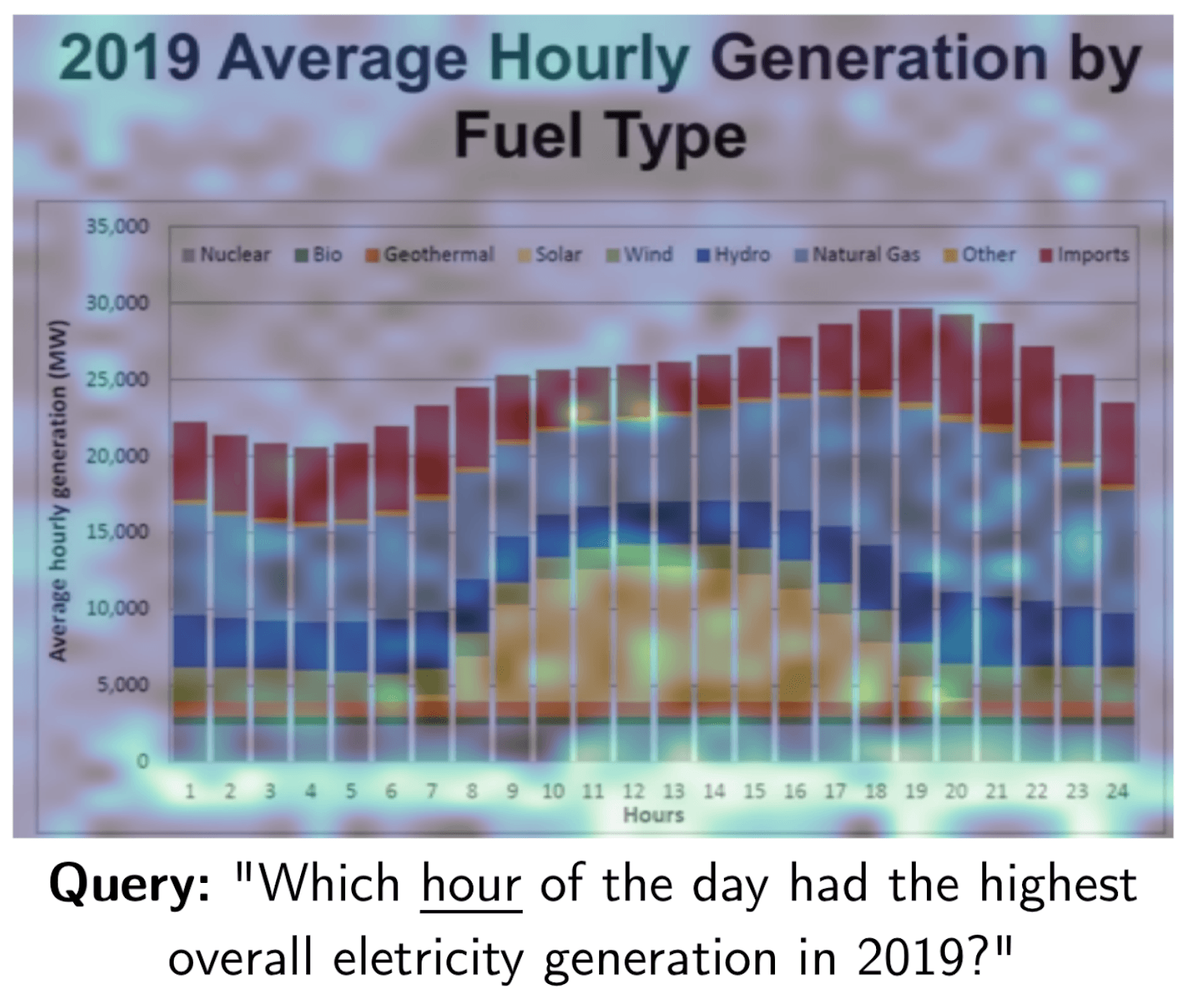
A heatmap of where the word “hour” matches in this document. Source: https://arxiv.org/pdf/2407.01449
Searching with ColPali in Elasticsearch
We will be taking a subset of the ViDoRe test set to take a look at how to index documents with ColPali in Elasticsearch. The full code examples can be found on GitHub.
To index the document vectors, we will be defining a mapping with the new rank_vectors field.
We now have an index ready to be searched full of ColPali vectors. To score our documents, we can use the new maxSimDotProduct function.

Key takeaways on ColPali in Elasticsearch
ColPali is a powerful new model that can be used to search complex documents with high accuracy. Elasticsearch makes it easy to use as it provides a fast and scalable search solution. Since the initial release, other powerful iterations such as ColQwen have been released. We encourage you to try these models for your own search applications and see how they can improve your results.
Before implementing what we covered here in production environments, we highly recommend that you check out part 2 of this article. Part 2 explores advanced techniques, such as bit vectors and token pooling, which can optimize resource utilization and enable effective scaling of this solution.
자주 묻는 질문
What is ColPali?
ColPali is a late-interaction model that simplifies the process of searching complex documents with images and tables.
How does ColPali works?
ColPali processes documents by dividing a screenshot into small rectangles and converting each into a 128-dimensional vector. For our query, the ColPali model creates a vector for each token. To score documents during search, the distance between each query vector and each document vector is calculated.
관련 콘텐츠
2026년 7월 20일
AI shopping agents: Why context comes before the query
AI shopping agents that guess at your vocabulary make expensive mistakes. Pre-computed catalog context stops the guessing before the first tool call.
2026년 7월 16일
A picture is worth 1.5x the words: What we learned benchmarking product search embeddings
We benchmarked two embedding models on 5,000 real products and found that combining image and text beats either alone by up to 50%. Here's the data and the model that won.
2026년 7월 13일
The disk that never woke up: what actually decided our Qdrant vector search benchmark rematch
On the same hardware, Elasticsearch and Qdrant land in the same range at 56 QPS. The io_uring disk scorer and memory claims turned out to be the two things that mattered least.

2026년 7월 21일
4 NVIDIA AI tasks, 1 Elasticsearch API: Embeddings, chat, completion, and rerank
Set up NVIDIA hosted models in Elasticsearch with one API key and a model ID. No custom integration code needed.
2026년 7월 10일
How BBQ shrinks Jina v5 embeddings by 29x without losing recall in Elasticsearch
A hands-on test comparing BBQ and float32 vector indices in Elasticsearch, measuring memory, disk and recall@10 across five languages.