Free yourself from operations with Elastic Cloud Serverless. Scale automatically, handle load spikes, and focus on building—start a 14-day free trial to test it out yourself!
You can follow these guides to build an AI-Powered search experience or search across business systems and software.
Cross-project search (CPS) in Elastic Cloud Serverless lets you query data across multiple projects in a single request, a need many organizations have. With project tags and routing, you can easily scope that search. Project routing filters by project alias before the query runs, so Elasticsearch never touches non-matching projects: no index resolution, no coordination, no compute. Project tag fields work inside the query like any other field, so you can filter, aggregate, sort, and group results by tag values such as environment or department.
This blog introduces Serverless project tags and details how to use them in the context of cross-project search to target specific projects in queries and improve the query performance.
Project tags background
Each Serverless project has a set of key-value pairs associated with it, allowing you to categorize and organize your projects. These are called project tags. There are two types of tags:
- Prebuilt tags: Predefined tags that exist for every project and are generated automatically; for example,
_alias,_id,_type, corresponding to the project alias, project ID, and project type. Predefined tag names always begin with an underscore. - Custom tags: User-defined tags; they can have any name that begins with a letter and can contain lowercase letters, numbers, underscores, and hyphens. For example, you could have the tag
env:qafor your QA environment projects andenv:productionfor your production environment.
In the Elastic Cloud console, you can manage project tags in the “Manage project” screen:
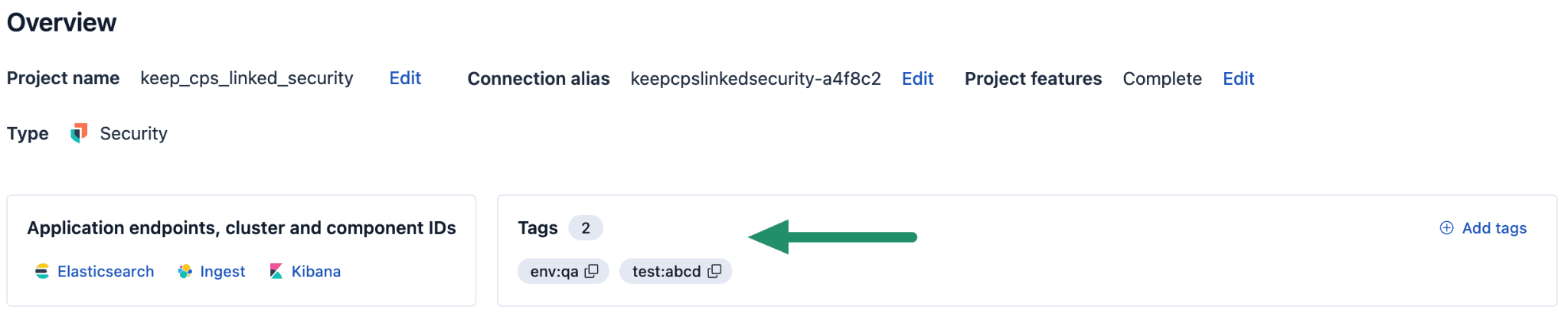
And programmatically, you can see the tags by using the GET _project/tags Elasticsearch API:
In your queries, you can use project tags to limit the scope of the search to a subset of your linked projects; for example, only observability projects or only projects belonging to the billing department. This is called project routing; for each search, you can provide a filtering expression that confines the search only to the projects which have the tags matching the expression. This is a very efficient way of reducing the search space, because it doesn’t require accessing any projects that don’t have the matching data.
In addition, you can use the project tags in queries just like any index fields are used: for matches, aggregations, sorting, as part of the search fields output, and more. When used in this way, project tags look exactly like any mapped field, but their values aren’t stored in the index; they’re loaded dynamically from the project configuration. This adds flexibility in using project tag information in searches and aggregations.
When used in this manner, project tags are always prefixed with _project.; for example, project tag _alias becomes _project._alias, and project tag department becomes _project.department.
Project routing
Project routing restricts cross-project search to a subset of linked projects by applying a filter expression, which uses a subset of Lucene query syntax, before the query processing begins; for example, _alias:my_search_project. This is a very efficient way of limiting the query, since the filter is applied before any of the operations are executed, and the linked projects that don’t match the filter won’t even be contacted in this query. However, this way of filtering is limited because you can only use it to exclude the whole project.
This filtering is applied to every index expression, so for example, when running GET logs/_search without the routing expression, it would look for logs index on the origin project and every linked project; however, with routing expression _alias:my-o11y-project, only the project with the alias my-o11y-project will be used.
For convenience, you can store frequently used routing expressions as named project routing expressions and reuse them between different queries by specifying just the expression name: @routing-expression.
In the Technical Preview release, project routing is limited to only filtering by _alias tag matching; for example, _alias:my-security-*. In future releases, we plan to support all tags and most of the Lucene filter syntax.
Query DSL
Project routing can be specified for search using request body field:
Elasticsearch Query Language (ES|QL)
You can specify project routing as a statement preceding your main query:
Alternatively, you could use a project_routing query parameter in an API call, as above, but within ES|QL, the SET syntax is preferred.
Precedence rule: If both the SET project_routing syntax is used and a project_routing query parameter is provided via the API, the SET syntax takes precedence.
Project tags as fields
Project tags can be used as fields in queries (for fetching, matching, aggregating, and sorting) by referencing them with the _project. prefix. This is implemented by creating a special dynamic mapping type and attaching it to the field named _project. By itself, this field doesn’t have any data and cannot be used directly, but it has subfields with names matching project tag names; for example, _project._alias or _project.env. These fields return constant keyword values, taken directly from the project tags map stored in memory.
Query DSL
In Query DSL, you can use the project tag fields just as you do with regular fields, wherever a field name is accepted; for example:
Fetching:
Wildcard patterns work, too:
By default, however, project tags aren’t in the output fields (including when using * as fields); you always need to include them explicitly with the _project. prefix. You don’t need to add project tags to the output to use them for matching or aggregations; these functions are independent of each other.
Matching:
For this simple example, project routing may be a more efficient way; however, more complex matching can be used, too:
Unlike project routing, the full set of Elasticsearch matching expressions can be used here, even in the Technical Preview release. Keep in mind that this comes at a performance cost: All indices named in the index expression will still be resolved, and all linked projects will be contacted, even if the match expression ultimately excludes all their data.
You can also use aggregation on project tags:
And sort by a project tag:
ES|QL
To use project tags as fields in your query results, you must explicitly include them using the METADATA keyword in your FROM clause:
Wildcards can be used to include multiple tags:
Once included, these tag fields behave like any other field, usable by all ES|QL commands; for example:
In ES|QL, there are a few important differences between using project_routing and defining filters based on project tags in a WHERE command.
Index resolution:
- With
project_routing="...", indices are only resolved on the specified projects, so you won’t see fields that are only defined in the mappings of the excluded projects. - With a simple filter, for example,
WHERE _project._alias LIKE "...", the index resolution will be routed to all the projects, so you’ll also see columns that are only defined in projects that don’t match the alias pattern.
Query routing:
- With
project_routing="...", the query will be routed only to the involved projects. - With
WHERE _project._alias LIKE "...", the query will be routed to all the projects, so you’ll pay at least for the cost of query coordination.
Query execution:
- With
project_routing="...", the query will be executed only on the nodes that match the expression. - With
WHERE _project._alias LIKE "...", the query will be routed to all the nodes, but ES|QL will perform a second optimization phase and will replace project tags with constants, performing constant folding that will transform the original filter into aWHERE truefor projects that match the condition and withWHERE falsefor projects that don’t match the condition. In this case, the engine will recognize that the query will return no results, so in practice there will be no execution. In conclusion, you’ll pay for the cost of coordination and for the cost of local replanning, but the actual execution will be a no-op.
Flexibility:
- In the Technical Preview release,
project_routingonly allows filtering based on project aliases. Future releases will support more complex syntax and all tags. - The ES|QL language supports project tags in any command or expression where a field name is allowed, including filters, even with very complex expressions.
Conclusion
Both project routing and project tag fields give you control over which projects participate in a cross-project search, but they serve different purposes.
Use project routing when performance matters most. Whether you set project_routing in a Query DSL request body or use SET project_routing in ES|QL, the effect is the same: Non-matching projects are excluded before any query work begins; no index resolution, no coordination overhead, no wasted compute. If you know exactly which projects to target, this is always the most efficient path.
Use project tag fields when you need flexibility. Project tags behave like regular fields in both Query DSL and ES|QL. You can filter, aggregate, sort, and include them in output. This opens up scenarios that routing alone cannot handle, such as combining tags with Boolean logic, grouping results by project, or filtering on custom tags like “env” or “department”. The trade-off is that all linked projects are still contacted, even if the filter ultimately excludes their data.
Combine both for the best of both worlds. Start with project routing to narrow down to the relevant projects, and then use project tag fields within your query for finer-grained logic. This gives you the performance benefits of early exclusion with the expressiveness of full query support.
関連記事
2026年6月11日
Replica management: Inside the system that keeps Elasticsearch Serverless searches fast at scale
A technical walkthrough of how two replica systems (one for failover, one for load balancing) combine every five minutes into a single cache-aware recommendation per index in Elasticsearch Serverless.
2026年6月5日
Your Elastic agent, Google's ADK, and zero custom APIs: building “Lucky Planet” over A2A
Elastic Agent Builder's native A2A endpoint lets Google's ADK orchestrate a remote agent, with no custom REST API. Watch it work in 'Lucky Planet,' a random-exoplanet game built end-to-end.

2026年6月2日
Elasticsearch reindex now relocates across nodes automatically: zero user intervention, no lost progress
Elasticsearch reindex now survives node shutdowns, uses Point in Time for more efficient source iteration, and ships with dedicated management APIs. Reindex-from-remote is GA in Serverless.

2026年5月18日
One query, multiple Elasticsearch Serverless projects: introducing cross-project search
Cross-project search in Elastic Cloud Serverless lets you query data across isolated projects in a single Elasticsearch or ES|QL request: no duplication, no network peering, and no egress costs from copying logs.

2026年4月30日
How cross-project search (CPS) works in Elasticsearch Serverless
Elastic Cloud Serverless cross-project search (CPS) treats index expressions as cross-project by default. This post explains how TransportSearchAction scopes projects, resolves index expressions, skips projects with no matches, and validates index resolution against allow_no_indices and ignore_unavailable.