Get hands-on with Elasticsearch: Dive into our sample notebooks in the Elasticsearch Labs repo, start a free cloud trial, or try Elastic on your local machine now.
Add one line to any Elasticsearch Query Language (ES|QL) query, and get answers 100x+ faster on billions of documents. Your gains grow as your data grows. Built-in confidence signals tell you when results carry formal guarantees and when they’re best estimates.
One line: Speed that scales with your data
On billions of documents, analytical queries push against a real efficiency-precision trade-off. We’ve been hard at work pushing back. Our native columnar support is one of the best there are. ES|QL itself is a fast, purpose-built analytical engine, getting ever smarter at aggregation execution. And Elasticsearch ships a steady stream of efficiency innovations, like Block k-dimensional (BKD) tree pruning, with more landing all the time.
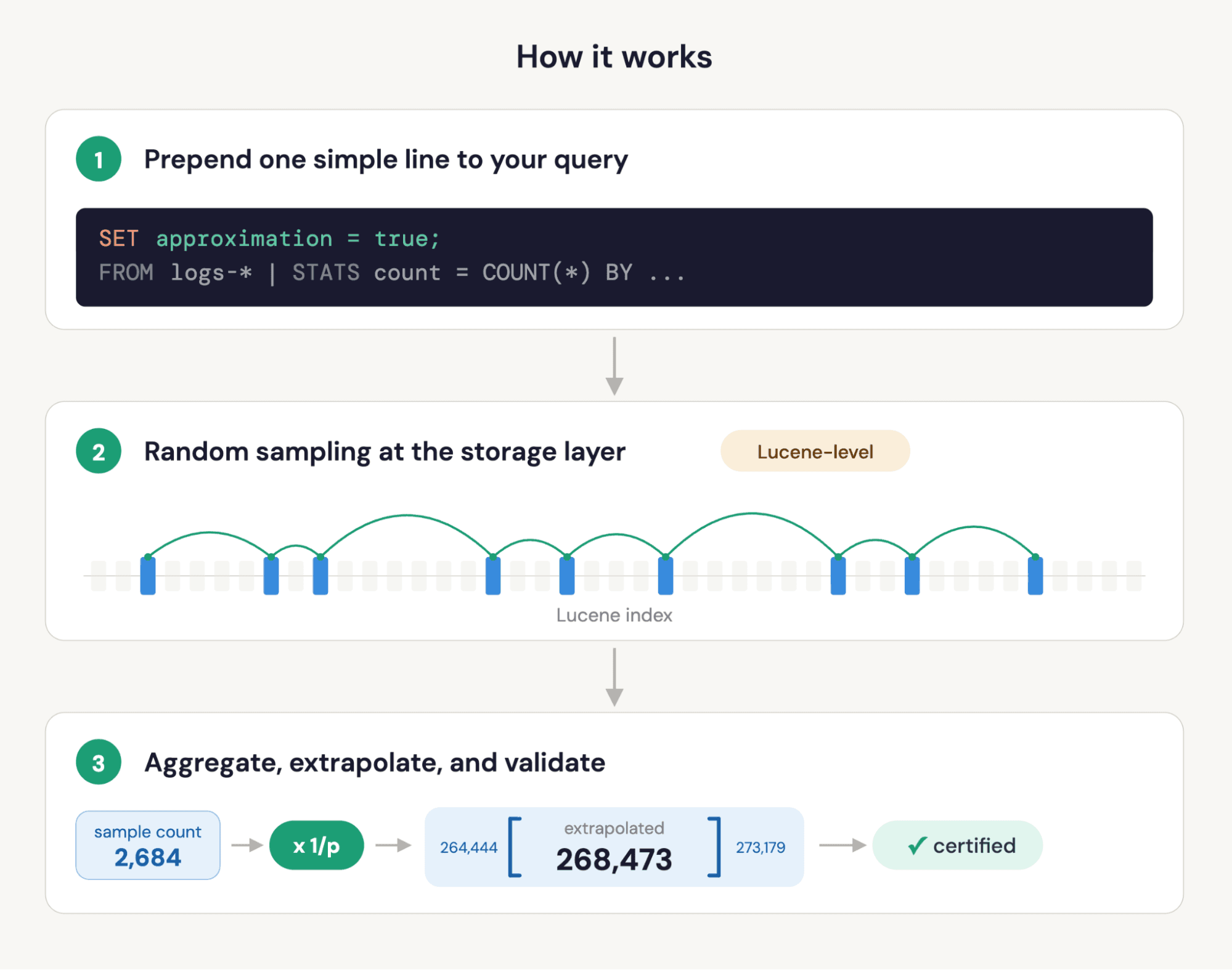
But even with all of that, native approximate queries really shine through. Starting in Elasticsearch 9.4, ES|QL supports approximate query execution. All you have to do is add one line to your queries: Prepend SET approximation = true. Now Elasticsearch will automatically sample a subset of your data, run the aggregation on that sample, extrapolate the results, and report confidence intervals. All transparently.
Your existing query stays unchanged. The SET directive tells Elasticsearch to handle the sampling, extrapolation, and statistical validation for you. No query rewriting, no manual sampling math, no guessing at sampling probabilities.
SET approximation = true is a forward-compatible directive. Today, it speeds up the most heavily used aggregations. As we expand support to more capabilities, your existing queries benefit automatically. Queries that aren’t yet approximated run exactly without errors; a warning header explains why.
How much faster?
On the ClickBench benchmark, well-behaved analytical queries ran on average 23x faster with confidence intervals enabled. Individual queries hit ~100x. Disabling confidence interval computation, the highest-leverage queries land near ~300x.
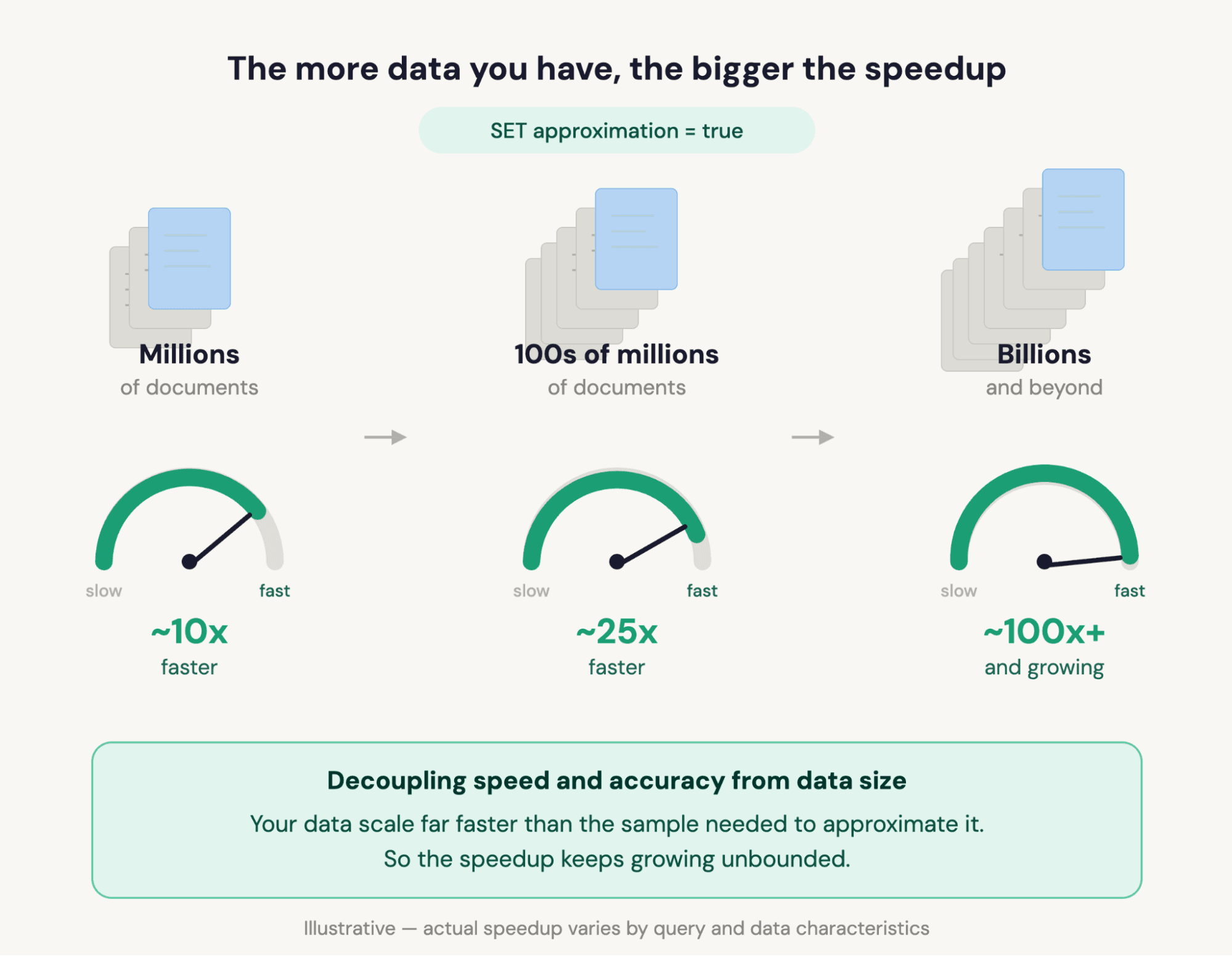
The advantage grows as your datasets grow. Approximate-mode cost is capped by the configured sample size, while exact-execution cost scales with row count. Doubling your index doubles exact-query time but barely changes approximate-query time for the same accuracy! This is a beautiful property of the underlying math, not an engineering trick, and it’s why approximation gets more valuable as you scale.
Speedup also depends on query shape, grouping cardinality, and sample size. See the FAQ for the full set of factors and tuning tips. Read “Fast approximate ES|QL” in two parts ([Part 1], [Part 2]), straight from the creators of the feature.
What you get back
The response includes your original aggregated values, automatically scaled to represent the full dataset; a COUNT on a 1% sample comes back as the estimated total, not the sample count. Column names and types are preserved (backwards-compatible). Plus two additional columns per approximated value:
- Confidence interval: A range that bounds the true value at the configured confidence level (default 90%). For example, a count of 268,473 with interval [264,444–273,179] means you can be 90% confident the true count falls in that range.
- Certified flag: A Boolean indicating whether the confidence interval for that value meets formal statistical guarantees. When certified is
true, the data distribution allows us to rely on the results at face value. Whenfalse, the approximation is still often close but we can’t claim the same formal guarantees, typically because the distribution may be highly skewed or involve too few documents in a group. Think of it as the difference between "statistically proven" and "best estimate."

This is a deliberate design choice: Consumers that don't care about the confidence metadata can choose to not compute them at all (see “Granular control when you need it”) or ignore the extra columns and use the results exactly as before. Consumers that do care (like AI agents that read the results programmatically) get everything they need without a second query.
Use cases for approximate queries in ES|QL: Where this matters
AI agents and agentic workflows
Approximate queries don’t just speed up agent queries; they enable a scan-then-enhance investigation pattern that wasn’t practical at scale before. An agent can sweep billions of documents in sub-second time, identify candidates, and zoom in for exact answers, all inside a single reasoning loop. The certified flag turns approximation into a decision signal: Proceed at face value when it’s true, escalate to an exact query when it’s false and the step needs a tight guarantee. As ES|QL becomes the foundation for agentic analytics in Elastic, approximation is the speed layer that makes investigation possible at this scale.
Dashboards and charts on large datasets
Dashboards that aggregate weeks or months of data can become sluggish as data volumes grow. With SET approximation = true, the same dashboard loads faster. In the future, Kibana will inject the setting transparently, so users won't need to know it's happening; they’ll just see faster charts.
Log pattern analysis in ES|QL at scale
CATEGORIZE, GROK, and regex-heavy conditions are among the most compute-intensive parts of ES|QL because they require nontrivial compute per document. With approximate execution enabled, these large-scale pattern and exploration workflows become practical on very large indices.
Exploratory analysis and hypothesis testing
When you're exploring data to form hypotheses, for example, "Which services have the highest error rates this week?", you rarely need exact counts. You need shapes, relative magnitudes, and outliers. Approximate mode gives you those at interactive speed, and the confidence intervals tell you when to switch back to exact mode for the final answer.
How approximate queries work in ES|QL, without the math
The speedup is real engineering, not a query-planner trick. Sampling happens at the Lucene layer: Elasticsearch reads only the documents in the sample, so I/O and compute savings are proportional to the sampling rate. The aggregation runs on the sample, and the result is automatically scaled to represent the full dataset.
Confidence intervals are computed by a bootstrap procedure over multiple sub-partitions of the sample: statistically rigorous, not a heuristic or a guess. This is what backs the certified flag: When the methodology’s assumptions are met, the intervals carry formal guarantees.
One line: Massive gains, extrapolation, confidence signals.
Granular control when you need it
The defaults are designed to work well out of the box, but you can tune them:
- rows: How many documents to sample (default: 100,000 for ungrouped queries, 1,000,000 for grouped). More rows means higher accuracy and longer runtime.
- confidence_level: The confidence level for intervals. Defaults to: 0.9. Set it to a higher level for an increased probability that the value is within the confidence interval.
- Skip confidence intervals for maximum speed: Set
confidence_leveltonull, and Elasticsearch returns just the point estimates, adding another 2–5x speed on top of approximate execution. This is how the highest-leverage queries land near 300x.
What's next
SET approximation = true is a forward-compatible directive. As we add support for FORK, JOIN, chained STATS, and additional aggregations, your existing queries automatically benefit.
Future work also includes tighter integration with Kibana so dashboards and Discover can enable approximation automatically and improved handling of highly skewed grouping fields.
Additionally, we’ll make approximate queries natively accessible to agents, so they can opt into fast execution as part of their analytics tools and reasoning loop.
Get started
Approximate queries are available in Elasticsearch 9.4 as a technical preview on the Enterprise subscription tier. Add SET approximation = true; to the beginning of your query, and see the difference. Check the ES|QL SET command reference for configuration options.
FAQ
What is approximate query execution in Elasticsearch?
Approximate query execution is a mode where Elasticsearch samples a subset of your data, runs the aggregation on the sample, and extrapolates the result to represent the full dataset. You get back the estimated value plus a confidence interval showing how much to trust it. It's controlled by a single SET directive prepended to your existing ES|QL query; no query rewriting required.
How do I speed up ES|QL aggregations without reducing my data retention?
Just add SET approximation = true to your query. Approximate execution samples at query time, not at index time. Your data stays fully indexed, fully retained, and queryable both exactly and approximately. Elasticsearch handles sampling and extrapolation on the fly. Drop the directive any time you want exact results; nothing about the underlying data changes.
How much faster are approximate queries?
On the ClickBench benchmark, aggregation-heavy ES|QL queries that are well-suited to sampling typically run 10–40x faster with confidence intervals enabled, with individual queries reaching 100x or more. Disabling confidence interval computation (SET approximation = {"confidence_level": null}) adds another 2–5x on top, so the highest-leverage queries hit nearly 300x. The advantage grows with dataset size: Sampling cost is capped by the configured sample size, while exact execution cost scales with the row count, so the bigger your index, the bigger the win for the same precision.
How accurate are approximate queries? Can I trust the results?
Each approximated value comes back with two signals: a confidence interval (a range bounding the true value at a configurable confidence level) and a certified Boolean flag. When certified is true, the confidence interval carries formal statistical guarantees. When false, the result is still often close, but the data distribution didn't meet the assumptions required for a formal guarantee. Accuracy depends on data characteristics and query shape, not on document count, so speedup gains increase as your dataset grows.
What does the speedup depend on?
Five main factors:
- Dataset size. Larger datasets produce larger speedups, for the reason described above (exact scans grow with N; sampled scans don’t).
- Query shape. Queries that scan a lot to compute relatively little (large
STATS, especiallyMEDIANandPERCENTILE) benefit most. Queries that are already cheap (smallWHEREfilters matching few rows, or simple counts that hit indexed summary statistics) see little speedup. - Grouping cardinality and distribution. Well-distributed
BYfields with healthy per-group sample counts benefit cleanly. Very sparse or highly skewed grouping (for example, a near-unique field or a long tail of rare values) can erode the gain because rare groups end up with too few sampled documents. - Confidence interval computation. Computing intervals adds overhead. Set
confidence_leveltonull, and you trade interval reporting for an additional 2–5x speedup. - Sample size. The defaults (100k for ungrouped
STATS, 1M forSTATS … BY) work well for most queries. Increasing rows improves accuracy on high-cardinality grouping at the cost of some speedup; decreasing it does the reverse.
Can I use approximate queries for log analysis and pattern detection?
Yes. CATEGORIZE, GROK, and regex-heavy conditions are among the most compute-intensive operations in ES|QL because they require per-document processing. With SET approximation = true, these operations run on a sampled subset instead of the full index, making large-scale log pattern analysis and exploration fast on very large datasets.
Do I have to rewrite my ES|QL queries to use approximate mode?
No. Prepend SET approximation = true to your existing query. The aggregation expressions, column names, and output types stay the same. The response adds two columns per approximated value (the confidence interval and the certified flag), but existing consumers that don't use those columns see no breaking change.
What aggregations does approximate mode support in 9.4?
COUNT, SUM, AVG, WEIGHTED_AVG, MEDIAN, PERCENTILE (except extremes), MEDIAN_ABSOLUTE_DEVIATION, and STD_DEV (with caveats for highly skewed distributions). More coverage on the way.
Will I get the same result twice for the same query?
Not exactly. Approximate execution randomly samples documents at query time, so successive runs of the same query return slightly different point estimates and confidence intervals. The variation between runs is small relative to the confidence interval each run reports. If you need bit-for-bit reproducibility, run the exact query. For dashboards, depending on the use case, the variation can typically be smaller than the visual resolution of the chart.
The release and timing of any features or functionality described in this post remain at Elastic's sole discretion. Any features or functionality not currently available may not be delivered on time or at all.
Contenido relacionado
How to build search analytics on Elastic using OpenTelemetry, no extra pipeline required
How to instrument your search application to use modern Open Telemetry standard to drive insights in to your search and users.
Follow the money: tracing laundering networks with ES|QL and cross-cluster search
The data model, cross-cluster architecture and five ES|QL queries that power mule detection and laundering network tracing, built from infrastructure most financial institutions already run.

1 de julio de 2026
One command. Natural language. Your Elasticsearch data, straight to the terminal.
Query your Elasticsearch data from the terminal in plain English. The official Elastic GitHub Copilot CLI plugin generates and runs ES|QL queries against your cluster. No Kibana, no manual syntax.
30 de junio de 2026
Building a multilingual voice agent with Elastic Agent Builder & Sarvam AI
A working demo combining Sarvam AI speech with Elastic Agent Builder: identity verification, per-customer ES|QL queries, and mid-call language switching across 22 Indian languages without multilingual indices.

29 de junio de 2026
Bringing it together: How we rebuilt Elasticsearch as a columnar metrics engine; 6.6x less storage, 160x faster queries
Elasticsearch metrics in version 9.4 run on a fully columnar engine: 6.6x less storage, 160x faster queries, native PromQL and OTel support.