Test Elastic's leading-edge, out-of-the-box capabilities. Dive into our sample notebooks in the Elasticsearch Labs repo, start a free cloud trial, or try Elastic on your local machine now.
Synthetic _id reduces time-series index storage by up to 34% and eliminates 6% CPU overhead at ingest. Instead of building an inverted index for _id, Elasticsearch computes the document identifier on the fly from _tsid and @timestamp, using a bloom filter for deduplication. This optimization ships in Elasticsearch 9.4 and is already live on Elastic Cloud Serverless.
This post is a deep dive into the implementation. For context on how synthetic _id fits into the broader metrics performance story, see How we rebuilt Elasticsearch as a leading columnar metrics datastore to achieve up to 6.6x improvement in storage efficiency and 50% improvement in indexing throughput for OpenTelemetry metrics.
We'll start by explaining why the _id field is expensive for time-series workloads. We'll then describe how synthetic _id works and how it uses a bloom filter to optimize document deduplications instead of maintaining a traditional inverted index. Finally, we'll share the performance results from our benchmarks and serverless production deployments.
The hidden cost of _id in time-series indices
Time-series indices are a specialized index mode optimized for metrics, logs, traces, and other timestamped data. They store sequences of data points (like CPU usage, stock prices, or sensor readings) that track changes to specific entities over time. In Elasticsearch, each of these data points is indexed as a document with a unique identifier called _id. This identifier is used to look up, update, or delete specific documents. When a document is indexed in Elasticsearch, the system checks whether a document with the same _id already exists. Depending on the operation type (op_type), an existing document is either replaced (index) or the new document is rejected (create); the latter is the most common path for metrics ingestion.
To perform this lookup efficiently, Elasticsearch builds an inverted index for the _id field. This inverted index maps each _id value to its location in the index, enabling fast document lookups. Until version 8.11, the _id value was also stored separately in order to be returned in search results and other APIs. From 8.11 and onwards, we optimized Elasticsearch to only store this value temporarily for document replication purposes, the value being quickly merged away and reconstructed on demand.
For many use cases, building the inverted index and storing it is an acceptable overhead. But for time-series data, like metrics or traces, the cost can add up quickly. Our experiments showed that building the inverted index for the field _id adds 6% CPU overhead compared to indexing without it. In some extreme cases, we benchmarked that it could reduce indexing throughput by 25%.
This overhead is especially painful for time-series workloads where data points are typically small (often just a timestamp and a few numeric values) and compress extremely well. The _id field, however, doesn't benefit from the same compression. As a result, the inverted index for _id can represent a disproportionate share of the total storage. In our benchmarks with OpenTelemetry (OTel) metrics, the _id inverted index alone consumed around 5 bytes of the total 25 bytes per data point.
We considered several approaches to eliminate this overhead:
- Stop indexing
_idand checking for duplicates: This would be the simplest solution, but without deduplication, duplicate data points could corrupt aggregations. A gauge average, for instance, would be skewed by repeated values. - Accept duplicates during indexing, deduplicate at query time: This preserves correctness but adds overhead to every query, degrading dashboard responsiveness.
- Deduplicate during segment merges: Duplicates would eventually be removed, but queries on unmerged segments would still return results with duplicates.
- Synthetic
_id: Compute the document identifier on the fly from fields that already uniquely identify each data point, and use a lightweight bloom filter for deduplication instead of a full inverted index.
We chose synthetic _id because it maintains correctness at ingest time while eliminating the storage and CPU overhead of the traditional approach. And we decided to implement it for time-series indices because they’re very well suited for this optimization.
In time-series indices, the _id isn’t arbitrary. Each document has a time series identifier (_tsid) and a timestamp (@timestamp). The _tsid is generated from the dimensions fields of the document (like host.name, pod.name, or sensor_id), while the @timestamp marks the point in time of the document. Together, these two fields uniquely identify the document: There can only be one data point for a given time series at a given moment in time. This means we can derive the _id from the _tsid and @timestamp field values, rather than storing it separately.
How does synthetic _id work in Elasticsearch?
With synthetic _id, Elasticsearch computes the document identifier on the fly as the combination of the _tsid and @timestamp fields. This computed value is used wherever _id would normally be used: in API responses, for document lookups, and for deduplication. However, it’s never stored in an inverted index nor is it stored on disk for later retrieval.
The challenge is deduplication. When a new document arrives, Elasticsearch must verify that no document with the same _id already exists. Without an inverted index on _id, how can we perform this check efficiently?
How synthetic _id simulates an inverted index without building one
Our Elastic Lucene experts suggested a clever idea: Since _tsid and @timestamp are already stored as doc values, we could expose our own custom Lucene postings format that simulates an inverted index without actually building one.
This means that when Elasticsearch needs to look up a document by its _id, it uses the same code path as usual: It queries the underlying Lucene index to look up the _id term. But instead of hitting a real inverted index, our custom postings format intercepts the call, extracts the _tsid and @timestamp encoded in the synthetic _id, and uses their doc values to locate the document. Because time-series indices are sorted by these fields, documents belonging to the same time series are stored contiguously. This allows Elasticsearch to skip large subsets of nonmatching documents (sometimes entire segments) to find the target document(s) quickly.
While this process is efficient, it can involve several random-access reads: looking up the _tsid value, scanning for matching documents, and reading timestamps. For the common case in time-series indices where we don’t expect the document to already exist, we wanted to fail fast without touching doc values at all.
Bloom filters for fast membership testing
We solve this problem using a bloom filter, a probabilistic data structure that can quickly answer the question Could this element be in the set? with a small risk of false positives but no risk of false negatives. In other words, a bloom filter might occasionally say yes when the answer is actually no, but it will never say no when the answer is yes.
When a document is indexed, its synthetic _id is added to the bloom filter. When a new document arrives, we first check the bloom filter. If the bloom filter says no, we know for certain that no document with this _id exists and we can proceed with indexing immediately. If the bloom filter says maybe yes, we fall back to the more expensive verification using the _tsid and @timestamp doc values.
Synthetic _id indexing workflow: step by step
Let's walk through what happens when a document is indexed into a time-series index with synthetic _id enabled:
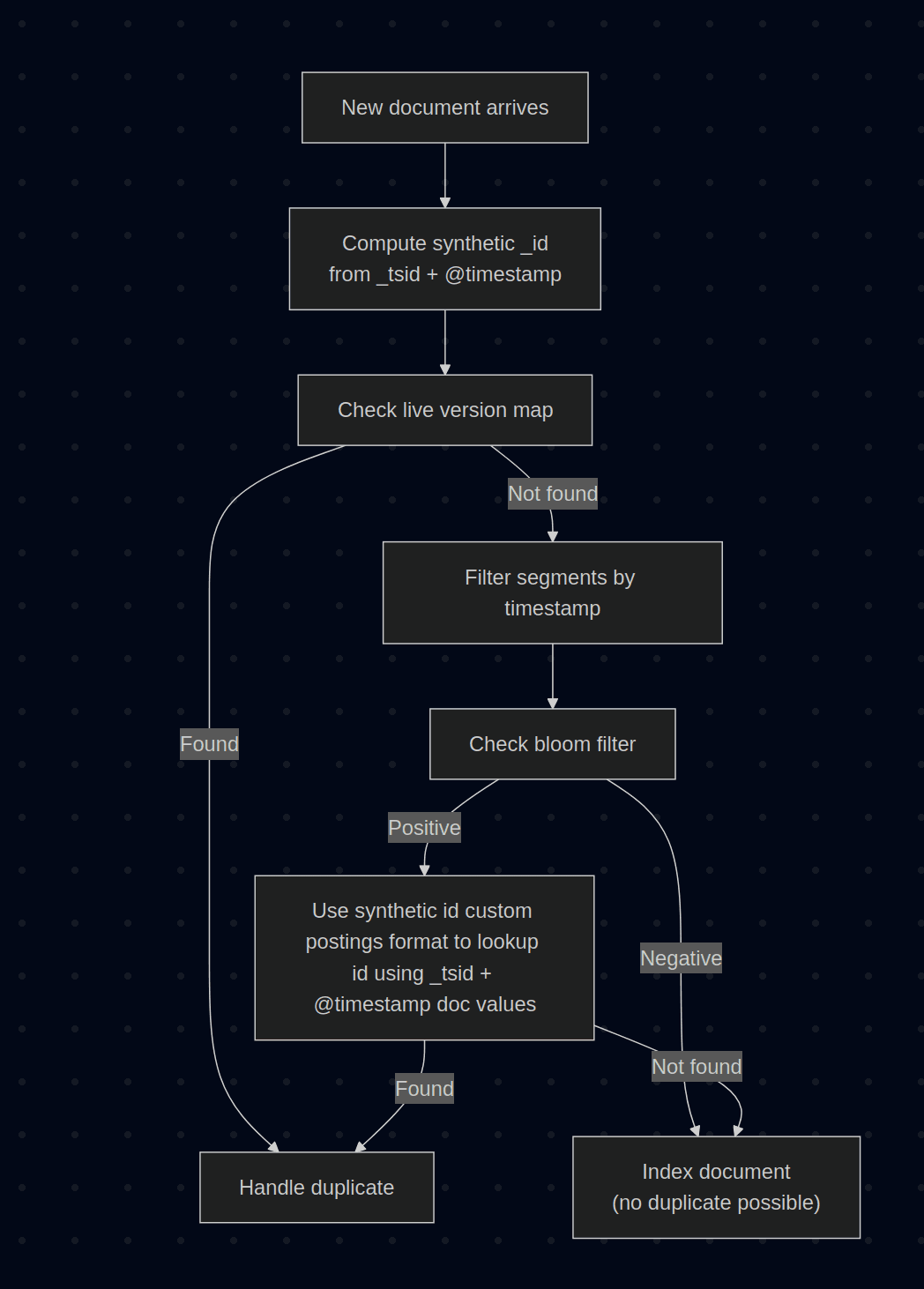
- Compute the synthetic
_id: Elasticsearch calculates_idas a combination of_tsid || @timestamp. - Check the live version map: Like today, we first check an in-memory map of recently indexed documents. If the document is present in this map, we can handle the duplicate immediately.
- Filter segments by timestamp: Time-series indices are sorted by
_tsidand@timestamp. We can skip any segment whose timestamp range does not overlap with the incoming document's timestamp. - Check the bloom filter: For each candidate segment, we test whether the
_idmight exist using the bloom filter. - Verify if needed: If the bloom filter returns a positive result, we look up the document using the
_tsidand@timestampdoc values. Since documents are sorted by these fields, this lookup is efficient. - Index the document: If no existing version is found, the document is indexed. The
_idis added to the segment's bloom filter, but no inverted index is built and the field value is never stored.
In the common case where new data arrives with recent timestamps, step 3 eliminates most segments from consideration, and step 4 quickly confirms that the document is new. The expensive verification in step 5 only happens on bloom filter false positives, which are expected to be rare.
Bloom filter false positive rate: how Elasticsearch keeps it low
One challenge with bloom-filter-based deduplication is controlling the false positive rate without sacrificing the storage efficiency we were after. To size bloom filters effectively, we consider the number of data points in each segment and target both a low false positive rate and a bit set saturation below 50%.
The saturation target serves a specific purpose: When segments are merged, we OR the bit sets rather than rebuilding bloom filters from scratch. This makes merges fast but means the false positive rate converges toward 100% as segments are merged repeatedly. Keeping saturation below 50% before merging buys headroom, delaying that convergence.
The low false positive rate target is justified by access patterns: Recent segments are checked far more often than older ones, since we prune the search space based on data point timestamps. Older, heavily merged segments with degraded bloom filters are unlikely to be checked.
Synthetic _id performance benchmarks: indexing and storage
We ran extensive benchmarks to validate our implementation.
Indexing throughput
A core goal of this effort was to match or improve on existing indexing throughput. In principle, the new approach does less work: Building an inverted index for _id requires hashing each value, building and maintaining complex data structures in memory, and flushing them to disk. These structures must also be reconstructed during segment merges, adding CPU and I/O overhead in high-throughput use cases.
Building a bloom filter isn't free (we still hash each value), but the memory footprint is smaller and there are no complex data structures to maintain or flush. The bloom filter is also cheap to merge: When possible, we simply OR the bit sets together rather than rebuilding from scratch.
The main cost of synthetic _id comes from verifying potential duplicates using doc values. However, this cost is mitigated by two factors: First, bloom filter false positives are rare, so most documents skip this step entirely. Second, time-series indices are sorted by _tsid and @timestamp, which means doc value lookups can skip large blocks of nonmatching documents efficiently.
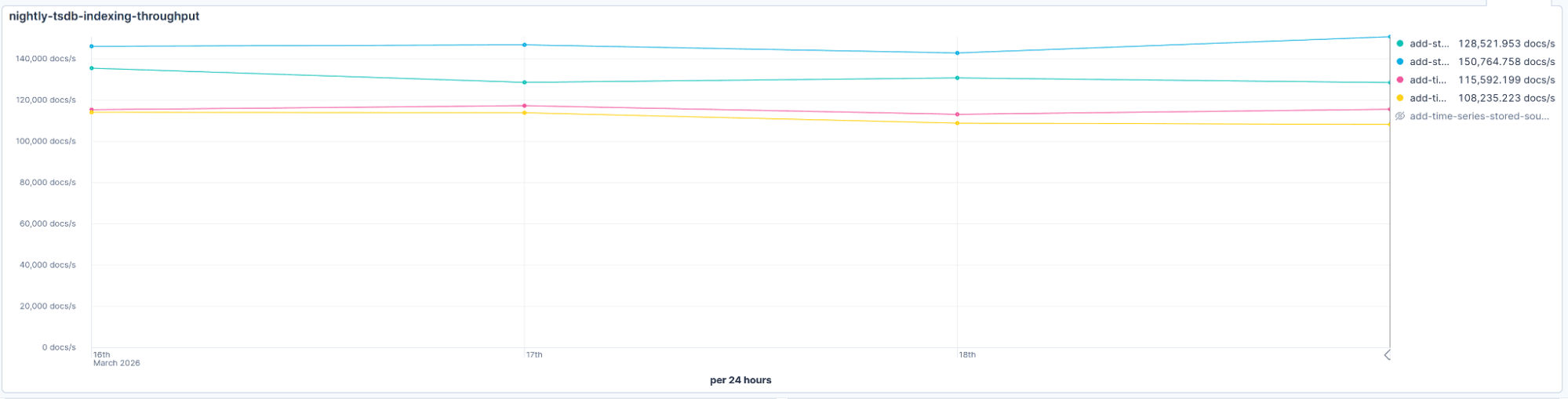
In practice, that's exactly what we observed. Even accounting for the extra seeks needed to verify matches against the tsid and timestamp when a bloom filter returns a positive, throughput came out comparable or better than before. The savings from not building and merging the inverted index outweigh the occasional cost of a false positive check, as confirmed by our nightly benchmarks:
Storage savings
In our benchmarks with OTel metrics, synthetic _id reduced storage by approximately 5 bytes per data point. For a dataset where documents average 25 bytes per data point, this represents a 20% reduction in storage from this single optimization alone.
These results were soon confirmed by our nightly benchmarks.The chart below shows the storage footprint reduction over time as we enabled the synthetic _id feature on March 19, 2026:
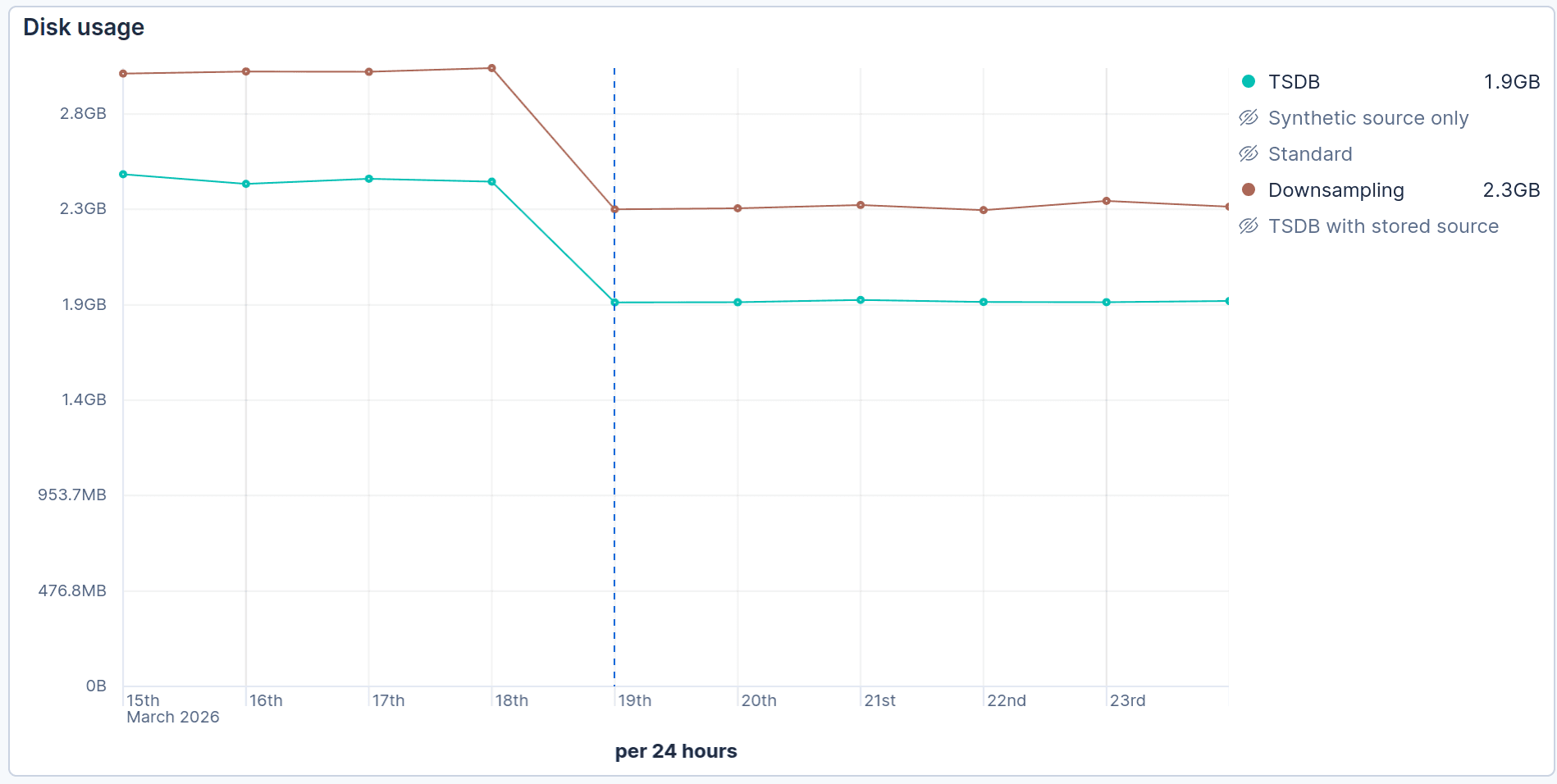
Our standard time series database (TSDB) benchmark showed a reduction from 2.5 GiB to 1.9 GiB (24%). Similarly the time-series downsampling benchmark showed a comparable reduction from 3 GiB to 2.3 GiB (23%).
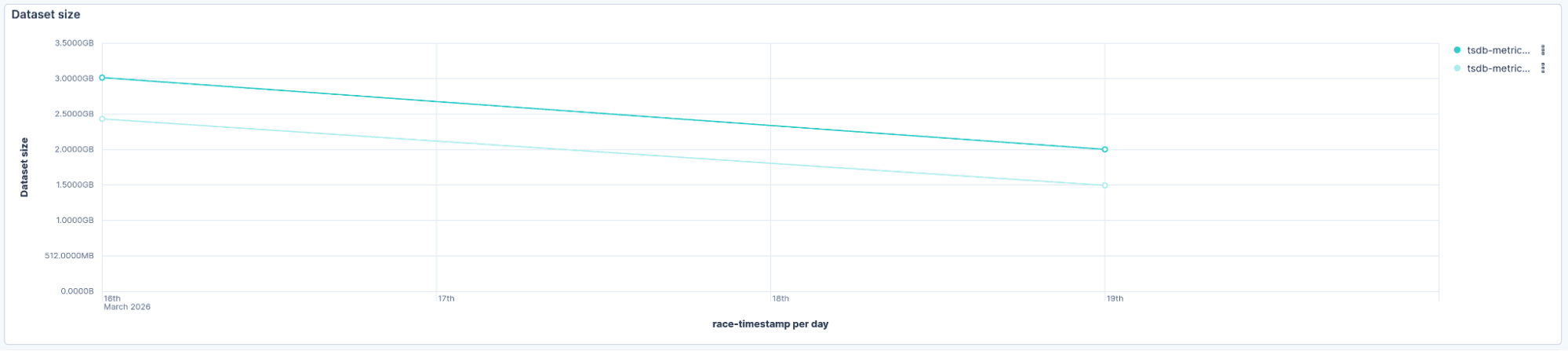
Another benchmark, more focused on metrics, showed an even better reduction, from 3.0 GiB to 2.0 GiB (34%):
API compatibility
An important design goal was maintaining compatibility with existing Elasticsearch APIs. With synthetic _id, all document APIs continue to work as expected: Bulk, Get, Update, Delete, Reindex, and Update/Delete by Query. This compatibility layer also limited the blast radius of the change, ensuring any issues would be contained to the internal implementation.
When the _id isn’t provided in an API request, Elasticsearch computes it from the _tsid and @timestamp fields. To check if the document already exists, it first queries the bloom filter and, if needed, falls back to doc values. The _id is also synthesized on demand from doc values when returning documents in search results or API responses.
One case that requires special handling is searching or filtering by _id prefix or pattern. Such queries require scanning many documents to find matching documents, and while this works correctly, it incurs a performance penalty compared to a direct _id lookup. We don’t expect this use case to be common for time-series indices though.
Elasticsearch 9.4 and Elastic Cloud Serverless availability
The synthetic _id feature will be released in Elasticsearch 9.4.0 and is already available on Elastic Cloud Serverless.
No configuration is required: The feature is enabled by default, and newly created time-series indices (including those created on datastream rollover) will automatically benefit from this optimization. Existing time-series indices created before 9.4 will continue to create inverted indices for the _id field.
We expect synthetic _id to perform well across all time-series use cases. However, in some very specific, update-heavy use cases, if you encounter performance issues, the feature can be disabled by setting index.mapping.synthetic_id to false for new indices.
Summary: synthetic _id storage and performance gains
In this article, we’ve presented how synthetic _id eliminates the storage and compute overhead of document identifiers in time-series indices. By computing _id on the fly from _tsid and @timestamp, and using a bloom filter for deduplication, we achieve comparable or better indexing performance with up to 34% reduction in storage footprint while maintaining full API compatibility. For users running large-scale time-series workloads, this translates directly into lower infrastructure costs.
Roadmap: what comes after synthetic _id
Synthetic _id is part of a broader effort to reduce storage overhead in Elasticsearch.
- Sequence number trimming: Every document carries a sequence number for replication and concurrency control. For append-only time-series data, these become redundant after segments are merged. Elasticsearch 9.4 now trims them during merges to reclaim even more storage: We'll cover this optimization in detail in an upcoming blog post.
- Synthetic _id beyond time-series: We’re exploring how to bring synthetic
_idto regular indices by letting users declare which fields uniquely identify their documents and configuring index sorting on those fields to enable efficient lookups.
Stay tuned!
Häufige Fragen
Why is the _id field expensive in Elasticsearch time-series indices?
The _id field requires an inverted index for deduplication, which adds 6% CPU overhead during indexing and consumes approximately 5 bytes per data point. For small time-series documents (often just 25 bytes), this represents 20% of total storage.
How does synthetic _id work in Elasticsearch?
Synthetic _id computes the document identifier on the fly by combining _tsid (time series identifier) and @timestamp. Instead of storing an inverted index, Elasticsearch uses a bloom filter to check for duplicates, falling back to doc values only on false positives.
What storage savings can I expect from synthetic _id?
Benchmarks show 20–34% storage reduction, depending on your data profile. OTel metrics workloads saw 34% reduction (3.0 GiB to 2.0 GiB), while general TSDB workloads saw 24% reduction (2.5 GiB to 1.9 GiB).
Does synthetic _id affect Elasticsearch API compatibility?
No. All document APIs (Bulk, Get, Update, Delete, Reindex, Update/Delete by Query) continue to work as expected. The _id is computed transparently and returned in API responses.
How do bloom filters help with deduplication in Elasticsearch?
Bloom filters answer "could this element exist?" with no false negatives. When a new document arrives, Elasticsearch checks the bloom filter first. If it says no, the document is immediately indexed. If it says maybe yes, Elasticsearch verifies using doc values. This avoids expensive lookups for the common case where documents are new.
Can I disable synthetic _id if I encounter issues?
Yes. For new indices, set index.mapping.synthetic_id to false. This is only recommended for specific update-heavy use cases where you observe performance issues.
When will synthetic _id be available?
Synthetic _id is available now on Elastic Cloud Serverless and will ship in Elasticsearch 9.4.0. It's enabled by default for all new time-series indices.
Zugehörige Inhalte

9. Juli 2026
Why Elasticsearch is becoming a columnar database
Elasticsearch is becoming a first-class columnar database. Columnar Mode ships in 9.5, storing data once alongside the existing modes and cutting storage footprints while speeding up analytical queries.

7. Juli 2026
Your compliance posture just got an upgrade: Elasticsearch now supports FIPS 140-3
Elastic 9.4 brings FIPS 140-3 support for Elasticsearch and Kibana to GA. Here's what changes for federal, defense and regulated deployments, and how to migrate from 140-2.

2. Juli 2026
A simdvec deep-dive: How Elasticsearch uses neural-net and video-codec CPU instructions for vector search
Four ways Elasticsearch's vector search engine reuses neural-network, video-codec and cryptography CPU instructions for up to 6x speedups; with the math, the failed attempts and the benchmarks.

29. Juni 2026
Bringing it together: How we rebuilt Elasticsearch as a columnar metrics engine; 6.6x less storage, 160x faster queries
Elasticsearch metrics in version 9.4 run on a fully columnar engine: 6.6x less storage, 160x faster queries, native PromQL and OTel support.

11. Juni 2026
How Elasticsearch cut metrics storage by 41% by dropping sequence numbers after replication
Find out how Elasticsearch trims sequence numbers at merge time to cut TSDS storage by 41%, what you give up, and why it's safe for metrics workloads.