Agent Builder is available now GA. Get started with an Elastic Cloud Trial, and check out the documentation for Agent Builder here.
What if your users stopped writing queries and started asking questions? Most data analysis still feels like translation work. You begin with a simple question, like, Why did these URLs spike with 5xx errors last week? or Which product categories are driving revenue? But getting the answer usually means writing queries, joining tables, checking dashboards, validating assumptions, and repeating the process again and again. That gap between curiosity and insight is where most teams lose time.
This article walks through a working agent that takes a plain-English question, runs Elasticsearch Query Language (ES|QL) and index searches against your Elasticsearch data through Elastic's Model Context Protocol (MCP) server, and returns an answer with every step auditable. The stack: Elastic Agent Builder for tools, AWS Bedrock for reasoning, AgentCore for managed memory, and the Strands Agents SDK to wire it all together. Full code is on GitHub.
A September 2025 Elasticsearch Labs article showcased how a self-managed MCP server connects with Bedrock AgentCore Runtime. Here, we simplify things by using Elastic’s hosted MCP in Kibana, combined with the Strands Agents SDK and AgentCore Memories.
How the Elasticsearch agent loop works
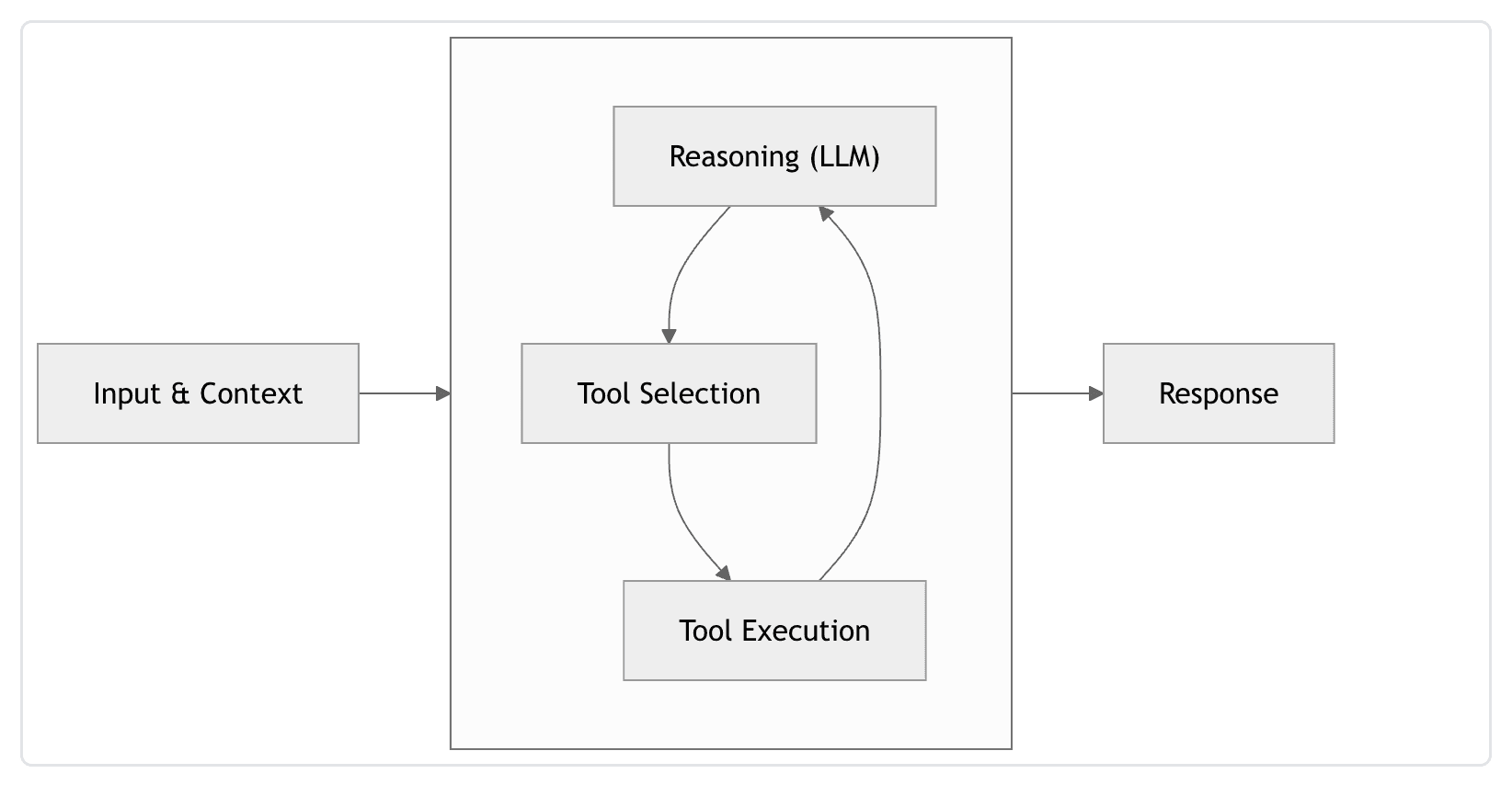
Credits: https://strandsagents.com/docs/user-guide/concepts/agents/agent-loop/#how-the-loop-worksAn agent is a continuous loop. Rather than a linear input-to-output process, the agent operates in a cycle where it constantly evaluates its progress toward a goal. It reasons, acts, observes the result, and then repeats that cycle until the task is complete.
To implement this loop in practice, we need three core layers:
| Layer | Component | Role |
|---|---|---|
| Memory + Tool Execution | Elastic Cloud (Elasticsearch + Kibana) | Searchable memory and MCP tool execution via Agent Builder |
| Reasoning + Infra | AWS Bedrock + AgentCore | LLM reasoning, managed runtime, session memory |
| Orchestration | Strands Agents SDK (v1.29.0) | Connects LLM, tools and memory in the agent loop |
Elastic (memory layer and tool selection/execution): An Elastic Cloud project (Elasticsearch Serverless is a natural fit) that provides the searchable memory layer for the agent loop, while also powering tool selection and execution through Elastic MCP. This article uses the familiar sample web logs and sample ecommerce datasets as a running example.
AWS (reasoning and infra layer): An account with Amazon Bedrock enabled, model access granted for the foundation models you plan to call (for example, Anthropic Claude), and identity and access management (IAM) permissions for Bedrock and Bedrock AgentCore. This layer handles reasoning, runtime, and managed agent infrastructure that powers the agent loop.Agent SDK (orchestration layer): The Strands Agents SDK (v1.29.0), which is the orchestration layer for your agent loop, managing the interaction between the large language model (LLM), tools, and memory. It natively supports the AWS services.
How to connect Elastic Agent Builder MCP to an AI agent
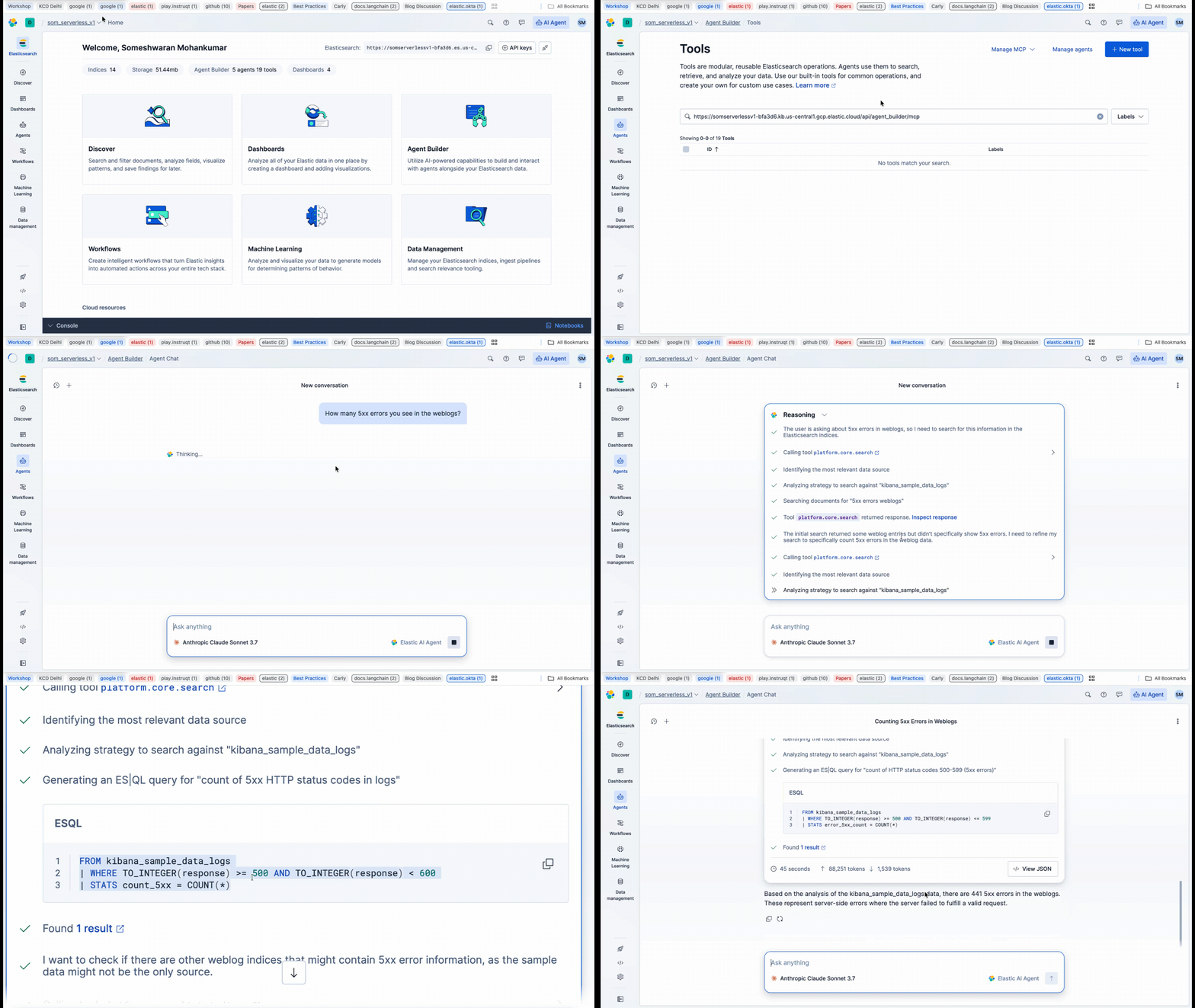
Agent Builder in Kibana exposes tools to perform operations such as running ES|QL, searching indices, and inspecting mappings. While the built-in tools reference lists what clients can invoke out of the box, you can also create and manage custom tools to extend your agent's capabilities, allowing it to interact with external APIs or specific internal business logic via the MCP server.
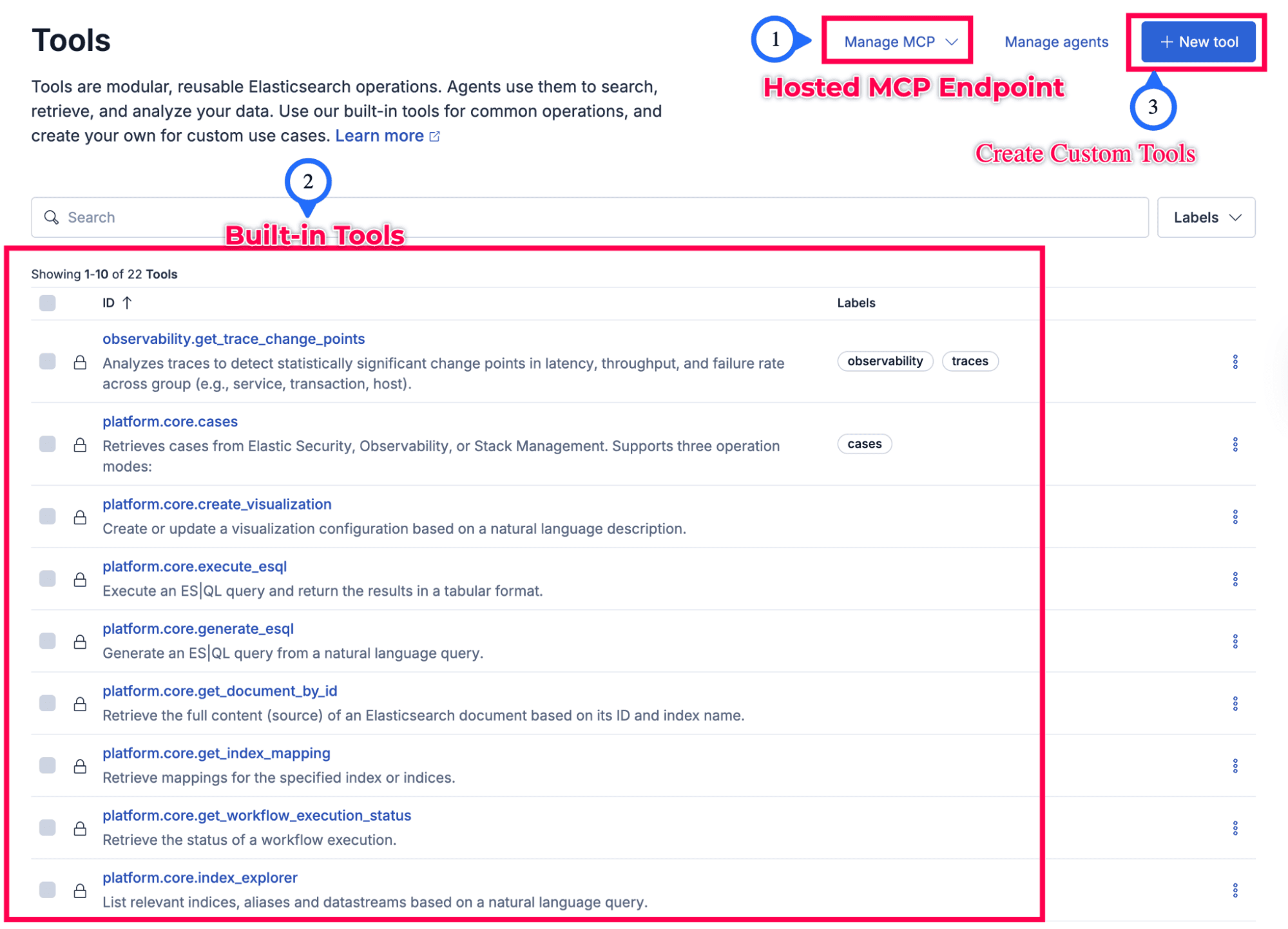
MCP is an open bidirectional protocol built on JSON-RPC 2.0 that allows agents to discover and execute tools through a structured interface. Instead of hard-coding integrations, clients connect directly to MCP servers, inspect available capabilities, and invoke tools using structured requests and responses. Elastic exposes a hosted MCP server available via the Agent Builder in Kibana. In practice, your agent connects to the below HTTPS endpoint in Kibana:
It authenticates with an API key that has the right cluster, specific role-based index privileges, and Kibana application privileges (including access to Agent Builder).
Please note: Without the feature_agentBuilder.read application privilege, you'll receive a 403 Forbidden error when attempting to connect to the MCP endpoint.
That hosted path means the MCP server runs as part of your deployment, not as a separate server you build and push. It still gives you the same tool-calling model the previous Elasticsearch Labs article demonstrated with a containerized MCP server on Amazon Elastic Container Registry (ECR) and AgentCore Runtime. Both are valid approaches.
Amazon Bedrock AgentCore: managed runtime and memory for Elasticsearch agents
Amazon Bedrock AgentCore is AWS's managed layer for running and operating agents in production. The components that matter most for this setup are shared in the table below.
| Capability | Role |
|---|---|
| Hosting | Hosts your agent behind an invocation API, with scaling and isolation for production workloads. |
| Memory | Stores short-term conversational context and runs long-term extraction strategies (summaries, user preferences, semantic facts) so behavior can improve across sessions. |
| Identity | Integrations for authentication with IAM policies. |
| Observability | For tracing and monitoring agent behavior in AWS. |
AgentCore helps because you aren’t reinventing session isolation, memory lifecycle, and deployment for every demo or product. The Strands SDK integrates AgentCore Memory directly and AgentCore based on the user interaction with the agents. It asynchronously extracts and stores the memory in the relevant strategies. See Use AgentCore Memory with the Strands SDK in the AWS documentation for details.

Strands Agents SDK: orchestrating the agent loop in Python
The Strands Agents SDK is an agent framework consisting of four components. It helps us to connect between AgentCore and Elasticsearch:
- System prompt.
- Tools.
- A session manager wired to AgentCore Memory (when enabled).
- Model provider.
When you construct an agent without passing a custom model, Strands uses Amazon Bedrock via its default Bedrock model configuration. See the Amazon Bedrock model provider documentation for defaults and overrides.
Please refer to BedrockModel._get_default_model_with_warning: Why both DEFAULT_BEDROCK_MODEL_ID and _DEFAULT_BEDROCK_MODEL_ID? Basically, both exist because one is the overridable default (DEFAULT_BEDROCK_MODEL_ID), and the other is the private template (_DEFAULT_BEDROCK_MODEL_ID) used to derive a region-correct ID when no override is set. That’s why you see the { } placeholder in the prefix. Strands compares them to tell the difference.
A typical flow in code looks like this:
1. Build a tool list: At minimum, an MCP client pointed at Elastic's hosted MCP, which exposes the tools. See MCP tools in Strands.
2. Add Strands tools that index and search memory documents in Elasticsearch (store_memory, recall_memories) backed by a semantic_text field on an agent-memory index.
3. Attach AgentCoreMemorySessionManager with your memory ID, actor (user), and session identifiers when you use AgentCore Memory. This holds the session context.
4. Expose the same agent behind BedrockAgentCoreApp for Runtime, or call it from any UI layer for interaction.
For deployment to AgentCore Runtime, follow Deploy a Python agent to Amazon Bedrock AgentCore Runtime. Regarding permissions (IAM policies) details when you go to production, please see AgentCore Runtime permissions.
How does Elastic hosted MCP connect to an AI agent?
The LLM never logs in to Elasticsearch directly. It emits tool calls, and Strands executes them.
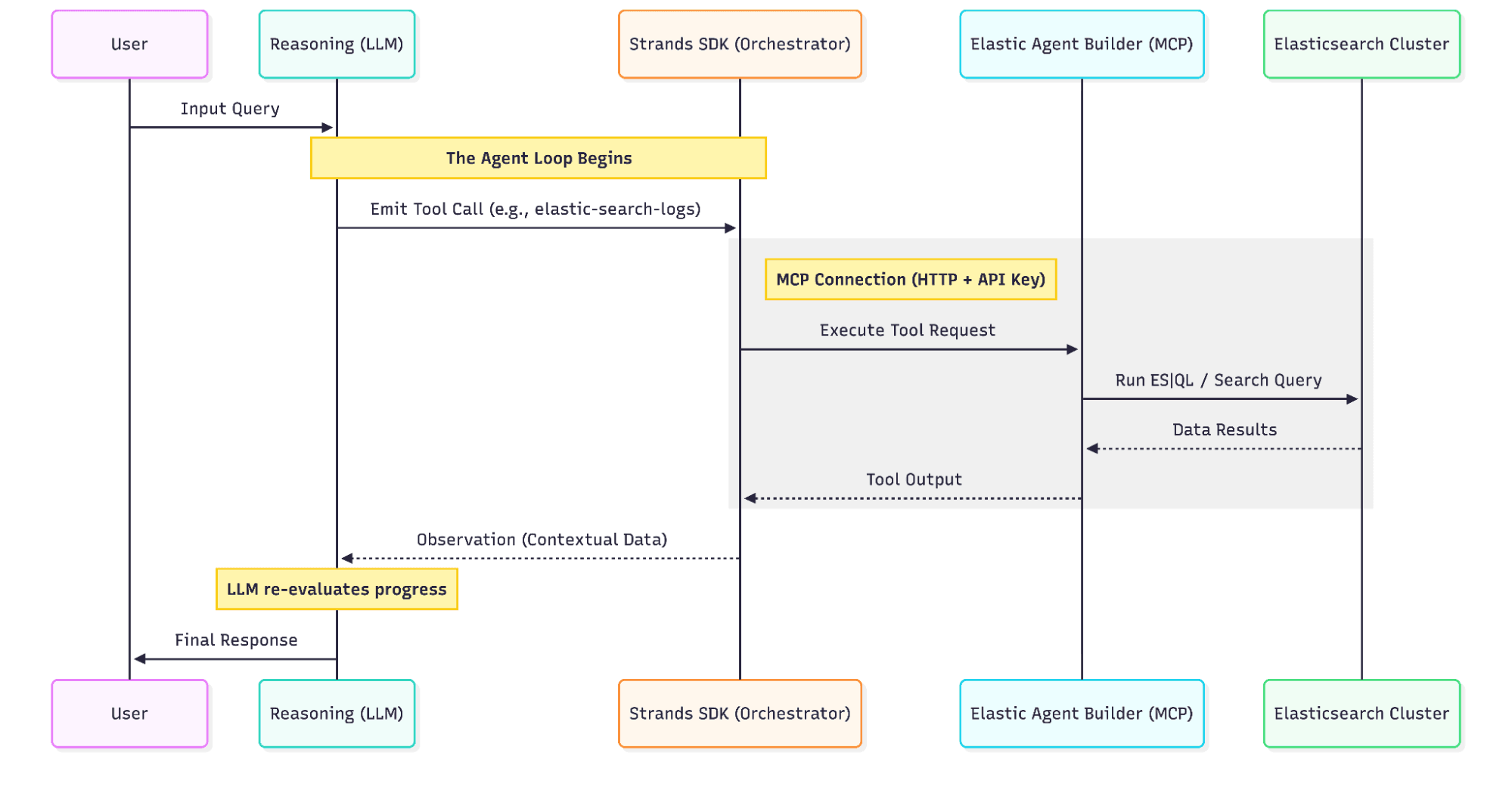
As per the concept, the client builds an MCP connection to Kibana using HTTP transport, ApiKey authorization, and the kbn-xsrf header as required by Kibana. The Strands MCPClient wraps that streamable HTTP session so every Agent Builder tool appears to the model as a callable function (typically as an elastic- prefix, a best practice to make tool selection and invocation easier for the model). The model might call a tool to list indices, run ES|QL, or run a search. Elastic executes that against your cluster using the privileges encoded in the API key.
That’s how natural language becomes constrained, auditable actions on real data, grounded in the same security model you use for human analysts.
Dual-layer memory: AgentCore session context and Elasticsearch semantic search
AgentCore Memory
With AgentCore Memory, each conversation turn can be recorded in the session memory. Long-term strategies (summary, user preference, semantic memory, and others you configure) extract durable records over time. That handles personalization and continuity for you, without you implementing extraction pipelines manually.
From an operations and data-governance perspective, AgentCore Memory is a managed service. You inspect it through AWS consoles and APIs (for example, listing memory records for a memory resource, session, or actor). As shown earlier, the Strands session manager abstracts the wiring so you can simply call the agent with a prompt.
Why also store memory in Elasticsearch?
AgentCore Memory and Elasticsearch solve different visibility problems:
- AgentCore optimizes for managed retention, extraction strategies, and tight integration with the agent runtime on AWS.
- Elasticsearch optimizes for search, dashboards, and ad hoc analytics. Those are the same capabilities your team already uses for logs and revenue data.
By giving the agent tools that write memory documents to an agent-memory index (with a semantic_text field for natural-language recall and keyword fields for user and tags), you gain:
- Discover and ES|QL over what was stored, when, and for which user.
- Semantic search over memory text to find contradictions, duplicates, or gaps before they confuse users.
- A way to ask Does what the model just said match what we have stored? This supports quality review and prompt or model tuning.
This Elasticsearch memory plane sits next to your logs and analytics indices in the same cluster you operate daily. AgentCore Memory continues to handle session semantics and AWS-side long-term extraction. The agent-memory index makes agent-curated facts and preferences first-class data for search and observability.
Elastic Agent Builder + AWS AgentCore: end-to-end architecture
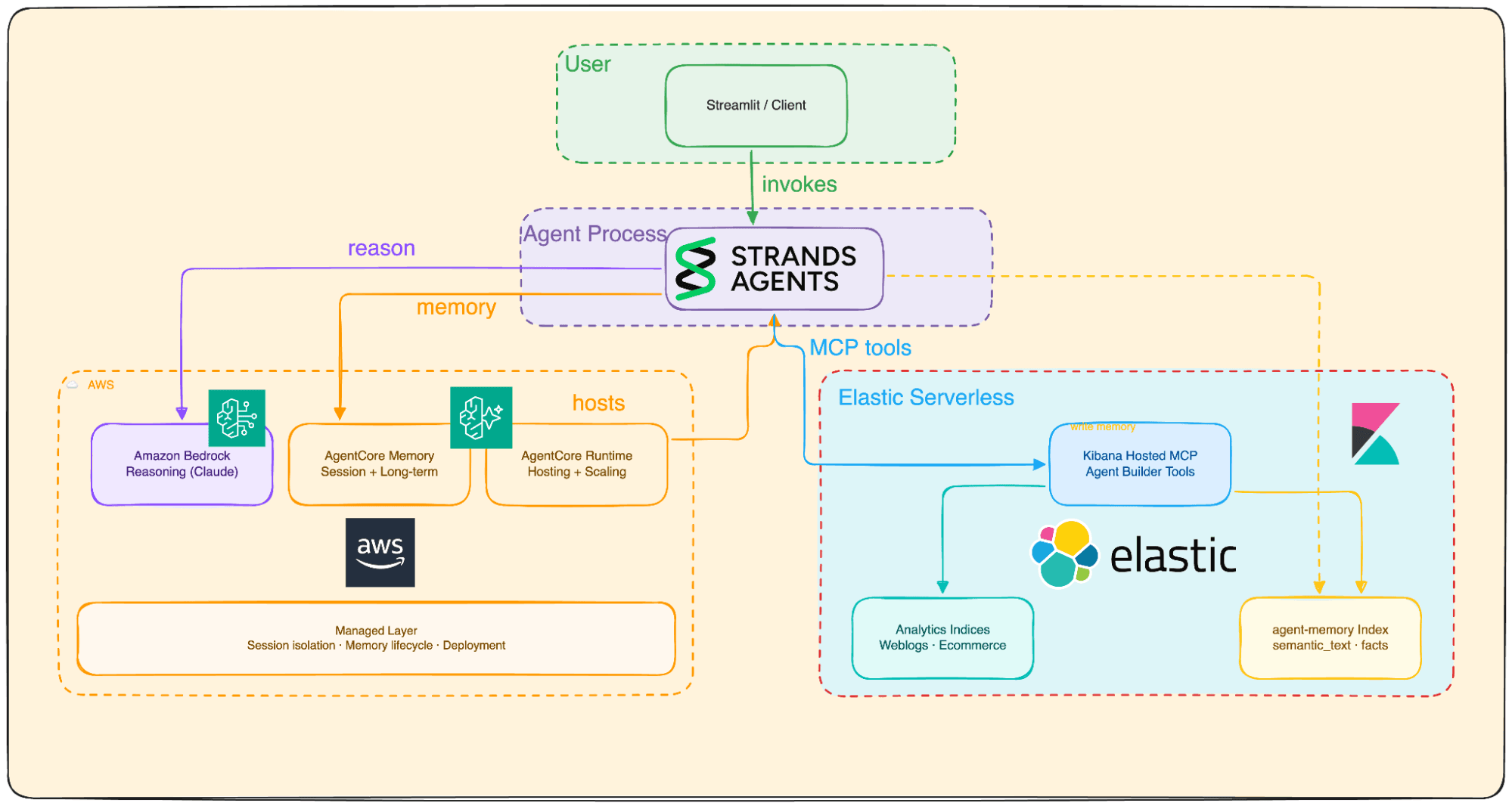
From the diagram: The user (or a client) invokes the Strands agent locally, via Streamlit or through AgentCore Runtime. The agent calls Bedrock for reasoning, AgentCore Memory for session-backed context, Kibana-hosted MCP to run Agent Builder tools against analytics indices, and the Elasticsearch client API via Strands tools to store and recall rows in agent-memory.
Get the code: GitHub repo and Codespaces quickstart
Check out the full example at github.com/Som23Git/elastic-agentcore. Clone the repo, or use GitHub Codespaces for a quick start.
Conclusion: what this Elasticsearch agent architecture gives you in production
By bringing together Elasticsearch, AWS Bedrock and AgentCore, and the Strands Agents SDK, you move beyond linear scripts into a true agent loop. This architecture provides a credible path to production: Elastic governs your data and custom tools via MCP, AWS provides the managed reasoning engine and strategy-based memory, and Strands orchestrates the entire cycle with transparency.
Because the agent’s "thoughts" and "actions" are indexed back into Elasticsearch, you get a practical benefit: You can search, dashboard, and audit your agent’s reasoning just as easily as you do your application logs.
Next steps for scaling your loop:
Security: Implement least-privilege API keys and secure secrets management for your MCP connections.
Governance: Define retention policies for your agent-memory indices to manage data growth.
Evaluation: Regularly assess tool-call accuracy and LLM reasoning using automated evaluation frameworks.
Full-stack observability: Use Elastic and AWS monitoring to trace exactly what the agent did, which tool it chose, and why ensuring your loop remains efficient and reliable.
Further reading
Complete application
Elasticsearch
- Agent Builder MCP server
- Agent Builder built-in tools reference
- Semantic text field type
- Deploy and build AI agents with Elastic MCP server on Amazon Bedrock AgentCore Runtime (Elasticsearch Labs, September 2025)
AWS
- What is Amazon Bedrock?
- Model access
- What is Amazon Bedrock AgentCore?
- AgentCore Memory: Getting started
- Use AgentCore Memory with the Strands SDK
- AgentCore Runtime permissions (IAM)
Strands Agents SDK
Häufige Fragen
What is Elastic Agent Builder MCP?
Elastic Agent Builder exposes a hosted Model Context Protocol (MCP) server through Kibana. It lets external agents discover and call Elasticsearch tools, like Elasticsearch Query Language (ES|QL) queries, index searches, and custom business logic through a standard JSON-RPC 2.0 interface.
How do I authenticate with the Elastic MCP endpoint?
Create an API key with cluster privilege monitor_inference, index read privileges for your data, and Kibana application privileges feature_agentBuilder.read and feature_actions.read. Pass it as an ApiKey authorization header alongside kbn-xsrf: true.
What’s the difference between AgentCore Memory and Elasticsearch agent memory?
A3: AgentCore Memory is AWS-managed and handles session context, summaries, and user-preference extraction automatically. Elasticsearch agent memory stores documents in a searchable index with semantic_text fields, letting you run dashboards, ES|QL, and semantic search over what the agent remembers and keeps your agent grounded with retrieval augmented generation (RAG) and knowledge base.
Which Python SDK version do I need for this integration?
The article uses Strands Agents SDK v1.29.0. It also requires the bedrock-agentcore-memory package for the AgentCoreMemorySessionManager integration.
Can I add custom tools to the Elastic MCP server?
Yes. In addition to built-in tools (ES|QL, index search, mappings), you can create and manage custom tools in Kibana under Agent Builder > Tools to expose external APIs or internal business logic.
Zugehörige Inhalte

1. Juli 2026
One command. Natural language. Your Elasticsearch data, straight to the terminal.
Query your Elasticsearch data from the terminal in plain English. The official Elastic GitHub Copilot CLI plugin generates and runs ES|QL queries against your cluster. No Kibana, no manual syntax.
30. Juni 2026
Building a multilingual voice agent with Elastic Agent Builder & Sarvam AI
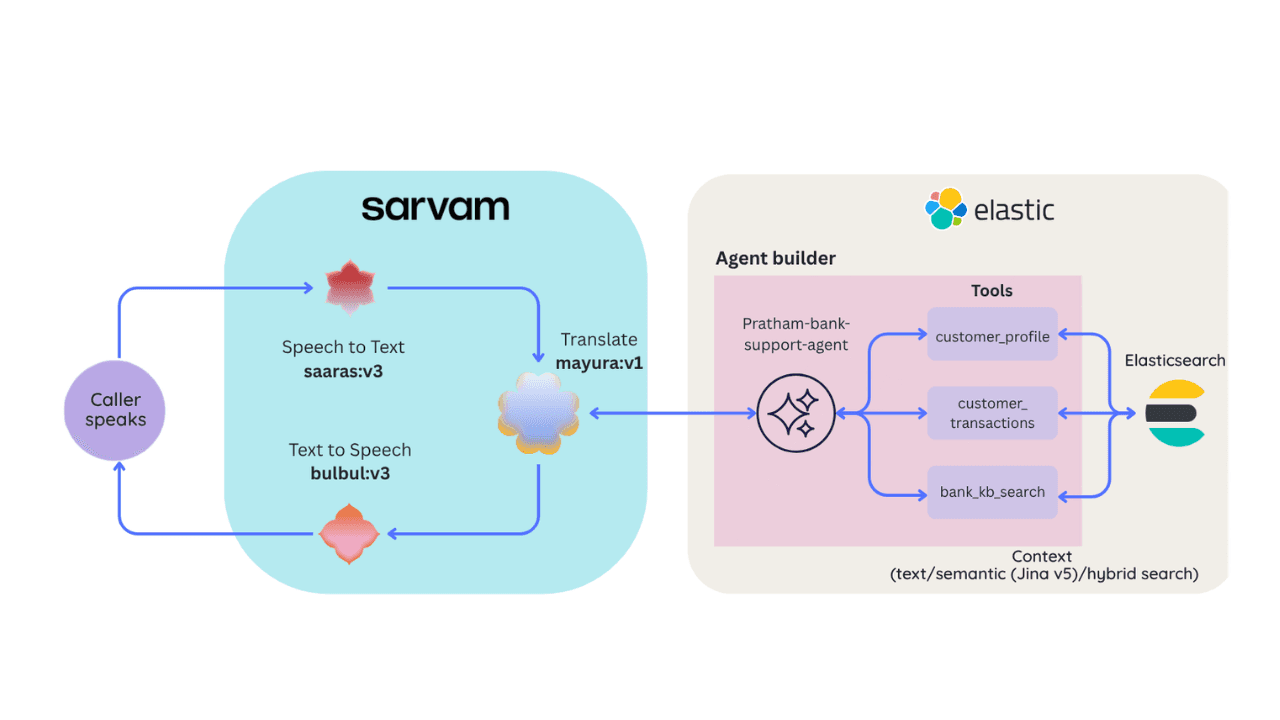
A working demo combining Sarvam AI speech with Elastic Agent Builder: identity verification, per-customer ES|QL queries, and mid-call language switching across 22 Indian languages without multilingual indices.
26. Juni 2026
Talk to your Elasticsearch data: building a real-time voice agent with Google ADK and MCP in 3 components
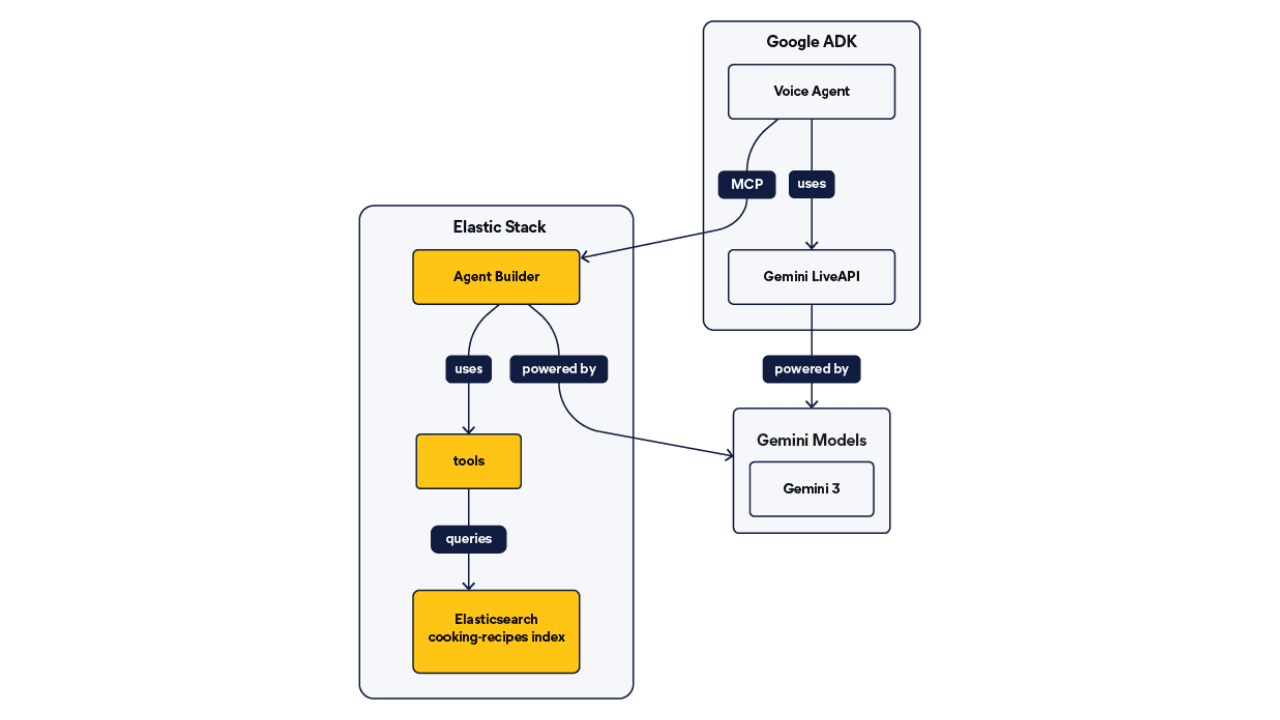
Wire Google ADK's real-time voice streaming to your Elasticsearch data via Agent Builder's built-in MCP server; no custom integration code required.
6. Juli 2026
Who grades the grader? LLM-as-a-Judge inside Elasticsearch Workflows
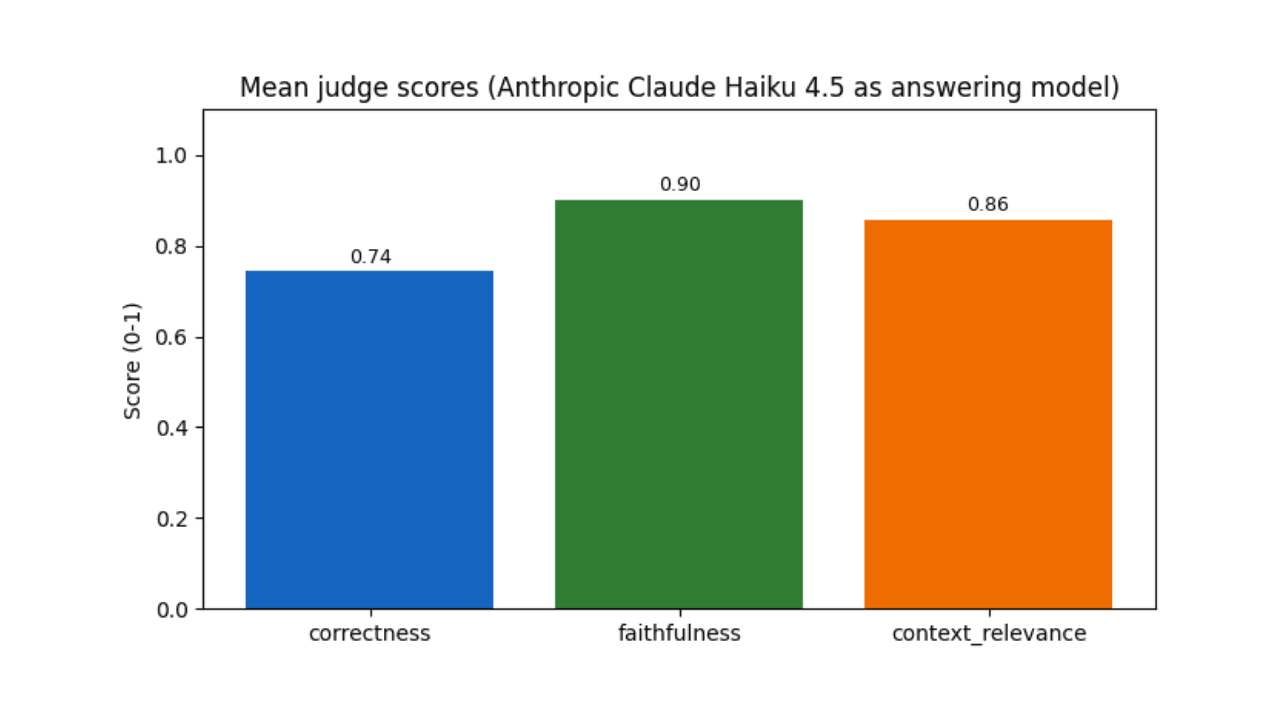
Find out if your RAG agent is ready to ship. Score it on correctness, faithfulness and retrieval quality using only Elasticsearch Workflows and two Claude models.
17. Juni 2026
Extract chart data standard OCR misses: Elastic Agent Builder and LlamaParse in one pipeline
Build an end-to-end pipeline that extracts structured data (including values from charts) out of complex PDFs and into Elasticsearch, ready for agent queries with ES|QL.