The Elastic Stack
The Elastic Stack is a suite of open-source products, like Elasticsearch, Kibana, Elastic Agent, Logstash, and more, that work together to ingest, store, search, and visualize data at scale. This page describes each component and explains how they fit together across Elastic deployments.
All Elastic deployments and projects share the same open source foundation:
- Elasticsearch: The distributed data store and search engine that handles indexing, querying, and analytics.
- Kibana: The user interface with dashboards, visualizations, and management tools.
Depending on your use case, you might need to install more products that work together with Elasticsearch and Kibana (referred to as the Elastic Stack or ELK). For example:
- Elastic Agent: A lightweight data shipper that collects and forwards data to Elasticsearch.
- Logstash: The data ingestion and transformation engine, often used for more complex ETL (extract, transform, load) pipelines.
The Elastic Stack includes products for ingesting, storing, and exploring data at scale:
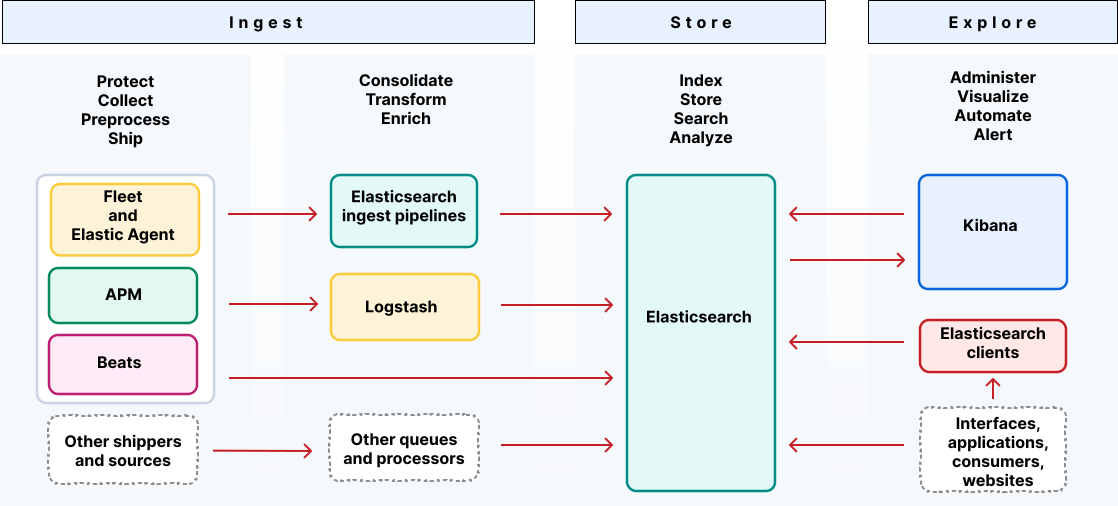
Continue reading to learn how these products work together.
All deployments include Elasticsearch. Elasticsearch is the distributed search and analytics engine, scalable data store, and vector database at the heart of all Elastic deployments and solutions. You can use the Elasticsearch clients to access data directly by using common programming languages.
Elasticsearch is a data store and vector database that provides near real-time search and analytics for all types of data. Whether you have structured or unstructured text, time series (timestamped) data, vectors, or geospatial data, Elasticsearch can efficiently store and index it in a way that supports fast searches. It also includes multiple query languages, aggregations, and robust features for querying and filtering your data.
Elasticsearch is built to be a resilient and scalable distributed system. It runs as a cluster of one or more servers, called nodes. When you add data to an index, which is the fundamental unit of storage in Elasticsearch, it's divided into pieces called shards, which are spread across the various nodes in the cluster. This architecture allows Elasticsearch to handle large volumes of data and ensures that your data remains available even if a node fails. If you use Elastic Cloud Serverless, it has a unique Search AI Lake cloud-native architecture and automates the nodes, shards, and replicas for you.
Elasticsearch also includes AI-powered features and built-in natural language processing (NLP) models that enable you to make predictions, run inference, and integrate with LLMs faster.
Nearly every aspect of Elasticsearch can be configured and managed programmatically through its REST APIs. This allows you to automate repetitive tasks and integrate Elastic management into your existing operational workflows. For example, you can use the APIs to manage indices, update cluster settings, run complex queries, and configure security. This API-first approach is fundamental to enabling infrastructure-as-code practices and managing deployments at scale.
Learn more about the Elasticsearch data store, its distributed architecture, and APIs.
The clients provide a convenient mechanism to manage API requests and responses to and from Elasticsearch from popular languages such as Java, Ruby, Go, and Python. Both official and community contributed clients are available.
Learn more about the Elasticsearch clients.
Use Kibana to explore, manage, and visualize the data that's stored in Elasticsearch and to manage components of the Elastic Stack.
Kibana provides the user interface for all Elastic solutions and Serverless projects. It's a powerful tool for visualizing and analyzing your data and for managing and monitoring the Elastic Stack. Although you can use Elasticsearch without it, Kibana is required for most use cases and is included by default when you deploy using some deployment types, including Elastic Cloud Serverless.
With Kibana, you can:
- Use Discover to interactively search and filter your raw data.
- Build custom visualizations like charts, graphs, and metrics with tools like Lens, which offers a drag-and-drop experience.
- Assemble your visualizations into interactive dashboards to get a comprehensive overview of your information.
- Perform geospatial analysis and add maps to your dashboards.
- Configure notifications for significant data events and track incidents with alerts and cases.
- Manage resources such as processors, pipelines, data streams, trained models, and more.
Each solution or project type provides access to customized features in Kibana such as built-in dashboards and AI assistants.
Kibana also has query tools such as Console, which provides an interactive way to send requests directly to the Elasticsearch API and view the responses. For secure, automated access, you can create and manage API keys to authenticate your scripts and applications.
Learn more in Explore and analyze data with Kibana.
Before you can search it, visualize it, and use it for insights, you must get your data into Elasticsearch. There are multiple methods for ingesting data. The best approach depends on the type of data and your specific use case. For example, you can collect and ship logs, metrics, and other types of data with Elastic Agent or collect detailed performance information with APM. If you want to transform and enrich data before it's stored, you can use Elasticsearch ingest pipelines or Logstash.
Trying to decide which ingest components to use? Refer to Ingest: Bring your data to Elastic and Ingest tools overview.
Elastic Agent is a single, unified way to add monitoring for logs, metrics, and other types of data to a host. It can also protect hosts from security threats, query data from operating systems, and forward data from remote services or hardware. Each agent has a single policy to which you can add integrations for new data sources, security protections, and more. You can also use Elastic Agent processors to sanitize or enrich your data.
To monitor the state of all your Elastic Agents, manage agent policies, and upgrade Elastic Agent binaries or integrations, refer to Central management in Fleet.
Learn more about Elastic Agent.
APM is an application performance monitoring system. It allows you to monitor software services and applications in real-time by collecting detailed performance information on response time for incoming requests, database queries, calls to caches, external HTTP requests, and more. This makes it efficient to pinpoint and fix performance problems quickly.
OpenTelemetry is a vendor-neutral observability framework for collecting, processing, and exporting telemetry data. Elastic is a member of the Cloud Native Computing Foundation (CNCF) and active contributor to the OpenTelemetry project.
In addition to supporting upstream OTel development, Elastic provides Elastic Distributions of OpenTelemetry, specifically designed to work with Elastic Observability.
With EDOT, you can use vendor-neutral instrumentation and stream native OTel data such as standardized traces, metrics, and logs without proprietary agents.
Beats open source data shippers that you install as agents on your servers to send operational data to Elasticsearch. Elastic provides separate Beats for different types of data, such as logs, metrics, and uptime.
Beats has been replaced by Elastic Agent for most use cases. When you use Elastic Agent, you’re getting core Beats functionality, but with more added features. Where you might need to install multiple Beats shippers on a host depending on your data requirements, single Elastic Agent installed on a host can collect and transport multiple types of data.
Ingest pipelines let you perform common transformations on your data before indexing them into Elasticsearch. You can configure one or more "processor" tasks to run sequentially, making specific changes to your documents before storing them in Elasticsearch.
Learn more about ingest pipelines.
Logstash is a data collection engine with real-time pipelining capabilities. It can dynamically unify data from disparate sources and normalize the data into destinations of your choice. Logstash supports a broad array of input, filter, and output plugins, with many native codecs further simplifying the ingestion process.
When installing the Elastic Stack, you must use the same version across the entire stack. For example, if you are using Elasticsearch 9.4.4, you install Beats 9.4.4, APM Server 9.4.4, Elasticsearch Hadoop 9.4.4, Kibana 9.4.4, and Logstash 9.4.4.
If you’re upgrading an existing installation, see Upgrade your deployment, cluster, or orchestrator for information about how to ensure compatibility with 9.4.4.
If you're deploying the Elastic Stack in a self-managed cluster, then install the Elastic Stack products you want to use in the following order:
Installing in this order ensures that the components each product depends on are in place.
If you're deploying a production environment and you plan to use trusted CA-signed certificates for Elasticsearch, then you should do so before you deploy Fleet and Elastic Agent. If new security certificates are configured, any Elastic Agents need to be reinstalled, so we recommend that you set up Fleet and Elastic Agent with the appropriate certificates in place.