Check out the different ways to ingest data into Elasticsearch and dive into practical examples to try something new.
Elasticsearch is packed with new features to help you build the best search solutions for your use case. Start a free cloud trial or try Elastic on your local machine now.
Reindex operations now survive graceful node shutdowns in Elasticsearch, automatically relocating to another eligible node and resuming from the last completed batch with no user intervention. Source iteration switches from scroll to Point in Time where available: no per-shard search contexts, portable progress state, and cleaner task relocation. A new set of reindex-specific management APIs (list, inspect, cancel, rethrottle) replaces the patchwork of generic task API calls. And reindex-from-remote is now generally available in Elastic Cloud Serverless, opening direct migration paths from any Hosted deployment or Serverless project. If you've been scheduling reindex operations around maintenance windows or writing retry logic for mid-flight failures, most of that complexity is now handled by the cluster.
These improvements are available today in Elastic Cloud Serverless, with a release for Elastic Cloud Hosted (ECH) and Elasticsearch self-managed environments coming soon. Read on for how each piece works, the engineering tradeoffs we made, and what this all means for how you use reindex in production.
How Elasticsearch reindex survives node shutdowns
A reindex operation can take minutes or hours, depending on the volume of data involved. During that time, the cluster doesn't stand still; nodes get upgraded, infrastructure shifts, and operators perform routine maintenance. If a reindex operation is running on a node that gets shut down for maintenance, the operation disappears. You're left with a partially completed reindex and the question: Where did it leave off? We wanted to fix that. Now, reindex operations survive graceful node shutdowns.
How Elasticsearch reindex task relocation works
Previously, reindex ran as a task on the node that received the request, for the lifetime of the operation. Now, the shutdown coordination layer knows about reindex tasks. During a graceful shutdown, the node signals the task to pause, captures its progress state, and hands the remaining work off to another node. The receiving node uses a new task (with new identifier) to continue processing from the last completed batch, but it keeps track of any prior task identifiers. The reindex management APIs seamlessly support either the original or the relocated identifiers. From the user's perspective, the processing continues without any intervention.
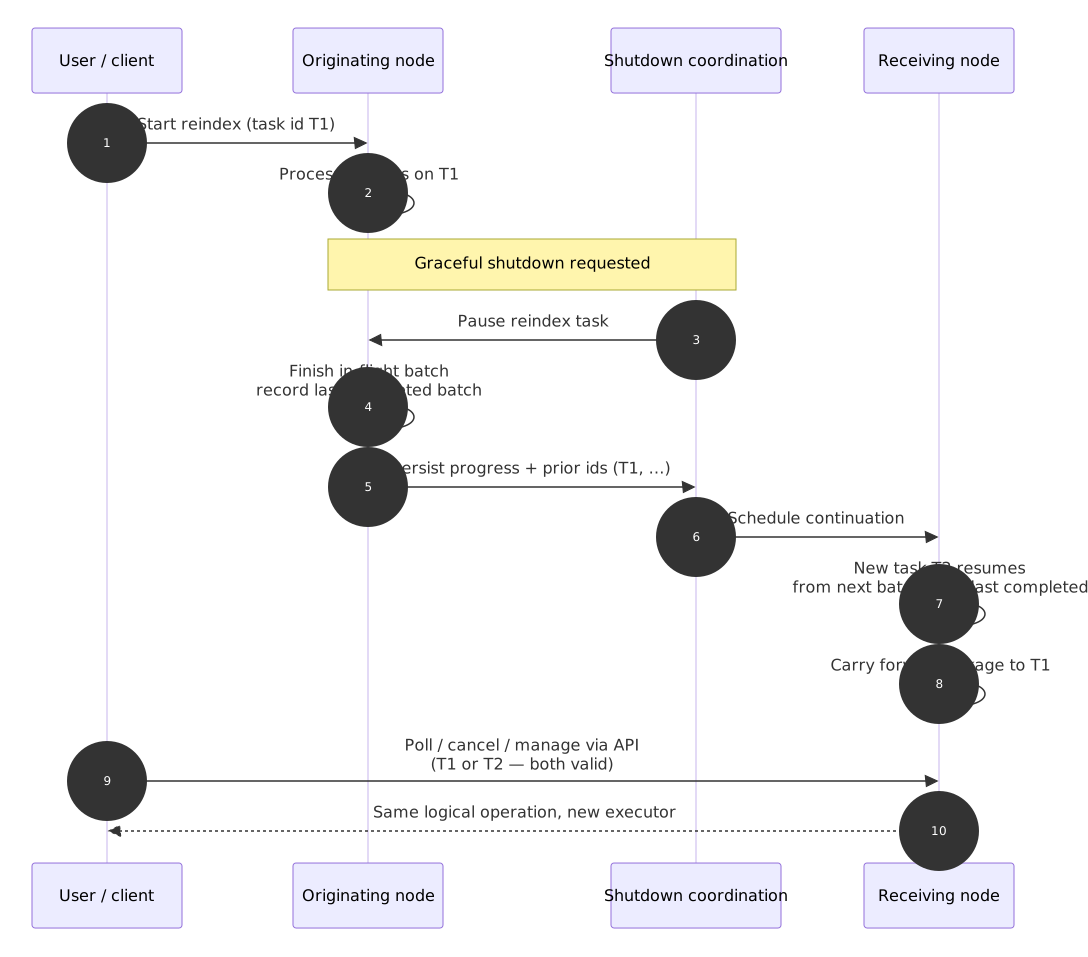
This matters most in managed environments, like Elastic Cloud, where infrastructure operations are often automated to reduce operational load. In Serverless projects, scaling and topology changes are everyday events; long reindexes are exactly where you notice a coordinating task that cannot move. It’s equally relevant for ECH deployments and self-managed clusters during version upgrades or topology changes.
What to expect from automatic reindex task relocation
- Relocation happens automatically during graceful shutdown flows; no user action required.
- You can continue to pass the original task ID to management APIs; they’ll continue to work after a relocation.
New reindex-specific task management APIs
Reindex has historically leaned on Elasticsearch's task API for status and cancel (GET /_tasks/{node_id:task_id}, POST /_tasks/{node_id:task_id}/_cancel), while rethrottle already lived under POST /_reindex/{task_id}/_rethrottle. These needed to be updated to accommodate the relocations mentioned earlier. We recognized that the generalized task management APIs haven’t necessarily given an ideal experience when working directly with reindex operations. Additionally, some of these API routes haven’t been available in Serverless (leading to gaps in management capabilities).
We're introducing reindex-first REST routes so you can list, inspect, rethrottle, and cancel reindex operations using a reindex task identifier that doesn’t assume the task still lives on the original node. Under the hood, the cluster can still accept the legacy node_id:task_id shape for compatibility; when it sees that older format, it can fall back to the existing task API behavior. All of these capabilities are now available in Serverless.
Reindex management routes
The following table lists the complete set of reindex-specific management APIs.
| Method | Route | Purpose |
|---|---|---|
| GET | /_reindex | List reindex operations |
| GET | /_reindex/{reindex_task_id} | Get status for one reindex operation (progress, metrics) |
| POST | /_reindex/{reindex_task_id}/_cancel | Cancel a reindex operation |
| POST | /_reindex/{reindex_task_id}/_rethrottle | Change throttle on an in-flight reindex operation |
What the new reindex management APIs fix in practice
- Response relevance: Responses are formatted to focus on the reindex operation details you need.
- Listing:
GET /_reindexgives you a reindex-centric view instead of filtering the global task list for*reindex*entries. - Full coverage across all deployment models: All these API routes will be fully supported with a consistent experience across all Elasticsearch environments. That's especially important in Serverless, where listing and cancel via the generic task API weren’t available.
Reindex API privileges: monitor_reindex and manage_reindex
The design introduces narrower cluster privileges so you can follow least privilege without handing out full manage or superuser: monitor_reindex (read-only: list and get status) and manage_reindex (includes cancel and rethrottle). Serverless now supports these privilege types; built-in solution roles there are still coarse, but you can use custom roles that grant only these reindex permissions when you want tighter control.
Point in Time over scroll: A better foundation
Reindex has traditionally relied on scroll to iterate through source documents. PIT gives reindex better properties for task relocation than scroll: no per-shard search contexts, portable state, no node affinity. Scroll contexts also tie up resources on specific nodes, creating exactly the kind of node-affinity problem that makes task relocation harder. Reindex now prefers PIT over scroll for reading source data.
What changes for you: PIT vs. scroll in Elasticsearch reindex
PIT provides a consistent snapshot of the data at a specific moment, without the per-shard resource overhead of scroll. For many reindex operations, you can expect PIT to improve performance, efficiency and reliability over the scroll-based approach.
The engineering tradeoff: why PIT requires explicit pagination
Reindex now uses PIT with explicit search_after pagination instead of scroll's implicit cursor advance, adding bookkeeping overhead in exchange for portable, resumable progress state.
This is one of those changes where the right engineering decision (PIT) also happens to be the right user experience decision (more resilient, less resource-intensive). For reindex from remote, you still need scroll when the remote cluster is at a version earlier than 7.10.0; the coordinator negotiates behavior from the remote version. Reindex uses one PIT per task (slices share it via search slicing); PIT state is serialized on relocation alongside sort continuation values.
When the reindex finishes or fails, the implementation closes the PIT; if that close fails, the normal PIT timeout still applies.
Reindex-from-remote is now generally available in Serverless
Reindex-from-remote, that is, the ability to reindex data from one Elasticsearch cluster to another, is now generally available (GA) in Serverless.
This is significant for teams consolidating their Elastic Cloud footprint. You can now reindex data from an ECH deployment or another Serverless project, in any region, directly into your Serverless project. This opens up straightforward migration paths for teams moving from ECH to Serverless, or reorganizing data across projects.
Note that reindex-from-remote in Serverless only accepts remote endpoints within ECH deployments and Serverless projects, in any region. There’s no allowlist required, as this is fully managed by the platform. If you need to bring data from a self-managed cluster into a Serverless project, one practical approach is to take snapshots from self-managed, mount them as searchable snapshots on a temporary ECH deployment, and then run reindex-from-remote from that ECH deployment into Serverless.
Why making reindex work in Serverless was the hard path
Serverless is designed so customers don’t coordinate infrastructure, but the platform does, all the time. That’s a strength for operators and a stress test for long-running APIs. Reindex is hours of coordinated reads and writes; if progress is tied to a single node or hidden behind task IDs that stop working after a relocation, every routine scale event or graceful shutdown becomes a migration incident.
The features described above are general Elasticsearch improvements. We treated them as prerequisites for Serverless reindex-from-remote GA because they address failures that are rare in a static cluster but common in an automated one: non-relocatable tasks, management gaps (including routes that weren’t available on Serverless), and scroll-based interaction that fights portability. Getting to GA meant hardening how relocation, remote authentication, and the management APIs behave as one system. The gnarly distributed-systems bugs show up only under load: coordinating node shutdown while slices, throttles, and PIT state are all active on a reindex operation that must resume cleanly on another node.
Getting started with reindex-from-remote in Serverless
Point source.remote.host at an ECH deployment or another Serverless project endpoint. Serverless doesn’t have an allowlist to manage: All Elastic Cloud endpoints are allowed. Execute the reindex request:
Refer to the reindex-from-remote documentation for full details on authentication options and configuration.
How Elasticsearch reindex relocation, PIT and new APIs work together
The three improvements to the Elasticsearch reindex (task relocation, PIT iteration, the new management APIs) work together as a system. PIT makes reindex less resource-intensive and more portable. Task relocation uses that portability to survive node shutdowns. The new reindex management APIs give you visibility and control over the whole process. And reindex-from-remote in Serverless opens up migration paths that previously required workarounds. (Any Elastic Cloud endpoint can now be your authenticated remote source.)
If you've been running reindex operations with custom retry scripts, batch-splitting logic, or maintenance-window scheduling, this is an opportunity to simplify. Let the cluster handle more of the resilience, and use the new APIs to monitor and manage your operations. While it’s still possible for reindex tasks to fail (and you should plan for that possibility), you can expect success in most cases (with no planning around timing). We hope you’ll agree that the new APIs deliver a better management experience across managed data movement options across all Elasticsearch environments. And next time you’re quietly copying data between indices, applying new mappings, or migrating documents across clusters with reindex, we’d love for you to find it unremarkable and unsurprising. Maybe even intentionally boring?
What's next for Elasticsearch reindex and long-running operations
We're continuing to invest in making data movement within and across Elasticsearch clusters more predictable and easier to manage. The patterns we've built for reindex (task relocation, PIT-based iteration, purpose-built management APIs) can be applied for additional long-running operations in the future.
Try out the updated reindex APIs in your cluster, and let us know how they work for your workflows. You can share feedback on Discuss or file issues on GitHub.
Preguntas frecuentes
What happens to an Elasticsearch reindex task when a node shuts down?
When a node begins a graceful shutdown, for example, during a rolling upgrade, Elasticsearch automatically relocates any active asynchronously called (wait_for_completion=false) reindex task to another eligible node. The task resumes from the last completed batch with no user intervention and no loss of progress. Abrupt failures (hardware loss, network partition, kill -9) aren’t covered; those still require a restart of your reindex.
What’s the difference between scroll and Point in Time (PIT) for Elasticsearch reindex?
Scroll holds open search contexts on every shard for the duration of the reindex operation, which is resource-intensive on large indices and creates node affinity that makes task relocation harder. Point in Time (PIT) captures a consistent data snapshot without per-shard search contexts, making reindex less resource-intensive and portable across nodes. For remote ECH and self-managed clusters too old to support PIT (earlier than 7.10.0), the Elasticsearch reindex coordinator falls back to scroll automatically.
How do I cancel or rethrottle a running Elasticsearch reindex operation?
Use the new reindex-specific management APIs: POST /_reindex/{reindex_task_id}/_cancel to stop a running reindex, and use POST /_reindex/{reindex_task_id}/_rethrottle to change its throttle mid-operation. These routes are relocation-aware; they find the currently processing node regardless of where the task originated. On Serverless, these dedicated paths are required; list and cancel via the generic /_tasks API aren’t available there.
How do I list all running reindex operations in Elasticsearch?
Use GET /_reindex to get a reindex-centric view of all active reindex operations. This is cleaner than filtering GET /_tasks for reindex entries and returns reindex-specific metrics (documents processed, slice progress, throughput, and error counts) without needing to track which node ID is currently coordinating the task.
Can I reindex from a self-managed Elasticsearch cluster into Serverless?
Not directly. Reindex-from-remote in Serverless only accepts Elastic Cloud endpoints (ECH deployments and other Serverless projects, in any region). For self-managed sources, the recommended path is: Take snapshots from self-managed, mount them as searchable snapshots on a temporary ECH deployment, and then run reindex-from-remote from that ECH deployment into your Serverless project.
What Elasticsearch permissions do I need to manage reindex operations?
Two new cluster privileges cover least-privilege access: monitor_reindex for read-only operations (list and get status) and manage_reindex for cancel and rethrottle. These are narrower than the manage or superuser privileges previously required. On Serverless, use custom roles that grant only these reindex permissions for tighter control.
Contenido relacionado

19 de junio de 2026
Why your Elasticsearch cluster is hitting disk watermarks: 14 real-world causes explained
Learn how Elasticsearch disk watermarks work, why they trigger, and how to diagnose 14 of the most common scenarios Support encounters, from index bloat to ILM stalls.
12 de junio de 2026
How DocValuesSkippers in Lucene 10 make range queries faster without doubling your storage
DocValuesSkippers add block-level skipping to Lucene DocValues fields, speeding up range queries on sorted or insert-ordered indexes with less than 0.1% storage overhead.
11 de junio de 2026
Replica management: Inside the system that keeps Elasticsearch Serverless searches fast at scale
A technical walkthrough of how two replica systems (one for failover, one for load balancing) combine every five minutes into a single cache-aware recommendation per index in Elasticsearch Serverless.
5 de junio de 2026
Your Elastic agent, Google's ADK, and zero custom APIs: building “Lucky Planet” over A2A
Elastic Agent Builder's native A2A endpoint lets Google's ADK orchestrate a remote agent, with no custom REST API. Watch it work in 'Lucky Planet,' a random-exoplanet game built end-to-end.

20 de mayo de 2026
Elasticsearch downsampling methods: last-value vs. aggregate sampling
Elasticsearch downsampling now gives you a choice: last-value sampling for maximum storage savings or aggregate sampling for precise rate calculations and counter resets, both fully queryable in ES|QL.