Elastic on Elastic: How InfoSec deploys infrastructure and stays up-to-date with ECK
This post is part of a blog series highlighting how we embrace the solutions and features of the Elastic Stack to support our business and drive customer success.
The Elastic InfoSec Security Engineering team is responsible for deploying and managing InfoSec's infrastructure and tools. At Elastic, speed, scale, and relevance is our DNA and leveraging the power of the Elastic Stack is the heart of InfoSec. Our goal is not only to test new features as they are rolled out, but to use these capabilities to protect Elastic.
We trust and believe in our products to protect our brand. If you, too, use the Elastic Stack, you’re likely familiar with its rich features and power, which are deliberately released at a rapid cadence. The intent behind our frequent releases is to enable customers to solve issues and make life easier where possible, and what better way to do this than to consistently make new features readily available?
I know what you are thinking: in theory, remaining up-to-date sounds like an excellent idea, but frequently upgrading can be time consuming, can introduce new bugs, and can disrupt production systems. That is why here at Elastic, we put theory into practice. We would not expect you to keep up with our release cadence if we could not keep up with our own pace. So let us show you how we are harnessing Elastic Cloud on Kubernetes (ECK) and Helm to deploy infrastructure and remain up-to-date. If you would like more information on how InfoSec leverages our technology to protect Elastic, check out “Securing our endpoints with Elastic Security.”
Why ECK?
Our managed Elasticsearch offering — Elasticsearch Service on Elastic Cloud — meets all of our requirements around scalability, functionality, and capability. That said, why doesn’t InfoSec use Elasticsearch Service? If you think about how you would handle operational logs, the general best practice is to ship monitoring logs to a remote cluster because you want to ensure that data is available to you in the event the cluster you are monitoring becomes unavailable. For this reason, InfoSec wanted to operate independently from the Elasticsearch Service to ensure we are able to monitor our services if issues were to arise.
A couple years ago, SecEng began exploring using Kubernetes to deploy Elasticsearch clusters and when our internal teams developed ECK, it was a no brainer for us to test and provide feedback.
What is ECK?
ECK not only makes it easier to deploy Elasticsearch and Kibana, but it enables you to quickly upgrade, manage multiple clusters, perform backups, scale, and update clusters. Plus, it handles security by default. SecEng currently manages 6 production Elasticsearch clusters that are home to audit, monitoring, and various security logs. Our largest cluster is roughly 35 GKE nodes and growing as we collect additional data for better visibility.
As of today, we receive an average of 30,000 events per second (EPS), which is over 2 billion events per day or 6TB of data a day. Infosec is also leveraging cross-cluster search, which allows our Detection and Response teams to centralize reporting and alerting. With the latest ECK release, enabling this feature has never been easier. Below, we will show you how we have added this to our Helm chart, as well as other features that Elastic Infosec normally enables.
Getting started with ECK
If you are new to ECK, please review the ECK quickstart documentation to get started. If you want to a deploy a one-node Elasticsearch cluster, your manifest would look like this:
apiVersion: elasticsearch.k8s.elastic.co/v1
kind: Elasticsearrch
metadata:
  name: quickstart
spec:
  version: 7.8.0
  nodeSets:
  - name: default
    count: 1
    config:
      node.master: true
      node.data: true
      node.ingest: true
      node.store.allow_mmap: false
As you can see, you can easily configure the number of nodes and node types for your deployment. The Kibana manifest looks very similar:
cat <<EOF | kubectl apply -f -
apiVersion: kibana.k8s.elastic.co/v1
kind: Kibana
metadata:
  name:
spec:
  version: 7.8.0
  count: 1
  elasticsearchRef:
    name: quickstart
EOF
Whether you want to deploy a one-node cluster or 100 nodes, you can configure the manifest to meet your needs. When we first started leveraging ECK, we would create a separate manifest per cluster. After deploying several clusters, we noticed several things:
- When creating a new cluster, we would manually copy the base Elasticsearch and Kibana manifest. Note: This made deployments prone to errors and more difficult to review in GitHub because it was being treated as new code.
- If there were any changes to the operator, we would have to update all of our manifest files as we upgraded.
- While our deployments consisted of the same services — Elasticsearch, Kibana, Logstash, Beats, beats-setup, NGINX-ingress — we needed to alter the specs for each cluster: resource sizes, SAML settings, secrets, storage, services and ports, cross-cluster search, etc. This resulted in a large amount of duplicate/repetitive code, making our deployments difficult to manage
- Wait… We still have to manage Logstash, Beats, NGINX — oh my?
We concluded that we needed to abstract specific values relevant to each of the clusters and make it customizable. With this requirement in mind, we started experimenting with Helm, a package manager and templating engine for Kubernetes. We found that Helm allowed us to template and deploy our standard services and dependencies consistently across our clusters, while still allowing for flexibility.
Note: We already had pockets of Helm deployments in our environment so we expanded on its usage. You could achieve the same results with whatever package manager you would like to use: bring your own package manager.
ECK and Helm
We decided to create Helm charts for all of the components that made up our stack and re-use charts where possible. By doing so, we significantly reduced the amount of code that needed to be modified and reviewed. We relied on the requirements.yaml to define our dependencies and the values.yaml to pass the appropriate values for our cluster. Using this approach, we were able to reuse a single ECK manifest to deploy Elasticsearch and Kibana. If modifications needed to be made, we would submit a PR against the manifest and then update each of the cluster’s dependencies. By default, here are the basic components that make up an Infosec cluster:
NGINX
Route users to an OAuth proxy to check whether or not they are an Elastician. if true, route to the appropriate service — Elasticsearch or Kibana. We created a ConfigMap for the nginx.yml and abstracted custom values such as:
- DNS name
- Enable OAuth
- Load custom certificates
- Define backend services
This is the values.yaml:
nginx:
hosts:
  elasticsearch:
    oauth: true
    proxy: "https://oauth-url"
    host: my-es-cluster.com
    pki:
      secretName: nginx-certificate
    backend:
      address: "infosec-demo-es-http:9200"
      pki:
        secretName: infosec-demo-http-certs-public
        key: tls.crt
  kibana:
    oauth: true
    proxy: "https://oauth-url"
    host: my-kibana-instance.com
    pki:
      secretName: nginx-certificate
    backend:
      address: "infosec-demo-kb-http:5601"
      pki:
        secretName: infosec-demo-kb-http-certs-public
        key: tls.crt
Logstash
This is our ingestion tier for logs. It Receives logs from Beats deployed at Elastic. We use the official Elastic Helm chart for Logstash.
Beats
We monitor our stack using Auditbeat, Filebeat, and Heartbeat. We use the official Elastic Helm chart for Filebeat, but have created custom charts for Auditbeat and Heartbeat, since they are tailored for our use. ConfigMaps are created for both auditbeat.yml and heartbeat.yml anytime we add these charts as a dependency.
Beats-Setup
We load Beats templates as we upgrade, so we don’t run into mapping conflicts. This is the values.yaml:
beats-setup:
  elasticsearchAddress: my-es-cluster-es-http:9220
  kibanaAddress: my-es-cluster-kb-http:5601
  clusterName: my-es-cluster
  versions: [
    7.6.0, 7.6.1, 7.6.2,
    7.7.0, 7.7.1,
    7.8.0
  ]
  credentials:
    # The secret name where the Elasticsearch credentials are stored
    secretName: my-es-cluster-es-elastic-user
    passwordKey: elastic
    usernameKey: null
job.yaml
When the beats-setup job runs, it will automatically connect to Elasticsearch, use the *beats.yml, and load any dashboards/templates based on the version specified.
apiVersion: batch/v1
kind: Job
metadata:
  name: {{ $Release.Name }}-auditbeat-setup
spec:
  template:
    spec:
      restartPolicy: OnFailure
      hostPID: true
      containers:
      {{- range $version :=  .Values.versions }}
      - name: auditbeat-setup-{{ regexReplaceAllLiteral :\\." $version "-" }}
        image: docker.elastic.co/beats/auditbeat:{{ $version }}
        # Setup dashboards and templates.
        command: ["auditbeat", "-e", "setup"]
        securityContext:
          capabilities:
            add: ["AUDIT_CONTROL", "AUDIT_READ"]
        resources:
          limits:
            memory: 200Mi
          requests:
            cpu: 100m
            memory: 200Mi
        volumeMounts:
        - name: auditbeat-setup
          mountPath: /usr/share/auditbeat/auditbeat.yml
          subPath: auditbeat.yml
        - name: elasticsearch-pki
          mountPath: /usr/share/auditbeat/pki/elasticsearch.crt
          subPath: elasticsearch.crt
        - name: kibana-pki
          mountPath: /usr/share/auditbeat/pki/kibana.crt
          subPath: kibana.crt
        env:
          - name: ELASTIC_USERNAME
            {{ if $Values.credentials.usernameKey -}}
            valueFrom: { secretKeyRef: { name: {{ $Values.credentials.secretName }}, key: {{ $Values.credentials.usernameKey }} } }
            {{- else -}}
            value: elastic
            {{- end }}
          - name: ELASTIC_PASSWORD
            valueFrom: { secretKeyRef: { name: {{ $Values.credentials.secretName }}, key: {{ $Values.credentials.passwordKey }} } }
      {{- end }}
      volumes:
      - name: auditbeat-setup
        configMap:
          name: auditbeat-setup
          items:
          - key: auditbeat.yml
            path: auditbeat.yml
      - name: elasticsearch-pki
        secret:
          secretName: {{ .Values.clusterName }}-es-http-certs-public
          items:
          - key: tls.crt
            path: elastic.crt
   - name: kibana-pki
        secret:
          secretName: {{ .Values.clusterName }}-kb-http-certs-public
          items:
          - key: tls.crt
            path: kibana.crt
___
Elasticsearch / Kibana
We created an ECK chart to abstract the following values:
- Resources: CPU, RAM and Java Heap, storage (Google SSD persistent storage)
- Enable SAML SSO
- Kube Secrets: Webhooks, certificates, and credentials
- Node roles: Master, data, ingest, machine-learning, Coordination. We also allow combined roles; although, we don’t have every possible combination, just those commonly used for our clusters
- IsBC: Is this a build candidate? InfoSec frequently deploys build candidates in production to validate them in real-world scenarios.
- Cross-cluster search: Enables and orchestrates cross-cluster search by just passing the client server’s CA. This automatically configures transport layer services.
{{- if $config.ccs }}
 xpack.security.transport.ssl.certificate_authorities:
 {{- range $cert := $config.ccs.secretNames }}
 - "/usr/share/elasticsearch/config/other/{{ $cert }}"
 {{- end }}
 {{- end }}
 containers:
 - name: elasticsearch
 env:
 - name: ES_JAVA_OPTS
 value: {{ $config.java_heap }}
 - name: NSS_SDB_USE_CACHE
 value: "no"
 resources:
 requests:
 memory: {{ $config.memory }}
 cpu: {{ $config.cpu }}
 limits:
 memory: {{ $config.memory }}
 # Loads remote certificates if Cross-Cluster Search is Enabled.
 {{- if $config.ccs }}
 volumeMounts:
 - mountPath: "/usr/share/elasticsearch/config/other"
 name: remote-certs
 volumes:
 - name: remote-certs
 secret:
 secretName: remote-certs
 {{- end }}
Deploy a cluster using ECK and Helm
Let’s walk through a deployment. In this example, we are going to deploy a two-node Elasticsearch cluster, Kibana, and Auditbeat. One node will have the master role and the appropriate resource specs. The other node will be a data and ingest node.
values.yaml
nginx:
 hosts:
   elasticsearch:
     oauth: true
     proxy: "https://oauth-url"
     host: my-es-cluster.com
     pki:
       secretName: nginx-certificate
     backend:
       address: "infosec-demo-es-http:9200"
       pki:
         secretName: infosec-demo-http-certs-public
         key: tls.crt
   kibana:
     oauth: true
     proxy: "https://oauth-url"
     host: my-kibana-instance.com
     pki:
       secretName: nginx-certificate
     backend:
       address: "infosec-demo-kb-http:5601"
       pki:
         secretName: infosec-demo-kb-http-certs-public
         key: tls.crt
eck:
 clusterName: infosec-demo
 version: 7.7.0
 enableSecrets: false
 secrets: [
 ]
 elasticsearch:
   nodes:
     master:
       isBC: false
       # Enable Single Sign-on
       enableSSO: false
       role: master
       count: 1
       storage: 5Gi
       memory: 8Gi
       cpu: 2
       java_heap: -Xms4g -Xmx4g
     data:
       isBC: false
       # Enable Single Sign-on
       enableSSO: false
       role: data+ingest
       count: 1
       storage: 10Gi
       spec:
       memory: 8Gi
       cpu: 2
       java_heap: -Xms4g -Xmx4g
 kibana:
   count: 1
   enableSSO: false
   enableSecrets: false
   secrets: [
   ]
   isBC: false
auditbeat:
 version: 7.7.0
requirements.yaml
dependencies:
  - name: nginx
    repository: file://../../infosec-demo/charts/nginx
    version: 0.1.0
  - name: eck
    repository: file://../../infosec-demo/charts/eck
    version: 0.1.0
  - name: auditbeat
    repository: file://../../infosec-demo/charts/auditbeat
    version: 0.1.0
With the values.yml and dependencies above, we are able to quickly and consistently deploy an Elasticsearch cluster that meets all of our standards into a new K8s cluster. This helps us to efficiently meet the needs of our internal customers when a dedicated cluster is required in a new location. With this as our foundation, we are able to quickly upgrade or scale our existing clusters by simply tweaking the values.yml for each cluster. For example, if we wanted to upgrade to a newer version and add additional nodes to the above cluster, we would simply make these changes in our values.yml and then deploy:
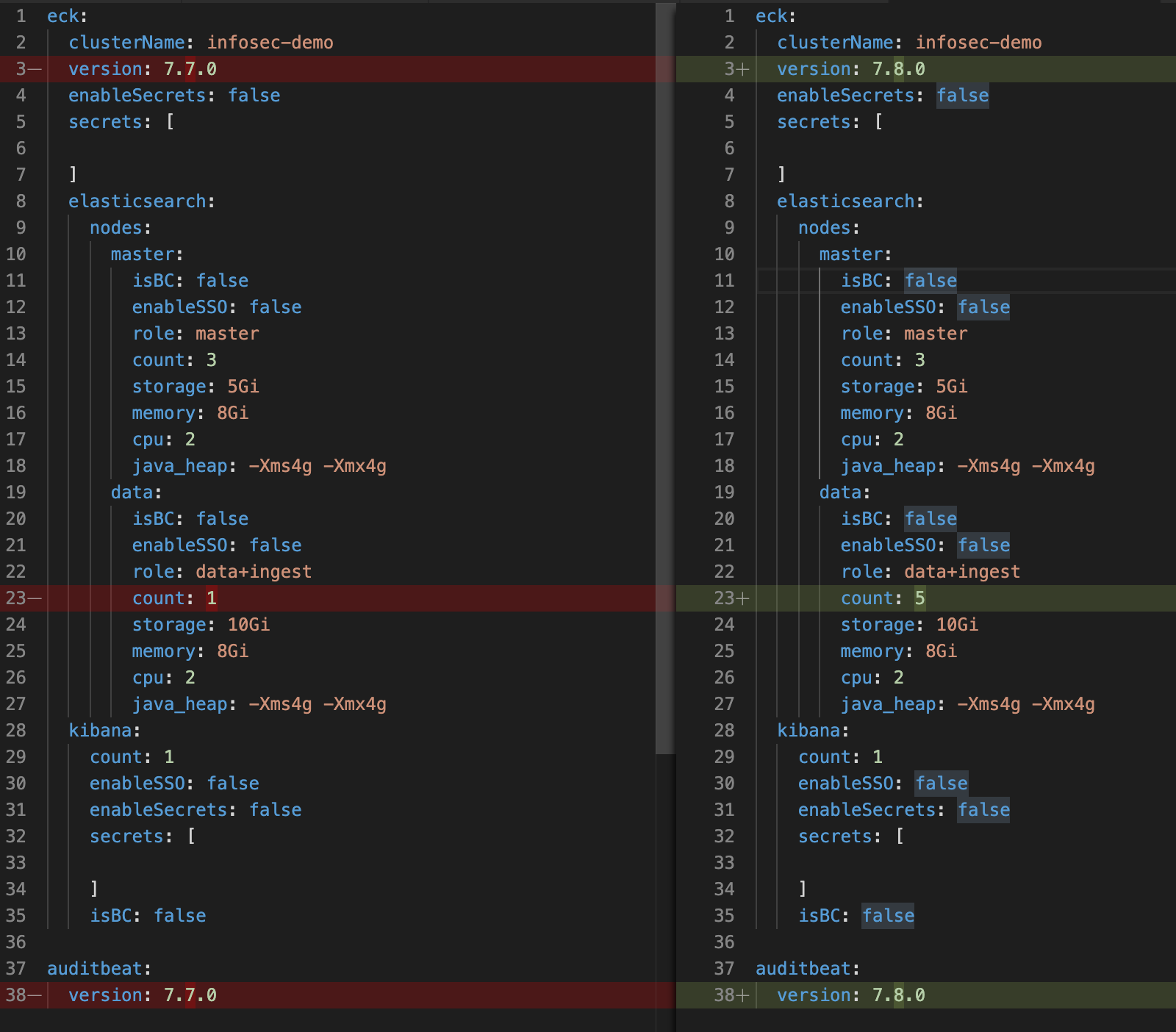
By keeping these changes confined to the single values.yml file, it becomes simple for a teammate to quickly review the PR and validate the changes that were made prior to deployment.
Safety
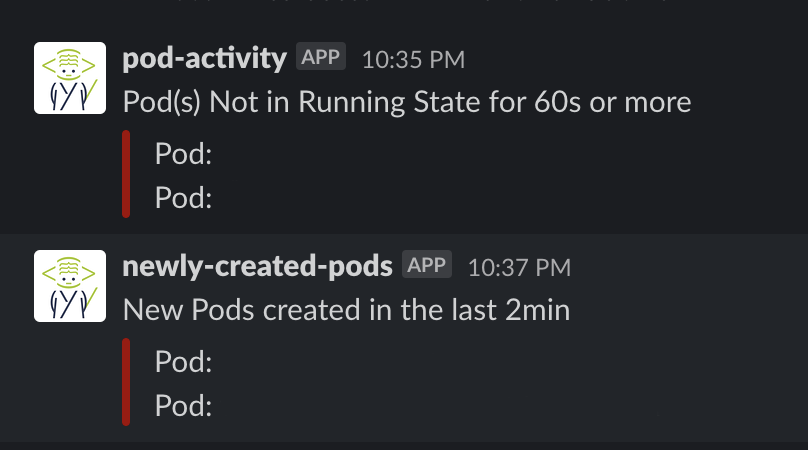
Deploying build candidates can be a bit scary, but the benefits they provide our team outweighs the bad. By deploying build candidates, we enable our product teams to test and build content using real-life data. We minimize upgrade risks by scheduling hourly snapshots using snapshot lifecycle management (SLM), creating alerts (pod-activity, system performance, search latency, Metricbeat, etc., -), and having the flexibility to quickly rebuild a new cluster with our charts.
Conclusion
ECK and Helm have been a game changer for InfoSec. We went from managing dependencies and struggling to keep up with the pace of security, product releases, and human error to focusing on making our services better. We have significantly reduced our upgrade time from weeks to upgrading our entire environment in under two hours. With this approach, we no longer have to sacrifice platform stability to enhance security visibility.
If you are new to Kubernetes, download ECK and enjoy the journey. Take your time understanding the basics and incrementally create your templates. This has been an exciting six-month journey for InfoSec and I can promise you, there is light at the end of the tunnel. Deploying infrastructure and remaining up to date doesn’t have to be a small project anymore and you can enjoy the awesome features Elastic has to offer now — $helm upgrade!