Speeding APT Attack Confirmation with Attack Discovery, Workflows, and Agent Builder
This article walks through how Elastic Security's Attack Discovery, combined with Workflows and Agent Builder, can automatically detect, correlate, and confirm APT-level attacks like Chrysalis while reducing analyst response time from hours to minutes.
9:15 AM: The Non-Event - A headline breaks: "Chrysalis Backdoor: A Deep Dive into Lotus Blossom." Your CISO sends a Slack message: "Are we affected?"
In a traditional SOC, you’re about to lose your entire morning to a manual scramble - sifting through dozens of alerts, writing queries, manually checking VirusTotal, and pivoting across index patterns to build a timeline hoping you don’t miss something.
But in an Agentic SOC, the work is already done. Attack Discovery, running on its hourly schedule, had already correlated 5 critical alerts out of 30+ into a single attack narrative: "Malware with DLL Side-Loading Persistence." That discovery automatically triggered a workflow, which handed the findings to an agent. The agent used its tools and verified the malware hash on VirusTotal, searched your logs with ES|QL, checked the on-call schedule, created a case, and spun up a Slack incident channel with the on-call analyst already added, and also generated a CISO-ready summary — all before you sat down for coffee.
You reply to your CISO: "Already confirmed and triaged. The case is open. Here's the link."
This post explains how we built that pipeline: the integration of Attack Discovery, Workflows, and Agent Builder.
The threat: Chrysalis backdoor by Lotus Blossom
Threat actor profile
| Attribute | Details |
|---|---|
| Name | Lotus Blossom (aka Billbug, Raspberry Typhoon, Spring Dragon) |
| Origin | China (state-sponsored) |
| Active Since | 2009 |
| Motivation | Espionage |
| Target Sectors | Government, Telecom, Aviation, Critical Infrastructure, Media |
| Target Regions | Southeast Asia, Central America |
Campaign overview
Lotus Blossom executed a supply chain compromise of Notepad++ update infrastructure:
- Attack Window: June 2025 – December 2025 (~6 months)
- Vector: Hijacked Notepad++ update mechanism (WinGUp)
- Method: Selective redirection of targeted users to malicious update servers
- Payload: Previously undocumented "Chrysalis" backdoor
- Discovery: Rapid7 MDR team, published 2026-02-02
Chrysalis backdoor capabilities
The Chrysalis backdoor is a sophisticated, feature-rich implant:
- Custom encryption (LCG, FNV-1a hashing, MurmurHash)
- Reflective DLL loading
- API hashing for evasion
- DLL sideloading via legitimate Bitdefender binary (
BluetoothService.exe) - Full remote access capabilities
- Persistent Windows service installation
Attack chain
[1] INITIAL ACCESS
    └── User executes malicious NSIS installer from Desktop
              ↓
[2] EXECUTION
    └── Installer drops files to hidden AppData folder
        ├── BluetoothService.exe (legitimate binary)
        └── log.dll (malicious Chrysalis loader)
              ↓
[3] PERSISTENCE
    └── BluetoothService.exe registered as Windows service
        └── Runs under SYSTEM context
              ↓
[4] DEFENSE EVASION
    └── DLL sideloading via legitimate signed binary
              ↓
[5] COMMAND & CONTROL
    └── DNS beacon to api[.]skycloudcenter[.]com ✅ CONFIRMED
MITRE ATT&CK mapping
| Tactic | Technique | ID |
|---|---|---|
| Initial Access | Supply Chain Compromise | T1195.002 |
| Execution | User Execution | T1204.002 |
| Persistence | Windows Service | T1543.003 |
| Defense Evasion | DLL Side-Loading | T1574.002 |
| Command & Control | DNS | T1071.004 |
The Challenge: Speed vs. Accuracy
When threat intelligence drops on a nation-state APT campaign, SOC teams face a brutal trade-off:
Speed: Executives want answers now. "Are we compromised?"
Accuracy: Analysts need time to hunt, correlate, and confirm before making the call.
Traditional workflows require analysts to:
- Determine the scope of analysis and relevant search criteria
- Manually search for IOCs across multiple data sources
- Correlate alerts that may span days or weeks
- Validate findings against threat intelligence
- Build the attack timeline
- Escalate with confidence
This process takes hours to days, during which an active attacker may exfiltrate data or move laterally.
The Solution: Attack Discovery + Workflows + Agent Builder
Elastic Security's AI-powered automation stack transforms this workflow from manual hunting to automated confirmation. But before we dive into the specific setup, it's worth understanding how the building blocks fit together.
Agents & Workflows: Two entry points, one composable architecture
Diagram showing the composable relationship between Agents and Workflows
Agent Builder gives you two primitives that work together:
- Agents are the intelligence layer. They reason about a task, decide which tools to call, and adapt based on what they find. An agent can call search tools, MCP tools, and critically - workflows as tools.
- Workflows are the structure layer. They're deterministic pipelines: steps run in order, reliably and repeatably. Any step in a workflow can optionally be an agent step, giving it the ability to reason mid-pipeline.
The two are fully composable. A workflow can invoke an agent. An agent can call a workflow. An agent step inside a workflow can call another workflow. Every connection is optional allowing you to mix and match based on what the problem demands.
This is what makes the architecture powerful: agents reason and decide; workflows execute and coordinate. For our Chrysalis attack scenario, we used both.
Our Flow
The Flow:
- Many Alerts → Attack Discovery correlates disparate alerts into a single attack narrative
- Attack Discovery → Generates an alert that triggers the workflow
- Workflow → Invokes Agent Builder to analyze the attack discovery findings
- Agent Builder → Calls enrichment workflows (VirusTotal, Threat Intel, ES|QL queries)
- Agent Builder Calls a Workflow → Agent builder continues with incident response actions calling on workflow as a tool (case actions, isolate host, notify team)
Step 1: Attack Discovery surfaces the threat
Attack Discovery uses LLMs to analyze security alerts and identify attack patterns. Unlike traditional alert grouping, it understands the semantic relationships between alerts.
The alert queue: Needle in a haystack
Shows the raw Elastic Security alerts table with dozens of alerts across different rules, severities, hosts, and users.
Here's reality for a SOC analyst. You open the alerts page and see dozens of alerts across multiple hosts, users, and rules, combination of, mixed severities, mixed types, many of them noise.
Dozens of alerts. Multiple rules firing. Severity levels ranging from low to critical. Some are the Chrysalis attack. Some are unrelated Windows Defender events. Some are SIEM change detections from a completely different workflow. It’s difficult to find the coordinated attack in this wall of noise.
What Attack Discovery found
Attack Discovery analyzed all of these alerts and identified 5 alerts that belonged to a single coordinated attack - pulling them out of the noise and correlating them into one narrative:
Shows the Attack Discovery showing a summary of the correlated attack
Shows the Attack Discovery view with the correlated attack: 5 alerts, all critical, tied to a host and user.
Instead of presenting 5 individual alerts, Attack Discovery correlated them into a single discovery:
Malware with DLL Side-Loading Persistence
Malicious executable on srv-win-defend-01 escalated to persistence via BluetoothService.exe with DLL side-loading
- Host: srv-win-defend-01
- User: james_spiteri
- Severity: Critical
- Attack Chain: Initial Access → Execution → Persistence → Defense Evasion → C2
Attack Discovery also:
- Mapped alerts to MITRE ATT&CK tactics
- Identified the DLL sideloading technique
- Flagged the suspicious persistence mechanism
- Highlighted the C2 network indicator
Step 2: Scheduled discovery triggers the workflow
Shows Attack Discovery’s scheduling page where users can schedule attack discovery to run at desired intervals.
Attack Discovery doesn't require an analyst to click a button. We configured it to run on an hourly schedule, continuously analyzing the latest alerts for coordinated attacks.
When our hourly run kicked off, it ingested all alerts from the last hour including the Chrysalis-related alerts buried among routine detections and surfaced the DLL side-loading attack as a discovery.
Shows Attack Discovery schedule editor linked to specific workflows.
Linking a workflow as an action step from attack discovery means every time Attack Discovery finds a coordinated attack, it automatically fires the workflow..
But here's what makes this approach different from traditional SOAR playbooks: the workflow doesn't script out every step. It hands the entire attack discovery to Agent Builder and says "figure it out."
Workflow definition
This is the real workflow we used consisting of two steps, that's it:
name: Auto Triage AD
description: >-
  Demonstrates the application of AI agents and workflows
  to enable agentic alert triaging.
enabled: true
tags:
  - Example
  - Agentic Workflow

triggers:
  - type: alert                          # Fires when Attack Discovery generates an alert

steps:
  # Step 1: Hand the attack discovery to the agent with clear instructions
  - name: initial_analysis
    type: kibana.request
    with:
      method: "POST"
      path: "/api/agent_builder/converse"
      headers:
        kbn-xsrf: "true"
      body:
        agent_id: <your-agent-id>        # Your custom Hunting Agent
        input: |
          Confirm the attack by searching for behaviour in the logs
          (all logs which are relevant), always leverage security labs tools,
          always leverage virustotal if file hashes are available.
          If this is a true positive, create a case with all the relevant content too.

          {{event|json}}

          Create a slack channel for this incident, check who's on call,
          add them to it, and send a formatted message with what's happening
          and next steps. If this is a true positive, create a case with all
          the relevant content too - add a button to the slack message linking
          to the case, and another button leading to the result of the attack.
          Lastly, include a button that will take me to this agent conversation,
          just replace the conversation ID with the actual one from this conversation
          (https://<your-kibana-url>/app/agent_builder/conversations/<conversation-id>)

          Change the attack discovery status to acknowledged, or,
          if false positives, close it.
    timeout: 10m
    on-failure:
      retry:
        max-attempts: 3

  # Step 2: Follow up to catch anything that didn't complete
  - name: followup_analysis
    type: kibana.request
    with:
      method: "POST"
      path: "/api/agent_builder/converse"
      headers:
        kbn-xsrf: "true"
      body:
        conversation_id: "{{ steps.initial_analysis.output.conversation_id }}"
        agent_id: <your-agent-id>
        input: |
          Complete any previous steps which might not have ran successfully.
          Just in case, the conversation ID is
          {{ steps.initial_analysis.output.conversation_id }}
    timeout: 10m
    on-failure:
      retry:
        max-attempts: 3
Why this workflow is so short
The entire automation is two steps:
initial_analysis: Send the attack discovery to Agent Builder with natural language instructions describing what you want donefollowup_analysis: A failsafe that resumes the same conversation and asks the agent to verify all tasks were completed. Because agents call multiple tools in sequence and any individual tool call could time out or hit a transient error, this step ensures nothing falls through the cracks.
This is the fundamental shift: the workflow is the trigger and the safety net; the agent is the brain.
Under the hood: How we extended the Threat Hunting Agent
Before we continue with the results, it's worth pausing on what made this possible. One of Agent Builder's most powerful capabilities is that you can extend existing agents with additional tools. Rather than building from scratch, we took the default Threat Hunting Agent and added custom workflow-backed tools to give it the specific capabilities this scenario required.
What we added
Agent Builder ships with built-in platform tools like platform.core.generate_esql and platform.core.product_documentation. But the real power comes from adding your own. We extended the Threat Hunting Agent with tools across several categories:
| Tool | Type | What It Does |
|---|---|---|
vt.hash.lookup | Workflow (custom) | Analyze a file hash with VirusTotal |
check.on.call.schedule | Workflow (custom) | Query the on-call schedule to find the current responder |
create.case | Workflow (custom) | Create a case in Elastic Security |
create.channel | Workflow (custom) | Create a Slack channel for incident coordination |
get.time | Workflow (custom) | Get the current time for naming and timestamps |
Five custom tools. That's all it took to turn the default Hunting Agent into automatically verifying malware, searching logs, finding the on-call responder, creating a case, and spinning up an incident channel - all expediting the time to detect a potential threat.
The Agent's reasoning chain
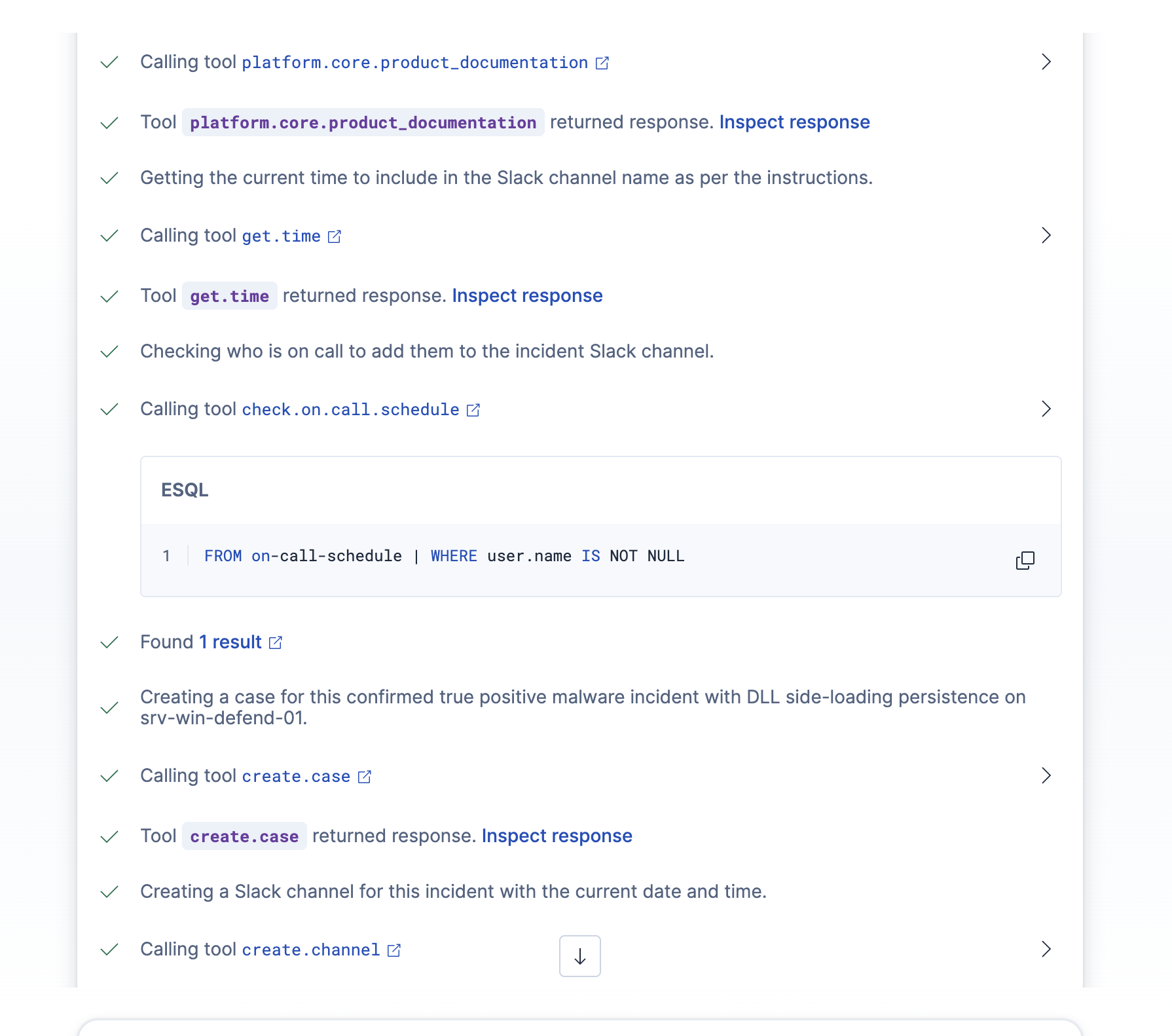
Here's what's remarkable: given the Attack Discovery context, the agent automatically decided which tools to call and in what order. No human scripted these steps.
Shows the agent's reasoning chain: starting with VirusTotal lookup on the file hash, then generating an ES|QL query to search endpoint logs for the affected host, user, and malicious processes. Demonstrates autonomous tool selection.
Step 1: VirusTotal Lookup: vt.hash.lookup
- The agent's first move: verify the malware hash.
Step 2: Generate ES|QL Query: platform.core.generate_esql
- With malware confirmed, the agent searched for all related activity.
Step 3: Product Documentation: platform.core.product_documentation
- The agent referenced Elastic Security docs to generate remediation commands for the Response Console.!
Reasoning steps showing which tools were called in sequence for transparency
Shows the additional reasoning chain: referencing product documentation, then checking the on-call schedule information before creating a case with all relevant information and notifying the analyst on call over Slack.
Step 4: Check current time: get.time
Step 5: Check On-Call Schedule: check.on.call.schedule
- The agent ran an ES|QL query against the
on-call-scheduleindex to find the current responder:
Step 6: Create Case: create.case
Step 7: Create Slack Channel: create.channel
Why this matters
The agent wasn't following a script. It reasoned about the situation and decided:
- First, verify the malware is real (VirusTotal)
- Then, understand the impact (ES|QL log search)
- Then, figure out how to remediate (product documentation)
- Then, find the right person to respond (on-call schedule)
- Then, create tracking artifacts (case)
- Finally, coordinate the team (Slack channel)
This is the difference between a workflow (which follows a fixed sequence) and an agent (which reasons about what to do next). The workflow triggered the agent; the agent figured out the rest.
Step 3: Automated incident response
With high-confidence confirmation, the workflow automatically:
1. Creates an incident Case
A structured case is created with all relevant evidence attached:
- Attack Discovery findings
- VirusTotal analysis results
- Threat intelligence matches
- Agent Builder analysis
- Recommended response actions
2. Notifies the SOC
A Slack message is sent to the right channel informing analysts of the critical incident.
Shows the actual Slack channel with the Incident Bot posting the full attack summary, malware details, attack chain, MITRE ATT&CK mapping, and immediate next steps.
3. Enables Response Actions
The workflow can optionally trigger automated response actions:
- Host Isolation: Isolate
srv-win-defend-01via Elastic Defend - User Suspension: Disable
james_spiteriin Active Directory - Network Block: Push C2 domain to firewall blocklist
- IOC Sweep: Launch fleet-wide scan for Chrysalis indicators
Time-to-confirmation: Before and after
| Metric | Manual Process | Automated Pipeline |
|---|---|---|
| Alert Correlation | 30-60 minutes | Instant (Attack Discovery) |
| IOC Extraction | 15-30 minutes | Instant (Workflow) |
| VirusTotal Lookup | 10-15 minutes | 5 seconds (API) |
| Threat Intel Correlation | 30-60 minutes | 10 seconds (ES |
| Attack Attribution | 1-4 hours | 30 seconds (Agent Builder) |
| Incident Creation | 15-30 minutes | Instant (Workflow) |
| SOC Notification | 5-10 minutes | Instant (Connector) |
| Total Time | 2-6 hours | < 4 minutes |
The other path: Just ask the Agent
Everything above describes the automated pipeline - Attack Discovery finds the threat, the workflow fires, the agent triages it, and the right analyst(s) gets notified.
But there's another equally powerful way to use this: go directly to Agent Builder and ask it in plain English.
Scenario: You read about the threat first
Imagine you're scrolling through your threat intel feeds and see Rapid7's blog post about the Chrysalis backdoor. You just want to know: are we compromised?
That's it. The same agent with the same tools does the rest:
- Reads the threat report using the
web.searchtool to pull IOCs and TTPs from the Rapid7 blog - Generates ES|QL queries to hunt for Chrysalis indicators across your file, network, and process event logs
- Checks VirusTotal for any matching file hashes found in your environment
- Produces a CISO-ready summary with findings, confidence level, and recommended actions
The agent calls the same tools it would in the automated pipeline. The difference is the entry point: instead of a scheduled Attack Discovery triggering a workflow, you triggered the agent with a question.
Why this changes the game for analysts
This is the part that's easy to overlook but profoundly important: the analyst didn't need to know a single query language, index pattern, or tool name.
They didn't write ES|QL. They didn’t need to remember where their different data lives. They didn't need to remember the VirusTotal API syntax or figure out which threat intel index to query.
They asked a question in natural language. The agent figured out the rest including which indices to search, which queries to write, which tools to call, and how to synthesize the results.
For a junior analyst who joined the team last month, this is transformative. For a senior analyst who's been doing this for a decade, it's hours of their life back. For a CISO who wants a status update, it's a question away.
The barrier to effective threat hunting just dropped from "knows ES|QL and 47 index patterns" to "can describe what they're looking for."
Key takeaways
- Attack Discovery on a schedule means you don't miss attacks - it continuously analyzes your alerts, so coordinated threats get surfaced even when no one is watching the queue.
- Workflows orchestrate the response, triggering on discoveries, invoking agents, executing actions.
- Agent Builder lets you build or extend agents for your needs - whether you start from scratch or add custom tools to an existing agent, you shape the capabilities to match your environment.
- Agents reason, workflows execute - the agent autonomously decided to call VirusTotal, search logs, check the on-call schedule, and create a Slack channel. No human scripted that sequence.
- Two entry points, same power - the automated pipeline and the chat interface use the same agent and the same tools. Whether a scheduled discovery triggers it or an analyst asks a question, the outcome is the same.
- Natural language is the new query language - analysts don't need to know ES|QL, index patterns, or API syntax. They describe what they're looking for, and the agent handles the rest.
The Chrysalis backdoor campaign demonstrates why this matters. When nation-state actors can compromise your supply chain and establish persistence in 4 seconds, you need defenses that can match that speed - whether that's an automated pipeline running while you sleep, or a direct conversation with an agent when you're the first to spot the threat.
How helpful was this content?
Related Content
No MDM for Linux? A 68-line Elastic workflow keeps every endpoint's config current

Quarantined isn't contained: Agentic phishing response with Elastic and Sublime