Office 365 module
editOffice 365 module
editThis functionality is in beta and is subject to change. The design and code is less mature than official GA features and is being provided as-is with no warranties. Beta features are not subject to the support SLA of official GA features.
This is a module for Office 365 logs received via one of the Office 365 API endpoints. It currently supports user, admin, system, and policy actions and events from Office 365 and Azure AD activity logs exposed by the Office 365 Management Activity API.
The ingest-geoip and ingest-user_agent Elasticsearch plugins are required to run this module.
Read the quick start to learn how to configure and run modules.
Configure the module
editYou can further refine the behavior of the o365 module by specifying
variable settings in the
modules.d/o365.yml file, or overriding settings at the command line.
Variable settings
editEach fileset has separate variable settings for configuring the behavior of the
module. If you don’t specify variable settings, the o365 module uses
the defaults.
For advanced use cases, you can also override input settings. See Override input settings.
When you specify a setting at the command line, remember to prefix the
setting with the module name, for example, o365.audit.var.paths
instead of audit.var.paths.
audit fileset settings
editThe audit fileset uses the Office 365 Management Activity API to retrieve
audit messages from Office 365 and Azure AD activity logs. These are the same
logs that are available under Audit Log Search in the Security and
Compliance Center.
Setup
editTo use this fileset you need to enable Audit Log Search and register an application in Azure AD.
Once this application is registered note the Application (client) ID and the Directory (tenant) ID. Then configure the authentication in the Certificates & Secrets section.
Example configuration o365.yml using client-secret authentication:
  audit:
    enabled: true
    var.application_id: "<My Azure AD Application ID>"
    var.tenants:
      - id: "<My Tenant ID>"
        name: "mytenant.onmicrosoft.com"
    var.client_secret: "<My client secret>"
Certificate-based authentication is specially useful when monitoring multiple tenants. Example configuration:
  audit:
    enabled: true
    var.application_id: "<My Azure AD Application ID>"
    var.tenants:
      - id: "<Tenant A ID>"
        name: "tenantA.onmicrosoft.com"
      - id: "<Tenant B ID>"
        name: "tenantB.onmicrosoft.com"
    var.certificate: "/path/to/certificate.pem"
    var.key: "/path/to/private_key.pem"
    var.key_passphrase: "my_passphrase" # (optional) for encrypted keys
Finally you need to add permissions in the API permissions section and grant it admin consent. Click on Add permission and select Office 365 Management APIs. The needed permissions are:
- User.Read
- ActivityFeed.Read
- ActivityFeed.ReadDlp
- ServiceHealth.Read
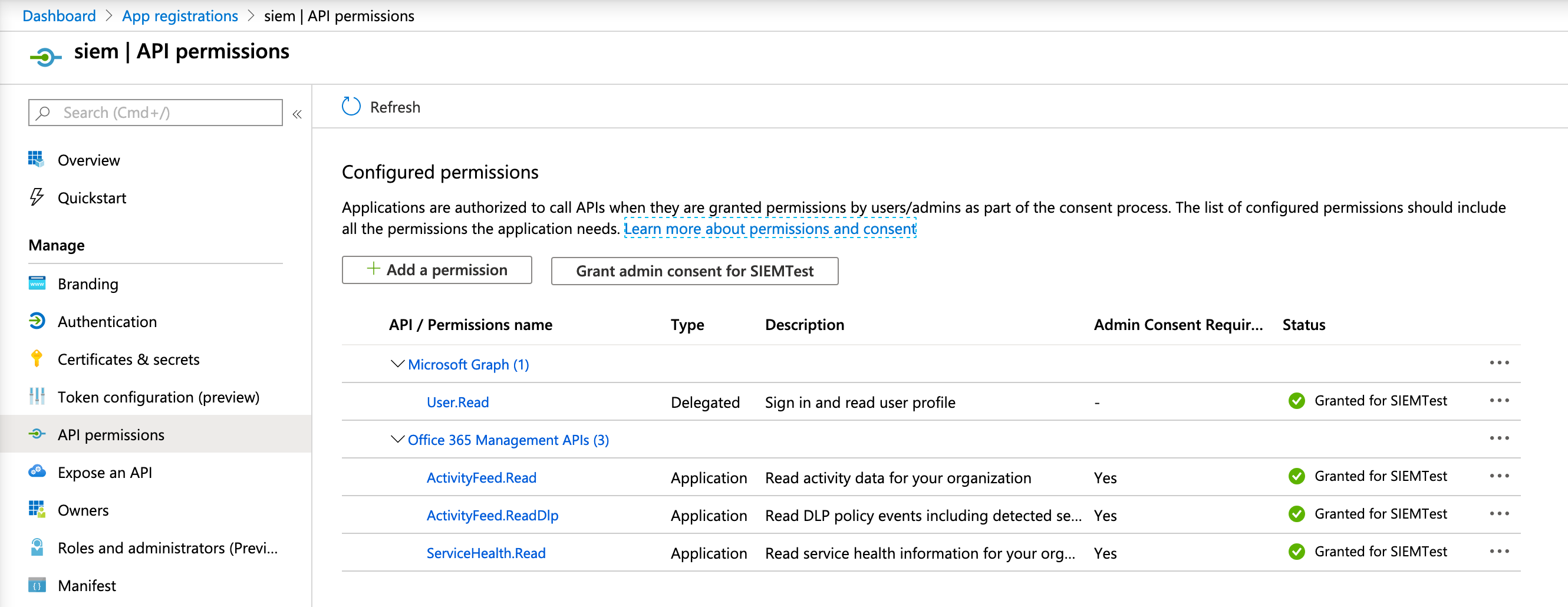
Once the required permissions are added, click the Grant admin consent button. Note that it can take a while for the required permissions to be in effect, so it’s possible that you observe some permission errors when running Filebeat right away.
Alternative endpoints
editThis module supports custom endpoints for on-prem deployments as well as
alternative endpoints (GCC High endponts, U.S. DoD, European Union, etc). In
order to point the module to an alternative endpoint, you need to adjust the
authentication_endpoint and resource variables accordingly. For example:
    var.api:
      # default is https://login.microsoftonline.com/
      authentication_endpoint: https://login.microsoftonline.us/
      # default is https://manage.office.com
      resource: https://manage.office365.us
Configuration options
edit-
var.application_id - The Application ID (also known as client ID) of the Azure application.
-
var.tenants -
A list of one or more tenant IDs and name pairs. Set the
idfield to the tenant ID (also known as Directory ID). Set the name to the host name for the tenant, that is, the Office 365 domain for your organization. -
var.client_secret -
The client-secret (api_key) used to authenticate your Azure AD application. This
option cannot be specified at the same time as the
var.certificateoption. -
var.certificate -
Path to the certificate file used for client authentication. This option cannot
be specified at the same time as the
var.client_secretoption. -
var.key - Path to the private key file used for client authentication.
-
var.key_passphrase -
The passphrase used to decrypt an encrypted key stored in the configured
var.keyfile. Only set this option when the key is encrypted. -
var.content_type -
The list of content-types to subscribe to. By default, it subscribes to all known content-types:
- Audit.AzureActiveDirectory
- Audit.Exchange
- Audit.SharePoint
- Audit.General
- DLP.All
Advanced configuration options
editThe following configuration options are only recomended in case of problems.
They must be nested under a single var.api key, like this:
    var.api:
      authentication_endpoint: https://login.microsoftonline.com/
      resource: https://manage.office.com
      max_retention: 168h
      poll_interval: 3m
      max_requests_per_minute: 2000
      max_query_size: 24h
-
var.api.authentication_endpoint -
The authentication endpoint used to authorize the Azure app. This is
https://login.microsoftonline.com/by default, and can be changed to access alternative endpoints. -
var.api.resource -
The API resource to retrieve information from. This is
https://manage.office.comby default, and can be changed to access alternative endpoints. -
var.api.max_retention -
The maximum data retention period to support.
168hby default. Filebeat will fetch all retained data for a tenant when run for the first time. The default is 7 days, which matches the standard period that Microsoft will keep the logs before deleting them. Only increase it if your tenant has a longer retention period. -
var.api.poll_interval -
The interval to wait before polling the API server for new events. Default
3m. -
var.api.max_requests_per_minute -
The maximum number of requests to perform per minute, for each tenant. The
default is
2000, as this is the server-side limit per tenant. -
var.api.max_query_size -
The maximum time window that API allows in a single query. Defaults to
24hto match Microsoft’s documented limit.
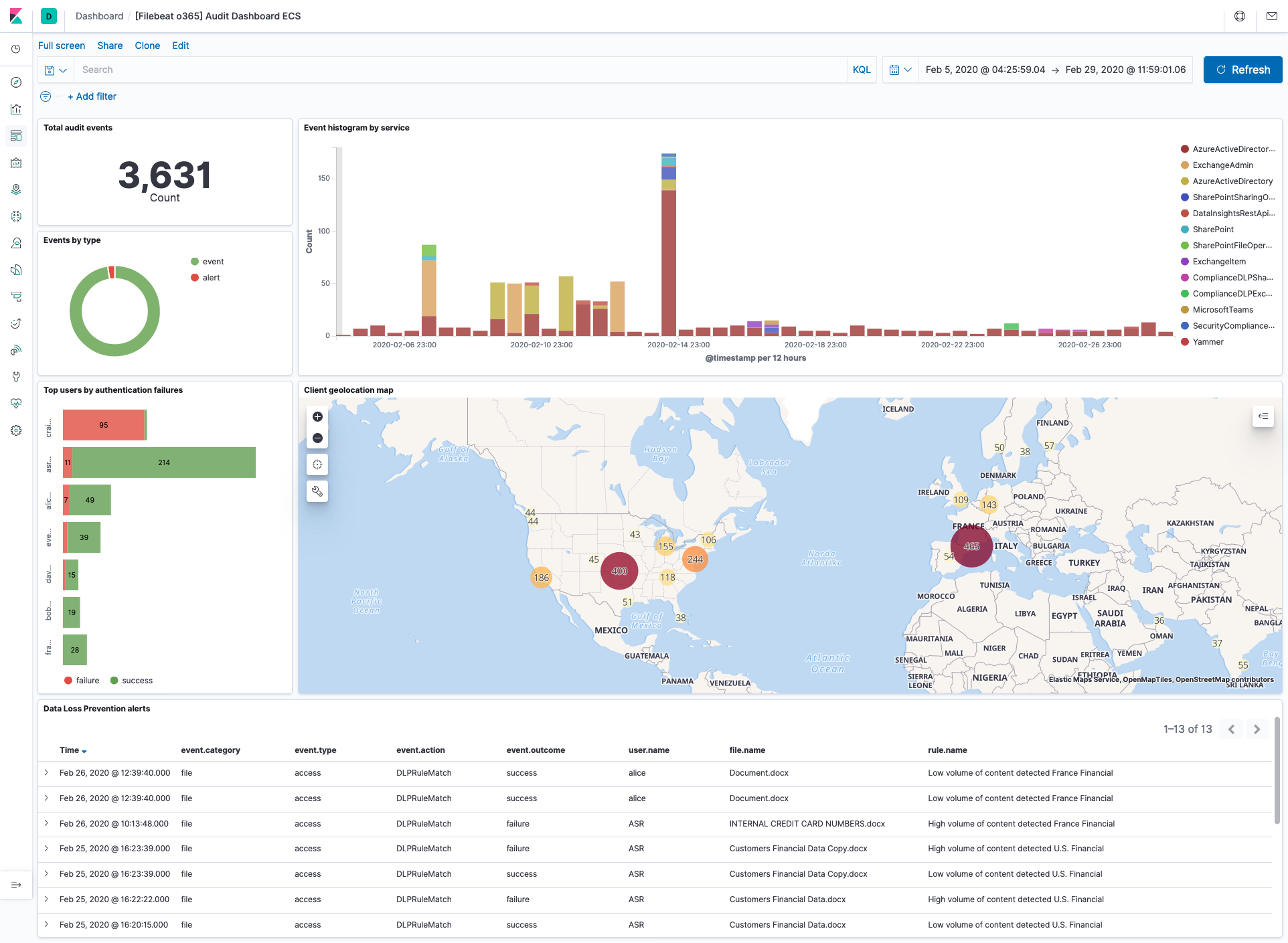
Example dashboard
editThis module comes with a sample dashboard:
Fields
editFor a description of each field in the module, see the exported fields section.