One agent, the right skills: Elastic Security 9.4 brings domain expertise on demand to every SOC workflow
Elastic Security 9.4 introduces skills, modular AI capabilities that teach the Elastic AI Agent how to detect, investigate, and hunt like a specialist. This is how they work, and why they matter for the SOC.
Three things land on you at once: Attack Discovery correlated 12 alerts into a credential-harvesting campaign overnight, your team just onboarded a new fleet of macOS endpoints and needs detection rules for LOLBin abuse, and a risk score spike on a service account just crossed the critical threshold.
In most security operations centers (SOCs), that's three different people, three different workflows, and a morning spent context-switching. In Elastic Security 9.4, it's one conversation.
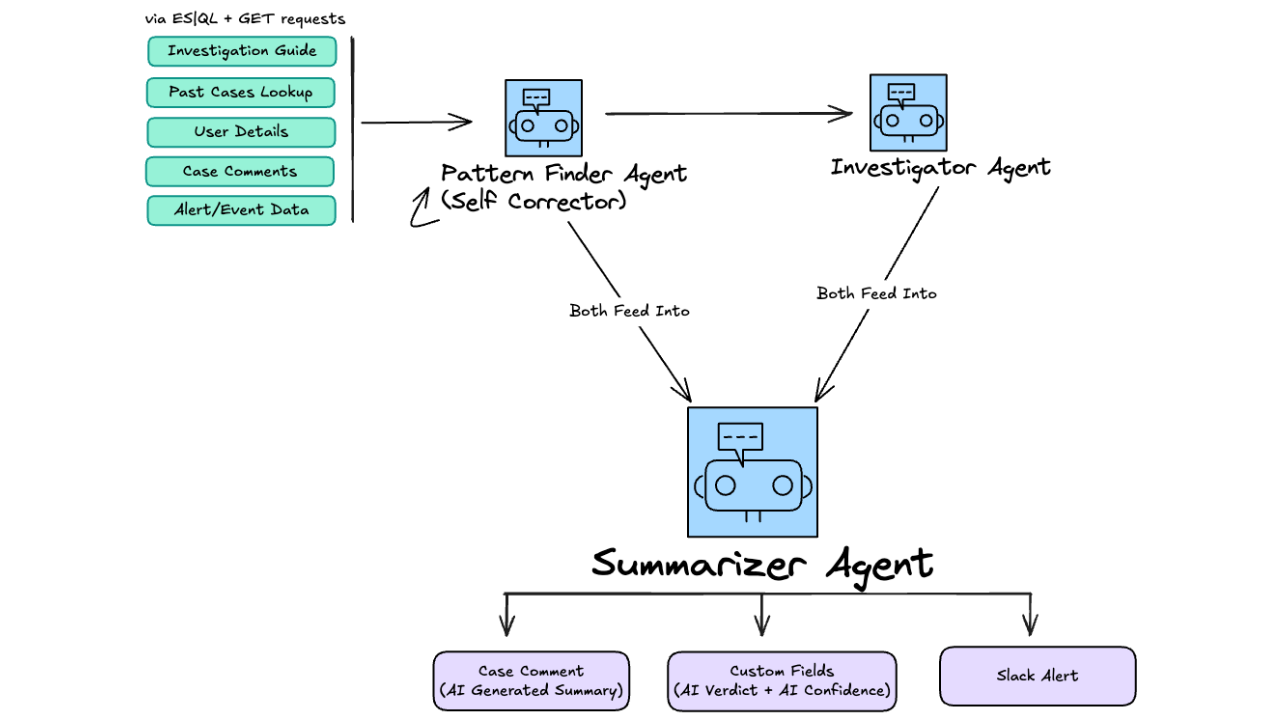
You open the Elastic AI Agent and start working. The agent doesn't try to handle everything with one giant prompt. Instead, it activates the right skill for each task, loading specialized instructions, selected tools, and domain context only when needed. Detection Rule Edit writes your Elasticsearch Query Language (ES|QL) rule. Alert Analysis triages the campaign. Threat Hunting chases the service account. Each skill focuses on one job. Together, they cover the full pipeline.
In this article, we'll walk through the architecture, what each skill does, and how they work together in real scenarios.
The problem: AI assistants that know a little about everything
Most AI assistants are monolithic. One system prompt tries to cover detection, investigation, response, entity analysis, and threat hunting all at once. This creates two problems that compound as capabilities grow.
Context window dilution. Every instruction, every tool description, every example takes up tokens. When the prompt tries to cover every SOC workflow, the model has less room for the actual data it needs to reason about: your alerts, your entities, your logs. As you add more capabilities, the quality of each one degrades.
Jack-of-all-trades performance. A prompt that covers everything handles nothing with depth. Ask it to write a detection rule, and it produces something generic. Ask it to investigate an entity, and it misses the nuance of the risk score composition. The model knows a little about many things but lacks the specialized knowledge that makes the output useful.
The industry response has been to build separate agents for separate tasks: a detection agent, a hunting agent, a triage agent. But that fragments the experience. Analysts have to know which agent to use, switch between them, and manually pass context from one to another. The AI becomes a tool-switching exercise rather than a productivity gain.
We needed an architecture that scales to dozens of capabilities without diluting any of them, and without forcing analysts to manage multiple agents.
The solution: Skills
Skills are a well-established pattern in AI agent architecture, a way to give a generalist model specialized capabilities on demand. In our implementation, a skill is a package of three things: a system prompt tuned for a specific SOC workflow, a curated set of tools selected for the task, and referenced domain content. The concept isn't new. What's new is applying it to security operations with depth: Each skill encodes the reasoning patterns, query templates, and domain knowledge that experienced analysts use daily.
The architecture rests on three ideas.
Each skill does one job well. The Threat Hunting skill knows how to formulate hypotheses, iterate on ES|QL queries, identify anomalies, and document findings. It doesn't know how to edit detection rules. That's not a limitation; it's the point. Because each skill focuses on a single intent, it can include richer instructions, better examples, and more precise tool configurations than a monolithic prompt ever could.
Skills work together. When Alert Analysis encounters a high-risk entity, it references the Entity Analytics skill for deeper profiling. When Threat Hunting finds a suspicious binary, it can hand off to the detection pipeline. Multi-step investigations happen without requiring the analyst to orchestrate each handoff.
Nothing loads until it's needed. Skills activate on demand, not all at once. The agent's context window stays lean as the total number of capabilities grows. You can add a new skill without degrading any existing one, because each operates in its own focused context.
At a glance, the following image shows a skill in action:
Agent reasoning steps loading in multiple skills based on the user’s request.
Five skills for the security operations pipeline
Elastic Security 9.4 ships five skills that span the core SOC workflows: detection, triage, hunting, entity analysis, and anomaly investigation.
| Skill | Domain | What it does | Example prompt |
|---|---|---|---|
| Detection Rule Edit | Detection engineering | Creates and edits detection rules from natural language, maps to MITRE ATT&CK, validates queries | Write a rule to detect DLL sideloading via unsigned DLLs loaded by signed binaries. |
| Alert Analysis | Alert triage | Triages alerts, finds related alerts by shared entities, enriches with threat intelligence and risk scores | Analyze alert 82a1f, is this related to the credential-harvesting campaign? |
| Threat Hunting | Proactive hunting | Runs hypothesis-driven hunts with iterative querying, embedded query templates for common tactics, techniques, and procedures (TTPs) | Hunt for lateral movement from the compromised host in the last 7 days. |
| Entity Analytics | Entity investigation | Profiles entities from the Entity Store: risk scores, behaviors, asset criticality, relationships | Show me the riskiest users this week and what's driving their scores. |
| Security ML Jobs | Anomaly investigation | Investigates anomalies from Security ML jobs, correlates with entity context | What anomalies are associated with svc-backup-prod? |
Three scenarios show how these skills work in practice.
Scenario 1: Writing a detection rule for macOS LOLBin abuse
Your team just onboarded a fleet of macOS endpoints. You have solid detection coverage for Windows living-off-the-land binaries but almost nothing for macOS equivalents. Attackers routinely abuse built-in macOS utilities, like osascript, curl, openssl, and sqlite3, to execute payloads, exfiltrate data, and access credential stores without triggering basic malware detection. You need rules for these, and you need them before the next red team exercise.
You open the Elastic AI Agent and type: Create an ES|QL detection rule for macOS LOLBin abuse. Look for suspicious use of built-in macOS utilities, like osascript, curl, openssl, and sqlite3, being spawned by unexpected parent processes.
The Detection Rule Edit skill activates:
-
The skill uses
platform.core.generate_esqlto draft an ES|QL query targetinglogs-endpoint.events.process-*, filtering for known macOS LOLBins spawned by unusual parent processes (for example,osascriptlaunched by a web browser, orurlinvoked by a shell script running from/tmp). -
It maps the rule to MITRE ATT&CK: T1059.002, AppleScript, and T1105, Ingress Tool Transfer under the Execution and Command and Control tactics.
-
The skill calls
security.security_labs_searchto check whether Elastic Security Labs has published research on macOS LOLBin techniques, pulling relevant context into the rule's investigation guide. -
It generates the complete rule definition (name, description, severity, risk score, tags, MITRE mapping, schedule, and the validated ES|QL query) and presents it as an editable rule attachment in the conversation.
You review the query, tune the parent-process allow list to exclude your IT team's legitimate automation scripts, and save. The rule is live. Total time: under five minutes.
Without the skill, this process means switching to the detection rules UI, manually writing ES|QL against the correct indices, researching which macOS utilities qualify as LOLBins, looking up the right MITRE technique IDs, and hoping you haven't missed an edge case. That's 30–60 minutes for an experienced detection engineer, longer for someone less familiar with the macOS process hierarchy.
Scenario 2: Attack Discovery surfaces a campaign
Overnight, Attack Discovery correlated 12 alerts across three hosts and two users into a single narrative: Credential harvesting via browser credential store access and suspicious authentication patterns. The discovery is sitting in your queue when you arrive.
You click into the agent and ask: Analyze the credential-harvesting discovery. Are these alerts true positives? What's the blast radius?
Alert Analysis goes first. It fetches the correlated alerts using security.alerts, pulling the full alert details: rule names, severities, MITRE techniques, affected entities. Then it uses its inline tool security.alert-analysis.get-related-alerts to find additional alerts sharing entities with the correlated set. It discovers four additional alerts involving the same user (j.martinez) from the past 48 hours, alerts that weren't part of the credential-harvesting campaign pattern but are relevant to the broader investigation of this user's activity. These are failed authentication attempts against a different service, suggesting the attacker is testing stolen credentials across systems.
Next, it queries security.security_labs_search to check whether the observed TTPs match known threat actor playbooks. It finds a match: The technique chain (credential store access → lateral authentication → service enumeration) aligns with a published Elastic Security Labs report on a commodity access broker toolkit.
Finally, it calls security.entity_risk_score to assess the involved entities. j.martinez has a risk score of 87 (critical), already elevated before this campaign due to prior anomalous VPN activity.
The triage is done: true positive, high confidence, expanding blast radius. But you want deeper entity context. What else has j.martinez been doing?
The Entity Analytics skill picks up. Using security.get_entity, it pulls the full entity profile: risk score history over 90 days, contributing risk inputs (the current campaign plus two prior anomaly detections), asset criticality (the account has admin access to three production databases), and behavioral patterns. The profile shows that `j.martinez's risk score has increased by 34 points in the last week, well above the significant-change threshold.
You now have the full picture: confirmed campaign, expanding scope, high-value target, and historical context. You ask the agent to create a case with all findings attached. It compiles alert evidence, entity profile, threat intel matches, and recommended containment actions into a single case.
Scenario 3: An anomaly leads to a hunt
While reviewing the morning's anomalies, the Security ML jobs flagged unusual behavior on svc-backup-prod, a service account that normally runs scheduled backup jobs between 2:00 and 4:00 a.m. The anomaly: large outbound data transfers at 11:00 p.m., well outside the normal window, to an IP address the account has never contacted before.
You ask: Investigate the anomalies on svc-backup-prod. What's happening?
The Security ML Jobs skill starts by calling find.security.ml.jobs to find the relevant ML jobs and anomaly indices, in this case jobs monitoring network traffic patterns and data exfiltration signals. It generates and executes an ES|QL query against `.ml-anomalies-*, filtering for svc-backup-prod` records above the anomaly score threshold. The results show three anomalous sessions over the past week, each with increasing data volume: 2 GB, then 8 GB, and then 23 GB.
Since Entity Store v2 is enabled, the skill extracts the entity's unique identifier and calls security.get_entity to pull the full entity profile. It reveals that svc-backup-prod was recently granted access to a new file share containing customer PII, and its asset criticality is classified as extreme_impact.
The anomaly data is concerning, but you need to dig deeper. You type: Hunt for all network activity from svc-backup-prod to external IPs in the last 30 days. Compare against baseline.
The Threat Hunting skill takes over. Using platform.core.generate_esql and platform.core.execute_esql, it iteratively builds queries against logs-endpoint.events.network-*:
-
First pass: Aggregate all outbound connections by destination IP, ordered by total bytes transferred. The results confirm that the flagged IP (
198.51.100.47) accounts for 33 GB of outbound traffic, all within the past 10 days. None before that. -
Second pass: Check the destination IP against DNS resolution patterns. The IP resolves to a recently registered domain (
storage-sync-cdn.cloud) with a registrar commonly associated with bulletproof hosting. -
Third pass: Correlate with process telemetry. The connections originate from a process (
rsync) thatsvc-backup-prodnormally uses, but it's connecting to an unauthorized destination. The attacker is using a legitimate tool for exfiltration, making rule-based detection difficult.
The hunt confirms a data exfiltration campaign using living-off-the-land techniques. The Threat Hunting skill documents the hypothesis, queries, and evidence trail. You create a case with containment recommendations: Isolate the host, rotate the service account credentials, and block the destination IP at the network perimeter.
Three skills. One conversation. From anomaly to confirmed exfiltration in minutes, not hours.
Under the hood: How skills are built
Each skill is defined as a SkillType, a structured object that bundles everything the agent needs for a specific domain:
-
System prompt (
content): The core instructions. This is where domain expertise lives. The Threat Hunting skill, for example, includes a complete hunting process (formulate hypothesis → identify data sources → explore iteratively → identify anomalies → search for IOCs → document findings) with embedded ES|QL templates for common patterns, like lateral movement detection and C2 beaconing analysis. -
Registry tools (
getRegistryTools): The set of platform and security tools the skill can invoke. Each skill gets only the tools it needs. Alert Analysis getssecurity.alerts,security.security_labs_search, andsecurity.entity_risk_score. Threat Hunting getsplatform.core.generate_esql,platform.core.execute_esql,platform.core.search, andplatform.core.cases. No skill has access to tools it doesn't need. -
Inline tools (
getInlineTools): Skill-specific tools that only exist within that skill's context. Alert Analysis definessecurity.alert-analysis.get-related-alerts, a tool that finds alerts sharing entities with a given alert. This tool doesn't exist outside the Alert Analysis skill because no other workflow needs it. -
Referenced content (
referencedContent): Named chunks of domain knowledge that the skill can pull in when needed. The Threat Hunting skill includes embedded ES|QL query templates for lateral movement, C2 beaconing, brute force detection, and rare process execution. These are ready-made patterns that the agent adapts to the specific investigation.
Because each skill is self-contained, adding a new one (for incident response automation or binary analysis, say) doesn't touch any existing skill. Each operates independently, with its own prompt, its own tools, and its own domain knowledge
Skills in the Agentic SOC
If you read our previous post on Attack Discovery, Workflows, and Elastic Agent Builder, you'll recognize the pattern. In that post, we extended the Threat Hunting Agent with five custom workflow tools (VirusTotal lookups, on-call schedule checks, case creation, Slack channel creation, and time retrieval) to build an automated triage pipeline for advanced persistent threat–level (APT-level) threats.
Skills are the productized evolution of that approach. Instead of requiring each SOC team to build custom agents and wire up individual tools, Elastic Security now ships domain expertise out of the box. The five skills in 9.4 cover the workflows that every SOC runs daily (detection, triage, hunting, entity analysis, and anomaly investigation) with the same composable, tool-backed architecture.
Skills also integrate directly with the rest of the Agentic SOC stack:
-
Attack Discovery generates alerts that can trigger Workflows, which invoke the agent. The agent activates Alert Analysis, Entity Analytics, or Threat Hunting, depending on what the discovery requires.
-
Workflows provide the execution layer, both scripted automation and AI-augmented reasoning. A Workflow can run deterministic actions, like case creation, host isolation, and notification, but it can also invoke the Elastic AI Agent as a step, triggering skill-based reasoning mid-pipeline. This means a single Workflow can isolate a host (scripted), then ask the agent to triage the related alerts using Alert Analysis (AI-driven), and then escalate to Slack (scripted), combining reliability with intelligence.
-
Custom tools and Model Context Protocol (MCP) remain fully available. Skills don't replace customization. They complement it. Teams can still add workflow-backed tools, connect external MCP servers, and extend the agent for their environment-specific needs.
Security users also benefit from three platform skills that ship alongside the security-specific ones.
-
Dashboard Management lets analysts build and update Kibana dashboards through conversation. After completing the exfiltration investigation in Scenario 3, you could ask the agent: Create a dashboard showing outbound data transfer volume by service account over the last 30 days, with a breakdown by destination IP. The skill generates the visualizations and presents them as an editable attachment, so you go from investigation findings to a shareable executive briefing without switching tools.
-
Workflow Authoring (available as an experimental capability) helps teams write and modify workflow YAML through the agent. Instead of hand-authoring a triage Workflow from scratch, you could ask: Create a workflow that triggers on critical-severity alerts, runs the alert through the AI agent for triage, and creates a Slack channel if it's confirmed as a true positive. The skill generates the YAML definition, validates it, and lets you review before deploying. This turns Workflow creation from a manual authoring task into a conversation.
-
Graph Creation lets analysts visualize entity relationships and attack paths through conversation. After the Alert Analysis skill identifies that j.martinez's compromised credentials were used across three hosts, you could ask: Create a graph showing the relationship between j.martinez, the affected hosts, and the credential-harvesting alerts. The skill generates an interactive node-link visualization showing how entities connect, making it easier to brief stakeholders on attack scope and lateral movement paths.
The pieces form a layered system: Attack Discovery surfaces threats, skills provide domain expertise for analysis, Workflows execute the response, and platform skills help you build the dashboards, graphic representation, and automation that tie it all together.
Key takeaways
-
Skills are the unit of AI expertise in the SOC. Each skill packages domain knowledge, curated tools, and specialized instructions for a single workflow: detection, triage, hunting, entity analysis, or anomaly investigation.
-
One agent, not five. Analysts don't switch between agents. The Elastic AI Agent activates the right skill based on the task, keeping the experience unified and the context connected.
-
Composable by design. Skills reference each other. Alert Analysis hands off to Entity Analytics for deeper profiling. Threat Hunting builds on ML anomaly findings. Investigations flow naturally across skills without manual context transfer.
-
Efficient at scale. Skills load on demand. Adding new skills doesn't degrade existing ones. Each operates in its own focused context window, so quality improves as capabilities grow.
-
Built on the Agentic SOC stack. Skills work with Attack Discovery, Workflows, and custom tools. They make the automation pipeline richer by giving the agent deeper domain expertise at every step.
-
Extensible. The five out-of-the-box skills ship with 9.4, but the architecture supports custom skills. Teams can build skills tailored to their environment, their data sources, and their SOC processes.
Get started
Skills ship as part of Elastic Security 9.4. They're available out of the box in the Elastic AI Agent with no configuration required. Open a conversation, ask a security question, and the agent activates the right skill.
To learn more, see the Elastic AI Agent documentation and the Elastic Security 9.4 release notes.
How helpful was this content?
Related Content
No MDM for Linux? A 68-line Elastic workflow keeps every endpoint's config current

Quarantined isn't contained: Agentic phishing response with Elastic and Sublime