NOTE: You are looking at documentation for an older release. For the latest information, see the current release documentation.
Writing bool queries
editWriting bool queries
editWriting bool queries can grow verbose rather quickly when using the query DSL. For example,
take a single bool query with two should clauses
var searchResults = this.Client.Search<Project>(s => s
    .Query(q => q
        .Bool(b => b
            .Should(
                bs => bs.Term(p => p.Name, "x"),
                bs => bs.Term(p => p.Name, "y")
            )
        )
    )
);
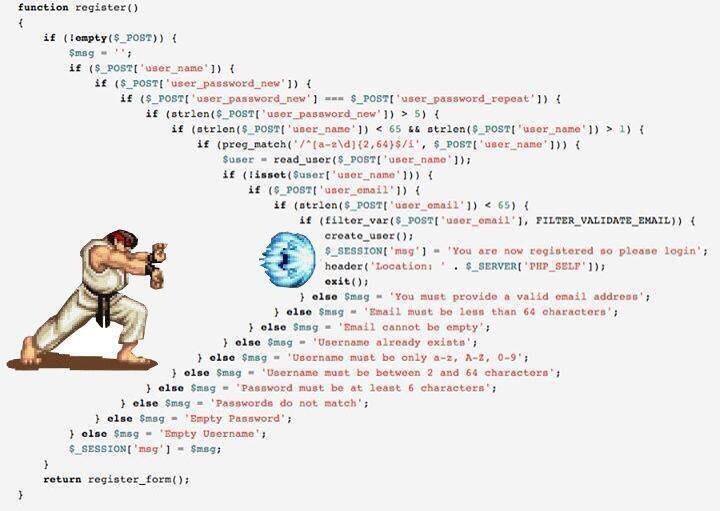
Now, imagine multiple nested bool queries; you’ll realise that this quickly becomes an exercise
in hadouken indenting
Operator overloading
editFor this reason, NEST introduces operator overloading so complex bool queries become easier to write.
The overloaded operators are
We’ll demonstrate each with examples.
Binary || operator
editUsing the overloaded binary || operator, a bool query with should clauses can be more succinctly
expressed.
The previous example now becomes the following with the Fluent API
var firstSearchResponse = client.Search<Project>(s => s
    .Query(q => q
        .Term(p => p.Name, "x") || q
        .Term(p => p.Name, "y")
    )
);
and, with the the Object Initializer syntax
var secondSearchResponse = client.Search<Project>(new SearchRequest<Project>
{
    Query = new TermQuery { Field = Field<Project>(p => p.Name), Value = "x" } ||
            new TermQuery { Field = Field<Project>(p => p.Name), Value = "y" }
});
Both result in the following JSON query DSL
{
  "query": {
    "bool": {
      "should": [
        {
          "term": {
            "name": {
              "value": "x"
            }
          }
        },
        {
          "term": {
            "name": {
              "value": "y"
            }
          }
        }
      ]
    }
  }
}
Binary && operator
editThe overloaded binary && operator can be used to combine queries together. When the queries to be combined
don’t have any unary operators applied to them, the resulting query is a bool query with must clauses
var firstSearchResponse = client.Search<Project>(s => s
    .Query(q => q
        .Term(p => p.Name, "x") && q
        .Term(p => p.Name, "y")
    )
);
and, with the the Object Initializer syntax
var secondSearchResponse = client.Search<Project>(new SearchRequest<Project>
{
    Query = new TermQuery { Field = Field<Project>(p => p.Name), Value = "x" } &&
            new TermQuery { Field = Field<Project>(p => p.Name), Value = "y" }
});
Both result in the following JSON query DSL
{
  "query": {
    "bool": {
      "must": [
        {
          "term": {
            "name": {
              "value": "x"
            }
          }
        },
        {
          "term": {
            "name": {
              "value": "y"
            }
          }
        }
      ]
    }
  }
}
A naive implementation of operator overloading would rewrite
term && term && term
to
bool
|___must
   |___term
   |___bool
       |___must
           |___term
           |___term
As you can imagine this becomes unwieldy quite fast, the more complex a query becomes. NEST is smart enough
to join the && queries together to form a single bool query
bool
|___must
   |___term
   |___term
   |___term
as demonstrated with the following
Unary ! operator
editNEST also offers a shorthand notation for creating a bool query with a must_not clause
using the unary ! operator
var firstSearchResponse = client.Search<Project>(s => s
    .Query(q => !q
        .Term(p => p.Name, "x")
    )
);
and, with the Object Initializer syntax
var secondSearchResponse = client.Search<Project>(new SearchRequest<Project>
{
    Query = !new TermQuery { Field = Field<Project>(p => p.Name), Value = "x" }
});
Both result in the following JSON query DSL
{
  "query": {
    "bool": {
      "must_not": [
        {
          "term": {
            "name": {
              "value": "x"
            }
          }
        }
      ]
    }
  }
}
Two queries marked with the unary ! operator can be combined with the && operator to form
a single bool query with two must_not clauses
Unary + operator
editA query can be transformed into a bool query with a filter clause using the unary + operator
var firstSearchResponse = client.Search<Project>(s => s
    .Query(q => +q
        .Term(p => p.Name, "x")
    )
);
and, with the Object Initializer syntax
var secondSearchResponse = client.Search<Project>(new SearchRequest<Project>
{
    Query = +new TermQuery { Field = Field<Project>(p => p.Name), Value = "x" }
});
Both result in the following JSON query DSL
{
  "query": {
    "bool": {
      "filter": [
        {
          "term": {
            "name": {
              "value": "x"
            }
          }
        }
      ]
    }
  }
}
This runs the query in a filter context, which can be useful in improving performance where the relevancy score for the query is not required to affect the order of results.
Similarly to the unary ! operator, queries marked with the unary + operator can be
combined with the && operator to form a single bool query with two filter clauses
Assert(
    q => +q.Query() && +q.Query(),
    +Query && +Query,
    c => c.Bool.Filter.Should().HaveCount(2));
Combining bool queries
editWhen combining multiple queries with the binary && operator
where some or all queries have unary operators applied,
NEST is still able to combine them to form a single bool query.
Take for example the following bool query
bool
|___must
|   |___term
|   |___term
|   |___term
|
|___must_not
   |___term
This can be constructed with NEST using
Assert(
    q => q.Query() && q.Query() && q.Query() && !q.Query(),
    Query && Query && Query && !Query,
    c=>
    {
        c.Bool.Must.Should().HaveCount(3);
        c.Bool.MustNot.Should().HaveCount(1);
    });
An even more complex example
term && term && term && !term && +term && +term
still only results in a single bool query with the following structure
bool
|___must
|   |___term
|   |___term
|   |___term
|
|___must_not
|   |___term
|
|___filter
   |___term
   |___term
Assert(
    q => q.Query() && q.Query() && q.Query() && !q.Query() && +q.Query() && +q.Query(),
    Query && Query && Query && !Query && +Query && +Query,
    c =>
    {
        c.Bool.Must.Should().HaveCount(3);
        c.Bool.MustNot.Should().HaveCount(1);
        c.Bool.Filter.Should().HaveCount(2);
    });
You can still mix and match actual bool queries with operator overloaded queries e.g
bool(must=term, term, term) && !term
This will still merge into a single bool query.
Assert(
    q => q.Bool(b => b.Must(mq => mq.Query(), mq => mq.Query(), mq => mq.Query())) && !q.Query(),
    new BoolQuery { Must = new QueryContainer[] { Query, Query, Query } } && !Query,
    c =>
    {
        c.Bool.Must.Should().HaveCount(3);
        c.Bool.MustNot.Should().HaveCount(1);
    });
Combining queries with || or should clauses
editAs per the previous example, NEST will combine multiple should or || into a single bool query
with should clauses, when it sees that the bool queries in play only consist of should clauses;
To summarize, this
term || term || term
becomes
bool
|___should
   |___term
   |___term
   |___term
However, the bool query does not quite follow the same boolean logic you expect from a
programming language. That is
term1 && (term2 || term3 || term4)
does not become
bool
|___must
|   |___term1
|
|___should
   |___term2
   |___term3
   |___term4
Why is this? Well, when a bool query has only should clauses, at least one of them must match.
However, when that bool query also has a must clause, the should clauses instead now act as a
boost factor, meaning none of them have to match but if they do, the relevancy score for that document
will be boosted and thus appear higher in the results. The semantics for how should clauses behave then
changes based on the presence of the must clause.
So, relating this back to the previous example, you could get back results that only contain term1.
This is clearly not what was intended when using operator overloading.
To aid with this, NEST rewrites the previous query as
bool
|___must
   |___term1
   |___bool
       |___should
           |___term2
           |___term3
           |___term4
Assert(
    q => q.Query() && (q.Query() || q.Query() || q.Query()),
    Query && (Query || Query || Query),
    c =>
    {
        c.Bool.Must.Should().HaveCount(2);
        var lastMustClause = (IQueryContainer)c.Bool.Must.Last();
        lastMustClause.Should().NotBeNull();
        lastMustClause.Bool.Should().NotBeNull();
        lastMustClause.Bool.Should.Should().HaveCount(3);
    });
Add parentheses to force evaluation order
Using should clauses as boost factors can be a really powerful construct when building
search queries, and remember, you can mix and match an actual bool query with NEST’s operator overloading.
There is another subtle situation where NEST will not blindly merge two bool queries with only
should clauses. Consider the following
bool(should=term1, term2, term3, term4, minimum_should_match=2) || term5 || term6
if NEST identified both sides of a binary || operation as only containing should clauses and
joined them together, it would give a different meaning to the minimum_should_match parameter of
the first bool query; rewriting this to a single bool with 5 should clauses would break the semantics
of the original query because only matching on term5 or term6 should still be a hit.
Assert(
    q => q.Bool(b => b
        .Should(mq => mq.Query(), mq => mq.Query(), mq => mq.Query(), mq => mq.Query())
        .MinimumShouldMatch(2)
        )
         || !q.Query() || q.Query(),
    new BoolQuery
    {
        Should = new QueryContainer[] { Query, Query, Query, Query },
        MinimumShouldMatch = 2
    } || !Query || Query,
    c =>
    {
        c.Bool.Should.Should().HaveCount(3);
        var nestedBool = c.Bool.Should.First() as IQueryContainer;
        nestedBool.Bool.Should.Should().HaveCount(4);
    });
Locked bool queries
editNEST will not combine bool queries if any of the query metadata is set e.g if metadata such as boost or name are set,
NEST will treat these as locked.
Here we demonstrate that two locked bool queries are not combined
Assert(
    q => q.Bool(b => b.Name("leftBool").Should(mq => mq.Query()))
         || q.Bool(b => b.Name("rightBool").Should(mq => mq.Query())),
    new BoolQuery { Name = "leftBool", Should = new QueryContainer[] { Query } }
    || new BoolQuery { Name = "rightBool", Should = new QueryContainer[] { Query } },
    c => AssertDoesNotJoinOntoLockedBool(c, "leftBool"));
neither are two bool queries where either right query is locked
Assert(
    q => q.Bool(b => b.Should(mq => mq.Query()))
         || q.Bool(b => b.Name("rightBool").Should(mq => mq.Query())),
    new BoolQuery { Should = new QueryContainer[] { Query } }
    || new BoolQuery { Name = "rightBool", Should = new QueryContainer[] { Query } },
    c => AssertDoesNotJoinOntoLockedBool(c, "rightBool"));
or the left query is locked
Assert(
    q => q.Bool(b => b.Name("leftBool").Should(mq => mq.Query()))
         || q.Bool(b => b.Should(mq => mq.Query())),
    new BoolQuery { Name = "leftBool", Should = new QueryContainer[] { Query } }
    || new BoolQuery { Should = new QueryContainer[] { Query } },
    c => AssertDoesNotJoinOntoLockedBool(c, "leftBool"));
Perfomance considerations
editIf you have a requirement of combining many many queries using the bool dsl please take the following into account.
You can use bitwise assignments in a loop to combine many queries into a bigger bool.
In this example we are creating a single bool query with a 1000 must clauses using the &= assign operator.
var c = new QueryContainer();
var q = new TermQuery { Field = "x", Value = "x" };

for (var i = 0; i < 1000; i++)
{
    c &= q;
}
|     Median|     StdDev|       Gen 0|  Gen 1|  Gen 2|  Bytes Allocated/Op
|  1.8507 ms|  0.1878 ms|    1,793.00|  21.00|      -|        1.872.672,28
As you can see while still fast its causes a lot of allocations to happen because with each iteration we need to re evaluate the mergability of our bool query.
Since we already know the shape of our bool query in advance its much much faster to do this instead:
QueryContainer q = new TermQuery { Field = "x", Value = "x" };
var x = Enumerable.Range(0, 1000).Select(f => q).ToArray();
var boolQuery = new BoolQuery
{
    Must = x
};
|      Median|     StdDev|   Gen 0|  Gen 1|  Gen 2|  Bytes Allocated/Op
|  31.4610 us|  0.9495 us|  439.00|      -|      -|            7.912,95
The drop both in performance and allocations is tremendous!
If you assigning many bool queries prior to NEST 2.4.6 into a bigger bool query using an assignment loop,
the client did not do a good job of flattening the result in the most optimal way and could
cause a stackoverflow when doing ~2000 iterations. This only applied to bitwise assigning many bool queries,
other queries were not affected.
Since NEST 2.4.6 you can combine as many bool queries as you’d like this way too. See PR #2335 on github for more information