Configuration options
editConfiguration options
editYou can specify the following options for a specific input in the config.yaml file to control how the Elastic Serverless Forwarder deals with messages that span multiple lines.
inputs:
  - type: "s3-sqs"
    id: "arn:aws:sqs:%REGION%:%ACCOUNT%:%QUEUENAME%"
    multiline:
      type: pattern
      pattern: '^\\['
      negate: true
      match: after
    outputs:
      - type: "elasticsearch"
        args:
          elasticsearch_url: "arn:aws:secretsmanager:eu-central-1:123456789:secret:es_url"
          username: "arn:aws:secretsmanager:eu-west-1:123456789:secret:es_secrets:username"
          password: "arn:aws:secretsmanager:eu-west-1:123456789:secret:es_secrets:password"
          es_datastream_name: "logs-generic-default"
The forwarder takes all the lines that do not start with [ and combines them with the previous line that does. For example, you could use this configuration to join the following lines of a multiline message into a single event:
[beat-logstash-some-name-832-2015.11.28] IndexNotFoundException[no such index]
    at org.elasticsearch.cluster.metadata.IndexNameExpressionResolver$WildcardExpressionResolver.resolve(IndexNameExpressionResolver.java:566)
    at org.elasticsearch.cluster.metadata.IndexNameExpressionResolver.concreteIndices(IndexNameExpressionResolver.java:133)
    at org.elasticsearch.cluster.metadata.IndexNameExpressionResolver.concreteIndices(IndexNameExpressionResolver.java:77)
    at org.elasticsearch.action.admin.indices.delete.TransportDeleteIndexAction.checkBlock(TransportDeleteIndexAction.java:75)
Note that you should escape the opening square bracket ([) in the regular expression, because it specifies a character class i.e. a set of characters that you wish to match. You also have to escape the backslash (\) used for escaping the opening square bracket as raw strings are not used. Thus, ^\\[ will produce the required regular expression upon compiling.
inputs.[].multiline.type defines which aggregation method to use. The default is pattern. The other options are count, which enables you to aggregate a constant number of lines, and while_pattern, which aggregates lines by pattern without matching options.
inputs.[].multiline.pattern differs from the patterns supported by Logstash. See Python’s 3.9 regular expression syntax for a list of supported regexp patterns. Depending on how you configure other multiline options, lines that match the specified regular expression are considered either continuations of a previous line or the start of a new multiline event.
inputs.[].multiline.negate defines whether the pattern is negated. The default is false. This setting works only with pattern and while_pattern types.
inputs.[].multiline.match changes the grouping of multiple lines according to the schema below (works only with pattern type):
Setting for |
Setting for |
Result |
Example |
|
|
Consecutive lines that match the pattern are appended to the previous line that doesn’t match. |
|
|
|
Consecutive lines that match the pattern are prepended to the next line that doesn’t match. |
|
|
|
Consecutive lines that don’t match the pattern are appended to the previous line that does match. |
|
|
|
Consecutive lines that don’t match the pattern are prepended to the next line that does match. |
|
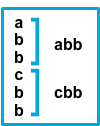
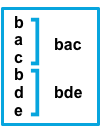
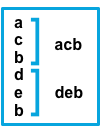
The after setting is equivalent to previous in Logstash, and before is equivalent to next.
inputs.[].multiline.flush_pattern specifies a regular expression, in which the current multiline will be flushed from memory, ending the multiline-message. Works only with pattern type.
inputs.[].multiline.max_lines defines the maximum number of lines that can be combined into one event. If the multiline message contains more than max_lines, any additional lines are truncated from the event. The default is 500.
inputs.[].multiline.max_bytes defines the maximum number of bytes that can be combined into one event. If the multiline message contains more than max_bytes, any additional content is truncated from the event. The default is 10485760.
inputs.[].multiline.count_lines defines the number of lines to aggregate into a single event. Works only with count type.
inputs.[].multiline.skip_newline defined whether multiline events must be concatenated, stripping the line separator. If set to true, the line separator will be stripped. The default is false.