Run a pattern analysis on your log data
Pattern analysis in Discover helps you find patterns in unstructured log messages by performing categorization analysis on text fields. It creates categories based on message structures, displays their distribution in a chart, and provides example documents for each pattern. This makes it easier to identify common log patterns, filter out noise, and focus on anomalous messages during troubleshooting.
You can also detect patterns from ES|QL:
-
Use the CATEGORIZEgrouping function to render the results as expandable groups with row actions. Refer to Inspect grouped STATS results in Discover. -
Add a SPARKLINEaggregation to display an inline trend for each pattern. Refer to Add sparklines to patterns.
Pattern analysis works on any text field. This example uses the sample web logs data, or you can use your own log data.
Go to Discover.
Expand the data view dropdown, and select Kibana Sample Data Logs.
If you don’t see any results, expand the time range, for example, to Last 15 days.
Select Patterns (or View as → Patterns, depending on your version). The pattern analysis starts. The results are displayed under the chart. You can change the analyzed field by using the field selector. In the Pattern analysis menu, you can change the Minimum time range. This option enables you to widen the time range for calculating patterns which improves accuracy. The patterns, however, are still displayed by the time range you selected in step 3.
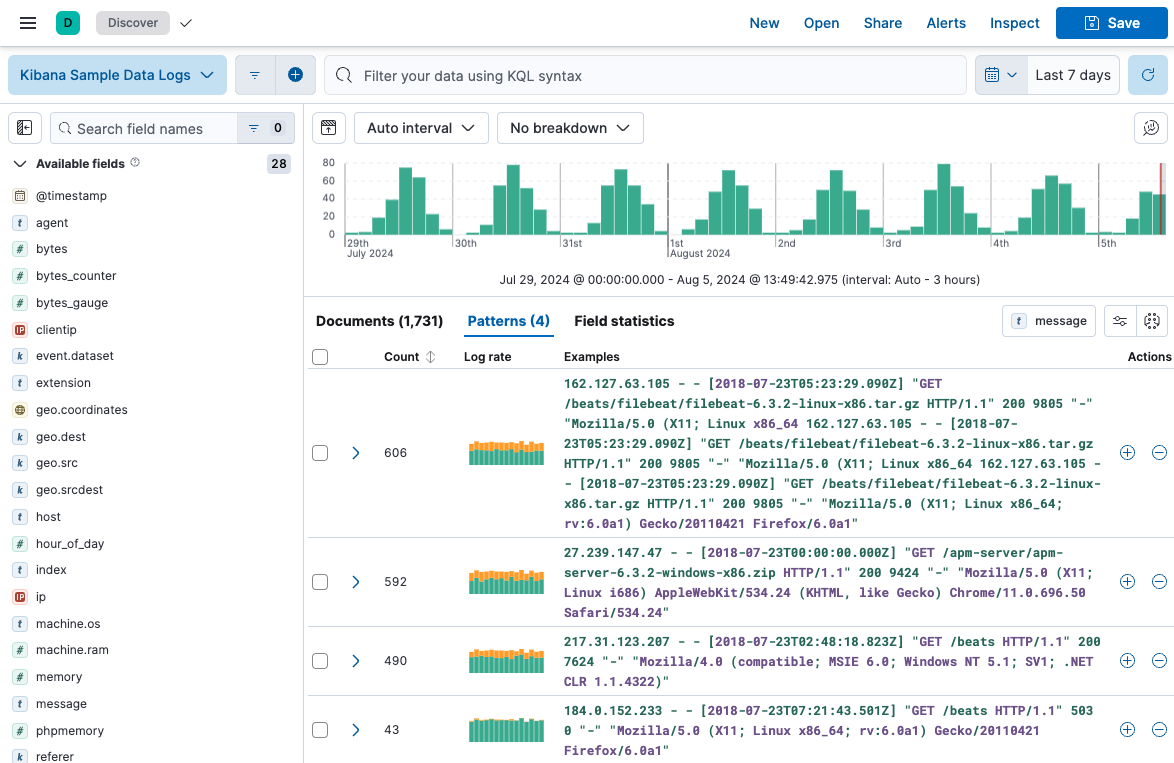
(optional) Apply filters to one or more patterns. Discover only displays documents that match the selected patterns. Additionally, you can remove selected patterns from Discover, resulting in the display of only those documents that don’t match the selected pattern. These options enable you to remove unimportant messages and focus on the more important, actionable data during troubleshooting. You can also create a categorization anomaly detection job directly from the Patterns view to find anomalous behavior in the selected pattern.